Solved Can't Download after Install a Registry

reyzafany

New member
Local time
9:49 PM
Messages
3
My brother just install a Registry and now i Can't Download anything(but i still can browsing) Please tell me what is the problem, and give me the solution.
This is the registry script
Code:
REGEDIT4
[HKEY_LOCAL_MACHINESYSTEMCurrentControlSetServicesT cpipParameters]
“SackOpts” = dword: 00000001
“TcpWindowSize” = dword: 0005ae4c
“Tcp1323Opts” = dword: 00000003
“DefaultTTL” = dword: 00000040
“EnablePMTUBHDetect” = dword: 00000000
“EnablePMTUDiscovery” = dword: 00000001
“GlobalMaxTcpWindowSize” = dword: 0005ae4c
 

My Computer My Computer

At a glance

Windows 7 Ultimate 32bitIntel(R) Atom(TM) CPU N550 @1.50Ghz (4CPUs), ...2048MB RAM
OS
Windows 7 Ultimate 32bit
CPU
Intel(R) Atom(TM) CPU N550 @1.50Ghz (4CPUs), ~1.5Ghz
Memory
2048MB RAM
Screen Resolution
1366x768
Hello reyzafany and welcome to Seven Forums.

The problem is your brother. The solution is to hit him up side his head with a 2x4 to get his attention and then explain to him if he ever touches your computer again you'll really hurt him. :D

Have your brother undo the changes he made.

If that doesn't work try using System Restore to roll back the computer to a date/time prior to when your brother made the registry changes.

http://www.sevenforums.com/tutorials/700-system-restore.html
 

My Computer My Computer

At a glance

Win 7 Pro 64-bitIntel i5 2.4 Ghz8GB DDR3Intel HD 3000
Computer type
Laptop
Computer Manufacturer/Model Number
Sony Vaio VPCEB47GM Laptop
OS
Win 7 Pro 64-bit
CPU
Intel i5 2.4 Ghz
Memory
8GB DDR3
Graphics Card(s)
Intel HD 3000
Sound Card
IDT High Definition
Monitor(s) Displays
15.6 WGXA Anti-Glare LED
Screen Resolution
1280x800
Hard Drives
640Gb 7200rpm
Antivirus
MSE
Browser
Opera (primary) with IE9 backup
The problem is he deleted my system restore to save more HDD space without telling me and know i don't know what i must do....
 

My Computer My Computer

At a glance

Windows 7 Ultimate 32bitIntel(R) Atom(TM) CPU N550 @1.50Ghz (4CPUs), ...2048MB RAM
OS
Windows 7 Ultimate 32bit
CPU
Intel(R) Atom(TM) CPU N550 @1.50Ghz (4CPUs), ~1.5Ghz
Memory
2048MB RAM
Screen Resolution
1366x768
The best solution is to have your brother undo the changes he made. Only he would know if he changed anything else in the registry. If he can't (or won't) undo the changes, hit him a few more times with that 2x4. :p

I have two possible things you can try but absolutely no guarantee either one will work. Before trying either one make a new restore point (or better yet, a system image) just in case things get worse.

First possibility: Last Known Good Configuration. LKGC has backups of the registry hives. But if you've rebooted the computer since your brother made the registry changes, then those registry backups will have also changed. But if you want to try it, you need to access Advanced Boot Options menu.

http://www.sevenforums.com/tutorials/666-advanced-boot-options.html

Second possibility: A repair install. This will try to fix your currently installed Windows 7 by using default configurations while preserving your user accounts, data, programs, system drivers, etc. You will need a Windows 7 installation disk that is the same edition of Windows 7 that you have installed.

http://www.sevenforums.com/tutorials/3413-repair-install.html

Perhaps some other Forum members will jump in with better solutions.
 

My Computer My Computer

At a glance

Win 7 Pro 64-bitIntel i5 2.4 Ghz8GB DDR3Intel HD 3000
Computer type
Laptop
Computer Manufacturer/Model Number
Sony Vaio VPCEB47GM Laptop
OS
Win 7 Pro 64-bit
CPU
Intel i5 2.4 Ghz
Memory
8GB DDR3
Graphics Card(s)
Intel HD 3000
Sound Card
IDT High Definition
Monitor(s) Displays
15.6 WGXA Anti-Glare LED
Screen Resolution
1280x800
Hard Drives
640Gb 7200rpm
Antivirus
MSE
Browser
Opera (primary) with IE9 backup
Hello reyzafany and welcome to the forums :party:

I second marsmimar's solution with the 2x4! That registry script couldn't be any more wrong if I tried to make a bad one! Firstly, Vista and Windows 7 use a Windows Registry Editor Version 5.00 and XP uses REGEDIT4 - so first of all he's used the wrong header. Secondly, the key name is completely wrong.

He has used: [HKEY_LOCAL_MACHINESYSTEMCurrentControlSetServicesT cpipParameters]
When it should be: [HKEY_LOCAL_MACHINE\SYSTEM\CurrentControlSet\Services\Tcpip\Parameters]

He has also used the wrong syntax for defining the values. It should be:

"Value"={type}"Data"

He's put spaces in there when they really shouldn't be.

I highly doubt you'll see any noticeable speed improvements with this registry change, so let's just remove them:

Backing Up Your Registry


  1. The steps that I am about to suggest involve modifying the registry. Modifying the registry can be dangerous so we will make a backup of the registry first.
    Modification of the registry can be EXTREMELY dangerous if you do not know exactly what you are doing so follow the steps that are listed below EXACTLY. if you cannot perform some of these steps or if you have ANY questions please ask BEFORE proceeding.
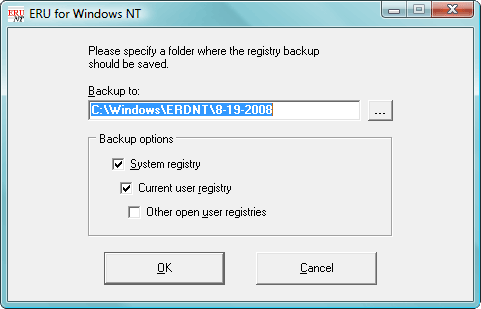
  2. Download ERUNT
    (ERUNT (Emergency Recovery Utility NT) is a free program that allows you to keep a complete backup of your registry and restore it when needed.)
  3. Install ERUNT by following the prompts
    (use the default install settings but say no to the portion that asks you to add ERUNT to the start-up folder, if you like you can enable this option later)
  4. Start ERUNT
    (either by double clicking on the desktop icon or choosing to start the program at the end of the setup)
  5. Choose a location for the backup
    (the default location is C:\WINDOWS\ERDNT which is acceptable).
  6. Make sure that at least the first two check boxes are ticked
  7. Press OK
  8. Press YES to create the folder.

erunt.png


Registry Modifications


  1. Go to Start > Run to bring up the run box
  2. In the box, type notepad.exe and press OK to open Notepad
  3. Copy (Ctrl+C) all of the text in the following box and paste (Ctrl+V) it into Notepad

    Code:
    Windows Registry Editor Version 5.00
    
    [HKEY_LOCAL_MACHINE\SYSTEM\CurrentControlSet\Services\Tcpip\Parameters]
    “SackOpts”=-
    “TcpWindowSize”=-
    “Tcp1323Opts”=-
    “DefaultTTL”=-
    “EnablePMTUBHDetect”=-
    “EnablePMTUDiscovery”=-
    “GlobalMaxTcpWindowSize”=-
  4. Go to File > Save As... and save it to your Desktop named Fix.reg. Make sure you change the Save as type to All Files (*.*)
  5. Locate Fix.reg on your Desktop and double-click on it to merge it with your registry
  6. Answer Yes when prompted about merging with the registry


Tom
 
Last edited:

My Computer My Computer

At a glance

Windows 8.1 Pro x64Intel i7 3770K @4.5GHzCorsair Vengeance 2x4GB DDR3 1600MHz Low Prof...Gigabyte Radeon HD 7850 (2GB GDDR5)
Computer type
PC/Desktop
Computer Manufacturer/Model Number
Build #1
OS
Windows 8.1 Pro x64
CPU
Intel i7 3770K @4.5GHz
Motherboard
ASUS P8Z77-V PRO
Memory
Corsair Vengeance 2x4GB DDR3 1600MHz Low Profile (White)
Graphics Card(s)
Gigabyte Radeon HD 7850 (2GB GDDR5)
Sound Card
Integrated on motherboard
Monitor(s) Displays
23" LG LCD/LED IPS
Screen Resolution
1920*1080
Hard Drives
Samsung EVO 128GB SSD
Seagate Barracuda 2GB 7200rpm
2x Seagate FreeAgent [500gb]
PSU
Corsair TX650W V2 (80+ Bronze)
Case
NZXT Phantom 410 White
Cooling
Corsair H100 Water Cooler
Keyboard
Microsoft Desktop 2000 Wireless Keyboard
Mouse
Microsoft Desktop 2000 Wireless Mouse
Internet Speed
95 Mb/s Download 70 Mb/s Upload
Antivirus
MSE + MBAM Pro
Browser
Firefox
Thanks tom982 now i can download again,but when i want download from IDM it always show this eror, any solution?

1284943-L7J38TS.png
 
Last edited:

My Computer My Computer

At a glance

Windows 7 Ultimate 32bitIntel(R) Atom(TM) CPU N550 @1.50Ghz (4CPUs), ...2048MB RAM
OS
Windows 7 Ultimate 32bit
CPU
Intel(R) Atom(TM) CPU N550 @1.50Ghz (4CPUs), ~1.5Ghz
Memory
2048MB RAM
Screen Resolution
1366x768
Uninstall it whilst we troubleshoot :)

Uninstall Software


  1. Click on the Start
    Start%20Orb.jpg
    button and select Control Panel
  2. Click on Programs then click on Uninstall a program
  3. You will now see a list of your installed software, double click on the following one by one to uninstall them:

    • Internet Download Manager
  4. Once you have done this, reboot your computer


Tom
 

My Computer My Computer

At a glance

Windows 8.1 Pro x64Intel i7 3770K @4.5GHzCorsair Vengeance 2x4GB DDR3 1600MHz Low Prof...Gigabyte Radeon HD 7850 (2GB GDDR5)
Computer type
PC/Desktop
Computer Manufacturer/Model Number
Build #1
OS
Windows 8.1 Pro x64
CPU
Intel i7 3770K @4.5GHz
Motherboard
ASUS P8Z77-V PRO
Memory
Corsair Vengeance 2x4GB DDR3 1600MHz Low Profile (White)
Graphics Card(s)
Gigabyte Radeon HD 7850 (2GB GDDR5)
Sound Card
Integrated on motherboard
Monitor(s) Displays
23" LG LCD/LED IPS
Screen Resolution
1920*1080
Hard Drives
Samsung EVO 128GB SSD
Seagate Barracuda 2GB 7200rpm
2x Seagate FreeAgent [500gb]
PSU
Corsair TX650W V2 (80+ Bronze)
Case
NZXT Phantom 410 White
Cooling
Corsair H100 Water Cooler
Keyboard
Microsoft Desktop 2000 Wireless Keyboard
Mouse
Microsoft Desktop 2000 Wireless Mouse
Internet Speed
95 Mb/s Download 70 Mb/s Upload
Antivirus
MSE + MBAM Pro
Browser
Firefox
Thanks DevIconChanger, I'll give it a test when I'm next home and post the results here :)
 

My Computer My Computer

At a glance

Windows 8.1 Pro x64Intel i7 3770K @4.5GHzCorsair Vengeance 2x4GB DDR3 1600MHz Low Prof...Gigabyte Radeon HD 7850 (2GB GDDR5)
Computer type
PC/Desktop
Computer Manufacturer/Model Number
Build #1
OS
Windows 8.1 Pro x64
CPU
Intel i7 3770K @4.5GHz
Motherboard
ASUS P8Z77-V PRO
Memory
Corsair Vengeance 2x4GB DDR3 1600MHz Low Profile (White)
Graphics Card(s)
Gigabyte Radeon HD 7850 (2GB GDDR5)
Sound Card
Integrated on motherboard
Monitor(s) Displays
23" LG LCD/LED IPS
Screen Resolution
1920*1080
Hard Drives
Samsung EVO 128GB SSD
Seagate Barracuda 2GB 7200rpm
2x Seagate FreeAgent [500gb]
PSU
Corsair TX650W V2 (80+ Bronze)
Case
NZXT Phantom 410 White
Cooling
Corsair H100 Water Cooler
Keyboard
Microsoft Desktop 2000 Wireless Keyboard
Mouse
Microsoft Desktop 2000 Wireless Mouse
Internet Speed
95 Mb/s Download 70 Mb/s Upload
Antivirus
MSE + MBAM Pro
Browser
Firefox
Back
Top