Back to square one.
First of all, I am very sorry to you all for this vicious circle because I thought I had it almost solved, but now I have realized it wasn't. Next, let me say that I have a duplicate copy of the Hard Disc which I made before attempting to solve the problem from the beginning in case of anything that might go wrong. I used the DisCopy of EaseUS for it.
Now, having tried the Mr. Fixit, and still didn't get anywhere, I disposed the HD and changed it with the original duplicate copy to start all over again. What I noticed with this copy was, I made mistake for NOT to press the Retry button before posting the problem in the Forum. I only tried to press it after GokAy #28, when it seemed to work, although it has been like that all the time. But this time, with this HD copy to confirm it, I pressed the "Retry" after it failed to download, and there it proceeded from 0% to finish, and gave the result as "download was successful." But when I look at the icon of the downloaded file, it is a white icon that would require a Program to open it.
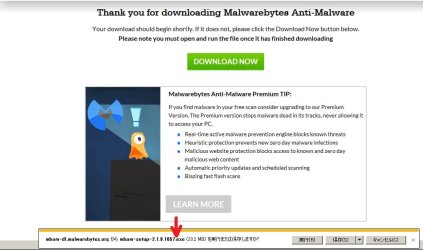
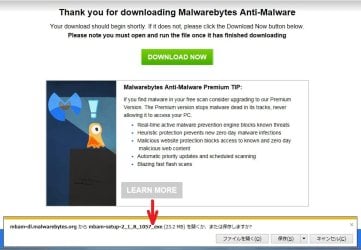
Then I moved to another machine to start download the same file for a check. Then I realized the character before the extension file was not the same. Under normal event, it is like the file in the Attachment where I pointed with red arrow, "Downloading extension format 1", which is a point (not underbar or else). With this kind of downloading, there is no problem.
But, with the one which gives me headache now, it is like the one on the file in the Attachment with the character before the exe extension as an underbar. See file "Downloading extension format 2". As you can see, how on earth the point has been changed to an underbar like that from the server before even starting the downloading. I have no control of that. If I continue to save this file as it is, a "Save As" window will open, as in the Attachment file "Downloading extension format 3", and an error message will eventually show up, saying "Unable to download ....." However, if I click the Retry button, it does the downloading to the finish, but with a blank icon that needs a program to open it. Here I have two choices. (1) Either, I will alter the underbar in the filename of that icon as xxxxxx.exe (in that case it changes to the proper icon, or (2) I change the underbar before the exe of the filename in "Save as" window as in the Attachment file "Downloading extension format 3", and this also will work as normal.
The Mr.Fixit didn't help with this.
I have un-installed AVG with Revo Uninstaller (Trial version). but still didn't do the job.
So I am now back to square one with this new duplicate copy of the original, having more precise knowledge of the problem than what I described before.
For this reason, that is why I asked for an apology, and for your understanding right from the beginning of this new description of the problem.
Many thanks to you all, as always.



 )
)