Solved Cant enable dx 11 in amd catalyst center

bala2289

New member
Member
VIP
Local time
3:19 PM
Messages
101
Location
india
hi.. I have an ati 5670 graphic card what settings should i use to enable dx11 tesselation.
the dx11 option cant be seen in max payne 3 only 9,10, and 10.1 also the tesselation option is grayed. I tried amd optimised, use application setiings with x64 but no use. I also forced the application with -dx11 but cudn't enable dx11. I had the same problem with crysis 2 earlier. Help please..:cry::cry::cry:
 

My Computer My Computer

At a glance

windows 7 ultimate x32core i3 530 @ 3.63 ghz4 gb ddr3 1333mhzSapphire radeon 7770 1gb Ghz Edition
Computer type
PC/Desktop
Computer Manufacturer/Model Number
Intel
OS
windows 7 ultimate x32
CPU
core i3 530 @ 3.63 ghz
Motherboard
Intel dh55pj
Memory
4 gb ddr3 1333mhz
Graphics Card(s)
Sapphire radeon 7770 1gb Ghz Edition
Monitor(s) Displays
lg 19"
Screen Resolution
1368*768
Hard Drives
Seagate 500gb @ 7200 rpm
PSU
Zebronics 450 w
Case
Zebronics
Cooling
Cooler master Tx3 Evo cpu and cooler master 120mm Inlet fan
Mouse
Lenovo razer 1600 dpi laser
Internet Speed
8 Mbps dsl
Antivirus
Avast Free
Browser
Chrome
The card & Windows 7 are already DX11 enabled, nothing needs to be done. In this case it's the game that will determine if all 3 (Windows, video card, and Game) are running in DX11 mode. If the game is DX11 capable it'll either be automatic, or you'll have to enable it in the game's settings panel.

See step 6 here for an explaination - http://www.sevenforums.com/gaming/77293-tips-troubleshooting-game-issues.html

See step 5 to get the latest DX (DirectX) files. Be aware the Windows already has DX11 installed, so what you're basically doing is making sure it and the other files, DX 9 in particular has the latest files.

Bottom line is if the game isn't DX11 the system won't run in DX11 mode. It'll just run in the lowest mode of the 3. Example - if the game is only DX10, the system will in either DX10, or if the game allows you to go lower, DX9.

Again read step 6 of my guide.

BTW Crysis 2 is only DX11 capable if you install the DX11 patch. Otherwise it's only DX10.

Good luck.
 

My Computer My Computer

At a glance

Windows 10 ProIntel Core i7-4770K (3.5Ghz)32 gig Corsair Dominator Platinum (4x8Gig)Sapphire Tri-X R9 Fury
Computer type
PC/Desktop
Computer Manufacturer/Model Number
Custom built by me.
OS
Windows 10 Pro
CPU
Intel Core i7-4770K (3.5Ghz)
Motherboard
Gigabyte G1 Sniper 5 (F10 Bios)
Memory
32 gig Corsair Dominator Platinum (4x8Gig)
Graphics Card(s)
Sapphire Tri-X R9 Fury
Sound Card
Soundblaster ZXR
Monitor(s) Displays
NEC PA242W 24" LCD Monitor
Screen Resolution
1920 x 1200
Hard Drives
Primary - Samsung 850 Pro (512gig), Samsung 840 Pro (256gig), 2TB WD Caviar Black.
PSU
EVGA Supernova 1000 G2
Case
Cooler Master HAF X
Cooling
Corsair H100i with Corsair Air Series SP120 Quiet Fans
Keyboard
Logitech Wireless Wave
Mouse
Logitech Performance MX
Internet Speed
High Speed Cable
Antivirus
Norton Security
Browser
IE11
Other Info
Memory Timings - 1866MHz @ 9-9-9-27-1T @ 1.5 volts
The card & Windows 7 are already DX11 enabled, nothing needs to be done. In this case it's the game that will determine if all 3 (Windows, video card, and Game) are running in DX11 mode. If the game is DX11 capable it'll either be automatic, or you'll have to enable it in the game's settings panel.

See step 6 here for an explaination - http://www.sevenforums.com/gaming/77293-tips-troubleshooting-game-issues.html

See step 5 to get the latest DX (DirectX) files. Be aware the Windows already has DX11 installed, so what you're basically doing is making sure it and the other files, DX 9 in particular has the latest files.

Bottom line is if the game isn't DX11 the system won't run in DX11 mode. It'll just run in the lowest mode of the 3. Example - if the game is only DX10, the system will in either DX10, or if the game allows you to go lower, DX9.

Again read step 6 of my guide.

BTW Crysis 2 is only DX11 capable if you install the DX11 patch. Otherwise it's only DX10.

Good luck.

Thanks for replying but i my card supports dx11, i have updated the dx11, i have installed dx11 patch once i have played crysis 2 in dx11 it just didnt work after that. Anyway i uninstalled it now. Just trying to play max payne now.
:(
 

My Computer My Computer

At a glance

windows 7 ultimate x32core i3 530 @ 3.63 ghz4 gb ddr3 1333mhzSapphire radeon 7770 1gb Ghz Edition
Computer type
PC/Desktop
Computer Manufacturer/Model Number
Intel
OS
windows 7 ultimate x32
CPU
core i3 530 @ 3.63 ghz
Motherboard
Intel dh55pj
Memory
4 gb ddr3 1333mhz
Graphics Card(s)
Sapphire radeon 7770 1gb Ghz Edition
Monitor(s) Displays
lg 19"
Screen Resolution
1368*768
Hard Drives
Seagate 500gb @ 7200 rpm
PSU
Zebronics 450 w
Case
Zebronics
Cooling
Cooler master Tx3 Evo cpu and cooler master 120mm Inlet fan
Mouse
Lenovo razer 1600 dpi laser
Internet Speed
8 Mbps dsl
Antivirus
Avast Free
Browser
Chrome
The card & Windows 7 are already DX11 enabled, nothing needs to be done. In this case it's the game that will determine if all 3 (Windows, video card, and Game) are running in DX11 mode. If the game is DX11 capable it'll either be automatic, or you'll have to enable it in the game's settings panel.

See step 6 here for an explaination - http://www.sevenforums.com/gaming/77293-tips-troubleshooting-game-issues.html

See step 5 to get the latest DX (DirectX) files. Be aware the Windows already has DX11 installed, so what you're basically doing is making sure it and the other files, DX 9 in particular has the latest files.

Bottom line is if the game isn't DX11 the system won't run in DX11 mode. It'll just run in the lowest mode of the 3. Example - if the game is only DX10, the system will in either DX10, or if the game allows you to go lower, DX9.

Again read step 6 of my guide.

BTW Crysis 2 is only DX11 capable if you install the DX11 patch. Otherwise it's only DX10.

Good luck.

Thanks for replying but i my card supports dx11, i have updated the dx11, i have installed dx11 patch once i have played crysis 2 in dx11 it just didnt work after that. Anyway i uninstalled it now. Just trying to play max payne now.
:(

Somehow I get the feeling you didn't understand it. Please re-read the post. It explains how DX11 works in relation to games.

And to be clear... the DX11 Crysis 2 patch you installed is only good for Crysis 2. Nothing else.

If a game isn't DX11 capable, you will not have DX11 features running.

Good luck.
 

My Computer My Computer

At a glance

Windows 10 ProIntel Core i7-4770K (3.5Ghz)32 gig Corsair Dominator Platinum (4x8Gig)Sapphire Tri-X R9 Fury
Computer type
PC/Desktop
Computer Manufacturer/Model Number
Custom built by me.
OS
Windows 10 Pro
CPU
Intel Core i7-4770K (3.5Ghz)
Motherboard
Gigabyte G1 Sniper 5 (F10 Bios)
Memory
32 gig Corsair Dominator Platinum (4x8Gig)
Graphics Card(s)
Sapphire Tri-X R9 Fury
Sound Card
Soundblaster ZXR
Monitor(s) Displays
NEC PA242W 24" LCD Monitor
Screen Resolution
1920 x 1200
Hard Drives
Primary - Samsung 850 Pro (512gig), Samsung 840 Pro (256gig), 2TB WD Caviar Black.
PSU
EVGA Supernova 1000 G2
Case
Cooler Master HAF X
Cooling
Corsair H100i with Corsair Air Series SP120 Quiet Fans
Keyboard
Logitech Wireless Wave
Mouse
Logitech Performance MX
Internet Speed
High Speed Cable
Antivirus
Norton Security
Browser
IE11
Other Info
Memory Timings - 1866MHz @ 9-9-9-27-1T @ 1.5 volts
hi.. I have an ati 5670 graphic card what settings should i use to enable dx11 tesselation.
the dx11 option cant be seen in max payne 3 only 9,10, and 10.1 also the tesselation option is grayed. I tried amd optimised, use application setiings with x64 but no use. I also forced the application with -dx11 but cudn't enable dx11. I had the same problem with crysis 2 earlier. Help please..:cry::cry::cry:

Also if the features are Greyed out on your card most likely it is done for a reason that game is a Video card hog and simply a Hd5670 is bottom line

It could be the card is not capable of playing at higher settings just at the one you already have
 

My Computer My Computer

At a glance

Windows 10 Home Premium 64bit sp1Intel I7-6700K @ 4.6 Ghz 1.344 volts everyday OC32GB G-Skill TridentZ 3200mhz 16-18-18-38 DDR4Sli Gigabyte Windforce GTX 980 G1
Computer type
PC/Desktop
Computer Manufacturer/Model Number
CoreI7-6700K MrFingerIII Special Builds
OS
Windows 10 Home Premium 64bit sp1
CPU
Intel I7-6700K @ 4.6 Ghz 1.344 volts everyday OC
Motherboard
Asrock Fatality K6 Z170 Socket 1151
Memory
32GB G-Skill TridentZ 3200mhz 16-18-18-38 DDR4
Graphics Card(s)
Sli Gigabyte Windforce GTX 980 G1
Sound Card
AC97 Creative Rage Tactic 3D Headphones Bluetooth
Monitor(s) Displays
27" Asus ROG Swift PG278Q G-Sync 48" Vizio Smart HD TV
Screen Resolution
2560x1440p 27"- 48" Currently Gaming at 2560x1440p Res 2K
Hard Drives
250GB Samsung Evo840SSD Seagate baracuda 500 GB WD Mybook 500Gb 1TB Seagate Barracuda
PSU
HX1050w Corsair Silver 80plus certified crosfire/sli
Case
Enthod Pro Full Tower
Cooling
Corsair H110i GT 280 mm High Performance WaterBlock
Keyboard
Logitech wireless keyboard
Mouse
Logitech wireless mouse
Internet Speed
Cox Cable 100+ mb
Antivirus
WebRoot Spysweeper with Antivirus
Browser
IE-10, Chrome, Opera
Other Info
My Other Rig is a AMD FX8320E @4.6Ghz 16GB Ballistic Sport Ram
Mobo Asrock Fatality 990FX 120GB OCZ SSD 1TB Seagate Barracuda Corsair H75 Cooling PSU Corsair CX750
GPU GTX Gigabyte 970G1
The card & Windows 7 are already DX11 enabled, nothing needs to be done. In this case it's the game that will determine if all 3 (Windows, video card, and Game) are running in DX11 mode. If the game is DX11 capable it'll either be automatic, or you'll have to enable it in the game's settings panel.

See step 6 here for an explaination - http://www.sevenforums.com/gaming/77293-tips-troubleshooting-game-issues.html

See step 5 to get the latest DX (DirectX) files. Be aware the Windows already has DX11 installed, so what you're basically doing is making sure it and the other files, DX 9 in particular has the latest files.

Bottom line is if the game isn't DX11 the system won't run in DX11 mode. It'll just run in the lowest mode of the 3. Example - if the game is only DX10, the system will in either DX10, or if the game allows you to go lower, DX9.

Again read step 6 of my guide.

BTW Crysis 2 is only DX11 capable if you install the DX11 patch. Otherwise it's only DX10.

Good luck.

Thanks for replying but i my card supports dx11, i have updated the dx11, i have installed dx11 patch once i have played crysis 2 in dx11 it just didnt work after that. Anyway i uninstalled it now. Just trying to play max payne now.
:(

Somehow I get the feeling you didn't understand it. Please re-read the post. It explains how DX11 works in relation to games.

And to be clear... the DX11 Crysis 2 patch you installed is only good for Crysis 2. Nothing else.

If a game isn't DX11 capable, you will not have DX11 features running.

Good luck.
Sorry for not being clear but i've mentioned that i have uninstalled crysis 2 now. I'm not trying to play max payne with crysis patch:D and may payne 3 is a dx11 game.
 

My Computer My Computer

At a glance

windows 7 ultimate x32core i3 530 @ 3.63 ghz4 gb ddr3 1333mhzSapphire radeon 7770 1gb Ghz Edition
Computer type
PC/Desktop
Computer Manufacturer/Model Number
Intel
OS
windows 7 ultimate x32
CPU
core i3 530 @ 3.63 ghz
Motherboard
Intel dh55pj
Memory
4 gb ddr3 1333mhz
Graphics Card(s)
Sapphire radeon 7770 1gb Ghz Edition
Monitor(s) Displays
lg 19"
Screen Resolution
1368*768
Hard Drives
Seagate 500gb @ 7200 rpm
PSU
Zebronics 450 w
Case
Zebronics
Cooling
Cooler master Tx3 Evo cpu and cooler master 120mm Inlet fan
Mouse
Lenovo razer 1600 dpi laser
Internet Speed
8 Mbps dsl
Antivirus
Avast Free
Browser
Chrome
hi.. I have an ati 5670 graphic card what settings should i use to enable dx11 tesselation.
the dx11 option cant be seen in max payne 3 only 9,10, and 10.1 also the tesselation option is grayed. I tried amd optimised, use application setiings with x64 but no use. I also forced the application with -dx11 but cudn't enable dx11. I had the same problem with crysis 2 earlier. Help please..:cry::cry::cry:

Also if the features are Greyed out on your card most likely it is done for a reason that game is a Video card hog and simply a Hd5670 is bottom line

It could be the card is not capable of playing at higher settings just at the one you already have

i have played crysis 2 in dx11 mode once, so i wont accept that it cant play maxpayne 3:D I'm playing the game in highest settings coz i have low 1368*768 monitor.
 

My Computer My Computer

At a glance

windows 7 ultimate x32core i3 530 @ 3.63 ghz4 gb ddr3 1333mhzSapphire radeon 7770 1gb Ghz Edition
Computer type
PC/Desktop
Computer Manufacturer/Model Number
Intel
OS
windows 7 ultimate x32
CPU
core i3 530 @ 3.63 ghz
Motherboard
Intel dh55pj
Memory
4 gb ddr3 1333mhz
Graphics Card(s)
Sapphire radeon 7770 1gb Ghz Edition
Monitor(s) Displays
lg 19"
Screen Resolution
1368*768
Hard Drives
Seagate 500gb @ 7200 rpm
PSU
Zebronics 450 w
Case
Zebronics
Cooling
Cooler master Tx3 Evo cpu and cooler master 120mm Inlet fan
Mouse
Lenovo razer 1600 dpi laser
Internet Speed
8 Mbps dsl
Antivirus
Avast Free
Browser
Chrome
well with max payne you need to have the latest DX driver which you go to Microsoft.com and get it but the one you might need is to redownload the SDK and see if that cleans up the issue

But i don't think it will play in 11 it always shows running dx 10
 

My Computer My Computer

At a glance

Windows 10 Home Premium 64bit sp1Intel I7-6700K @ 4.6 Ghz 1.344 volts everyday OC32GB G-Skill TridentZ 3200mhz 16-18-18-38 DDR4Sli Gigabyte Windforce GTX 980 G1
Computer type
PC/Desktop
Computer Manufacturer/Model Number
CoreI7-6700K MrFingerIII Special Builds
OS
Windows 10 Home Premium 64bit sp1
CPU
Intel I7-6700K @ 4.6 Ghz 1.344 volts everyday OC
Motherboard
Asrock Fatality K6 Z170 Socket 1151
Memory
32GB G-Skill TridentZ 3200mhz 16-18-18-38 DDR4
Graphics Card(s)
Sli Gigabyte Windforce GTX 980 G1
Sound Card
AC97 Creative Rage Tactic 3D Headphones Bluetooth
Monitor(s) Displays
27" Asus ROG Swift PG278Q G-Sync 48" Vizio Smart HD TV
Screen Resolution
2560x1440p 27"- 48" Currently Gaming at 2560x1440p Res 2K
Hard Drives
250GB Samsung Evo840SSD Seagate baracuda 500 GB WD Mybook 500Gb 1TB Seagate Barracuda
PSU
HX1050w Corsair Silver 80plus certified crosfire/sli
Case
Enthod Pro Full Tower
Cooling
Corsair H110i GT 280 mm High Performance WaterBlock
Keyboard
Logitech wireless keyboard
Mouse
Logitech wireless mouse
Internet Speed
Cox Cable 100+ mb
Antivirus
WebRoot Spysweeper with Antivirus
Browser
IE-10, Chrome, Opera
Other Info
My Other Rig is a AMD FX8320E @4.6Ghz 16GB Ballistic Sport Ram
Mobo Asrock Fatality 990FX 120GB OCZ SSD 1TB Seagate Barracuda Corsair H75 Cooling PSU Corsair CX750
GPU GTX Gigabyte 970G1
hi.. I have an ati 5670 graphic card what settings should i use to enable dx11 tesselation.
the dx11 option cant be seen in max payne 3 only 9,10, and 10.1 also the tesselation option is grayed. I tried amd optimised, use application setiings with x64 but no use. I also forced the application with -dx11 but cudn't enable dx11. I had the same problem with crysis 2 earlier. Help please..:cry::cry::cry:

Also if the features are Greyed out on your card most likely it is done for a reason that game is a Video card hog and simply a Hd5670 is bottom line

It could be the card is not capable of playing at higher settings just at the one you already have

Not sure what you're saying or alluding too but.....

The card's drivers are not going to gray out any DX11 features. That's not how the catalyst drivers work.

The DX11 portion of the video card is hardware based, not software, which means the "drivers" have nothing to do with whether the card is DX1 capable or not. In short you can't install drivers to make a video DX11 capable. Which is why you have to "buy" a DX11 capable card. Same with Nvidia.

And to be clear... the 5670 is a DX11 Capable card.

Item 3 under step 6 of my Tips on Troubleshooting Game Issues....

3- The video card must support the Mode(s) ATI 5000 series cards, Nvidia GTX 470, 480 (more?) See Windows 7 Compatibility Center for compatible cards.

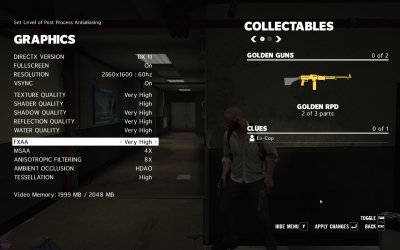
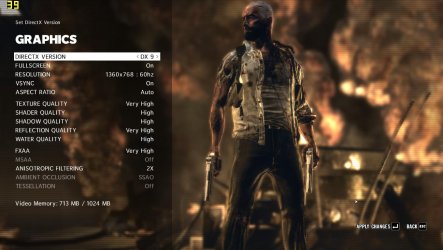
And according to bit-tecn.net - Max Payne 3 Graphics Analysis | bit-gamer.net Max Payne is a DX11 game, but as I said earlier, it needs to be enabled in the game's settings.....

Max Payne 3 settings.jpg
 

My Computer My Computer

At a glance

Windows 10 ProIntel Core i7-4770K (3.5Ghz)32 gig Corsair Dominator Platinum (4x8Gig)Sapphire Tri-X R9 Fury
Computer type
PC/Desktop
Computer Manufacturer/Model Number
Custom built by me.
OS
Windows 10 Pro
CPU
Intel Core i7-4770K (3.5Ghz)
Motherboard
Gigabyte G1 Sniper 5 (F10 Bios)
Memory
32 gig Corsair Dominator Platinum (4x8Gig)
Graphics Card(s)
Sapphire Tri-X R9 Fury
Sound Card
Soundblaster ZXR
Monitor(s) Displays
NEC PA242W 24" LCD Monitor
Screen Resolution
1920 x 1200
Hard Drives
Primary - Samsung 850 Pro (512gig), Samsung 840 Pro (256gig), 2TB WD Caviar Black.
PSU
EVGA Supernova 1000 G2
Case
Cooler Master HAF X
Cooling
Corsair H100i with Corsair Air Series SP120 Quiet Fans
Keyboard
Logitech Wireless Wave
Mouse
Logitech Performance MX
Internet Speed
High Speed Cable
Antivirus
Norton Security
Browser
IE11
Other Info
Memory Timings - 1866MHz @ 9-9-9-27-1T @ 1.5 volts
The card's drivers are not going to gray out any DX11 features. That's not how the catalyst drivers work.

The DX11 portion of the video card is hardware based, not software, which means the "drivers" have nothing to do with whether the card is DX1 capable or not. In short you can't install drivers to make a video DX11 capable. Which is why you have to "buy" a DX11 capable card. Same with Nvidia.

And to be clear... the 5670 is a DX11 Capable card.

True.

DX11 is not blocked at either the game or driver level.
 

My Computer My Computer

At a glance

8 Pro x64i7 3770K 4.6GHz16GB G.Skill Trident X 2666mhzx2 EVGA 780 Ti Superclocked SLI
Computer type
PC/Desktop
Computer Manufacturer/Model Number
Systems by SmartEyeball
OS
8 Pro x64
CPU
i7 3770K 4.6GHz
Motherboard
ASUS P8Z77 WS
Memory
16GB G.Skill Trident X 2666mhz
Graphics Card(s)
x2 EVGA 780 Ti Superclocked SLI
Sound Card
SB X-FI Surround 5.1 PRO USB / ATH-AD900 Headphones
Monitor(s) Displays
x3 Dell U2410 / 58" Samsung
Screen Resolution
5760*1200/ 1920*1200
Hard Drives
2x Intel 520 240GB (RAID 0) * 2x WD Caviar Blacks 2TB (RAID 0) * 2TB WD Caviar Black * Sony Optirac DVD
PSU
Silverstone Strider Evolution 1200W
Case
Thermaltake Level 10 GT Snow Edition
Cooling
Noctua NH-D14
Keyboard
Topre Realforce // Ducky Shine MX Black // Filco Ninja TKL
Mouse
Thermaltake Theron (Highly Recommended) + Razer Imperator
Antivirus
MSE
Browser
IE, FF, WaterFox
Other Info
GT Extreme V2 Sim Racing Cockpit + 40" LCD and K/B Mouse stand ▼
Fanatec CSR Elite Wheel + Clubsport V1 Pedals + CSR shifter/7G-H ▼Saitek X52 Pro ▼ TrackIR 5 Pro
Buttkicker v2 Seat Rumbler with Dedicated 5.1 and Sub Woofer attached to frame ▼
=
Bloody Big Grin
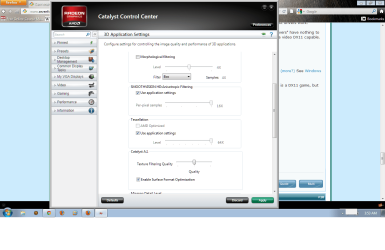
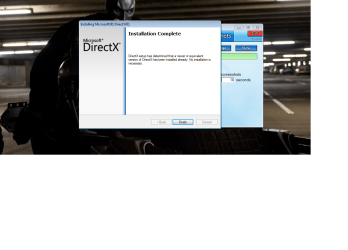
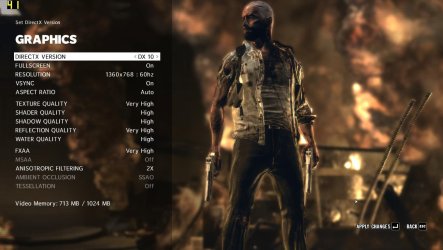
I tried to update directx but the installer says its upto date. Only dx 9,10,10.1 are visible in the game settings.
 

Attachments

  • Untitled.png
    Untitled.png
    66.6 KB · Views: 9
  • Untitled2.png
    Untitled2.png
    136.7 KB · Views: 9
  • MaxPayne3 2012-07-21 18-13-53-99.jpg
    MaxPayne3 2012-07-21 18-13-53-99.jpg
    99.4 KB · Views: 11
  • MaxPayne3 2012-07-21 18-13-56-18.jpg
    MaxPayne3 2012-07-21 18-13-56-18.jpg
    98.6 KB · Views: 10
  • MaxPayne3 2012-07-21 18-14-14-33.jpg
    MaxPayne3 2012-07-21 18-14-14-33.jpg
    106.9 KB · Views: 9

My Computer My Computer

At a glance

windows 7 ultimate x32core i3 530 @ 3.63 ghz4 gb ddr3 1333mhzSapphire radeon 7770 1gb Ghz Edition
Computer type
PC/Desktop
Computer Manufacturer/Model Number
Intel
OS
windows 7 ultimate x32
CPU
core i3 530 @ 3.63 ghz
Motherboard
Intel dh55pj
Memory
4 gb ddr3 1333mhz
Graphics Card(s)
Sapphire radeon 7770 1gb Ghz Edition
Monitor(s) Displays
lg 19"
Screen Resolution
1368*768
Hard Drives
Seagate 500gb @ 7200 rpm
PSU
Zebronics 450 w
Case
Zebronics
Cooling
Cooler master Tx3 Evo cpu and cooler master 120mm Inlet fan
Mouse
Lenovo razer 1600 dpi laser
Internet Speed
8 Mbps dsl
Antivirus
Avast Free
Browser
Chrome
Don't know why you can't enable DX11 in the game if it's DX11 capable. Have you loaded the latest patch for the game???

Bottom line is you card is DX11 capable (all ATI (AMD) 5000 series and above are DX11 capable), just as Nvidia's 400 series and above are DX11 capable as well. Being that you have a 5670, it is DX11 capable.... regardless of driver. Windows 7 is DX11 ready by default.

That said though, you could have something going on which requires a video card driver update and or installing the latest game patch.

Outside of that there shouldn't be any "DX11" issues unless it is at the game's level.

Good luck.
 

My Computer My Computer

At a glance

Windows 10 ProIntel Core i7-4770K (3.5Ghz)32 gig Corsair Dominator Platinum (4x8Gig)Sapphire Tri-X R9 Fury
Computer type
PC/Desktop
Computer Manufacturer/Model Number
Custom built by me.
OS
Windows 10 Pro
CPU
Intel Core i7-4770K (3.5Ghz)
Motherboard
Gigabyte G1 Sniper 5 (F10 Bios)
Memory
32 gig Corsair Dominator Platinum (4x8Gig)
Graphics Card(s)
Sapphire Tri-X R9 Fury
Sound Card
Soundblaster ZXR
Monitor(s) Displays
NEC PA242W 24" LCD Monitor
Screen Resolution
1920 x 1200
Hard Drives
Primary - Samsung 850 Pro (512gig), Samsung 840 Pro (256gig), 2TB WD Caviar Black.
PSU
EVGA Supernova 1000 G2
Case
Cooler Master HAF X
Cooling
Corsair H100i with Corsair Air Series SP120 Quiet Fans
Keyboard
Logitech Wireless Wave
Mouse
Logitech Performance MX
Internet Speed
High Speed Cable
Antivirus
Norton Security
Browser
IE11
Other Info
Memory Timings - 1866MHz @ 9-9-9-27-1T @ 1.5 volts
Drivers are upto date 12.6 version and game is also patched to latest 1.0.0.29
 

My Computer My Computer

At a glance

windows 7 ultimate x32core i3 530 @ 3.63 ghz4 gb ddr3 1333mhzSapphire radeon 7770 1gb Ghz Edition
Computer type
PC/Desktop
Computer Manufacturer/Model Number
Intel
OS
windows 7 ultimate x32
CPU
core i3 530 @ 3.63 ghz
Motherboard
Intel dh55pj
Memory
4 gb ddr3 1333mhz
Graphics Card(s)
Sapphire radeon 7770 1gb Ghz Edition
Monitor(s) Displays
lg 19"
Screen Resolution
1368*768
Hard Drives
Seagate 500gb @ 7200 rpm
PSU
Zebronics 450 w
Case
Zebronics
Cooling
Cooler master Tx3 Evo cpu and cooler master 120mm Inlet fan
Mouse
Lenovo razer 1600 dpi laser
Internet Speed
8 Mbps dsl
Antivirus
Avast Free
Browser
Chrome
Well I suggest you visit the game's website and find out why you can't enable DX11 in the game. I've don't have the game so I have no suggestions there.

Good luck.
 

My Computer My Computer

At a glance

Windows 10 ProIntel Core i7-4770K (3.5Ghz)32 gig Corsair Dominator Platinum (4x8Gig)Sapphire Tri-X R9 Fury
Computer type
PC/Desktop
Computer Manufacturer/Model Number
Custom built by me.
OS
Windows 10 Pro
CPU
Intel Core i7-4770K (3.5Ghz)
Motherboard
Gigabyte G1 Sniper 5 (F10 Bios)
Memory
32 gig Corsair Dominator Platinum (4x8Gig)
Graphics Card(s)
Sapphire Tri-X R9 Fury
Sound Card
Soundblaster ZXR
Monitor(s) Displays
NEC PA242W 24" LCD Monitor
Screen Resolution
1920 x 1200
Hard Drives
Primary - Samsung 850 Pro (512gig), Samsung 840 Pro (256gig), 2TB WD Caviar Black.
PSU
EVGA Supernova 1000 G2
Case
Cooler Master HAF X
Cooling
Corsair H100i with Corsair Air Series SP120 Quiet Fans
Keyboard
Logitech Wireless Wave
Mouse
Logitech Performance MX
Internet Speed
High Speed Cable
Antivirus
Norton Security
Browser
IE11
Other Info
Memory Timings - 1866MHz @ 9-9-9-27-1T @ 1.5 volts
Couldn't find any info in the website, completed the game in dx 10.1. Thanks for all:cool:

Finally got it working in dx11..

Create a textfile called commandline and paste the lines below in it.

-adapter 1
-dx11
-frameLimit 2
-fxaa 3
-MSAA 5
-MSAAQuality
-reflectionquality 3
-shadowquality 3
-ssao 1
-tessellation 3
-texturefilterquality 4
-texturequality 2
-useHighQualityShaders 1
-waterquality 2


Also uninstalled catalyst center and reinstalled, dont know which cleared the issue.
 
Last edited:

My Computer My Computer

At a glance

windows 7 ultimate x32core i3 530 @ 3.63 ghz4 gb ddr3 1333mhzSapphire radeon 7770 1gb Ghz Edition
Computer type
PC/Desktop
Computer Manufacturer/Model Number
Intel
OS
windows 7 ultimate x32
CPU
core i3 530 @ 3.63 ghz
Motherboard
Intel dh55pj
Memory
4 gb ddr3 1333mhz
Graphics Card(s)
Sapphire radeon 7770 1gb Ghz Edition
Monitor(s) Displays
lg 19"
Screen Resolution
1368*768
Hard Drives
Seagate 500gb @ 7200 rpm
PSU
Zebronics 450 w
Case
Zebronics
Cooling
Cooler master Tx3 Evo cpu and cooler master 120mm Inlet fan
Mouse
Lenovo razer 1600 dpi laser
Internet Speed
8 Mbps dsl
Antivirus
Avast Free
Browser
Chrome
I must admit I was a bit lost as to where to go next. I am glad you fixed it though :)
 

My Computer My Computer

At a glance

8 Pro x64i7 3770K 4.6GHz16GB G.Skill Trident X 2666mhzx2 EVGA 780 Ti Superclocked SLI
Computer type
PC/Desktop
Computer Manufacturer/Model Number
Systems by SmartEyeball
OS
8 Pro x64
CPU
i7 3770K 4.6GHz
Motherboard
ASUS P8Z77 WS
Memory
16GB G.Skill Trident X 2666mhz
Graphics Card(s)
x2 EVGA 780 Ti Superclocked SLI
Sound Card
SB X-FI Surround 5.1 PRO USB / ATH-AD900 Headphones
Monitor(s) Displays
x3 Dell U2410 / 58" Samsung
Screen Resolution
5760*1200/ 1920*1200
Hard Drives
2x Intel 520 240GB (RAID 0) * 2x WD Caviar Blacks 2TB (RAID 0) * 2TB WD Caviar Black * Sony Optirac DVD
PSU
Silverstone Strider Evolution 1200W
Case
Thermaltake Level 10 GT Snow Edition
Cooling
Noctua NH-D14
Keyboard
Topre Realforce // Ducky Shine MX Black // Filco Ninja TKL
Mouse
Thermaltake Theron (Highly Recommended) + Razer Imperator
Antivirus
MSE
Browser
IE, FF, WaterFox
Other Info
GT Extreme V2 Sim Racing Cockpit + 40" LCD and K/B Mouse stand ▼
Fanatec CSR Elite Wheel + Clubsport V1 Pedals + CSR shifter/7G-H ▼Saitek X52 Pro ▼ TrackIR 5 Pro
Buttkicker v2 Seat Rumbler with Dedicated 5.1 and Sub Woofer attached to frame ▼
=
Bloody Big Grin
Back
Top