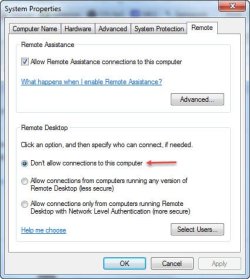
I can not enable remote desktop
its give me this
how can i over come this ...
Which version of Windows 7 are you using? Find out what version of Windows 7 you're running...
Go to Start and type winver in the search window.
If you're running
Windows 7 Ultimate or Pro go to
Start and type
gpedit.msc in the search window. Open the group policy editor and make sure the Computer
Configuration/Administrative Templates/System/Remote Assistance/Solicited Remote Assistance group policy is set to either
Not configured or
Enabled.
Note that if you're part of a domain environment group policies pushed from the servers may override whatever changes you make.
If you're running
Windows 7 Home Premium you can configure this in the registry because you cannot use the group policy editor. Go to
Start and type
cmd in the search window. Right click on
cmd.exe and select
Run as administrator. At the command prompt type
regedit. Navigate to the
HKLM\SOFTWARE\Policies\Microsoft\WindowsNT\Terminal Services path and make sure there is not a DWORD named
fAllowToGetHelp. If there is delete it.
(always backup the registry before making any changes)