Can't Enable System restore

alme1304

New member
Local time
5:43 PM
Messages
5
Hello everyone,

so after Winrar stopped working, I decided that I would install 7zip. And after the 7zip didn't work, I decided I would do a system restore, maybe I screwed something up by accident, which broke the context menus( what wasn't working on both programs), but when I tried to do a system restore I was greeted with this message
"system protection is turned off" is disabled and that I have to enable it in order to do a system restore, which is odd because I have always done automatic restore points.

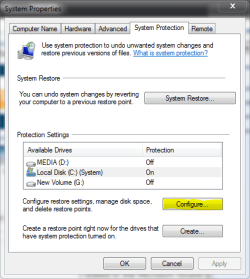
After a couple of google queries I found out how to enable it again, which points me to "system protection", and it shows me that every drive has system restore diabled, but when I try to enable the option "restore system settings and previous versions of files" is grayed out and I can't enable it.

I looked in the Microsoft forums but none of the solutions helped...

any suggestions?
 

My Computer

OS
Seven

My Computer

Computer type
PC/Desktop
Computer Manufacturer/Model Number
Dell XPS 420
OS
Windows 10, Home Clean Install
CPU
Intel Core2 processsor Q8200(2.33Ghz 1333FSB) Quad Core Tech
Motherboard
Dell
Memory
6 gb
Graphics Card(s)
ATI Radeon 256MB HD3650
Sound Card
Intergrated 7.1 Channel Audio
Monitor(s) Displays
Dell SP2009W 20"
Hard Drives
640 GB Serial ATA Hard drive
Cooling
Fan
Keyboard
Dell USB Keyboard
Mouse
Dell Premium Optical USB
Internet Speed
DSL 2.85

My Computer

Computer type
PC/Desktop
Computer Manufacturer/Model Number
Self Built
OS
Win 10 Pro x64
CPU
Intel I5-2500K @3.3GHz
Motherboard
Asrock P67 Extreme4
Memory
16GB G.Skill Ripjaws X (4x4GB)
Graphics Card(s)
EVGA GeForce 750 Ti SC 2GB
Sound Card
ASUS Xonar DG 5.1 Channels 24-bit 96KHz PCI Interface Sound
Monitor(s) Displays
auria eq2367
Screen Resolution
1920 x 1080
Hard Drives
250GB Samsung 850 EVO SSD
1TB WD Blue
1TB Hitachi
PSU
SeaSonic X 650W 80 Plus Gold
Case
Corsair Obsidian 750D
Cooling
Corsair H60, Three 140mm case fans
Keyboard
Logitech Wireless Keyboard K520
Mouse
Logitech Wireless Mouse M310
Internet Speed
Wave Broadband ~ 100 dn 5 up
Antivirus
Windows Defender, Malwarebytes Premium
Browser
Edge, IE11, Chrome
Other Info
Laptop specs: HP g7-1365dx /
CPU: AMD A6-3420M APU with Radeon(tm) HD Graphics /
RAM: Crucial 8Gb (2x4Gb) /
SSD: Crucial M4-CT128M4SSD2 ATA Device/ FW 000F /
GFX: AMD Radeon HD 6520G /
OS: Windows 10 Pro x64
just tried both, with no luck. The suggestion box it's still open
 

My Computer

OS
Seven
Did you actually check (with vssadmin) whether you have any restore points at all.
 

My Computer

Computer Manufacturer/Model Number
HP, Dell, Gateway, Toshiba - 4 laptops and 2 desktops
OS
Vista, Windows7, Mint Mate, Zorin, Windows 8
CPU
from 1.6GHz Duo to i7
Monitor(s) Displays
2x HP w2207
Hard Drives
5x HDD, 7x SSD, 12x Externals
Keyboard
with trackball - no mices
Mouse
Trackball mice
Internet Speed
DSL 6000
Did you Click on a drive to highlight it then configure.
 

Attachments

  • system protection.PNG
    system protection.PNG
    16.7 KB · Views: 56

My Computer

Computer type
PC/Desktop
Computer Manufacturer/Model Number
Self Built
OS
Win 10 Pro x64
CPU
Intel I5-2500K @3.3GHz
Motherboard
Asrock P67 Extreme4
Memory
16GB G.Skill Ripjaws X (4x4GB)
Graphics Card(s)
EVGA GeForce 750 Ti SC 2GB
Sound Card
ASUS Xonar DG 5.1 Channels 24-bit 96KHz PCI Interface Sound
Monitor(s) Displays
auria eq2367
Screen Resolution
1920 x 1080
Hard Drives
250GB Samsung 850 EVO SSD
1TB WD Blue
1TB Hitachi
PSU
SeaSonic X 650W 80 Plus Gold
Case
Corsair Obsidian 750D
Cooling
Corsair H60, Three 140mm case fans
Keyboard
Logitech Wireless Keyboard K520
Mouse
Logitech Wireless Mouse M310
Internet Speed
Wave Broadband ~ 100 dn 5 up
Antivirus
Windows Defender, Malwarebytes Premium
Browser
Edge, IE11, Chrome
Other Info
Laptop specs: HP g7-1365dx /
CPU: AMD A6-3420M APU with Radeon(tm) HD Graphics /
RAM: Crucial 8Gb (2x4Gb) /
SSD: Crucial M4-CT128M4SSD2 ATA Device/ FW 000F /
GFX: AMD Radeon HD 6520G /
OS: Windows 10 Pro x64
derekimo - yes I've tried that

whs - it didn't say anything, but when I converted the log to a .txt I found this
2010-01-27 20:30:25, Info CSI 0000014a [SR] Verifying 100 (0x00000064) components
2010-01-27 20:30:25, Info CSI 0000014b [SR] Beginning Verify and Repair transaction
2010-01-27 20:30:29, Info CSI 0000014d [SR] Repairing corrupted file [ml:520{260},l:58{29}]"\??\C:\Windows\System32\en-US"\[l:28{14}]"user32.dll.mui" from store
2010-01-27 20:30:29, Info CSI 0000014f [SR] Verify complete


and these other lines

2010-01-27 20:31:59, Info CSI 0000019d [SR] Repairing 1 components
2010-01-27 20:31:59, Info CSI 0000019e [SR] Beginning Verify and Repair transaction
2010-01-27 20:31:59, Info CSI 000001a0 [SR] Repairing corrupted file [ml:520{260},l:58{29}]"\??\C:\Windows\System32\en-US"\[l:28{14}]"user32.dll.mui" from store
2010-01-27 20:31:59, Info CSI 000001a2 [SR] Repair complete
2010-01-27 20:31:59, Info CSI 000001a3 [SR] Committing transaction
2010-01-27 20:31:59, Info CSI 000001a7 [SR] Verify and Repair Transaction completed. All files and registry keys listed in this transaction have been successfully repaired
2010-01-27 20:45:28, Info CSI 00000009 [SR] Verifying 100 (0x00000064) components
2010-01-27 20:45:28, Info CSI 0000000a [SR] Beginning Verify and Repair transaction
2010-01-27 20:45:30, Info CSI 0000000c [SR] Verify complete
I've also tried making restore points via SCRP.exe(small app to make restore points) and through Revo Unistaller, with no luck
 

My Computer

OS
Seven

My Computer

Computer type
PC/Desktop
Computer Manufacturer/Model Number
Self Built
OS
Win 10 Pro x64
CPU
Intel I5-2500K @3.3GHz
Motherboard
Asrock P67 Extreme4
Memory
16GB G.Skill Ripjaws X (4x4GB)
Graphics Card(s)
EVGA GeForce 750 Ti SC 2GB
Sound Card
ASUS Xonar DG 5.1 Channels 24-bit 96KHz PCI Interface Sound
Monitor(s) Displays
auria eq2367
Screen Resolution
1920 x 1080
Hard Drives
250GB Samsung 850 EVO SSD
1TB WD Blue
1TB Hitachi
PSU
SeaSonic X 650W 80 Plus Gold
Case
Corsair Obsidian 750D
Cooling
Corsair H60, Three 140mm case fans
Keyboard
Logitech Wireless Keyboard K520
Mouse
Logitech Wireless Mouse M310
Internet Speed
Wave Broadband ~ 100 dn 5 up
Antivirus
Windows Defender, Malwarebytes Premium
Browser
Edge, IE11, Chrome
Other Info
Laptop specs: HP g7-1365dx /
CPU: AMD A6-3420M APU with Radeon(tm) HD Graphics /
RAM: Crucial 8Gb (2x4Gb) /
SSD: Crucial M4-CT128M4SSD2 ATA Device/ FW 000F /
GFX: AMD Radeon HD 6520G /
OS: Windows 10 Pro x64
One of these should work:

Click Start then Computer
On the Tools menu Then or Organize Folder Options.
On the View tab, click Show hidden files and folders”.
Clear the Hide protected operating system files (Recommended) check box. Click Yes when you
are prompted to confirm the change.

Click OK.

Right-click the System Volume Information folder in the root folder, and then click Properties.
If the Read-only attibutes is checked, uncheck it and click, OK
Now try creating a restore point.

Hide the System Files when completed

This error might occurs because the recovery partition is enabled for File Backup or System Restore and is almost full. To work around this, do not select D:\ as a backup source. Also, go to System Protection in Control Panel and make sure that D:\ is not enabled for restore points.

Also try to reboot the Computer in Selective Startup with all the Protection Disabled

Type Services in Start Menu Search Box, hit Enter. Make sure that the Volume Shadow Copy Service is Running and set on Automatic. If the Status of System Restore Service is not Started, Start it. Also set it on Automatic if it is not. A reboot may be required. Reconfirm again, and now try

Reset the Repository.
Boot into Safe Mode without networking and open a command prompt as administrator.
Now Type net stop winmgmt and hit Enter. This will stop the Windows Management Instrumentation Service
Next go to C:\Windows\System32\wbem and rename therepository folder to repository old
Restart.
Now again open a command prompt as administrator, type net stop winmgmt and hit Enter.
Next Type winmgmt /resetRepository and hit Enter.
Restart.Now see if you can create a System Restore Point manually. Hope some of this
helps you.
 
Last edited:

My Computer

Computer type
PC/Desktop
Computer Manufacturer/Model Number
Dell XPS 420
OS
Windows 10, Home Clean Install
CPU
Intel Core2 processsor Q8200(2.33Ghz 1333FSB) Quad Core Tech
Motherboard
Dell
Memory
6 gb
Graphics Card(s)
ATI Radeon 256MB HD3650
Sound Card
Intergrated 7.1 Channel Audio
Monitor(s) Displays
Dell SP2009W 20"
Hard Drives
640 GB Serial ATA Hard drive
Cooling
Fan
Keyboard
Dell USB Keyboard
Mouse
Dell Premium Optical USB
Internet Speed
DSL 2.85
I am puzzled !!

alme1304 - those files look like they come from the System File Checker. Looks like it did repair something. I was asking that you run vssadmin list shadows and see whether there are any restore points on your C.

Richard, what is the significance of this in the context ???

2. This error might occurs because the recovery partition is enabled for File Backup or System Restore and is almost full. To work around this, do not select D:\ as a backup source. Also, go to System Protection in Control Panel and make sure that D:\ is not enabled for restore points.
 

My Computer

Computer Manufacturer/Model Number
HP, Dell, Gateway, Toshiba - 4 laptops and 2 desktops
OS
Vista, Windows7, Mint Mate, Zorin, Windows 8
CPU
from 1.6GHz Duo to i7
Monitor(s) Displays
2x HP w2207
Hard Drives
5x HDD, 7x SSD, 12x Externals
Keyboard
with trackball - no mices
Mouse
Trackball mice
Internet Speed
DSL 6000
I am puzzled !!

alme1304 - those files look like they come from the System File Checker. Looks like it did repair something. I was asking that you run vssadmin list shadows and see whether there are any restore points on your C.

Richard, what is the significance of this in the context ???

2. This error might occurs because the recovery partition is enabled for File Backup or System Restore and is almost full. To work around this, do not select D:\ as a backup source. Also, go to System Protection in Control Panel and make sure that D:\ is not enabled for restore points.

System is not working, there is a problem, but where? Could it be that system is not deleting the old points to make room for the new, or drive is full? . I really do not know.
Just coming up with different scenarios, which of course could prove to be incorrect. I find this problem very interesting and have posted everything that I have, to solve it.
 

My Computer

Computer type
PC/Desktop
Computer Manufacturer/Model Number
Dell XPS 420
OS
Windows 10, Home Clean Install
CPU
Intel Core2 processsor Q8200(2.33Ghz 1333FSB) Quad Core Tech
Motherboard
Dell
Memory
6 gb
Graphics Card(s)
ATI Radeon 256MB HD3650
Sound Card
Intergrated 7.1 Channel Audio
Monitor(s) Displays
Dell SP2009W 20"
Hard Drives
640 GB Serial ATA Hard drive
Cooling
Fan
Keyboard
Dell USB Keyboard
Mouse
Dell Premium Optical USB
Internet Speed
DSL 2.85
Understand Richard. But I did not gather any problems with the recovery partition from the previous posts. But the passage I quoted from your posting is very true. A lot of people get into trouble because they don't change the drive letter for file backup and are all amazed when they get a "red" D. And all of that because the OEMs are too cheap to give people a recovery disk.
The OP should run vssadmin to find out how his shadow situation is.
 

My Computer

Computer Manufacturer/Model Number
HP, Dell, Gateway, Toshiba - 4 laptops and 2 desktops
OS
Vista, Windows7, Mint Mate, Zorin, Windows 8
CPU
from 1.6GHz Duo to i7
Monitor(s) Displays
2x HP w2207
Hard Drives
5x HDD, 7x SSD, 12x Externals
Keyboard
with trackball - no mices
Mouse
Trackball mice
Internet Speed
DSL 6000
Your last post is correct, Wolfgang, but

as I said, I am just throwing everything I have and see if it sticks.

BTW, how you doing. Not much contact?
 

My Computer

Computer type
PC/Desktop
Computer Manufacturer/Model Number
Dell XPS 420
OS
Windows 10, Home Clean Install
CPU
Intel Core2 processsor Q8200(2.33Ghz 1333FSB) Quad Core Tech
Motherboard
Dell
Memory
6 gb
Graphics Card(s)
ATI Radeon 256MB HD3650
Sound Card
Intergrated 7.1 Channel Audio
Monitor(s) Displays
Dell SP2009W 20"
Hard Drives
640 GB Serial ATA Hard drive
Cooling
Fan
Keyboard
Dell USB Keyboard
Mouse
Dell Premium Optical USB
Internet Speed
DSL 2.85
I am doing fine, thanks for asking. I am waiting for warm weather - in FL of all places.
 

My Computer

Computer Manufacturer/Model Number
HP, Dell, Gateway, Toshiba - 4 laptops and 2 desktops
OS
Vista, Windows7, Mint Mate, Zorin, Windows 8
CPU
from 1.6GHz Duo to i7
Monitor(s) Displays
2x HP w2207
Hard Drives
5x HDD, 7x SSD, 12x Externals
Keyboard
with trackball - no mices
Mouse
Trackball mice
Internet Speed
DSL 6000
Ok, just a theory here but, since my C partition was completely fuller not too long ago it could have disabled some system settings, but it never re-enabled them when I changed the partition size? It doesn't explain why I can't enable it now tho...

Also, what is "vssadmin list shadows" not sure I know what it means

as of right now I haven't tried the options I'll post something later tomorrow
 

My Computer

OS
Seven
vssadmin list shadows - that is a command in elevated cmd which will list all shadows (restore points) of all disks/partitions on your system. Type cmd into start/search, right click on the cmd.exe above and go to "Run as administrator". That will open a little black window into which you paste the vssadmin command and hit Enter. Expand the black window so that you can see things and look for all entries for C (they are dated) - those are your restore points.
 

My Computer

Computer Manufacturer/Model Number
HP, Dell, Gateway, Toshiba - 4 laptops and 2 desktops
OS
Vista, Windows7, Mint Mate, Zorin, Windows 8
CPU
from 1.6GHz Duo to i7
Monitor(s) Displays
2x HP w2207
Hard Drives
5x HDD, 7x SSD, 12x Externals
Keyboard
with trackball - no mices
Mouse
Trackball mice
Internet Speed
DSL 6000
ok, so I ran the command and this is what it spat at me
"No items found that satisfy the query."

I'm assuming I don't have any restore points...and that I can't make them either
 

My Computer

OS
Seven

My Computer

Computer type
PC/Desktop
Computer Manufacturer/Model Number
Self Built
OS
Win 10 Pro x64
CPU
Intel I5-2500K @3.3GHz
Motherboard
Asrock P67 Extreme4
Memory
16GB G.Skill Ripjaws X (4x4GB)
Graphics Card(s)
EVGA GeForce 750 Ti SC 2GB
Sound Card
ASUS Xonar DG 5.1 Channels 24-bit 96KHz PCI Interface Sound
Monitor(s) Displays
auria eq2367
Screen Resolution
1920 x 1080
Hard Drives
250GB Samsung 850 EVO SSD
1TB WD Blue
1TB Hitachi
PSU
SeaSonic X 650W 80 Plus Gold
Case
Corsair Obsidian 750D
Cooling
Corsair H60, Three 140mm case fans
Keyboard
Logitech Wireless Keyboard K520
Mouse
Logitech Wireless Mouse M310
Internet Speed
Wave Broadband ~ 100 dn 5 up
Antivirus
Windows Defender, Malwarebytes Premium
Browser
Edge, IE11, Chrome
Other Info
Laptop specs: HP g7-1365dx /
CPU: AMD A6-3420M APU with Radeon(tm) HD Graphics /
RAM: Crucial 8Gb (2x4Gb) /
SSD: Crucial M4-CT128M4SSD2 ATA Device/ FW 000F /
GFX: AMD Radeon HD 6520G /
OS: Windows 10 Pro x64
Solving Restore problem

HI.. i have windows 7 32 bit OS and by default the system restore should be ON. But in fact, when i wanted to restore my PC to an earlier date...it was off and i was unable to use the system restore settings.

So here's wat ive done :

1st : Click on 'configure' in the system protection tab of the main window System Properties
2nd : Click on the first option = Restore system settings and previous versions of files
3rd : Apply and click on OK.

Make sure the Local Disk (C) is highlighted when doing this.

That's it. It should work.

IceSmacker
 

My Computer

OS
Windows 7 32 bit
Hello IceSmacker, welcome to Seven Forums!


Is the C: drive the only partition that it is set for, sometime having it set for another drive also will cause this; if it's set for another click to highlight the one you need to disable and click configure and dot "Turn off ... " in the dialog box that opens.


After you get this sorted, you may care to have a look through this tutorial at the link below, it shows 2 separate methods for System Restore points to be created automatically; to me, Method Two is the better of the 2.

System Restore Point : Create at System Startup
 

My Computer

Computer Manufacturer/Model Number
* BFK Customs *
OS
W 7 64-bit Ultimate
CPU
Intel Q9550 Yorkfield
Motherboard
ASUS P5Q Pro
Memory
8GB Dominator 8500C5D
Graphics Card(s)
ATI : XFX 5870
Sound Card
Realtek HD Audio 7-1
Monitor(s) Displays
1x 47" LCD HDMI & 3x 26" LCD HDMI
Screen Resolution
1920x1080P & 1920x1200
Hard Drives
1x 80GB Intel X25-M G2 SSD : 1x 500GB & 1x 640GB WD Caviar Black(s)
PSU
Corsair 620HX
Case
Cooler Master RC-690
Cooling
Tuniq Tower 120, 2x 140mm and 3x 120mm case fans
Keyboard
Microsoft 500
Mouse
Razer Diamondback 3G
Internet Speed
14 Mb/s
Other Info
1x Koutech 3Gb/s SATA HDD Hot Swap Rack
Back
Top