Can't enable Wireless WOL!

boytexas

New member
Local time
4:06 PM
Messages
7
Hi!

I'm trying to configure my Win 7 Pro machine to wake from sleep when I attempt to connect through RDP from my work machine. My home computer is connected through a Belkin N+ USB Wireless adapter (can't physically connect to router through ethernet due to house layout).

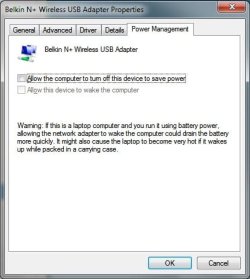
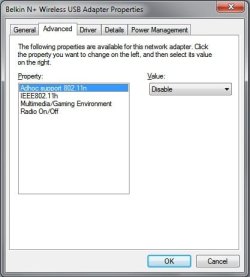
When I go to the adapter's power settings the Advanced tab doesn't have any of the WOL settings available and the Power Management tab has the "Allow this device to wake the computer" option greyed out (see attached screenshots).

In my bios I have S1 & S3 sleep enabled and everything I can find that could be related with WOL enabled (Wake from Modem, Wake from Ring, etc.) although I see nothing referring to Wake on Lan or WOL specifically mentioned. The machine wakes from sleep using a keyboard perfectly so no problems there.

When I go to the ethernet adapter's settings all of the WOL options are available and enabled but I need this to work for my WiFi since the machine isn't physically connected. I just want to save some energy costs since I'm currently leaving my machine one 24/7 so I can remote in when need be from work.

I have the newest BIOS Firmware, newest wireless adapter drivers (Win7 compatible) and all Windows Updates installed. This has got me stumped, any help would be appreciated. Thanks!
 

Attachments
  • Advanced.jpg
    Advanced.jpg
    21.9 KB · Views: 2,729
  • PowerManagement.jpg
    PowerManagement.jpg
    25.6 KB · Views: 2,706

My Computer My Computer

OS
Windows 7 Pro
CPU
AMD Athlon 64 X2 6000+
Motherboard
ASUS M2N32-SLI Deluxe
Memory
4 GB Corsair
Graphics Card(s)
ATI HD 4860
Hard Drives
640 gb Seagate
That Ralink RT61 USB device is bus powered. When the computer turns the device off to save power it can't "hear" the wakeup call nor could it tell Windows to power it up if it could "hear" it.
 

My Computer My Computer

Computer type
Laptop
Computer Manufacturer/Model Number
Apple
OS
El Capitan / Windows 10
CPU
i7-4980HQ
Memory
16GB
Graphics Card(s)
Iris 5200
Is there a way to keep the USB bus powered when asleep? Looking in Device Manager my two USB Root Hubs also have "Allow this device to wake the computer" greyed out. I unchecked "Allow the computer to turn off this device to save power" for both of them (they were checked) but I still can't enable WOL on the wireless adapter.

Also, I was having this same issue before I bought the USB Wireless N adapter and was using a PCI 802.11g MIMO card.
 

My Computer My Computer

OS
Windows 7 Pro
CPU
AMD Athlon 64 X2 6000+
Motherboard
ASUS M2N32-SLI Deluxe
Memory
4 GB Corsair
Graphics Card(s)
ATI HD 4860
Hard Drives
640 gb Seagate
Is there a way to keep the USB bus powered when asleep? Looking in Device Manager my two USB Root Hubs also have "Allow this device to wake the computer" greyed out. I unchecked "Allow the computer to turn off this device to save power" for both of them (they were checked) but I still can't enable WOL on the wireless adapter.

Also, I was having this same issue before I bought the USB Wireless N adapter and was using a PCI 802.11g MIMO card.

You'll need a USB adapter that supports Wireless Multimedia Extensions and a motherboard and BIOS that supports it as well. Wake-on-LAN - Wikipedia, the free encyclopedia
 

My Computer My Computer

Computer type
Laptop
Computer Manufacturer/Model Number
Apple
OS
El Capitan / Windows 10
CPU
i7-4980HQ
Memory
16GB
Graphics Card(s)
Iris 5200
Hmm... I know it's a couple years old but I can't imagine the Asus M2N32-SLI Deluxe not being able to support this with either a Belkin USB Wireless N adapter or my original pci wireless card. Do you know a way to find WME device compliance? Google seems to be failing me at the moment (to be fair, I'm probably failing google).

I'm just surprised because when researching this most people were able to resolve similar issues using older/stock machines.
 

My Computer My Computer

OS
Windows 7 Pro
CPU
AMD Athlon 64 X2 6000+
Motherboard
ASUS M2N32-SLI Deluxe
Memory
4 GB Corsair
Graphics Card(s)
ATI HD 4860
Hard Drives
640 gb Seagate
Hmm... I know it's a couple years old but I can't imagine the Asus M2N32-SLI Deluxe not being able to support this with either a Belkin USB Wireless N adapter or my original pci wireless card. Do you know a way to find WME device compliance? Google seems to be failing me at the moment (to be fair, I'm probably failing google).

I'm just surprised because when researching this most people were able to resolve similar issues using older/stock machines.

Did you see this? Configure Wake on Wireless LAN (WoWLAN)
 

My Computer My Computer

Computer type
Laptop
Computer Manufacturer/Model Number
Apple
OS
El Capitan / Windows 10
CPU
i7-4980HQ
Memory
16GB
Graphics Card(s)
Iris 5200
The registry dword wasn't there so I added it with the 1 value but "allow device to wake..." is still greyed out for the wireless adapter. I have the sneaking suspicion this problem is a registry edit away from being fixed but unfortunately that one didn't do the trick.
 

My Computer My Computer

OS
Windows 7 Pro
CPU
AMD Athlon 64 X2 6000+
Motherboard
ASUS M2N32-SLI Deluxe
Memory
4 GB Corsair
Graphics Card(s)
ATI HD 4860
Hard Drives
640 gb Seagate
The registry dword wasn't there so I added it with the 1 value but "allow device to wake..." is still greyed out for the wireless adapter. I have the sneaking suspicion this problem is a registry edit away from being fixed but unfortunately that one didn't do the trick.

I suspect a reboot is in order. And maybe selling off your Ralink USB adapter for something that advertises wowlan
 

My Computer My Computer

Computer type
Laptop
Computer Manufacturer/Model Number
Apple
OS
El Capitan / Windows 10
CPU
i7-4980HQ
Memory
16GB
Graphics Card(s)
Iris 5200
I rebooted after the registry edit but no good. I'm surprised that the Belkin n spec 2 adapter wouldn't have this ability when the router (older Belkin n spec 1) has WMM/QOS available and enabled in the router settings. It would be typical though, as I spent quite some time researching adapters before deciding to buy the overpriced Belkin USB (apparently they don't do internal cards anymore) one to play it safe with the router I got from a roommate.
 

My Computer My Computer

OS
Windows 7 Pro
CPU
AMD Athlon 64 X2 6000+
Motherboard
ASUS M2N32-SLI Deluxe
Memory
4 GB Corsair
Graphics Card(s)
ATI HD 4860
Hard Drives
640 gb Seagate
Oh, and for the record the WiFi adapter is the Belkin F5D8055 v2 Wireless N+ USB and the router is the F5D8236-4 v1 N.
 

My Computer My Computer

OS
Windows 7 Pro
CPU
AMD Athlon 64 X2 6000+
Motherboard
ASUS M2N32-SLI Deluxe
Memory
4 GB Corsair
Graphics Card(s)
ATI HD 4860
Hard Drives
640 gb Seagate
Anyone else have an idea or a similar situation?
 

My Computer My Computer

OS
Windows 7 Pro
CPU
AMD Athlon 64 X2 6000+
Motherboard
ASUS M2N32-SLI Deluxe
Memory
4 GB Corsair
Graphics Card(s)
ATI HD 4860
Hard Drives
640 gb Seagate
Same problem!

I have the exact same problem. My box is greyed out too and I have the Belkin Play Wireless USB adapter. I have RDT setup and on my new phone too and I would LOVE to use this ANYTIME I want. I will try the registry edit and the bios change, reboot and see what happens....*Crossing Fingers*
 

My Computer My Computer

OS
Windows 7 Ult. 64-bit
I went to Device Manager and went to properties under my Wireless Belkin Play adaptor. I then went to the advanced tab and went to Wake-Up Mode under Property. I tried every different setting under the Value and it STILL did not let me click the box...it was still greyed out. I am still trying and doing research and I am sure we will figure this out together.
 

My Computer My Computer

OS
Windows 7 Ult. 64-bit
I am having the same issue does anyhow know how to get this working?

I see that the wireless is being turned off when pc is put into sleep mode there must be a way to stop this??
 
Last edited:

My Computer My Computer

OS
windows 7
I am having the same issue. I am using a WNDA3100v2 and have tried on Vista and Windows 7 but is greyed out on both.

Anybody get this to work?
 

My Computer My Computer

OS
Windows 7 Home Premium 64bit
I am having a similar problem. I have a Dell Inspiron 620 running 64-bit Windows 7 Home Premium. It has a Dell Wireless 1502 802.11n adapter that I would like to configure for WoWLAN. I have the wireless network runnning in WPA2 PSK authentication mode, I have configured the EnableWoWLAN registry key, yet still the "Allow this device to wake the computer" checkbox is greyed out. I wish I knew why.
 

My Computer My Computer

OS
Windows 7 Home Premium 64bit
Your adapter does not support WoWLAN, at least according to Belkin's product information page. I've never seen a USB adapter support it and I imagine that it's actually impossible since USB doesn't offer a way to continue to be powered on in S3/G3 deep sleep states.

Everyone in this thread: PLEASE check with your manufacturer to see if the wireless adapter supports WoWLAN. Most do not. If it's greyed out in the device settings, that's because the driver is reporting to Windows that it DOES NOT SUPPORT THAT SETTING. Changing the registry around to hack it in will not magically make your adapter have that ability.

Sorry to be the bearer of news :-(
 

My Computer My Computer

OS
Win7 Ultimate x64
Belkin? Who said anything about Belkin? Or USB for that matter. Are you saying Dell is using Belkin's adapters? Seems very unlikely.
 

My Computer My Computer

OS
Windows 7 Home Premium 64bit
Oh, and for the record the WiFi adapter is the Belkin F5D8055 v2 Wireless N+ USB and the router is the F5D8236-4 v1 N.

Hmmm, I wonder where I got that idea?

edit: To be crystal clear, I was responding first and foremost to the original poster (it's his thread). Everyone else, if that box is greyed out, it's almost certain your card doesn't support WoWLAN.
 

My Computer My Computer

OS
Win7 Ultimate x64
Back
Top