cant enter bios with wireless usb keyboard

robin77

New member
Member
VIP
Local time
3:38 AM
Messages
93
hi,
i guess this is not exactly a pure win7 question, since the problem occurs before even booting up.... ; ) i hope someone can help anyway.

i have a logitech MK320 wireless combo and the receiver is attached to one of mobos usb ports

during startup i want to press F12 to get into the boot options... but it works only if i use an old ps2 keyboards.

it's a new gigabyte h67ma-ud2hbe mobo with the newest bios.

could anyone please point me in the right direction how to get this to work?

thanks
 

My Computer My Computer

OS
Windows7
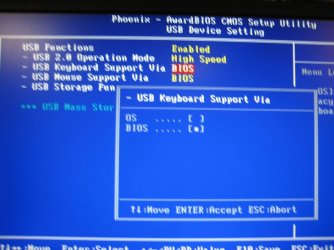
you sometimes have to turn on usb keyboard support in your bios.

your bios is probably different, but you'll most likely have a similar sort of setting:

bios.jpg

sorry for the poor photo - but my camera's been drinking :)
 

My Computer My Computer

Computer Manufacturer/Model Number
mickey megabyte 1234
OS
ultimate 64 sp1
CPU
i5 2500K [email protected]
Motherboard
MSI P67A-GD53
Memory
8 gigs GSkill Ripjaws 1600
Graphics Card(s)
amd hd6950
Sound Card
creative x-fi gamer
Monitor(s) Displays
samsung 24"
Screen Resolution
1920x1080
Hard Drives
ocz vertex 2e 60 gig, samsung f3 1tb, buffalo 2tb ext
PSU
antec 550
Case
antec three hundred
Cooling
i'm a cooling fan
Keyboard
saitek eclipse ii
Mouse
logitech g3
Internet Speed
about 4 Mbps
Other Info
i love win7
hi mickey,
thanks alot for the photo ; ) - as much as i remember I already turned this feature on already. (i have the chance tomorrow to check it again)
if until then anyone has another suggestion that i could try then please let me know.

but it IS possible, to use a wireless keyboard for preboot actions ,right?
 

My Computer My Computer

OS
Windows7
but it IS possible, to use a wireless keyboard for preboot actions ,right?

Sorry but I don't believe so, the wireless mouse has to be discovered and it is the operating system that discovers it.

That's why it is nice to have a spare keyboard laying around.

Sorry...
Rich
 

My Computer My Computer

Computer type
Laptop
Computer Manufacturer/Model Number
Toshiba Laptop Qosimo X870
OS
Windows 7 Pro x64 SP1
CPU
Intel Core I7
Motherboard
Toshiba Qosmio
Memory
16 Gigs
Graphics Card(s)
NVIDIA GeForce GTX 670M
Monitor(s) Displays
17.7" laptop
Screen Resolution
1600 x 900
Hard Drives
256 Gig SanDisk SSD for C
256 Gig Intel SSD for D
Internet Speed
50/25 FIOS
Antivirus
Vipre (all you can eat for 10 machines)
Browser
IE and FF
Other Info
I have dos 6.22, wfwg 3.11, win98, 2000 and xp VHD's available for testing. MS's Virtual PC works great.
BootUp

Rich, I don't know what Mobo the poster has but my Asus board finds and brings up my wireless kb and mouse in the bios and I can enter the bios from the kb while booting.
 

My Computer My Computer

Computer Manufacturer/Model Number
BGC (Bob's Garage Crew)
OS
win 7 X64 Ultimate SP1
CPU
I3770K
Motherboard
Asus P8Z77-V Deluxe
Memory
G Skill F3-14900CL9-4GBXL x 4
Graphics Card(s)
NVIDIA GeForce GTX670 + Intel 4000
Sound Card
Realtek HD 5.1 (MOB)
Monitor(s) Displays
Asus VW224T (1)
Screen Resolution
1920 x 1080
Hard Drives
SATA Corsair Force GT 2.5" 180GB (System) Sata 3
OCZ Vertex3 120GB
OCZ Vertex 2 120GB 2.5" SATA II
ST31000524AS 1000.2GB
WD15EARS (External)
PSU
CoolerMaster 1000 Watt
Case
CoolerMaster HAF X
Cooling
CPU -- CoolerMaster 520N
Keyboard
MS Wireless 3000 V2
Mouse
MS Wireless 3000 V2
Internet Speed
Cable
Antivirus
Norton Internet Security
Browser
IE9
Other Info
AMI Bios 1805
OC'd 3%
Yes it is true for the once you will have to make the settings change with a wired KB + save setting to BIOS, after you will then be able to use without problems...... its not always the case though dependant on make model and Bios versions ect
 

My Computer My Computer

Computer Manufacturer/Model Number
Me :P
OS
Windows 7 Home Premium x64 SP1
CPU
Core 2 Quad Q6600
Motherboard
Abit IN9 32X MAX
Memory
8 GB OCZ PC2-6400 nVIDIA SLI-Ready Edition (4X2GB)
Graphics Card(s)
AMP! GeForce GTX 260² 896MB 448-bit GDDR3 (650MHz/2100MHz)
Sound Card
Realtek 7.1 CH HD Audio
Monitor(s) Displays
37" LG 1080p HD LCD TV
Screen Resolution
1280x1024 + 1360x768
Hard Drives
40GB Mushkin SSD
60GB Intel 520 SSD
150GB Raptor HDD
500GB Caviar HDD
PSU
Thermaltake W0133RB 1200W PSU
Case
Antec 900
Cooling
OCZ Vendetta 2 + Antec 900 case fans
Keyboard
Logitech G15 (full layout)
Mouse
R.A.T.9
Internet Speed
Not fast enough!
The mobo is a Gigabyte H67MA-UD2H-B3 it's about 2 months old

I'm not infront of the machine right now... will be again tomorrow.
If I can't get it to work I'll post again...

Thanks so far....
 

My Computer My Computer

OS
Windows7
I found this out the hard way, in my case I had to my keyboard hooked up to a PCI usb add on card and it wouldn't let me into the bios either. I had to plug in keyboard to usb port on the mobo, once I did that I could get into the bios with not problem at all.
 

My Computer My Computer

Computer Manufacturer/Model Number
Custom built
OS
Windows 7 Ultimate 64 bit
CPU
AMD Phenom II X4 965 Black Edition
Motherboard
Gigabyte GA-MA790X-DS4
Memory
GSkill 4 X 2 GB PC 8500
Graphics Card(s)
XFX Radeon HD 6790 D
Sound Card
On board RealTek HD
Monitor(s) Displays
Dual monitors:Samsung SyncMaster S20B300
Screen Resolution
1600 X 900
Hard Drives
Seagate Barracuda 1TB (primary)
Seagate Barracuda 2 X 320 GB
PSU
Ultra X4 750 watt fully modular
Case
Thermaltake Overseer RX 1 full tower
Cooling
Core-Contact 92 mm CPU Cooler
Keyboard
Logitech G510
Mouse
Razor DeathAdder
Internet Speed
50/5 Mbps UL/DL
Other Info
Optical: Super Muliti DVD burner w/lightscribe, Hauppauge WinTV HVR-1800
Back
Top