karleidoscope
New member
- Local time
- 11:04 PM
- Messages
- 2
Hi Forum,
Had my Samsung S22B300H 21.5IN screens (2) working fine yesterday. Woke up this morning and the screens were mirrored (or at least not extended) and the resolution was turned down and both screens appeared zoomed.
I have an Acer Aspire M5811 with an intel graphics card that supported the dual monitors just fine up until today. I have one montior connected to my pc via VGA which is recognized by default as screen #1. The second I have connected via the HDMI outport. Both screens have a direct output from my pc. They are now operating as independent monitors and my system will not even recognize when I unplug and plug back in either of them.
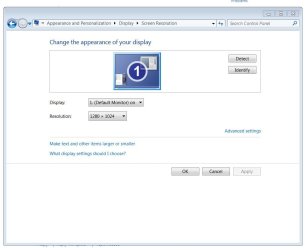
Start > Control Panel > Appearance > Display > Resolution > the only two drop down options are: Display (1. default monitor ON) and Resolution (now set to highest). The "Detect" and "Identify" buttons result in nothing.
Please help!
thanks in advance.
Had my Samsung S22B300H 21.5IN screens (2) working fine yesterday. Woke up this morning and the screens were mirrored (or at least not extended) and the resolution was turned down and both screens appeared zoomed.
I have an Acer Aspire M5811 with an intel graphics card that supported the dual monitors just fine up until today. I have one montior connected to my pc via VGA which is recognized by default as screen #1. The second I have connected via the HDMI outport. Both screens have a direct output from my pc. They are now operating as independent monitors and my system will not even recognize when I unplug and plug back in either of them.
Start > Control Panel > Appearance > Display > Resolution > the only two drop down options are: Display (1. default monitor ON) and Resolution (now set to highest). The "Detect" and "Identify" buttons result in nothing.
Please help!
thanks in advance.
My Computer
At a glance
BC - British Columbia
- OS
- BC - British Columbia