Solved can't extend primary partition (Disk C)

igalep132

New member
Local time
8:32 AM
Messages
34
Hi,
once when I've installed Win7, I've divided my HD to several partitions.
unfortunately i gave only 50 GB to drive C.

Now I would like to extend it, but the extend option is in gray.

my partitions status is attached.

is there anything i can do in order to merge partitions ?

thanks
 

Attachments

  • Untitled.jpg
    Untitled.jpg
    20 KB · Views: 1,673

My Computer

OS
7
Try using a different partition manager. I used to have problems with the default built-in Windows partition manager so I decided to use Acronis Disk Director Suite and my problems were solved. You may also want to try Paragon.
 

My Computer

Computer type
PC/Desktop
Computer Manufacturer/Model Number
Custom Built
OS
Windows 7 Ultimate x64
CPU
Intel(R) Core(TM) 2 Quad Q8200 @ 2.33 GHz
Motherboard
Asus P5KPL-AM SE Motherboard
Memory
2x2GB Kingston DDR2
Graphics Card(s)
1GB AMD Radeon HD 5450
Sound Card
VIA Technologies High Definition Audio Device
Monitor(s) Displays
Samsung SyncMaster 733NW
Screen Resolution
1440x900
Hard Drives
SEAGATE 320GB Barracuda® 7200.12, SATA 3 Gb/s, 7200 RPM, 16MB cache x 2
Case
Custom Casing
Cooling
Ice cubes from the freezer ;)
Keyboard
Generic Plug & Play Keyboard
Mouse
Optical Mouse
Internet Speed
Very slow
I think your problem stems from the fact you are using logical partitions, which are extended partitions belonging to a primary drive.

Your only primary drive is your C drive so as I see it, you need to do the following:

Back up whatever you need that is saved on your logical partitions, and then delete them. You should then be able to extend your C drive to take up all the free and unallocated space on the hard drive.

Once you've done that, you can then re-partition the drive if you still want to.

You may also want to consider using Partition Wizard if the Windows disk management utility won't let you do what you want.

http://www.sevenforums.com/tutorials/93322-partition-wizard-use-bootable-cd.html
 

My Computer

Computer Manufacturer/Model Number
HP Pavilion Elite 495UK
OS
Windows 7 Ultimate SP1 64-Bit
CPU
Intel Core i7 870 @ 2.93GHz
Motherboard
MSI 2A9C (CPU1)
Memory
8Gb Dual-Channel DDR3 @ 664MHz
Graphics Card(s)
nVidia GeForce GTX 460 1024MB dedicated RAM
Sound Card
Realtek HD Audio
Monitor(s) Displays
HP2310i
Screen Resolution
1920 x 1080
Hard Drives
1x1954GB Hitachi HDS22020ALA 330 (RAID), 1x1954GB Hitachi External for backup and storage
PSU
460W
Case
HP Elite
Cooling
Air cooled
Keyboard
Logitech K750 solar-powered keyboard
Mouse
Logitech Wireless M180 mouse
Internet Speed
2Mb
Other Info
Pure Avanti Flow Internet Radio with iPod Dock, 64Gb iPod, HP USB Speakers, Sony MDR-V500 Headphones, Sony Vaio F-Series Laptop
I think your problem stems from the fact you are using logical partitions, which are extended partitions belonging to a primary drive.

Your only primary drive is your C drive so as I see it, you need to do the following:

Back up whatever you need that is saved on your logical partitions, and then delete them. You should then be able to extend your C drive to take up all the free and unallocated space on the hard drive.

Once you've done that, you can then re-partition the drive if you still want to.
do i need to delete all logical partitions ?
 

My Computer

OS
7
Your problem is that the extended partition starts with unallocated space!! Use a partition manager and make the extended partition smaller and extend your C-partition

no backup needed!!!
 

My Computer

Computer type
Laptop
Computer Manufacturer/Model Number
ACER ASPIRE 5742G
OS
Microsoft Windows 7 Home Premium 64-bits 7601 Multiprocessor Free Service Pack 1
CPU
Intel(R) Core(TM) i3 CPU M 370 @ 2.40GHz
Motherboard
Acer Aspire 5742G
Memory
4,00 GB
Graphics Card(s)
ATI Mobility Radeon HD 5400 Series
Sound Card
(1) AMD High Definition Audio Device (2) Realtek High Defi
Screen Resolution
1366 x 768 x 32 bits (4294967296 colors) @ 60 Hz
Hard Drives
WDC WD5000BEVT-22ZAT0
I'm not absolutely sure on that one, but I'm fairly certain the option to extend the primary partition is not allowed because you have free space in front of the logical partitions.

As I see it, if you cant extend because of that fact, you may need to delete the logical partitions first. You could try deleting the first one, and then see if you can extend the primary partition.
 

My Computer

Computer Manufacturer/Model Number
HP Pavilion Elite 495UK
OS
Windows 7 Ultimate SP1 64-Bit
CPU
Intel Core i7 870 @ 2.93GHz
Motherboard
MSI 2A9C (CPU1)
Memory
8Gb Dual-Channel DDR3 @ 664MHz
Graphics Card(s)
nVidia GeForce GTX 460 1024MB dedicated RAM
Sound Card
Realtek HD Audio
Monitor(s) Displays
HP2310i
Screen Resolution
1920 x 1080
Hard Drives
1x1954GB Hitachi HDS22020ALA 330 (RAID), 1x1954GB Hitachi External for backup and storage
PSU
460W
Case
HP Elite
Cooling
Air cooled
Keyboard
Logitech K750 solar-powered keyboard
Mouse
Logitech Wireless M180 mouse
Internet Speed
2Mb
Other Info
Pure Avanti Flow Internet Radio with iPod Dock, 64Gb iPod, HP USB Speakers, Sony MDR-V500 Headphones, Sony Vaio F-Series Laptop
After you back up I would look on Partition Wizard site for changing logical to primary.
How to set partition as Primary or Logical - Partition Wizard Help Video

Sine you only have 4 partitions you may be able to make them all primary without losing data. But back up first since it's always risky when you mess with partitions. If you successfully change them all to primary then you should be able to just delete the free space and expand C: into it. In the end you'd have 3 primary partitions.
 

My Computer

Computer Manufacturer/Model Number
HP Media Center
OS
Windows 7 32 bit
CPU
AMD 5200+ dual core
Memory
2 GB
Graphics Card(s)
NVidia GeForce 6150SE 128 MB
Monitor(s) Displays
CRT
Screen Resolution
1280x1024
Hard Drives
500 GB Sata internal :

SIIG USB 3.0 docking stations w/WD Caviar Black 6 Gb/s drives
Keyboard
PS/2
Mouse
PS/2 Wheel Mouse
Other Info
SIIG USB 3.0 PCIexpress card.
When using Disk mgmt, in order to extend a Primary Partition into Logical Free Space, you must rightclick on the free Space to Delete the Volume. This will make it Unallocated Space to extend C into: Partition or Volume - Extend

If this doesn't work use free Partition Wizard which will Resize into any empty space whether (Primary) Unallocated or (Logical) Free Space. Rightclick C to Resize, slide right grey border all the way to the right, OK, Apply.
 
You're very welcome.

You had good advice from a top man. :)

Thanks for the update.
 

My Computer

Computer Manufacturer/Model Number
HP Pavilion Elite 495UK
OS
Windows 7 Ultimate SP1 64-Bit
CPU
Intel Core i7 870 @ 2.93GHz
Motherboard
MSI 2A9C (CPU1)
Memory
8Gb Dual-Channel DDR3 @ 664MHz
Graphics Card(s)
nVidia GeForce GTX 460 1024MB dedicated RAM
Sound Card
Realtek HD Audio
Monitor(s) Displays
HP2310i
Screen Resolution
1920 x 1080
Hard Drives
1x1954GB Hitachi HDS22020ALA 330 (RAID), 1x1954GB Hitachi External for backup and storage
PSU
460W
Case
HP Elite
Cooling
Air cooled
Keyboard
Logitech K750 solar-powered keyboard
Mouse
Logitech Wireless M180 mouse
Internet Speed
2Mb
Other Info
Pure Avanti Flow Internet Radio with iPod Dock, 64Gb iPod, HP USB Speakers, Sony MDR-V500 Headphones, Sony Vaio F-Series Laptop
If this doesn't work use free Partition Wizard which will Resize into any empty space whether (Primary) Unallocated or (Logical) Free Space. Rightclick C to Resize, slide right grey border all the way to the right, OK, Apply.

Minitool Partition Wizard rocks! I was able to extend my boot drive. Thanks for the help gregrocker.
 

My Computer

Computer type
Laptop
Computer Manufacturer/Model Number
lenovo
OS
Windows 7 Enterprise 32bit
This thread helped me out.
 

My Computer

Computer type
PC/Desktop
OS
win seven ultimate x64
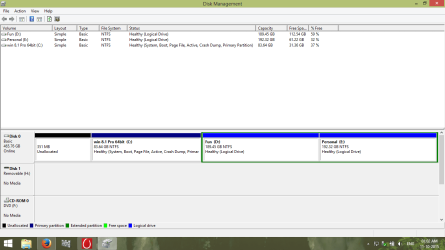
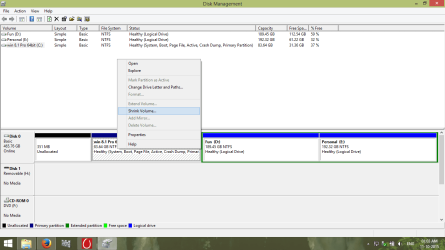
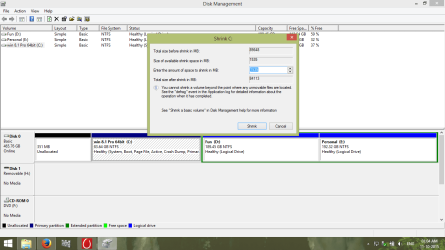
See the screenshot 1st.I've 3 partitions(i.e. C: primary,D: logical,E: logical)I need to know the following ans. :

1.From c: Drive(97GB),I want to cut 30GB by shrinking the volume & extend the 30 GB from c: drive to the E: drive.But by the disk management & also by the partition manager tool like EaseUs pro,I can't extend the 30GB to E: drive.please help me.

2.In the C: drive I have the os & it is a primary partition.E: & D: drives are logical.I install all the games in D: drive.Is it necessary to have a primary partition to the rest D: & E: drive?

I've HP R-033tx Laptop.It has the 466GB hDD of TOSHIBA.OS is 8.1pro 64bit.
 

Attachments

  • Screenshot (21).png
    Screenshot (21).png
    30.4 KB · Views: 1
  • Screenshot (22).png
    Screenshot (22).png
    34.6 KB · Views: 1
  • Screenshot (23).png
    Screenshot (23).png
    38.7 KB · Views: 1
  • Screenshot (24).png
    Screenshot (24).png
    34.5 KB · Views: 1
  • Screenshot (25).png
    Screenshot (25).png
    34.5 KB · Views: 1

My Computer

Computer type
Laptop
Computer Manufacturer/Model Number
HP
OS
windows 7 ultimate sp1 64bit,8 Pro 64bit,8.1 Pro 64bit
CPU
Intel core i3 4th gen.4005U @1.7ghz
Motherboard
HP
Memory
4GB
Graphics Card(s)
2GB Intel HD 4400 & 2GB Nvidia 820m
Hard Drives
Toshiba 500GB
Antivirus
AVG 2014 free edition Internet security(win7) & windows defe
Browser
Google chrome 32 bit
Back
Top