
Can't figure out how to add a non-local user for RDP access.

laggy

New member
Local time
9:26 PM
Messages
15
I just got a new laptop for school, and I wanted to set up RDP on my desktop to remote into when I'm at school. I thought it would be pretty straight-forward, but I'm having an issue that I can't quite figure out.

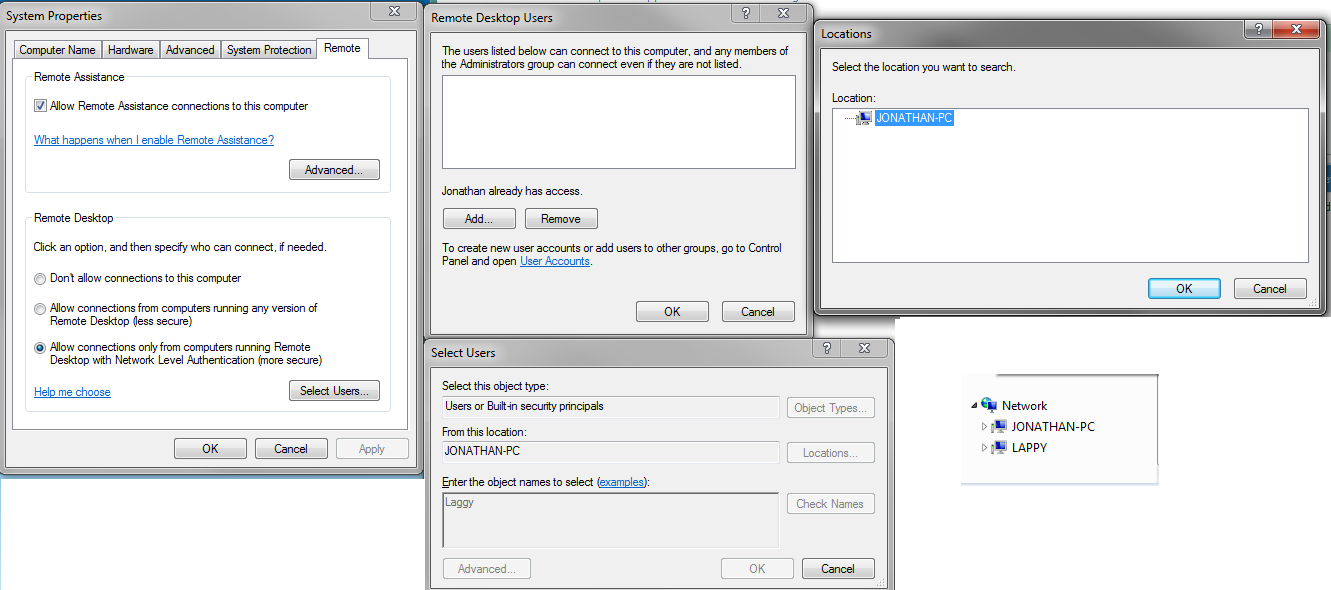
So, from the Remote tab of the System Properties dialog, I have "Allow Remote Assistance" ticked, and "Allow connections only from computers running Remote Desktop" blah blah.

Then I hit Select Users to add my user account from my laptop, except when I push the Locations button, the only location that is available is my desktop PC. I (maybe wrongfully?) assumed that I would be able to select any location on my network or something. If it makes any difference, my desktop is running Win7 Ultimate x64 and the laptop is running Win8.1 Home x64.

Here's what I mean:
ADOfLkH.png


Any ideas what the problem is? Thanks in advance!
 

My Computer My Computer

At a glance

Win7 Ultimate x64
Computer type
PC/Desktop
Computer Manufacturer/Model Number
custom
OS
Win7 Ultimate x64
Not really my area, but even for remote access you'll need to log in with a local account. Logging in remotely or locally is basically the same thing, but for remote desktop you can choose which accounts are allowed to be used. From your screenshots, the top middle, "Jonathan already has access".

Think of RDP like working locally but from a distance. When you use RDP and log in to your desktop you want the same desktop, icons and configuration as when you log in locally, right? Then you need to log in with the same account.
 

My Computer My Computer

At a glance

Windows 7 Pro 32Intel(R) Core(TM) i5 CPU M 540 @ 2.53GHz4,00 GB (Usable 2,98)NVIDIA NVS 5100M
Computer type
Laptop
Computer Manufacturer/Model Number
HP Elitebook 8540p
OS
Windows 7 Pro 32
CPU
Intel(R) Core(TM) i5 CPU M 540 @ 2.53GHz
Motherboard
Hewlett-Packard 1521
Memory
4,00 GB (Usable 2,98)
Graphics Card(s)
NVIDIA NVS 5100M
Sound Card
NVIDIA High Definition Audio
Screen Resolution
1600x900
Hard Drives
INTEL SSDSA2CW120G3
Antivirus
F-Secure Internet Security
Browser
IE, Firefox, Opera
Other Info
Sandboxie,
SRP (Software Restriction Policy),
EMET (Enhanced Mitigation Experience Toolkit),
WFC (Windows Firewall Control by BiniSoft),
Malwarebytes Premium
When you log in to your desktop from your laptop remotely, you will still log in with the same local user account as Tookeri already said.

RDP is different than Remote Assistance, so for what you want to do, you needn't check the "Allow Remote Assistance connections..." box. Remote Assistance is a temporary (one-time) invitation type thing.

I use RDP on a daily basis to connect to computers all over the country. The computers I connect to are all on my company's intra-net so it works very well. I find using RDP for connecting to computers that aren't on the same intra-net to be too much of a hassle.

For what you want to do, I would recommend TeamViewer, it's free for personal use and connecting from your lappy to your desktop is much easier than RDP.
 

My Computer My Computer

At a glance

W10 Pro desktop, W11 laptop, W11 Pro tablet (...3.7Ghz 8700K i7, i7-11800H, i7-1065G716G desktop, 16G laptop, 4G tabletAMD Radeon RX580, RTX 3060, Intel Iris Plus
Computer type
PC/Desktop
Computer Manufacturer/Model Number
Home Built desktop, Dell G15 5511 Gaming laptop,MS Surface Pro 7 tablet
OS
W10 Pro desktop, W11 laptop, W11 Pro tablet (all 64-bit)
CPU
3.7Ghz 8700K i7, i7-11800H, i7-1065G7
Motherboard
ASUS TUF Z370-Pro Gaming in desktop
Memory
16G desktop, 16G laptop, 4G tablet
Graphics Card(s)
AMD Radeon RX580, RTX 3060, Intel Iris Plus
Sound Card
High Definition Audio (Built-in to mobo)
Monitor(s) Displays
Samsung U32J59 32" (2x), 15.6", 12"
Screen Resolution
3840x2160, 3840x2160, 1920x1080, 2160x1440
Hard Drives
500G SSD for OS; 2T, 10T & 15T HDDs for Data on Desktop, 1TB SSD laptop, 128G SSD tablet.
PSU
Corsair CX 750M
Case
Antec 100
Cooling
CM 212+
Keyboard
IBM Model M - used continuously since 1986
Mouse
Microsoft Pro IntelliMouse
Internet Speed
400M down 8M up
Antivirus
Windows Defender
Browser
FireFox
Other Info
Built my first computer (8Mhz 8088cpu, 640K RAM, 20MB HDD, 2 360K floppy drives) in 1985 and have been building them for myself, relatives and friends ever since.
Back
Top