Solved Can't Find brightness control in Sony AIO computer win7

sportflyer

New member
Member
Local time
11:47 PM
Messages
71
The computer is Sony VGC-JS190 with Win7 home premiumas the OS.
I can't seem to find the brightness control slider in the usual places like power management, Display etc . My current keyboard does not have the Function keys with brightness buttons like the original Sony KB. Does this mean I need to connect up the old keyboard to perform this ? Is there a Windows control?
 

My Computer My Computer

At a glance

Vista 32bitIntel Core 2 duo Conroe E66002G Ram pc 5300Bfg Tech GF 8800gts
Computer Manufacturer/Model Number
Custom Build
OS
Vista 32bit
CPU
Intel Core 2 duo Conroe E6600
Motherboard
MSi 7241
Memory
2G Ram pc 5300
Graphics Card(s)
Bfg Tech GF 8800gts
Sound Card
internal
Monitor(s) Displays
Samsung 2253
Hard Drives
400G SATA
1000G SATA
PSU
700W
Cooling
Air
Aren't there controls on the side of the screen for brightness and contrast? If not, connect the keyboard up again.
 

My Computer My Computer

At a glance

Windows 10 Pro X64Intel Quad Core i7-4770 @ 3.4Ghz16.0GB PC3-12800 DDR3 SDRAM 1600 MHzIntel Integrated HD Graphics
Computer type
PC/Desktop
Computer Manufacturer/Model Number
Lenovo IdeaCenter 450
OS
Windows 10 Pro X64
CPU
Intel Quad Core i7-4770 @ 3.4Ghz
Memory
16.0GB PC3-12800 DDR3 SDRAM 1600 MHz
Graphics Card(s)
Intel Integrated HD Graphics
Sound Card
Realtek HD Audio
Monitor(s) Displays
HP 22" LCD
Screen Resolution
1680 x 1050
Hard Drives
250GB Samsung EVO SATA-3 SSD
2TB Seagate ST2000DM001 SATA-2
1.5TB Seagate ST3150041AS SATA
Keyboard
Dell USB
Mouse
Lenovo USB
Internet Speed
Cable via Road Runner 3MB Upload, 30MB Download
Antivirus
Windows Defender, MBAM Pro, MBAE
Browser
Seamonkey
Other Info
UEFI/GPT
PLDS DVD-RW DH16AERSH
If the old keyboard has a brightness control, it might be the easiest way. Then you can reconnect the keyboard that you are using now.
 

My Computer My Computer

At a glance

Win 7 Pro x64/Win 10 Pro x64 dual bootAMD FX 8350 Vishera @ 420016 GB Mushkin Blackline DDR3-2400 @ 1866 (9-1...XFX Radeon R9 280 Double D Black Edition
Computer type
PC/Desktop
Computer Manufacturer/Model Number
Mellon Labs (custom build)
OS
Win 7 Pro x64/Win 10 Pro x64 dual boot
CPU
AMD FX 8350 Vishera @ 4200
Motherboard
ASUS M5A97 R2.0
Memory
16 GB Mushkin Blackline DDR3-2400 @ 1866 (9-10-10-10-31)
Graphics Card(s)
XFX Radeon R9 280 Double D Black Edition
Sound Card
Realtek HD Audio on MB. Sounds great.
Monitor(s) Displays
Acer 24", Acer 22"
Screen Resolution
3840 x 1080
Hard Drives
1 x Mushkin Chronos 120 GB SSD (Win 10)
1 x Samsung 850 EVO 250 GB SSD (Win 7)
1 x WD 1TB SATA Blue
1 x WD 1TB SATA Green
PSU
Corsair TX-750
Case
CoolerMaster HAF 912+
Cooling
Coolermaster Seidon 240M Liquid AIO. 6 case fans
Keyboard
Logitech G710+
Mouse
Logitech G500s
Internet Speed
Much better since I got fiber, but still way overpriced.
Antivirus
MSE, Malware Bytes for scanning
Browser
Firefox
Other Info
Corsair VOID USB headphones.

A Mellon Labs X-1 - LCD Smartie driven system status display.

Brought to you by the letter E
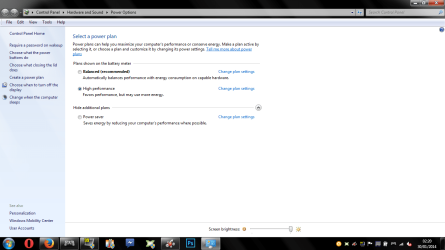
Does this work, Control panel>Hardware and Sound>Power Options.
 

Attachments

  • Untitled.png
    Untitled.png
    50.8 KB · Views: 2

My Computer My Computer

At a glance

Windows 7 Home Premium 64BitAMD A6-3420M 1.5GHZ OC - 2.0GHZ4GB DDR3 1600MHZAMD RADEON 6520G+AMD RADEON HD7470M 1GB DDR3
Computer type
Laptop
Computer Manufacturer/Model Number
Packard Bell
OS
Windows 7 Home Premium 64Bit
CPU
AMD A6-3420M 1.5GHZ OC - 2.0GHZ
Memory
4GB DDR3 1600MHZ
Graphics Card(s)
AMD RADEON 6520G+AMD RADEON HD7470M 1GB DDR3
Screen Resolution
1366x768
Hard Drives
500GB SATA
Internet Speed
18Mb Unlimited
Antivirus
AVAST!
Browser
MOZILLA FIREFOX
Hi there .. If you want to get the Hotkeys working again .. You need to use the Original Keyboard as only it will respond to the Function Key Software ...
 

My Computer My Computer

At a glance

windows 7 home 64bitINTEL-CORE I716GB
Computer Manufacturer/Model Number
W530-3630QM1
OS
windows 7 home 64bit
CPU
INTEL-CORE I7
Memory
16GB
Hard Drives
750GB
Browser
Chrome
It looks like I will have to use the old keyboard just for the brightness control. I was hoping for a sw solution . I did not like the original keyboard because of the colors for the Alt key and character functions. The original keyboard has a lot of alternate characters not normally found in a traditional US because this computer was from Canada .

Will the computer be confused if I temporarily plug in the old kb in a spare USB slot while the current kb is still in place?

Thanks guys.
 

My Computer My Computer

At a glance

Vista 32bitIntel Core 2 duo Conroe E66002G Ram pc 5300Bfg Tech GF 8800gts
Computer Manufacturer/Model Number
Custom Build
OS
Vista 32bit
CPU
Intel Core 2 duo Conroe E6600
Motherboard
MSi 7241
Memory
2G Ram pc 5300
Graphics Card(s)
Bfg Tech GF 8800gts
Sound Card
internal
Monitor(s) Displays
Samsung 2253
Hard Drives
400G SATA
1000G SATA
PSU
700W
Cooling
Air
Connecting back the old Keyboard does not work . Apparently when I upgraded the computer from Vista to Win 7x64, several Sony drivers were not included in the upgrade . I need to reinstall Sony Event Service, Sony Original Function Settings and Sony Shared libraries before the Function Keys will work:( I never bothered with it because I thought the brightness was fine and I don't use the function keys . However when I passed the computer to my wife she wants a brighter screen.
 

My Computer My Computer

At a glance

Vista 32bitIntel Core 2 duo Conroe E66002G Ram pc 5300Bfg Tech GF 8800gts
Computer Manufacturer/Model Number
Custom Build
OS
Vista 32bit
CPU
Intel Core 2 duo Conroe E6600
Motherboard
MSi 7241
Memory
2G Ram pc 5300
Graphics Card(s)
Bfg Tech GF 8800gts
Sound Card
internal
Monitor(s) Displays
Samsung 2253
Hard Drives
400G SATA
1000G SATA
PSU
700W
Cooling
Air
Does anyone know in what order I should install these files so I can get my keyboard function keys to operate again?

Vaio Event Service , Sony Original function settings, Extension Parser , Sony Shared library .

Thanks
 

My Computer My Computer

At a glance

Vista 32bitIntel Core 2 duo Conroe E66002G Ram pc 5300Bfg Tech GF 8800gts
Computer Manufacturer/Model Number
Custom Build
OS
Vista 32bit
CPU
Intel Core 2 duo Conroe E6600
Motherboard
MSi 7241
Memory
2G Ram pc 5300
Graphics Card(s)
Bfg Tech GF 8800gts
Sound Card
internal
Monitor(s) Displays
Samsung 2253
Hard Drives
400G SATA
1000G SATA
PSU
700W
Cooling
Air
Hi there ... Sony Shared library Sony Original function settings, As long as you leave Vaio Event Service to last it should be fine ....
 

My Computer My Computer

At a glance

windows 7 home 64bitINTEL-CORE I716GB
Computer Manufacturer/Model Number
W530-3630QM1
OS
windows 7 home 64bit
CPU
INTEL-CORE I7
Memory
16GB
Hard Drives
750GB
Browser
Chrome
Is there any reason that Event Service need to be last ? There seems to be much discussion which should be first . Apparently the order is quite important .
 

My Computer My Computer

At a glance

Vista 32bitIntel Core 2 duo Conroe E66002G Ram pc 5300Bfg Tech GF 8800gts
Computer Manufacturer/Model Number
Custom Build
OS
Vista 32bit
CPU
Intel Core 2 duo Conroe E6600
Motherboard
MSi 7241
Memory
2G Ram pc 5300
Graphics Card(s)
Bfg Tech GF 8800gts
Sound Card
internal
Monitor(s) Displays
Samsung 2253
Hard Drives
400G SATA
1000G SATA
PSU
700W
Cooling
Air
After installing the 3 drivers , I have regained control of the brightness control . Thanks to all.
 

My Computer My Computer

At a glance

Vista 32bitIntel Core 2 duo Conroe E66002G Ram pc 5300Bfg Tech GF 8800gts
Computer Manufacturer/Model Number
Custom Build
OS
Vista 32bit
CPU
Intel Core 2 duo Conroe E6600
Motherboard
MSi 7241
Memory
2G Ram pc 5300
Graphics Card(s)
Bfg Tech GF 8800gts
Sound Card
internal
Monitor(s) Displays
Samsung 2253
Hard Drives
400G SATA
1000G SATA
PSU
700W
Cooling
Air
Most welcome glad you got it sorted
 

My Computer My Computer

At a glance

windows 7 home 64bitINTEL-CORE I716GB
Computer Manufacturer/Model Number
W530-3630QM1
OS
windows 7 home 64bit
CPU
INTEL-CORE I7
Memory
16GB
Hard Drives
750GB
Browser
Chrome
Back
Top