Can't find desktop windows XP with printer on network

micahgill85

New member
Member
Local time
1:52 AM
Messages
16
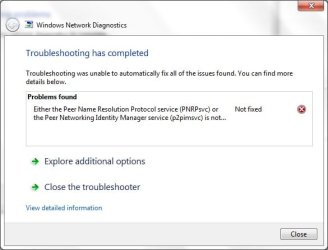
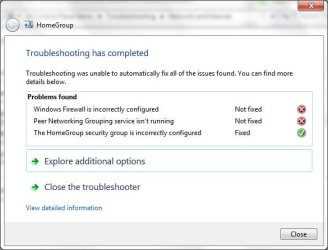
see attached images

I have two laptops with win7 (dell laptop, toshiba laptop ) and one desktop XP

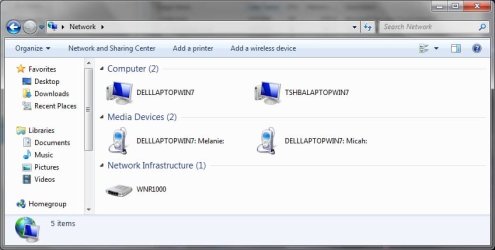
dell laptop is able to see all network devices but my toshiba only sees the dell laptop. i need to be able to see the desktop xp to connect to the printer on it.

In the end i want to be able to access any computer from any computer on my network. Currently i can not do this bc

1. access is denied from toshiba to dell
2. desktop xp doesnt show up on toshiba network

If i have to start from scratch let me know i am willing to do this thanks

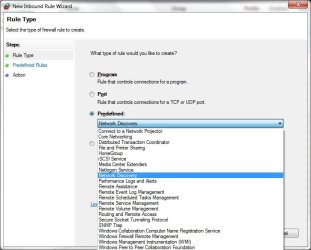
network discovery won't turn on also as shown in image
 

Attachments

  • Untitled1.jpg
    Untitled1.jpg
    25.8 KB · Views: 3
  • Untitled2.jpg
    Untitled2.jpg
    24.7 KB · Views: 3
  • Untitled3.jpg
    Untitled3.jpg
    36.2 KB · Views: 1
  • Untitled4.jpg
    Untitled4.jpg
    43.4 KB · Views: 4

My Computer My Computer

At a glance

Windows 7 Home Premium 32 BIT OSAMD Sempron SI-42 2.10 GhzDDR2 2048 MB (2 module of 1024 MB Each)ATI Radeon 3100
Computer Manufacturer/Model Number
Toshiba Satellite L455D
OS
Windows 7 Home Premium 32 BIT OS
CPU
AMD Sempron SI-42 2.10 Ghz
Memory
DDR2 2048 MB (2 module of 1024 MB Each)
Graphics Card(s)
ATI Radeon 3100
Monitor(s) Displays
Generic Pnp monitor

My Computer My Computer

At a glance

Windows 7 Ult, Windows 8.1 Pro,Q9650-4.275GHz, E8600 4.5GHz, E6750-3.8GHzG.Skill PC2 9600 1200Mhz 5 5 5 15 2TGTX480
Computer type
PC/Desktop
Computer Manufacturer/Model Number
Home built
OS
Windows 7 Ult, Windows 8.1 Pro,
CPU
Q9650-4.275GHz, E8600 4.5GHz, E6750-3.8GHz
Motherboard
Evga 780i FTW
Memory
G.Skill PC2 9600 1200Mhz 5 5 5 15 2T
Graphics Card(s)
GTX480
Sound Card
Asus Xonar D2
Monitor(s) Displays
HannsG
Screen Resolution
1680X1050
Hard Drives
GSkill Phoenix Pro 120GB SSD
PSU
ThermalTake Toughpower 1000Watt modular
Case
ThermalTake XaserV
Cooling
Xigmatek S1283
Keyboard
Logitech G15
Mouse
Logitech G9
Internet Speed
T1
Link from :
http://www.bleepingcomputer.com/forums/topic466377.html
is not solved, and therefore i was not able to get anywhere, it seems i have the same problem though. This does not help.

Link from:
http://superuser.com/questions/37510...n-i-get-them-b
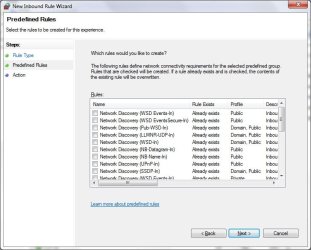
talks about predefined rules. Yes I do have the predefined rules option in Windows 7 firewall, but as you can see in the picture, i have no idea what the predefined rules were and if they have been tampered with. the link does not help, sorry.
 

Attachments

  • Untitled.jpg
    Untitled.jpg
    52 KB · Views: 1

My Computer My Computer

At a glance

Windows 7 Home Premium 32 BIT OSAMD Sempron SI-42 2.10 GhzDDR2 2048 MB (2 module of 1024 MB Each)ATI Radeon 3100
Computer Manufacturer/Model Number
Toshiba Satellite L455D
OS
Windows 7 Home Premium 32 BIT OS
CPU
AMD Sempron SI-42 2.10 Ghz
Memory
DDR2 2048 MB (2 module of 1024 MB Each)
Graphics Card(s)
ATI Radeon 3100
Monitor(s) Displays
Generic Pnp monitor
Link from :
http://www.bleepingcomputer.com/forums/topic466377.html
is not solved, and therefore i was not able to get anywhere, it seems i have the same problem though. This does not help.

Link from:
http://superuser.com/questions/37510...n-i-get-them-b
talks about predefined rules. Yes I do have the predefined rules option in Windows 7 firewall, but as you can see in the picture, i have no idea what the predefined rules were and if they have been tampered with. the link does not help, sorry.

The predefined rules for the firewall have been tampered with, that is the reason those services aren't working correctly.

The instructions in the second link show you how to return the firewall to it's original settings.

This procedure has already worked to fix the same problem. ;)

http://www.sevenforums.com/network-...overy-printer-file-sharing-will-not-stay.html
 

My Computer My Computer

At a glance

Windows 7 Ult, Windows 8.1 Pro,Q9650-4.275GHz, E8600 4.5GHz, E6750-3.8GHzG.Skill PC2 9600 1200Mhz 5 5 5 15 2TGTX480
Computer type
PC/Desktop
Computer Manufacturer/Model Number
Home built
OS
Windows 7 Ult, Windows 8.1 Pro,
CPU
Q9650-4.275GHz, E8600 4.5GHz, E6750-3.8GHz
Motherboard
Evga 780i FTW
Memory
G.Skill PC2 9600 1200Mhz 5 5 5 15 2T
Graphics Card(s)
GTX480
Sound Card
Asus Xonar D2
Monitor(s) Displays
HannsG
Screen Resolution
1680X1050
Hard Drives
GSkill Phoenix Pro 120GB SSD
PSU
ThermalTake Toughpower 1000Watt modular
Case
ThermalTake XaserV
Cooling
Xigmatek S1283
Keyboard
Logitech G15
Mouse
Logitech G9
Internet Speed
T1
Ok again the second link

What happened to my "Predefined rules" in Windows Firewall? How can I get them back? - Super User

does not help for the following reasons:

1. My predefined rules are not greyed out, as in the link. they are available as in the image below so not the same issue/

2. in the link it describes his registry key as not being there:
"[HKLM\SYSTEM\CurrentControlSet\services\SharedAccess\Defaults\FirewallPolicy\FirewallRules] On my Win7 Home Premium machine, I looked in that key and found.... nothing? "

Mine is not missing as seen in the image below. my registry key is there.

He resolved this by getting the registry key from another windows 7 copying and importing it into his registry. as you can see my registry is not missing and how can you tell it has been "tampered" with? I am not sure this is the same issue.

Again i am not trying to make my predefined rules appear, they already appear, so its not the same as the other post. I did a reset to default.

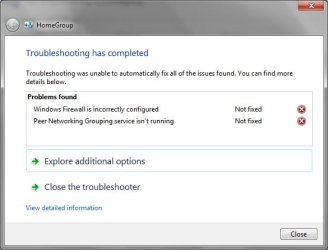
I did run into some problems when doing the troubleshooter as you can see in the last 2 images posted

thank you though
 

Attachments

  • Untitled1.jpg
    Untitled1.jpg
    104.3 KB · Views: 1
  • Untitled4.jpg
    Untitled4.jpg
    51.8 KB · Views: 1
  • Untitled3.jpg
    Untitled3.jpg
    43.9 KB · Views: 1
  • Untitled.jpg
    Untitled.jpg
    24.4 KB · Views: 1
  • Untitled2.jpg
    Untitled2.jpg
    28.5 KB · Views: 3

My Computer My Computer

At a glance

Windows 7 Home Premium 32 BIT OSAMD Sempron SI-42 2.10 GhzDDR2 2048 MB (2 module of 1024 MB Each)ATI Radeon 3100
Computer Manufacturer/Model Number
Toshiba Satellite L455D
OS
Windows 7 Home Premium 32 BIT OS
CPU
AMD Sempron SI-42 2.10 Ghz
Memory
DDR2 2048 MB (2 module of 1024 MB Each)
Graphics Card(s)
ATI Radeon 3100
Monitor(s) Displays
Generic Pnp monitor
Well for some reason the trouble shooter is still pointing to the firewall being incorrectly configured, and that is the reason that Peer Networking Grouping service won't stay on.

I would think that hitting the "Restore Defaults" button on the Windows Firewall page would fix the firewall problem but if the registry was corrupted that would point to the previous problem I described.
 

My Computer My Computer

At a glance

Windows 7 Ult, Windows 8.1 Pro,Q9650-4.275GHz, E8600 4.5GHz, E6750-3.8GHzG.Skill PC2 9600 1200Mhz 5 5 5 15 2TGTX480
Computer type
PC/Desktop
Computer Manufacturer/Model Number
Home built
OS
Windows 7 Ult, Windows 8.1 Pro,
CPU
Q9650-4.275GHz, E8600 4.5GHz, E6750-3.8GHz
Motherboard
Evga 780i FTW
Memory
G.Skill PC2 9600 1200Mhz 5 5 5 15 2T
Graphics Card(s)
GTX480
Sound Card
Asus Xonar D2
Monitor(s) Displays
HannsG
Screen Resolution
1680X1050
Hard Drives
GSkill Phoenix Pro 120GB SSD
PSU
ThermalTake Toughpower 1000Watt modular
Case
ThermalTake XaserV
Cooling
Xigmatek S1283
Keyboard
Logitech G15
Mouse
Logitech G9
Internet Speed
T1
Back
Top