Laptop can't find desktop computer -- Both Windows 7

machoalto

New member
Local time
9:01 AM
Messages
5
I have a home network set up on my desktop running Windows 7. Homegroup is NOT activated. My laptop has INTERNET access from the wireless card to the router attached to the desktop, but I can't get the laptop to "recognize" the desktop computer. When I type in \\computer name, it tells me that it can't locate that computer. So I can't print from my laptop, because the printer is attached to the desktop. I've tried everything I can think of -- renaming networks, etc. -- nothing has worked. The weird thing is that the laptop could find the printer last week, and I don't remember changing anything. Advice???
 

My Computer My Computer

OS
Windows 7
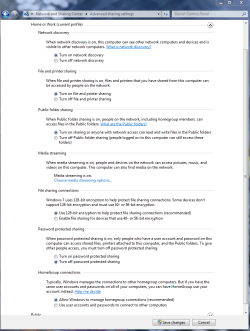
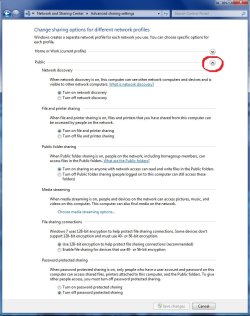
First check these settings on both machines. Make sure they both look like this. Make sure that both machines are using the same workgroup name. Both machines need to use a different machine name or they won't show up. I'm not sure if you are using workgroup or public file sharing so I showed both windows.
 

Attachments

  • Home or work homegroup enable.PNG
    Home or work homegroup enable.PNG
    45 KB · Views: 1,616
  • public sharing enabled all found.jpg
    public sharing enabled all found.jpg
    91.5 KB · Views: 1,311
Last edited:

My Computer My Computer

Computer type
PC/Desktop
Computer Manufacturer/Model Number
Home built
OS
Windows 7 Ult, Windows 8.1 Pro,
CPU
Q9650-4.275GHz, E8600 4.5GHz, E6750-3.8GHz
Motherboard
Evga 780i FTW
Memory
G.Skill PC2 9600 1200Mhz 5 5 5 15 2T
Graphics Card(s)
GTX480
Sound Card
Asus Xonar D2
Monitor(s) Displays
HannsG
Screen Resolution
1680X1050
Hard Drives
GSkill Phoenix Pro 120GB SSD
PSU
ThermalTake Toughpower 1000Watt modular
Case
ThermalTake XaserV
Cooling
Xigmatek S1283
Keyboard
Logitech G15
Mouse
Logitech G9
Internet Speed
T1
Thanks for the advice. Tried it, didn't work. Here are some of the messages I get:

When I go to Control Panel > All Control Panel Items > Network and Sharing Center, and click on the "Network" icon in between my laptop icon and the internet icon, I get a popup which shows both the laptop icon with the right name, and the desktop icon with the right name. When I double-click on the desktop computer icon, I get the message "Windows cannot access \\COMPUTERNAME" The error code says "The network path was not found."

Another thing I've tried is right-clicking on the desktop computer icon and trying to Connect with Remote Desktop Connection. When I do this, it searches for a few seconds to find the connection and then I get the message "Remote Desktop cannot find the computer \\COMPUTERNAME. This might mean that \\COMPUTERNAME does not belong to the specified network. Verify the computer name and domain that you are trying to connect to."

Is it possible that I have two different networks operating here? That was always really easy to see when in Vista or XP, but not in 7. How would I find out?

Thanks for advice!!
 

My Computer My Computer

OS
Windows 7
You might be using workgroup on one and public file sharing on another. Make sure you are using one or the other on both machines. This could also be a wireless networking problem. Sometimes just rebooting or refreshing will make the other machine appear.

Can the wireless machine see the other if it's plugged in with an eithernet cable?

Since you are running two Windows 7 machines you can also try using the Homegroup network which works pretty well for me. http://www.sevenforums.com/tutorials/43972-homegroup-add-computer-join.html?filter

To change sharing settings in Homegroup. http://www.sevenforums.com/tutorials/44464-homegroup-change-file-folder-sharing-settings.html?filter
 

My Computer My Computer

Computer type
PC/Desktop
Computer Manufacturer/Model Number
Home built
OS
Windows 7 Ult, Windows 8.1 Pro,
CPU
Q9650-4.275GHz, E8600 4.5GHz, E6750-3.8GHz
Motherboard
Evga 780i FTW
Memory
G.Skill PC2 9600 1200Mhz 5 5 5 15 2T
Graphics Card(s)
GTX480
Sound Card
Asus Xonar D2
Monitor(s) Displays
HannsG
Screen Resolution
1680X1050
Hard Drives
GSkill Phoenix Pro 120GB SSD
PSU
ThermalTake Toughpower 1000Watt modular
Case
ThermalTake XaserV
Cooling
Xigmatek S1283
Keyboard
Logitech G15
Mouse
Logitech G9
Internet Speed
T1
Found a fix for me

I dont know if anyone will have the same problem in the future. I've had this same problem for the last 10 straight and couldnt fix it. I already have two laptops connected and working perfectly fine on the network.

Right after i found this thread i turned wireless isolation on my router off and everything appeared on my network for my new laptop and can now do everything i could do on my other two.

i dont know if this is relavent bc my fix was with my router and not windows but who knows.
 

My Computer My Computer

OS
Windows 7 Professional Plus 64-bit
Can the laptop ping the desktop and have you tried connecting via ip address?

Can you do ipconfig for both laptop and desktop and show us?

Search for tutorial on how to connect from one machine to another.
 

My Computer My Computer

Computer Manufacturer/Model Number
Lenovo ThinkPad T60
OS
Windows 7 Ultimate 64Bit
CPU
GenuineIntel Intel(R) Core(TM) DuoCore T2400 @ 1.83GHz
Motherboard
Intel(R) 82801G (ICH7 Family)
Memory
2.00 GB
Graphics Card(s)
Mobile Intel(R) 945 Express Chipset
Sound Card
SoundMAX Integrated Digital HD Audio
Monitor(s) Displays
ThinkPad Display
Screen Resolution
1400x1050
Hard Drives
100Gb SATA
Keyboard
Standard Keyboard
Mouse
HID-compliant Mouse
Internet Speed
Cable Broadband - 54Mbps
Other Info
Intel(R) PRO/1000 PL Network Connection
11a/b/g Wireless LAN Mini PCI Express Adapter

My Computer My Computer

Computer Manufacturer/Model Number
HP Pavilion Elite 495UK
OS
Windows 7 Ultimate SP1 64-Bit
CPU
Intel Core i7 870 @ 2.93GHz
Motherboard
MSI 2A9C (CPU1)
Memory
8Gb Dual-Channel DDR3 @ 664MHz
Graphics Card(s)
nVidia GeForce GTX 460 1024MB dedicated RAM
Sound Card
Realtek HD Audio
Monitor(s) Displays
HP2310i
Screen Resolution
1920 x 1080
Hard Drives
1x1954GB Hitachi HDS22020ALA 330 (RAID), 1x1954GB Hitachi External for backup and storage
PSU
460W
Case
HP Elite
Cooling
Air cooled
Keyboard
Logitech K750 solar-powered keyboard
Mouse
Logitech Wireless M180 mouse
Internet Speed
2Mb
Other Info
Pure Avanti Flow Internet Radio with iPod Dock, 64Gb iPod, HP USB Speakers, Sony MDR-V500 Headphones, Sony Vaio F-Series Laptop
Back
Top