Hello everyone 
I recently downgraded from Windows 8.1 to Windows 7.
The issues
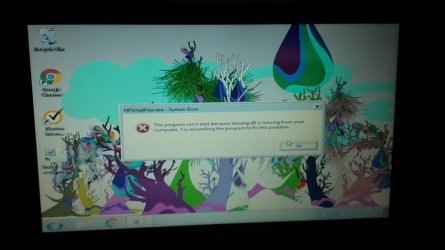
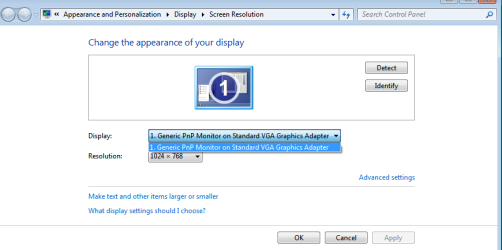
1. I have big goofy graphics, I have to change the resolution to 1024 x 768 whenever I log into Windows but it still looks awful and as soon as I log off it goes back to 800 x 600.
2. The touchpad no longer does the two-finger-scrolly-thing, I also keep accidentally clicking it somehow, it seems really sensitive.
3. I've got drivers missing that I can't find, but also have installed so many drivers that I no longer know which ones are doing something and which one's aren't.
I have a 'HP 15-g092sa Notebook PC (ENERGY STAR) Model #: J2U73EA' laptop and I've identified my product on the HP site and downloaded all drivers from the following link:
HP Software and Driver Downloads for HP Printers, Laptops, Desktops and More | HP® Customer Support
however, for some reason I'm facing a few issues.
The last time I downgraded to 7 I never had these graphics issues, so I know there's a way of doing it, I just can't figure it out and it's really bugging me!
I've tried updating the drivers directly from device manager to but to no avail.
Got assignments for University due in in the next week or two but the program I need to run is difficult to use with such big chunky graphics.
Really starting to panic if anyone could help me I'd be so grateful. :banghead:
Thank you so much!
I recently downgraded from Windows 8.1 to Windows 7.
The issues
1. I have big goofy graphics, I have to change the resolution to 1024 x 768 whenever I log into Windows but it still looks awful and as soon as I log off it goes back to 800 x 600.
2. The touchpad no longer does the two-finger-scrolly-thing, I also keep accidentally clicking it somehow, it seems really sensitive.
3. I've got drivers missing that I can't find, but also have installed so many drivers that I no longer know which ones are doing something and which one's aren't.
I have a 'HP 15-g092sa Notebook PC (ENERGY STAR) Model #: J2U73EA' laptop and I've identified my product on the HP site and downloaded all drivers from the following link:
HP Software and Driver Downloads for HP Printers, Laptops, Desktops and More | HP® Customer Support
however, for some reason I'm facing a few issues.
The last time I downgraded to 7 I never had these graphics issues, so I know there's a way of doing it, I just can't figure it out and it's really bugging me!
I've tried updating the drivers directly from device manager to but to no avail.
Got assignments for University due in in the next week or two but the program I need to run is difficult to use with such big chunky graphics.
Really starting to panic if anyone could help me I'd be so grateful. :banghead:
Thank you so much!
Attachments

My Computer
- Computer type
- Laptop
- Computer Manufacturer/Model Number
- HP
- OS
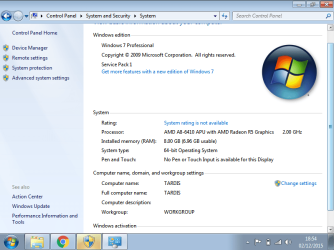
- Windows 7 Professional 64 bit.
- CPU
- AMD A8
- Memory
- 8GB
- Graphics Card(s)
- AMD Radeon R5
- Hard Drives
- 1 TB
- Internet Speed
- 150 mb
- Antivirus
- Norton
- Browser
- Google Chrome