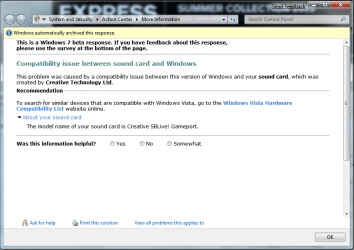
Don't feel too bab about the sound. I had some fun with the sound mixer, speaker settings, EAX effects section missing or simply incomplete here on a few 7000 build installs as well as on newer builds until lately.
AreoX you're going to need the SIW tool since that will dig in deep to pull the exact make and model information you need for the sound as well as the make and model board should I say with ease! That will show what you need to locate all kinds of drivers.
Now what did you saw you didn't have the make and model information?
W7 Ultimate x64/W10 Pro x64/W11 Pro Triple Boot - Main PC W7 Remote PC Micro ATX W7 Pro x64/W11 Pro
CPU
AMD Phenom II X4 975 Deneb 3.6ghz - 965 2nd remote pc
Motherboard
Gigabyte GA-790XTA-UD4-Gigabyte GA-880GM-D2H remote pc
Memory
Kingston Hyper X DDR3 1600 1.5v 16gb - Hyper X Fury 8gb 2nd
Graphics Card(s)
MSI HD Radeon 5750 1gb - MSI HD Radeon 6450 on mini tower
Sound Card
Creative Labs X-Fi Xtreme Audio P - Realtek onooard 2nd case
Monitor(s) Displays
ASUS VW199T-P 19" HP 2082a Main-HP 2082a 20" remote pc
Screen Resolution
Asus 1440x900 - HP 1600x900
Hard Drives
WD Black 1TB HD per OS W7, W10, and pending W11 presently on 500gb OS Drive - Pending Triple 1TB HDs for Spanned Storage/backup volume
Single 2TB external USB enclosure, single 1TB System 7 Host/Boot drive, Pending 8TB external HD for system image b
PSU
Corsair 750TX - primary / Corsair CX600 - second
Case
Antec 900-2 - SSD compatible / NZXT Vulcan mini tower
Oh I remember the fun days when first going to get things going on the 7000 builds! The Vista installer you download from the Creative support site will need a little help from 7's new tool now seen in the right click menu.
The troubleshoot compatibility option will come in very handy at times. Once you right click on the installer for the update you would select that foloowed by checking off the "worked with older version of Windows" option seen on the second screen that follows. On the next after select Vista.
The troubleshooted will then proceed to go through all the motions until you reach the try other method or close troubleshooter choice screen where if all went well you simply close that out and double click on the executable update. You'll also find that old XP programs you never thought would run will often go right this way.
W7 Ultimate x64/W10 Pro x64/W11 Pro Triple Boot - Main PC W7 Remote PC Micro ATX W7 Pro x64/W11 Pro
CPU
AMD Phenom II X4 975 Deneb 3.6ghz - 965 2nd remote pc
Motherboard
Gigabyte GA-790XTA-UD4-Gigabyte GA-880GM-D2H remote pc
Memory
Kingston Hyper X DDR3 1600 1.5v 16gb - Hyper X Fury 8gb 2nd
Graphics Card(s)
MSI HD Radeon 5750 1gb - MSI HD Radeon 6450 on mini tower
Sound Card
Creative Labs X-Fi Xtreme Audio P - Realtek onooard 2nd case
Monitor(s) Displays
ASUS VW199T-P 19" HP 2082a Main-HP 2082a 20" remote pc
Screen Resolution
Asus 1440x900 - HP 1600x900
Hard Drives
WD Black 1TB HD per OS W7, W10, and pending W11 presently on 500gb OS Drive - Pending Triple 1TB HDs for Spanned Storage/backup volume
Single 2TB external USB enclosure, single 1TB System 7 Host/Boot drive, Pending 8TB external HD for system image b
PSU
Corsair 750TX - primary / Corsair CX600 - second
Case
Antec 900-2 - SSD compatible / NZXT Vulcan mini tower
i was running xp but have also purchased a vista home premium upgrade and was able to get windows 7 up and running on the internet with the vista drivers from the vista upgrade. hc
If that's the older Audigy 2 line of SB Live you may run into a few problems with anything newer then Vista drivers. When first seeing the 7 beta become available at the Creative support site those listed the Audigy 4 lineup along with the X-Fi series.
The two options seen at the support site is manually searching or using the auto updater tool to see if that helps you any at Creative Worldwide Support
W7 Ultimate x64/W10 Pro x64/W11 Pro Triple Boot - Main PC W7 Remote PC Micro ATX W7 Pro x64/W11 Pro
CPU
AMD Phenom II X4 975 Deneb 3.6ghz - 965 2nd remote pc
Motherboard
Gigabyte GA-790XTA-UD4-Gigabyte GA-880GM-D2H remote pc
Memory
Kingston Hyper X DDR3 1600 1.5v 16gb - Hyper X Fury 8gb 2nd
Graphics Card(s)
MSI HD Radeon 5750 1gb - MSI HD Radeon 6450 on mini tower
Sound Card
Creative Labs X-Fi Xtreme Audio P - Realtek onooard 2nd case
Monitor(s) Displays
ASUS VW199T-P 19" HP 2082a Main-HP 2082a 20" remote pc
Screen Resolution
Asus 1440x900 - HP 1600x900
Hard Drives
WD Black 1TB HD per OS W7, W10, and pending W11 presently on 500gb OS Drive - Pending Triple 1TB HDs for Spanned Storage/backup volume
Single 2TB external USB enclosure, single 1TB System 7 Host/Boot drive, Pending 8TB external HD for system image b
PSU
Corsair 750TX - primary / Corsair CX600 - second
Case
Antec 900-2 - SSD compatible / NZXT Vulcan mini tower
thanks for the help. I read some topics and apparently a ton of people have the exact same problem. I baught myself a new card so hopefully it will work
If you bought one of the newer X-Fi models the 7 betas for both 32bit and 64bit alike are right there including the application. In fact that's what finally saw the speakers settings and EAX effects menu included here.
It's typical to see older model lines dropped anyways when a new version of Windows(not too many since Vista was delayed) or a new line of cards comes out. ATI was a good one for dropping support after so many catalyst verions were seen with the nest omitting one model line supported in the previous.
Creative and other companies tend to due the same thing at some point. I guess that one way to keep the economy going as well as introducing the new and improved ?
W7 Ultimate x64/W10 Pro x64/W11 Pro Triple Boot - Main PC W7 Remote PC Micro ATX W7 Pro x64/W11 Pro
CPU
AMD Phenom II X4 975 Deneb 3.6ghz - 965 2nd remote pc
Motherboard
Gigabyte GA-790XTA-UD4-Gigabyte GA-880GM-D2H remote pc
Memory
Kingston Hyper X DDR3 1600 1.5v 16gb - Hyper X Fury 8gb 2nd
Graphics Card(s)
MSI HD Radeon 5750 1gb - MSI HD Radeon 6450 on mini tower
Sound Card
Creative Labs X-Fi Xtreme Audio P - Realtek onooard 2nd case
Monitor(s) Displays
ASUS VW199T-P 19" HP 2082a Main-HP 2082a 20" remote pc
Screen Resolution
Asus 1440x900 - HP 1600x900
Hard Drives
WD Black 1TB HD per OS W7, W10, and pending W11 presently on 500gb OS Drive - Pending Triple 1TB HDs for Spanned Storage/backup volume
Single 2TB external USB enclosure, single 1TB System 7 Host/Boot drive, Pending 8TB external HD for system image b
PSU
Corsair 750TX - primary / Corsair CX600 - second
Case
Antec 900-2 - SSD compatible / NZXT Vulcan mini tower
Ummmm... I know this is a bit late but...
When I installed W7 it automatically found all the drivers and installed them. I stuck the W7 dvd in the cd drive and 45 minutes later I had W7 installed with all drivers and devices installed.
why'd that not happen here?
Since the initial release publicly of the 7000 build back in late January several updates for 7 have already been seen. That also has the Windows update to search for 3rd party 7 beta drivers otherwise found on the various support sites.
If there are 7 beta drivers found the update process will tend to see the latest Vista drivers available go on. You see that once 7 is connected online for the normal check for the latest available. It's no different that way from XP or Vista performing the same task when first connected or through the automatic updates.
W7 Ultimate x64/W10 Pro x64/W11 Pro Triple Boot - Main PC W7 Remote PC Micro ATX W7 Pro x64/W11 Pro
CPU
AMD Phenom II X4 975 Deneb 3.6ghz - 965 2nd remote pc
Motherboard
Gigabyte GA-790XTA-UD4-Gigabyte GA-880GM-D2H remote pc
Memory
Kingston Hyper X DDR3 1600 1.5v 16gb - Hyper X Fury 8gb 2nd
Graphics Card(s)
MSI HD Radeon 5750 1gb - MSI HD Radeon 6450 on mini tower
Sound Card
Creative Labs X-Fi Xtreme Audio P - Realtek onooard 2nd case
Monitor(s) Displays
ASUS VW199T-P 19" HP 2082a Main-HP 2082a 20" remote pc
Screen Resolution
Asus 1440x900 - HP 1600x900
Hard Drives
WD Black 1TB HD per OS W7, W10, and pending W11 presently on 500gb OS Drive - Pending Triple 1TB HDs for Spanned Storage/backup volume
Single 2TB external USB enclosure, single 1TB System 7 Host/Boot drive, Pending 8TB external HD for system image b
PSU
Corsair 750TX - primary / Corsair CX600 - second
Case
Antec 900-2 - SSD compatible / NZXT Vulcan mini tower
hubbys machine has lost his ethernel network adapter. dont know where it went, maybe he sent it on holidays but now his cant get the internet and i really dont know where to look. i have tried the website for a sis 900 pci but nothing there worked. it did b4 when i originally installed windows 7 but not now. can you help. thankyou helen c
One thing that's been tripping up the connection here on the 7000 build is seeing more then one connection setup while the drivers where still on good. With two adapters one a nic card and the other a cable modem simply disabling the nic card won't be enough at times to even get to the home page.
When going into the control panel>network and sharing take a look at how many items are shown. As you look to the top right next to the IE globe icon you'll see the light blue lettered "See full map" option. When the connection is configured correctly you will the "admin name ----gateway or adapter icon-----IE".
When not configured you won't see anything like that but simply see the no network devices configured message displayed in a blank window. Another place to look if you are not using any form of dial-up type modem is in the tools>internet options>connections tab to make sure no dial up items are liisted there as well.
With nothing plugged into the nic card for the time being here I have to disable that in the device manager upon each startup as you can see here. You may only have one item that may have a yellow mark on it if not properly being detected instead of the two shown here.
If you look in the device manager and see something listed under "other devices" like a pci or other type item without a brand name on it that may be for the adapter used. With modems and seeing the actual device in plain sight unplugging the power for several seconds on any ISP provided external modem or gateway and replugging it back in will often see the new device detection make that active again.
W7 Ultimate x64/W10 Pro x64/W11 Pro Triple Boot - Main PC W7 Remote PC Micro ATX W7 Pro x64/W11 Pro
CPU
AMD Phenom II X4 975 Deneb 3.6ghz - 965 2nd remote pc
Motherboard
Gigabyte GA-790XTA-UD4-Gigabyte GA-880GM-D2H remote pc
Memory
Kingston Hyper X DDR3 1600 1.5v 16gb - Hyper X Fury 8gb 2nd
Graphics Card(s)
MSI HD Radeon 5750 1gb - MSI HD Radeon 6450 on mini tower
Sound Card
Creative Labs X-Fi Xtreme Audio P - Realtek onooard 2nd case
Monitor(s) Displays
ASUS VW199T-P 19" HP 2082a Main-HP 2082a 20" remote pc
Screen Resolution
Asus 1440x900 - HP 1600x900
Hard Drives
WD Black 1TB HD per OS W7, W10, and pending W11 presently on 500gb OS Drive - Pending Triple 1TB HDs for Spanned Storage/backup volume
Single 2TB external USB enclosure, single 1TB System 7 Host/Boot drive, Pending 8TB external HD for system image b
PSU
Corsair 750TX - primary / Corsair CX600 - second
Case
Antec 900-2 - SSD compatible / NZXT Vulcan mini tower