Cant find folder for screensavers

tlcasey100

New member
Local time
9:15 AM
Messages
3
I found an old post the told the poster to type C:\windows\system 32 and the folder .scv would appear but it didnt happen for me. I am running Windows 7 Pro SP1 32 bit. Yoor help would be appreciated.
 

My Computer My Computer

Computer type
PC/Desktop
Computer Manufacturer/Model Number
custom build
OS
Windows 7 Professional SP1 32 bit
CPU
AMD 4 core 1.92 GIG
Motherboard
MSI 785 GM-E51
Memory
8gigs
Hard Drives
Hitachi 500 GIG
Antivirus
MIcrosoft security essentials
Browser
Chrome
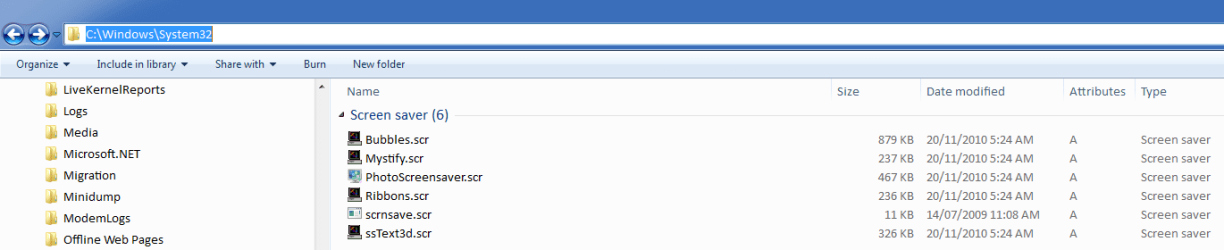
Try .scr

The screensaver extension is normally ".scr".

The screensavers appear in "C:\Windows\System32" on my W7 install.
Screensavers Location.png
 
Last edited:

My Computer My Computer

Computer type
PC/Desktop
Computer Manufacturer/Model Number
n/a
OS
W7 Ultimate SP1, LM19.2 MATE, W10 Home 1703, W10 Pro 1703 VM, #All 64 bit
CPU
AMD Phenom II x6 1100T, 3.3 GHz
Motherboard
ASUS M4A88T-M/USB3 (AM3)
Memory
12GB DDR3 1333 G-Skill (4GB x 2), G-Skill (2GB x 2)
Graphics Card(s)
NVIDIA GeForce GTX 660
Sound Card
Realtek?
Monitor(s) Displays
Samsung S23B350
Screen Resolution
1920x1080
Hard Drives
WD Green 2TB (SATA), WD Green 3TB (SATA), WD Blue 4TB (SATA), WD Blue 6TB (SATA)
PSU
Cooler Master
Case
Antec GX300 Tower
Cooling
3x Antec TRICOOL 120mm Fans
Mouse
Wired Optical
Internet Speed
DSL
Antivirus
Avast
Browser
Pale Moon (64 bit)
Other Info
2018-12-27 Upgraded HDDs
2015-12-10 Upgraded case, graphics card, storage
2015-08-15 Upgraded motherboard & RAM
2015-07-15 Upgraded LM17.1 to LM17.2
They aren't in a .scr folder, but rather in System32 as lehnerus2000 mentioned. If you don't see them there, see the warning by Brink Here

   Warning
If you cannot get the screen saver to work, then check these items:
Screen saver settings.
For the Photos (pictures) screensaver, remove any videos from the selected folder to keep it from freezing.
You may have downloaded a bad screen saver. Check by trying one that came with Vista above.
The .SCR file (screensaver) was not installed in the C:\Windows\System32 folder. They may sometimes get installed into the C:\Windows\SYSWOW32 or C:\Windows\SYSWOW64 folders by mistake instead.


A Guy
 

My Computer My Computer

Computer type
PC/Desktop
OS
Windows 10 Home x64
CPU
INTEL Core i5-750 Quad-Core 3.37GHz
Motherboard
ASUS P7P55D
Memory
HyperX Fury Black Series 8GB (2 x 4GB) 1866Mhz
Graphics Card(s)
EVGA GeForce GTX 750 Superclocked 1GB 128-Bit GDDR5
Monitor(s) Displays
LG 32MA68HY 32" IPS
Screen Resolution
1920 x 1080
Hard Drives
Samsung 840 Evo 120GB, SEAGATE 500GB Barracuda® 7200.12, SATA 3 Gb/s, 7200 RPM, 16MB cache
PSU
ANTEC TruePower New TP-550, 80 PLUS, 550W
Case
ANTEC Three Hundred Illusion
Cooling
COOLER MASTER Hyper 212 Plus, 4 x 120mm 1 x 140mm Noctua's
Internet Speed
85 + Mbps
Antivirus
Avast
Browser
Vivaldi
Back
Top