
Can't find signed drivers?

unclepickle1

New member
Local time
10:28 AM
Messages
6
Hey everybody. I'm at the end of my rope here :mad:

I'm trying to install Home Premium 64bit on a computer I just built. I get to the point where it looks for a mass storage device to install on and I get this message:

No signed device drivers were found. Make sure that the installation media contains the correct drivers, and then click ok.

I have a Western Digital Caviar Black hard drive that is recognized in the BIOS and, according to Microsoft, is compatible with Windows 7. http://www.microsoft.com/windows/compatibility/Windows-7/en-us/Details.aspx?type=Hardware&p=Western%20Digital%20Caviar%20Black%20WD1001FALS%201TB%20SATA-300%20Internal%20Hard%20Drive&v=Western%20Digital&uid=WD10000LSRTL&pf=0π=2&c=Storage%20Devices&sc=Hard%20Drives%2C%20Internal&os=64-bit

I've read of a way to disable device signatures in the command prompt by entering

bcdedit.exe -set loadoptions DDISABLE_INTEGRITY_CHECKS


....but it doesn't work.

Can anyone help me?
 

My Computer

OS
Windows 7 Home Premium 64bit
CPU
AMD Athlon II X2 250 Regor 3.0GHz 2 x 1MB L2 Cache Socket AM
Motherboard
GIGABYTE GA-MA785GM-US2H AM3/AM2+/AM2 AMD 785G HDMI Micro AT
Memory
CORSAIR XMS2 4GB (2 x 2GB) 240-Pin DDR2 SDRAM DDR2 1066 (PC2
Graphics Card(s)
XFX HD-467X-ZDF2 Radeon HD 4670 1GB 128-bit DDR2 PCI Express
Hard Drives
Western Digital Caviar Black WD5001AALS 500GB 7200 RPM 32MB Cache SATA 3.0Gb/s 3.5" Internal Hard Drive -Bare Drive
Case
APEX TU150 Black Steel ATX Mid Tower Computer Case ATX 12V 4
Have you tried the latest version of Easy BCD?

====================================
bcdedit.exe -set loadoptions DDISABLE_INTEGRITY_CHECKS
bcdedit.exe -set TESTSIGNING ON
====================================

### Easy BCD ###

Lastly, is the Hard Drive IDE or SATA connected.

I will return later to check if this solution has helped you.
 

My Computer

Computer Manufacturer/Model Number
HP
OS
Windows 7 Home Premium 64 Bit
CPU
AMD
Memory
4 Gig
Graphics Card(s)
ATI
Sound Card
Beats Audio
Monitor(s) Displays
17 inch
Screen Resolution
1440 x 900
Cooling
Air
Spill the beans and stick a list of your new puta parts down manu/model

pref. fill out system specs in your profile - Thanks

("UserCP" on top menu then EDIT "System Specs" in left column)
 

My Computer

Computer type
PC/Desktop
Computer Manufacturer/Model Number
D.I.Y.
OS
WIN7 Ultimate 64bit
CPU
AMD FX8150/Trinity A10-5700
Motherboard
Asus Sabertooth v.1 /Asus F2A85-M Pro
Memory
G-Skill 2400 x2 @ 1866 (both pc's)
Graphics Card(s)
Sapphire (factory OC version) AMD 7770
Sound Card
onboard
Monitor(s) Displays
T260 Samsung
Screen Resolution
1920x1080
Hard Drives
Western Digital Sata 2TB/1TB Caviar Blacks
Buffalo 1TB usb (excellent drive)
PSU
Be-Quiet 700W E-9/Be-Quiet 550W E-9(E-9 = built by FSP)
Case
Antec P183/Antec P180mini
Cooling
x2 Xigmatek SXHH7-U01 + C-Master R4-EXBB-20PK-R0 120mm Fans
Keyboard
Cherry
Mouse
MS Explorer 3.0
Other Info
LG Blu ray combo
Pioneer 207D/208 Blu ray burners
I fixed it. I had to set my bios to compatibility mode for the SATA controllers. It was set to enhanced mode and even though it was running in IDE mode it was not detecting correctly. I booted to the WD Data LifeGuard CD and it didn't even install the CD driver properly, and that's how I found out that the bios settings were incorrect. Once I fixed them I was also able to convert the 74GB drive back to a basic disk and install the OS to that drive.

Thanks again for your help!

I found this quote, try checking your BIOS for help. Should be the F8 or F12 Key, Maybe the Delete key. Just depends on your mother board.
 

My Computer

Computer Manufacturer/Model Number
HP
OS
Windows 7 Home Premium 64 Bit
CPU
AMD
Memory
4 Gig
Graphics Card(s)
ATI
Sound Card
Beats Audio
Monitor(s) Displays
17 inch
Screen Resolution
1440 x 900
Cooling
Air
Have you tried the latest version of Easy BCD?

====================================
bcdedit.exe -set loadoptions DDISABLE_INTEGRITY_CHECKS
bcdedit.exe -set TESTSIGNING ON
====================================

### Easy BCD ###

Lastly, is the Hard Drive IDE or SATA connected.

I will return later to check if this solution has helped you.

Ok everybody thanks for your input. I entered in the system specs in my profile. DarkScorpion, how do I use this program when I'm booting the system? And what do you recommend doing with it?
 

My Computer

OS
Windows 7 Home Premium 64bit
CPU
AMD Athlon II X2 250 Regor 3.0GHz 2 x 1MB L2 Cache Socket AM
Motherboard
GIGABYTE GA-MA785GM-US2H AM3/AM2+/AM2 AMD 785G HDMI Micro AT
Memory
CORSAIR XMS2 4GB (2 x 2GB) 240-Pin DDR2 SDRAM DDR2 1066 (PC2
Graphics Card(s)
XFX HD-467X-ZDF2 Radeon HD 4670 1GB 128-bit DDR2 PCI Express
Hard Drives
Western Digital Caviar Black WD5001AALS 500GB 7200 RPM 32MB Cache SATA 3.0Gb/s 3.5" Internal Hard Drive -Bare Drive
Case
APEX TU150 Black Steel ATX Mid Tower Computer Case ATX 12V 4
unclepickle1, welcome to the Seven Forums.

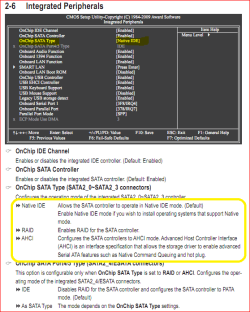
It isn't the hard drive that needs a driver, it is the SATA controller that Windows is looking for a driver for. Let's start with checking the bios settings,

satatype.PNG

If it is set to IDE mode (bios default) then there should be no need to load a driver during the Windows install.

RAID mode may need a driver to be installed for Windows to install. Also if by chance it is set to this mode, change it as RAID doesn't do/add anything with a single drive.

AHCI mode may or may not need the driver; on my 780G board Windows installs just fine with its native AHCI driver, and then I just update it to the AMD driver afterwards. This is the mode you want it set to for better performance from the hard drive. If this is where it is set (or you set it there after reading this) and Windows still asks for a driver go here,

GA-MA785GM-US2H (rev. 3.3) - GIGABYTE

and download the SATA AHCI driver, extract it (it is self extracting) and put it on a USB key if you have one, or a floppy if you have one of those still; it can also be placed on the hard drive as long as it isn't empty. Then when it asks for the driver during setup, and browse to where you put the extracted folder. It should then install the driver and continue with installing Windows.
 

My Computer

Computer type
PC/Desktop
Computer Manufacturer/Model Number
Me
OS
Win 7 Ultimate x64
CPU
FX-8350 @ 4.6 GHz so far
Motherboard
Asus M5A97 EVO
Memory
ADATA XPG V1 Series Black 8GB DDR3 1600
Graphics Card(s)
Sapphire R9 270x Dual-X
Sound Card
Xonar DGX w/ Corsair Vengence 1300
Monitor(s) Displays
Acer S232HL Abid
Screen Resolution
1920x1080
Hard Drives
120 GB OCZ Vertex 3
500 GB Seagate 7200.12
PSU
Antec Earthwatts 650W Green
Case
Antec Three Hundred
Cooling
Cooler Master 212 EVO
Keyboard
Logitech G510
Mouse
Logitech G500s
Internet Speed
35000/3000
unclepickle1, welcome to the Seven Forums.

It isn't the hard drive that needs a driver, it is the SATA controller that Windows is looking for a driver for. Let's start with checking the bios settings,

View attachment 104699

If it is set to IDE mode (bios default) then there should be no need to load a driver during the Windows install.

RAID mode may need a driver to be installed for Windows to install. Also if by chance it is set to this mode, change it as RAID doesn't do/add anything with a single drive.

AHCI mode may or may not need the driver; on my 780G board Windows installs just fine with its native AHCI driver, and then I just update it to the AMD driver afterwards. This is the mode you want it set to for better performance from the hard drive. If this is where it is set (or you set it there after reading this) and Windows still asks for a driver go here,

GA-MA785GM-US2H (rev. 3.3) - GIGABYTE

and download the SATA AHCI driver, extract it (it is self extracting) and put it on a USB key if you have one, or a floppy if you have one of those still; it can also be placed on the hard drive as long as it isn't empty. Then when it asks for the driver during setup, and browse to where you put the extracted folder. It should then install the driver and continue with installing Windows.

Thank you, but that is the location I downloaded the drivers from earlier and it still won't recognize them. I've tried setting the BIOS to AHCI, RAID, and Native IDE, and still no luck.
 

My Computer

OS
Windows 7 Home Premium 64bit
CPU
AMD Athlon II X2 250 Regor 3.0GHz 2 x 1MB L2 Cache Socket AM
Motherboard
GIGABYTE GA-MA785GM-US2H AM3/AM2+/AM2 AMD 785G HDMI Micro AT
Memory
CORSAIR XMS2 4GB (2 x 2GB) 240-Pin DDR2 SDRAM DDR2 1066 (PC2
Graphics Card(s)
XFX HD-467X-ZDF2 Radeon HD 4670 1GB 128-bit DDR2 PCI Express
Hard Drives
Western Digital Caviar Black WD5001AALS 500GB 7200 RPM 32MB Cache SATA 3.0Gb/s 3.5" Internal Hard Drive -Bare Drive
Case
APEX TU150 Black Steel ATX Mid Tower Computer Case ATX 12V 4
Did you extract it first?
 

My Computer

Computer type
PC/Desktop
Computer Manufacturer/Model Number
Me
OS
Win 7 Ultimate x64
CPU
FX-8350 @ 4.6 GHz so far
Motherboard
Asus M5A97 EVO
Memory
ADATA XPG V1 Series Black 8GB DDR3 1600
Graphics Card(s)
Sapphire R9 270x Dual-X
Sound Card
Xonar DGX w/ Corsair Vengence 1300
Monitor(s) Displays
Acer S232HL Abid
Screen Resolution
1920x1080
Hard Drives
120 GB OCZ Vertex 3
500 GB Seagate 7200.12
PSU
Antec Earthwatts 650W Green
Case
Antec Three Hundred
Cooling
Cooler Master 212 EVO
Keyboard
Logitech G510
Mouse
Logitech G500s
Internet Speed
35000/3000
Yes, I've extracted it. It now finds the AMD AHCI driver but when I click "Next," it looks like it installs and the goes back to the blank driver screen.
 

My Computer

OS
Windows 7 Home Premium 64bit
CPU
AMD Athlon II X2 250 Regor 3.0GHz 2 x 1MB L2 Cache Socket AM
Motherboard
GIGABYTE GA-MA785GM-US2H AM3/AM2+/AM2 AMD 785G HDMI Micro AT
Memory
CORSAIR XMS2 4GB (2 x 2GB) 240-Pin DDR2 SDRAM DDR2 1066 (PC2
Graphics Card(s)
XFX HD-467X-ZDF2 Radeon HD 4670 1GB 128-bit DDR2 PCI Express
Hard Drives
Western Digital Caviar Black WD5001AALS 500GB 7200 RPM 32MB Cache SATA 3.0Gb/s 3.5" Internal Hard Drive -Bare Drive
Case
APEX TU150 Black Steel ATX Mid Tower Computer Case ATX 12V 4

My Computer

Computer type
PC/Desktop
Computer Manufacturer/Model Number
Me
OS
Win 7 Ultimate x64
CPU
FX-8350 @ 4.6 GHz so far
Motherboard
Asus M5A97 EVO
Memory
ADATA XPG V1 Series Black 8GB DDR3 1600
Graphics Card(s)
Sapphire R9 270x Dual-X
Sound Card
Xonar DGX w/ Corsair Vengence 1300
Monitor(s) Displays
Acer S232HL Abid
Screen Resolution
1920x1080
Hard Drives
120 GB OCZ Vertex 3
500 GB Seagate 7200.12
PSU
Antec Earthwatts 650W Green
Case
Antec Three Hundred
Cooling
Cooler Master 212 EVO
Keyboard
Logitech G510
Mouse
Logitech G500s
Internet Speed
35000/3000

My Computer

OS
Windows 7 Home Premium 64bit
CPU
AMD Athlon II X2 250 Regor 3.0GHz 2 x 1MB L2 Cache Socket AM
Motherboard
GIGABYTE GA-MA785GM-US2H AM3/AM2+/AM2 AMD 785G HDMI Micro AT
Memory
CORSAIR XMS2 4GB (2 x 2GB) 240-Pin DDR2 SDRAM DDR2 1066 (PC2
Graphics Card(s)
XFX HD-467X-ZDF2 Radeon HD 4670 1GB 128-bit DDR2 PCI Express
Hard Drives
Western Digital Caviar Black WD5001AALS 500GB 7200 RPM 32MB Cache SATA 3.0Gb/s 3.5" Internal Hard Drive -Bare Drive
Case
APEX TU150 Black Steel ATX Mid Tower Computer Case ATX 12V 4
Back
Top