Cant Format E Drive Old copy of windows seems stuck on it

I have got to leave for the day in a few minutes.
You will need to run Startup Repair on the SSD (as the only connected drive) to get that to start normally. You should remove the Active flags on the other drives before that:
http://www.sevenforums.com/tutorials/197157-partition-mark-inactive.html

I hope that rvcjew can guide you through the rest of the cleanup so you don't have to wait till I get back.

More info:
http://www.sevenforums.com/tutorials/681-startup-repair.html
http://www.sevenforums.com/tutorials/105541-startup-repair-run-3-separate-times.html
 

My Computer My Computer

At a glance

Windows 7 64 Bit Home Premium SP1i7-3820GSkill F3-14900CL9Q - 16GBEVGA GeForce GTX660 - Driver 352.86
Computer type
PC/Desktop
Computer Manufacturer/Model Number
Home Built - Jan 2013
OS
Windows 7 64 Bit Home Premium SP1
CPU
i7-3820
Motherboard
Asus P9X79-PRO - Bios 4608
Memory
GSkill F3-14900CL9Q - 16GB
Graphics Card(s)
EVGA GeForce GTX660 - Driver 352.86
Sound Card
On board Realtek ALC898
Monitor(s) Displays
Acer S271HL
Screen Resolution
1920 x 1080
Hard Drives
#1- Samsung 840 Pro Series
#2- Western Digital WD1002FAEX Sata3 Black
#3- Western Digital WD1002FAEX Sata3 Black
PSU
Corsair CMPSU-850TX-V2 - 850 watt (by Seasonic)
Case
Corsair Obsidian 550D
Cooling
Standard 3 120mm case fans, Cooler Master Hyper 212 EVO
Keyboard
MS KC-0405
Mouse
Intellimouse 5-button
Internet Speed
56 Mbits/Sec (on a good day)
Antivirus
Avast & Malwarebytes
Browser
Firefox
Other Info
Asus DVD - DRW-24B1ST 24X
Thanks, I tried to get the computer to boot startup repair, from the windows 7 disk I have, I tried to boot and then used F8 for more options, but couldnt find start up repair. Thanks very much for your help, been most helpful.
 

My Computer My Computer

At a glance

Windows 7AMD Phenom II X6 1090T 3.2 GHz16GB DDR3 PC3-10700AMD Radeon R9200 Series
Computer type
PC/Desktop
Computer Manufacturer/Model Number
Custom Build
OS
Windows 7
CPU
AMD Phenom II X6 1090T 3.2 GHz
Motherboard
GA-880GM-UD2H
Memory
16GB DDR3 PC3-10700
Graphics Card(s)
AMD Radeon R9200 Series
Sound Card
On Board
Monitor(s) Displays
BenQ XL2420Z
Screen Resolution
1080P
Hard Drives
C: Samsung SSD 60 GB
D: 1000 GB Hitachi
E: 1000 GB Western
Case
CM Storm
Internet Speed
40MB Down 10MB Up
Antivirus
BitDefender
Browser
Firefox
Thanks, I tried to get the computer to boot startup repair, from the windows 7 disk I have, I tried to boot and then used F8 for more options, but couldnt find start up repair. Thanks very much for your help, been most helpful.

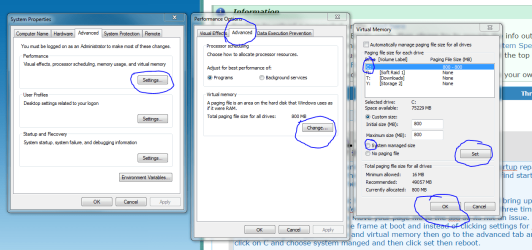
you need to have it load the disk then click repair my computer and its will bring up this window and you want to pick startup repair and like TVeblen said you will probably have to do it three times. Or you can try to use easy bcd instead. First thing lets move your page file to the ssd so its not an issue. go to how you got to the time delay options for the os time frame at boot and instead of clicking settings for startup and recovery choose settings for performance and virtual memory then go to the advanced tab and click on change and then click on C and choose system manged and then click set then reboot (but wait about 5 minutes as it will move the page file first).


EDIT: do you have a means to report back to this thread when your doing the next step(bcd repair) so if something goes wrong you can still ask us questions?
 

Attachments

  • pagefile.PNG
    pagefile.PNG
    63.8 KB · Views: 0

My Computer My Computer

At a glance

10 Pro x64Ryzen 9 3900X64GB(4x16GB) DDR4EVGA 1080ti FTW3
Computer type
PC/Desktop
Computer Manufacturer/Model Number
Custom
OS
10 Pro x64
CPU
Ryzen 9 3900X
Motherboard
Asrock x370 Tachi
Memory
64GB(4x16GB) DDR4
Graphics Card(s)
EVGA 1080ti FTW3
Sound Card
ASUS Xonar Essence STX (V4 Bursons), ODAC rev B, NFB-11, O2
Monitor(s) Displays
3xASUS PB278Q/R, Optoma HD142X
Screen Resolution
3x1440p, 1080p
Hard Drives
512GB 850 EVO(OS, Programs)
4TB (Movies)
3TB (Downloads)
3TB (Programs)
1TB HDD (Games)
2x6TB R1 (videos)
PSU
AX760
Case
Fractal Define R5
Cooling
NH-D15S
Keyboard
Massdrop Ctrl with Box Navy's
Mouse
G903, Alioth XXL Mat
Internet Speed
280/40
Antivirus
MBAM, ESET
Browser
Canary 64 Bit
Other Info
I also own a Thinkpad P50 Xeon 4K, X220T, X1C5
I can try and get on via the wifes laptop/netbook should there be an issue, thanks for the help, I will try and move the page file now
 

My Computer My Computer

At a glance

Windows 7AMD Phenom II X6 1090T 3.2 GHz16GB DDR3 PC3-10700AMD Radeon R9200 Series
Computer type
PC/Desktop
Computer Manufacturer/Model Number
Custom Build
OS
Windows 7
CPU
AMD Phenom II X6 1090T 3.2 GHz
Motherboard
GA-880GM-UD2H
Memory
16GB DDR3 PC3-10700
Graphics Card(s)
AMD Radeon R9200 Series
Sound Card
On Board
Monitor(s) Displays
BenQ XL2420Z
Screen Resolution
1080P
Hard Drives
C: Samsung SSD 60 GB
D: 1000 GB Hitachi
E: 1000 GB Western
Case
CM Storm
Internet Speed
40MB Down 10MB Up
Antivirus
BitDefender
Browser
Firefox
do I load the disk while PC is actually on ? rather than boot from CD ? as when I booted from CD I didnt get any repair options..

I have done the above moving the page file, how can I check to make sure its done what its supposed to ?
 

My Computer My Computer

At a glance

Windows 7AMD Phenom II X6 1090T 3.2 GHz16GB DDR3 PC3-10700AMD Radeon R9200 Series
Computer type
PC/Desktop
Computer Manufacturer/Model Number
Custom Build
OS
Windows 7
CPU
AMD Phenom II X6 1090T 3.2 GHz
Motherboard
GA-880GM-UD2H
Memory
16GB DDR3 PC3-10700
Graphics Card(s)
AMD Radeon R9200 Series
Sound Card
On Board
Monitor(s) Displays
BenQ XL2420Z
Screen Resolution
1080P
Hard Drives
C: Samsung SSD 60 GB
D: 1000 GB Hitachi
E: 1000 GB Western
Case
CM Storm
Internet Speed
40MB Down 10MB Up
Antivirus
BitDefender
Browser
Firefox
do I load the disk while PC is actually on ? rather than boot from CD ? as when I booted from CD I didnt get any repair options..

I have done the above moving the page file, how can I check to make sure its done what its supposed to ?

If you go to the area again it will show it is set at c and if system manged will be same size as your RAM amount. As for the repair disk it does not show up as follows? Make sure ONLY the install dvd and ssd are attached to the system.

Taken from: A guide to recovering from Windows 7 Home Premium User Account lost - Microsoft Community

Insert the Windows installation disk, restart the system. As soon as the PC maker’s logo appears, set the system to boot from the DVD / USB drive as appropriate by pressing repeatedly on the Boot options key or the BIOS key identified onscreen at this point [or identified in the PC manual].

7.2 After several minutes [that can include periods with a blank screen & no apparent activity], wait during the “Starting Windows” screen then, at the first Install Windows dialog, select the language the time-currency format & the keyboard. Then click Next.
042.JPG


7.3 At the next Install Windows dialog, select Repair your computer, wait while it searches for windows installations.
043.JPG


7.4 At the first System Recovery Options dialog, accept Windows 7 as the OS to repair & note the location of the Windows installation [for example, C: on the drive named OS], click Next.
033.JPG


7.5 At the System Recovery Options menu select Command prompt.
044.JPG
 

My Computer My Computer

At a glance

10 Pro x64Ryzen 9 3900X64GB(4x16GB) DDR4EVGA 1080ti FTW3
Computer type
PC/Desktop
Computer Manufacturer/Model Number
Custom
OS
10 Pro x64
CPU
Ryzen 9 3900X
Motherboard
Asrock x370 Tachi
Memory
64GB(4x16GB) DDR4
Graphics Card(s)
EVGA 1080ti FTW3
Sound Card
ASUS Xonar Essence STX (V4 Bursons), ODAC rev B, NFB-11, O2
Monitor(s) Displays
3xASUS PB278Q/R, Optoma HD142X
Screen Resolution
3x1440p, 1080p
Hard Drives
512GB 850 EVO(OS, Programs)
4TB (Movies)
3TB (Downloads)
3TB (Programs)
1TB HDD (Games)
2x6TB R1 (videos)
PSU
AX760
Case
Fractal Define R5
Cooling
NH-D15S
Keyboard
Massdrop Ctrl with Box Navy's
Mouse
G903, Alioth XXL Mat
Internet Speed
280/40
Antivirus
MBAM, ESET
Browser
Canary 64 Bit
Other Info
I also own a Thinkpad P50 Xeon 4K, X220T, X1C5
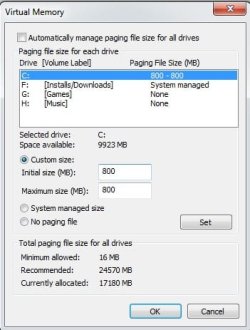
page.jpg

thats what it looks likes now, wont let me set system managed size, says drives to small or lack of space,

will try the recovery in a minute, once I know above is ok

EDIT: Removed some stuff from C, and now set it like you said, Do I set F to have no paging file ?
 

My Computer My Computer

At a glance

Windows 7AMD Phenom II X6 1090T 3.2 GHz16GB DDR3 PC3-10700AMD Radeon R9200 Series
Computer type
PC/Desktop
Computer Manufacturer/Model Number
Custom Build
OS
Windows 7
CPU
AMD Phenom II X6 1090T 3.2 GHz
Motherboard
GA-880GM-UD2H
Memory
16GB DDR3 PC3-10700
Graphics Card(s)
AMD Radeon R9200 Series
Sound Card
On Board
Monitor(s) Displays
BenQ XL2420Z
Screen Resolution
1080P
Hard Drives
C: Samsung SSD 60 GB
D: 1000 GB Hitachi
E: 1000 GB Western
Case
CM Storm
Internet Speed
40MB Down 10MB Up
Antivirus
BitDefender
Browser
Firefox
View attachment 356837

thats what it looks likes now, wont let me set system managed size, says drives to small or lack of space,

will try the recovery in a minute, once I know above is ok
If it's 800 your fine as it can dump bsod info with that much and I only made mine 800 like you saw because of that or I would not even have one. above 8GB of ram it seems pointless unless you have certain virtual ram issues. So try your startup repair next and the guide that TVeblen posted is very good for that.

OH and set none for the F drive.
 

My Computer My Computer

At a glance

10 Pro x64Ryzen 9 3900X64GB(4x16GB) DDR4EVGA 1080ti FTW3
Computer type
PC/Desktop
Computer Manufacturer/Model Number
Custom
OS
10 Pro x64
CPU
Ryzen 9 3900X
Motherboard
Asrock x370 Tachi
Memory
64GB(4x16GB) DDR4
Graphics Card(s)
EVGA 1080ti FTW3
Sound Card
ASUS Xonar Essence STX (V4 Bursons), ODAC rev B, NFB-11, O2
Monitor(s) Displays
3xASUS PB278Q/R, Optoma HD142X
Screen Resolution
3x1440p, 1080p
Hard Drives
512GB 850 EVO(OS, Programs)
4TB (Movies)
3TB (Downloads)
3TB (Programs)
1TB HDD (Games)
2x6TB R1 (videos)
PSU
AX760
Case
Fractal Define R5
Cooling
NH-D15S
Keyboard
Massdrop Ctrl with Box Navy's
Mouse
G903, Alioth XXL Mat
Internet Speed
280/40
Antivirus
MBAM, ESET
Browser
Canary 64 Bit
Other Info
I also own a Thinkpad P50 Xeon 4K, X220T, X1C5
Tha ks very much, will try the repair now and report back here if I do it and what the outcome is, do I do the repair with just the C Drive plugged in ?
 

My Computer My Computer

At a glance

Windows 7AMD Phenom II X6 1090T 3.2 GHz16GB DDR3 PC3-10700AMD Radeon R9200 Series
Computer type
PC/Desktop
Computer Manufacturer/Model Number
Custom Build
OS
Windows 7
CPU
AMD Phenom II X6 1090T 3.2 GHz
Motherboard
GA-880GM-UD2H
Memory
16GB DDR3 PC3-10700
Graphics Card(s)
AMD Radeon R9200 Series
Sound Card
On Board
Monitor(s) Displays
BenQ XL2420Z
Screen Resolution
1080P
Hard Drives
C: Samsung SSD 60 GB
D: 1000 GB Hitachi
E: 1000 GB Western
Case
CM Storm
Internet Speed
40MB Down 10MB Up
Antivirus
BitDefender
Browser
Firefox
correct the ssd.
 

My Computer My Computer

At a glance

10 Pro x64Ryzen 9 3900X64GB(4x16GB) DDR4EVGA 1080ti FTW3
Computer type
PC/Desktop
Computer Manufacturer/Model Number
Custom
OS
10 Pro x64
CPU
Ryzen 9 3900X
Motherboard
Asrock x370 Tachi
Memory
64GB(4x16GB) DDR4
Graphics Card(s)
EVGA 1080ti FTW3
Sound Card
ASUS Xonar Essence STX (V4 Bursons), ODAC rev B, NFB-11, O2
Monitor(s) Displays
3xASUS PB278Q/R, Optoma HD142X
Screen Resolution
3x1440p, 1080p
Hard Drives
512GB 850 EVO(OS, Programs)
4TB (Movies)
3TB (Downloads)
3TB (Programs)
1TB HDD (Games)
2x6TB R1 (videos)
PSU
AX760
Case
Fractal Define R5
Cooling
NH-D15S
Keyboard
Massdrop Ctrl with Box Navy's
Mouse
G903, Alioth XXL Mat
Internet Speed
280/40
Antivirus
MBAM, ESET
Browser
Canary 64 Bit
Other Info
I also own a Thinkpad P50 Xeon 4K, X220T, X1C5
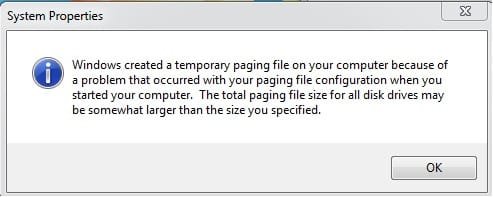
page Error.jpg

Rebooted after removing Page File from F and got this error message ? should I continue with the repair ?
 

My Computer My Computer

At a glance

Windows 7AMD Phenom II X6 1090T 3.2 GHz16GB DDR3 PC3-10700AMD Radeon R9200 Series
Computer type
PC/Desktop
Computer Manufacturer/Model Number
Custom Build
OS
Windows 7
CPU
AMD Phenom II X6 1090T 3.2 GHz
Motherboard
GA-880GM-UD2H
Memory
16GB DDR3 PC3-10700
Graphics Card(s)
AMD Radeon R9200 Series
Sound Card
On Board
Monitor(s) Displays
BenQ XL2420Z
Screen Resolution
1080P
Hard Drives
C: Samsung SSD 60 GB
D: 1000 GB Hitachi
E: 1000 GB Western
Case
CM Storm
Internet Speed
40MB Down 10MB Up
Antivirus
BitDefender
Browser
Firefox
View attachment 356840

Rebooted after removing Page File from F and got this error message ? should I continue with the repair ?

Yeah that's fine, when were are all done you can put a system manged one back on a drive with space. You should probably try to free up your ssd a little for free space if you can. Just worry about the startup repair first.
 

My Computer My Computer

At a glance

10 Pro x64Ryzen 9 3900X64GB(4x16GB) DDR4EVGA 1080ti FTW3
Computer type
PC/Desktop
Computer Manufacturer/Model Number
Custom
OS
10 Pro x64
CPU
Ryzen 9 3900X
Motherboard
Asrock x370 Tachi
Memory
64GB(4x16GB) DDR4
Graphics Card(s)
EVGA 1080ti FTW3
Sound Card
ASUS Xonar Essence STX (V4 Bursons), ODAC rev B, NFB-11, O2
Monitor(s) Displays
3xASUS PB278Q/R, Optoma HD142X
Screen Resolution
3x1440p, 1080p
Hard Drives
512GB 850 EVO(OS, Programs)
4TB (Movies)
3TB (Downloads)
3TB (Programs)
1TB HDD (Games)
2x6TB R1 (videos)
PSU
AX760
Case
Fractal Define R5
Cooling
NH-D15S
Keyboard
Massdrop Ctrl with Box Navy's
Mouse
G903, Alioth XXL Mat
Internet Speed
280/40
Antivirus
MBAM, ESET
Browser
Canary 64 Bit
Other Info
I also own a Thinkpad P50 Xeon 4K, X220T, X1C5
Thanks mate, on to repair I go now
 

My Computer My Computer

At a glance

Windows 7AMD Phenom II X6 1090T 3.2 GHz16GB DDR3 PC3-10700AMD Radeon R9200 Series
Computer type
PC/Desktop
Computer Manufacturer/Model Number
Custom Build
OS
Windows 7
CPU
AMD Phenom II X6 1090T 3.2 GHz
Motherboard
GA-880GM-UD2H
Memory
16GB DDR3 PC3-10700
Graphics Card(s)
AMD Radeon R9200 Series
Sound Card
On Board
Monitor(s) Displays
BenQ XL2420Z
Screen Resolution
1080P
Hard Drives
C: Samsung SSD 60 GB
D: 1000 GB Hitachi
E: 1000 GB Western
Case
CM Storm
Internet Speed
40MB Down 10MB Up
Antivirus
BitDefender
Browser
Firefox
finally got repair to start, had to plug the other HD back in or it would hang and not load from CD..

Problem is, when in repair it shows my operating system, but says its on my D Drive, nothing showing for my C Drive, do I repair the D or is there something else I should be doing ?
 

My Computer My Computer

At a glance

Windows 7AMD Phenom II X6 1090T 3.2 GHz16GB DDR3 PC3-10700AMD Radeon R9200 Series
Computer type
PC/Desktop
Computer Manufacturer/Model Number
Custom Build
OS
Windows 7
CPU
AMD Phenom II X6 1090T 3.2 GHz
Motherboard
GA-880GM-UD2H
Memory
16GB DDR3 PC3-10700
Graphics Card(s)
AMD Radeon R9200 Series
Sound Card
On Board
Monitor(s) Displays
BenQ XL2420Z
Screen Resolution
1080P
Hard Drives
C: Samsung SSD 60 GB
D: 1000 GB Hitachi
E: 1000 GB Western
Case
CM Storm
Internet Speed
40MB Down 10MB Up
Antivirus
BitDefender
Browser
Firefox
Much Much Much respect guys, Z Drive now formatted, C drive now set as it should be,

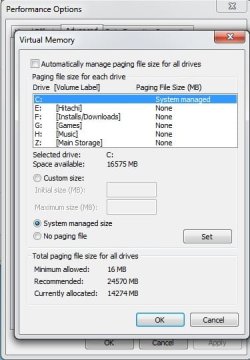
Only thing I can see as a possibly issue atm is my virtual memory. Im guessing I need to clear my C drive to make this better ?

Virtual Memory.jpg

Only having a 60 GB SSD trying to remove anything is near on impossible, so think im going to need to Buy a bigger C Drive at some point, Will it hinder me much atm ?
 

My Computer My Computer

At a glance

Windows 7AMD Phenom II X6 1090T 3.2 GHz16GB DDR3 PC3-10700AMD Radeon R9200 Series
Computer type
PC/Desktop
Computer Manufacturer/Model Number
Custom Build
OS
Windows 7
CPU
AMD Phenom II X6 1090T 3.2 GHz
Motherboard
GA-880GM-UD2H
Memory
16GB DDR3 PC3-10700
Graphics Card(s)
AMD Radeon R9200 Series
Sound Card
On Board
Monitor(s) Displays
BenQ XL2420Z
Screen Resolution
1080P
Hard Drives
C: Samsung SSD 60 GB
D: 1000 GB Hitachi
E: 1000 GB Western
Case
CM Storm
Internet Speed
40MB Down 10MB Up
Antivirus
BitDefender
Browser
Firefox
In Virtual Memory, select Custom Size, and make the initial 1024MB and the maximum 2048MB. That is plenty for a small drive.

Windows likes some overhead for various functions and you get best performance when the C: partition is no more than about 75% full. There is no problem with less free space, but your performance may drop off the more full it gets.
 
Last edited:

My Computer My Computer

At a glance

Windows 7 64 Bit Home Premium SP1i7-3820GSkill F3-14900CL9Q - 16GBEVGA GeForce GTX660 - Driver 352.86
Computer type
PC/Desktop
Computer Manufacturer/Model Number
Home Built - Jan 2013
OS
Windows 7 64 Bit Home Premium SP1
CPU
i7-3820
Motherboard
Asus P9X79-PRO - Bios 4608
Memory
GSkill F3-14900CL9Q - 16GB
Graphics Card(s)
EVGA GeForce GTX660 - Driver 352.86
Sound Card
On board Realtek ALC898
Monitor(s) Displays
Acer S271HL
Screen Resolution
1920 x 1080
Hard Drives
#1- Samsung 840 Pro Series
#2- Western Digital WD1002FAEX Sata3 Black
#3- Western Digital WD1002FAEX Sata3 Black
PSU
Corsair CMPSU-850TX-V2 - 850 watt (by Seasonic)
Case
Corsair Obsidian 550D
Cooling
Standard 3 120mm case fans, Cooler Master Hyper 212 EVO
Keyboard
MS KC-0405
Mouse
Intellimouse 5-button
Internet Speed
56 Mbits/Sec (on a good day)
Antivirus
Avast & Malwarebytes
Browser
Firefox
Other Info
Asus DVD - DRW-24B1ST 24X
Much Much Much respect guys, Z Drive now formatted, C drive now set as it should be,

Only thing I can see as a possibly issue atm is my virtual memory. Im guessing I need to clear my C drive to make this better ?

View attachment 356883

Only having a 60 GB SSD trying to remove anything is near on impossible, so think im going to need to Buy a bigger C Drive at some point, Will it hinder me much atm ?

Make sure the drive doesn't completely fill up or you could end up with a system that won't boot. WizTree is the best utility I've found for checking where space is used. They have a Portable Zip available, so you can unzip and run it, without installing it. [url=http://antibody-software.com/web/software/software/wiztree-finds-the-files-and-folders-using-the-most-disk-space-on-your-hard-drive/]Antibody Software - WizTree finds the files and folders using the most disk space on your hard drive[/url] There are utilities and options to help free up space if you're interested, such as CCleaner TFC - Temp File Cleaner turn off Hibernate
 

My Computer My Computer

At a glance

Multi-Boot W7_Pro_x64 W8.1_Pro_x64 W10_Pro_x6...AMD Athlon II x4 6206GB GSkill DDR2 800AMD 4670 GPU + AMD 4200 IGP
Computer type
PC/Desktop
Computer Manufacturer/Model Number
home built
OS
Multi-Boot W7_Pro_x64 W8.1_Pro_x64 W10_Pro_x64 +Linux_VMs +Chromium_VM
CPU
AMD Athlon II x4 620
Motherboard
Gigabyte GA-MA785G-UD3H
Memory
6GB GSkill DDR2 800
Graphics Card(s)
AMD 4670 GPU + AMD 4200 IGP
Sound Card
on board Realtek ALC889A
Monitor(s) Displays
RCA 40" LCD TV, Insignia 32" LCD TV, HP 15" LCD monitor
Screen Resolution
1680 x 1050
Hard Drives
OCZ Vertex 3 120GB,
Samsung F3 1TB (3),
Several others - WD, Seagate, Hitachi, ...
PSU
Corsair 500 W
Case
Rosewill mid tower
Cooling
CM 90mm rifle
Keyboard
Gyration wireless, Logitech wireless, Dell USB wired
Mouse
Gyration wireless, Logitech wireless, V7 USB wired
Internet Speed
Spectrum - 100Mbps D / 10Mbps U
Antivirus
Avast, MBAM3, EMET, WinPatrol
Browser
Pale Moon, Firefox, IE
Other Info
2 multi-boot PC's
Mainly HTPC/Office/Gen purpose (no gaming).
Trendnet USB KVM.
LG DVD burner/Blue Ray Player.
Tray system for removable SATA backup drives.

Not currently OCd, under-volted.
I use Hybrid sleep, rarely re-boot or shutdown.

Hauppauge HD-PVR, Avermedia PCIe TV Tuner, Hauppauge PCI TV Tuner.
Wont let me multi quote for some reason, Thanks TVeblen, set it as you have suggested, just doing that has given me more space on C Drive, now have 17 GB spare of 55 GB

Will have a look at Wiztree DavidE, I already have CCleaner I just looked at a guide for turning hibernation off, and found a Microsoft fixit, I now have 29.1 GB free on C.. great help DavidE

Im guessing I dont need the hibernation, cant beleive in all my years using PC's I have never heard of this before.

This forum is a fountain of great information and help, cant thank you all enough
 

My Computer My Computer

At a glance

Windows 7AMD Phenom II X6 1090T 3.2 GHz16GB DDR3 PC3-10700AMD Radeon R9200 Series
Computer type
PC/Desktop
Computer Manufacturer/Model Number
Custom Build
OS
Windows 7
CPU
AMD Phenom II X6 1090T 3.2 GHz
Motherboard
GA-880GM-UD2H
Memory
16GB DDR3 PC3-10700
Graphics Card(s)
AMD Radeon R9200 Series
Sound Card
On Board
Monitor(s) Displays
BenQ XL2420Z
Screen Resolution
1080P
Hard Drives
C: Samsung SSD 60 GB
D: 1000 GB Hitachi
E: 1000 GB Western
Case
CM Storm
Internet Speed
40MB Down 10MB Up
Antivirus
BitDefender
Browser
Firefox
Wont let me multi quote for some reason, Thanks TVeblen, set it as you have suggested, just doing that has given me more space on C Drive, now have 17 GB spare of 55 GB

Will have a look at Wiztree DavidE, I already have CCleaner I just looked at a guide for turning hibernation off, and found a Microsoft fixit, I now have 29.1 GB free on C.. great help DavidE

Im guessing I dont need the hibernation, cant beleive in all my years using PC's I have never heard of this before.

This forum is a fountain of great information and help, cant thank you all enough

Yeah Hibernation file takes a lot of space.
 

My Computer My Computer

At a glance

10 Pro x64Ryzen 9 3900X64GB(4x16GB) DDR4EVGA 1080ti FTW3
Computer type
PC/Desktop
Computer Manufacturer/Model Number
Custom
OS
10 Pro x64
CPU
Ryzen 9 3900X
Motherboard
Asrock x370 Tachi
Memory
64GB(4x16GB) DDR4
Graphics Card(s)
EVGA 1080ti FTW3
Sound Card
ASUS Xonar Essence STX (V4 Bursons), ODAC rev B, NFB-11, O2
Monitor(s) Displays
3xASUS PB278Q/R, Optoma HD142X
Screen Resolution
3x1440p, 1080p
Hard Drives
512GB 850 EVO(OS, Programs)
4TB (Movies)
3TB (Downloads)
3TB (Programs)
1TB HDD (Games)
2x6TB R1 (videos)
PSU
AX760
Case
Fractal Define R5
Cooling
NH-D15S
Keyboard
Massdrop Ctrl with Box Navy's
Mouse
G903, Alioth XXL Mat
Internet Speed
280/40
Antivirus
MBAM, ESET
Browser
Canary 64 Bit
Other Info
I also own a Thinkpad P50 Xeon 4K, X220T, X1C5
One other thing you can do to save space is to limit your Volume Shadow Copies (System Restore Points) size.

Start > Computer > System Properties > System Protection > select Drive C: > Configure > And move the slider until you have 5% or 5GB, whichever is less. You could go as small as 2GB without issue if you wanted, but don't allow more than 5GB on a small drive.
 

My Computer My Computer

At a glance

Windows 7 64 Bit Home Premium SP1i7-3820GSkill F3-14900CL9Q - 16GBEVGA GeForce GTX660 - Driver 352.86
Computer type
PC/Desktop
Computer Manufacturer/Model Number
Home Built - Jan 2013
OS
Windows 7 64 Bit Home Premium SP1
CPU
i7-3820
Motherboard
Asus P9X79-PRO - Bios 4608
Memory
GSkill F3-14900CL9Q - 16GB
Graphics Card(s)
EVGA GeForce GTX660 - Driver 352.86
Sound Card
On board Realtek ALC898
Monitor(s) Displays
Acer S271HL
Screen Resolution
1920 x 1080
Hard Drives
#1- Samsung 840 Pro Series
#2- Western Digital WD1002FAEX Sata3 Black
#3- Western Digital WD1002FAEX Sata3 Black
PSU
Corsair CMPSU-850TX-V2 - 850 watt (by Seasonic)
Case
Corsair Obsidian 550D
Cooling
Standard 3 120mm case fans, Cooler Master Hyper 212 EVO
Keyboard
MS KC-0405
Mouse
Intellimouse 5-button
Internet Speed
56 Mbits/Sec (on a good day)
Antivirus
Avast & Malwarebytes
Browser
Firefox
Other Info
Asus DVD - DRW-24B1ST 24X
Back
Top