Cant get 7 Ultimate 64 to see 3TB drive

Bebeto94

New member
Local time
5:39 PM
Messages
4
Guys,
Ive spent days now trying to get windows 7 64bit ultimate to see my new 3TB barracuda drive. Ive read several pages of info but still to no avail. All i want is a single 3TB partition but am always left with 2TB and a seperate partition of 750GB approx. My gigabyte motherboard is new and uefi compatible and so I booted the windows DVD in uefi mode but still no different. It still says I have 2TB and 750GB ?? Is this something to do with formatting the drive to sort this out as the windows setup wont let me increase or delete partitions.
Any help appreciated.
Cheers guys
Steve
 

My Computer My Computer

At a glance

Windows 7 Ultimate 64AM3+ 420016GBRadeon HD7850
Computer type
PC/Desktop
Computer Manufacturer/Model Number
Custom Build
OS
Windows 7 Ultimate 64
CPU
AM3+ 4200
Motherboard
Gigabyte GA-990FXA-UD3
Memory
16GB
Graphics Card(s)
Radeon HD7850
Hard Drives
Seagate 3TB Barracuda
I realize the board is new but check it's Support Downloads webpage anyway to see if there is a newer BIOS version which sometimes handles these larger drives which may not have been available during manufacture.

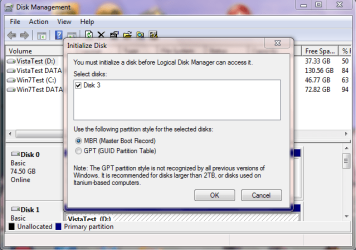
If you are trying to install Win7 using UEFI (Unified Extensible Firmware Interface) - Install Windows 7 with to this HDD after its been formatted in MBR format, then a UEFI install requires GPT formatting which handles large drives better. So be sure to wipe the HD first with Diskpart Clean Command to reset the formatting so the UEFI installer will create GPT partitions.

Keep in mind also that such a huge install partition makes backup imaging unwieldy, and this is the modern method by which most users handle recovery in 20 minutes if Win7 becomes unbootable.

Better to have a compact OS and Programs partition, then link your User folders data to a larger data partition by rightclicking each User folder copied there to add to the related Library - Include a Folder - Windows 7 Forums.
 
Last edited:
Thanks for the reply.
Yes, ive already checked and its running the latest BIOS version.
Perhaps it might be an idea to have a partition for backup/storage.
Cheers
Steve
 

My Computer My Computer

At a glance

Windows 7 Ultimate 64AM3+ 420016GBRadeon HD7850
Computer type
PC/Desktop
Computer Manufacturer/Model Number
Custom Build
OS
Windows 7 Ultimate 64
CPU
AM3+ 4200
Motherboard
Gigabyte GA-990FXA-UD3
Memory
16GB
Graphics Card(s)
Radeon HD7850
Hard Drives
Seagate 3TB Barracuda
Hi there

Theog has shown how to set these up as GPT disks.

For 3 GB (> 2GB if my basic arithmetic still works in my advancing years (and this is BEFORE going out to the pub tonight) need you to use GPT disks.

Normal systems can read / write these too -- you just can't BOOT from them if you don't have UEFI in the BIOS -- you don't need UEFI to USE GPT disks though.

Cheers
jimbo
 

My Computer My Computer

At a glance

Linux CENTOS 7 / various Windows OS'es and se...Intel i7 Intel i58GB, 16GBOn Motherboard
Computer type
PC/Desktop
Computer Manufacturer/Model Number
Custom built, several laptops HP/ASUS
OS
Linux CENTOS 7 / various Windows OS'es and servers
CPU
Intel i7 Intel i5
Memory
8GB, 16GB
Graphics Card(s)
On Motherboard
Sound Card
Realtek HD audio
Monitor(s) Displays
Apple Cinema display, Samsung LCD
Screen Resolution
1920 X 1080
Hard Drives
4 X 1TB SATA
Mouse
Toshiba wireless laser
Internet Speed
> 20MB up
Thanks for all the replies guys. I thought id cracked it yesterday when I compiled a UEFI BOOT USB of windows 7 after using diskpart to clean and convert the hard drive to GPT and it displayed the whole 3TB drive (well about 2.89TB approx) in the installation setup but when windows was installed and I checked the properties of the drive, it displayed the same again :- 2TB partition (primary) and about 750gb in another partition I cant access. What Id ideally like is one primary drive (c:) with all available space from the 3TB. Ive read somewhere that you cant do this with a bootable drive using GPT ? Any further advice appreciated.
Cheers guys
Steve
 

My Computer My Computer

At a glance

Windows 7 Ultimate 64AM3+ 420016GBRadeon HD7850
Computer type
PC/Desktop
Computer Manufacturer/Model Number
Custom Build
OS
Windows 7 Ultimate 64
CPU
AM3+ 4200
Motherboard
Gigabyte GA-990FXA-UD3
Memory
16GB
Graphics Card(s)
Radeon HD7850
Hard Drives
Seagate 3TB Barracuda
All i want is a single 3TB partition

You can not have a single partition, if you install to that HDD.
 

My Computer My Computer

At a glance

ME/XP/Vista/Win7
OS
ME/XP/Vista/Win7
Is the HDD plug in to a SATA3 version port & cable?
 

My Computer My Computer

At a glance

ME/XP/Vista/Win7
OS
ME/XP/Vista/Win7
Yes it is. So let me get this right as i might have got the wrong end of the stick. I cant have the full available 3TB on my boot drive but I can have a 2tb boot drive and the rest of the drive on a separate partition which is converted to GPT ?
Most appreciated guys
Steve
 

My Computer My Computer

At a glance

Windows 7 Ultimate 64AM3+ 420016GBRadeon HD7850
Computer type
PC/Desktop
Computer Manufacturer/Model Number
Custom Build
OS
Windows 7 Ultimate 64
CPU
AM3+ 4200
Motherboard
Gigabyte GA-990FXA-UD3
Memory
16GB
Graphics Card(s)
Radeon HD7850
Hard Drives
Seagate 3TB Barracuda
Back
Top