Can’t get access to shared folder from one computer to
I have 2 windows 7 computers and i'm trying to share a folder (that I want password protection on) outside of the homegroup.
Both computers are part of the same workgroup and I have the same user account/password combination on both computers plus I have password protected sharing turned on in the network and sharing centre along with file and printer sharing turned on.
On computer 1 I have right clicked and selected that I want the folder shared. When I navigate via the network on computer 2 to computer 1 the shared folder shows up on computer 2 but double clicking on it to open it gives me an alert saying I don't have permission to access it, no option to type in the user name and password (according to the help files I shouldn't even need to type the password in if both computers have the same username/password anyway but would need it if I'm logged in as a different user). It's just a blanket denial of access.
I do have a Homegroup set up yes but I'm using the advanced sharing (the old way before Homegroups existed) to share a particular folder. Forgetting the password thing for a second. I'm just simply selecting that I want a folder shared, on the second computer the shared folder can be seen but I can't open it as I apparently don't have permission to open it.
According to the help files if the user account and passwords are not the same on both computers I should be prompted for a username and password (as I have password protected file sharing turned on). But if both usernames and passwords are the same (which they are) then I shouldn't even need the password.
To confuse matters even more I've tried it with password protected file sharing turned off on the computer where the folder I want shared is on. Yet still from the second computer I'm told I don't have access. This happens with the firewall on computer 1 turned off too.
I've sort of managed to get this working in a round about way. In the Network and Sharing Centre advanced sharing settings I've set it to use user accounts and passwords instead of let windows manage homegroup settings.
This has allowed me to open a network shared folder on the other computer without being denied access. The label for the setting I changed is completely and utterly misleading though as I'm using standard networking via the workgroup so nothing to do with homegroup at all and it still doesn't have anything to do with the password either as changing the password for the user account on computer 2 still gave me access to the share. But trying to access it from a different user account on computer 2 simply denied me access without asking for a password.
Also password protected file sharing is a different setting to the one above but has no effect on whether a password is asked for or not since you are either given access (I'm presuming based on user name being the same on both machines but password doesn't matter) or completely denied access.
Homegroup just adds another layer of settings and confusion on top of an already badly designed, with settings all over the place that aren't labelled correctly system for workgroups. Add to that the fact that the help files have no relation to what actually happens if you follow the instructions doesn't help either.
I've managed to allow myself access to the music, pictures and videos folders from one computer to the other as long as I'm logged in with the same user name. It still won't allow access to accounts with a different user name even though the folders are set up to share with everyone with full access. To be honest I just give up with it now though. Microsoft really need to sort this networking mess out.
Yeah, that's how I got it to work, after fiddling with some seemingly unrelated settings. It's just that the explanations of what each setting does are completely misleading.
I had a workgroup and now run a homegroup here @ my home office due to the ease of sharing with the other PCs on the network (all Win7). <-- unless you count vm's!
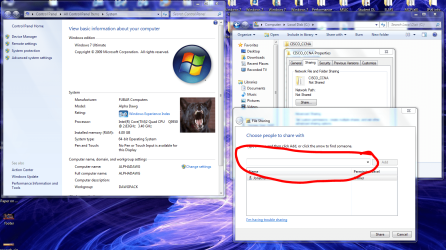
It shows up as a workgroup from my old setup... in addition to the easy HomeGroup shares I still have all sharing options through the folder properties ---> Sharing tab ---> Share button... I assume you tried Everyone through the circled drop down shown below? Or through Advanced Sharing if that doesnt work...
My Computer
Computer Manufacturer/Model Number
Homebrew PC - "Alpha_Dawg"
OS
Windows 7 Ultimate 64 bit Steve Ballmer Signature Edition
Yeah, I've tried that too. Another thing that confuses me with that is that the help files suggest that using that drop down list is how you share with only selected people that are part of the homegroup yet only local accounts appear in the drop down list. So how do you specify that you only want certain people on the homegroup to access certain folders?
That's what I was thinking but the help files have this point under file sharing: -
"If password-protected sharing is turned on, the person you want to share with must have a user account and password on your computer for access to shared items. Password-protected sharing is located in Control Panel under Advanced sharing settings. It's turned on by default."
This implies that you can share with specific people without the need for them to have a local account.
Sounds like I am having the same problem you are having.
3 Win7 computers, one Win7Pro as a server using advanced sharing on specific folders with password protection turned on. User accounts/passwords for the 2 Win7HP client computers are set up on the server machine. On one client I get prompted for the username/password and everything works fine. On the other, I can see the shared folders but when clicked, I never get prompted for a password... it just says that "you don't have permission to access..."
As far as I can tell I have them set up identically with security permissions and advanced sharing permissions all linked to usernames. I have tried with the same usernames and passwords as the clients but that did not help either.
I am pulling my hair out on this one! It seems so simple. Help!