Cant Get Full Screen mode

timaloy

New member
Local time
1:02 AM
Messages
4
hello there.
was wondering if any one could help im running winows7 ultimate x64 on a 42 inch hdmi to dvi tv and cannot get full screen mode on my desktop unless i have just finished playing a game in the 1920 x1080 resolution then when i finish the game its in full screen mode.and after i restart my comp it goes back to having the black rim around the screen

running
asus p5kc
q6600
8 gig ocz
1tb hdd
ati 4870
 

My Computer

Computer Manufacturer/Model Number
asus
OS
windows 7 ultimate x64
CPU
asus Q6600 quadcore
Motherboard
asus PK5C
Memory
8 gig ocz 1600
Graphics Card(s)
ati 4870
Sound Card
hdmi
Monitor(s) Displays
lg42 lcdtv
Screen Resolution
1920x1080
Hard Drives
1tb
500gb
PSU
ocz 600watt
Case
coolermaster haf
Cooling
stock
Keyboard
wolfking
Mouse
razer diamondback 3g
Internet Speed
50 MEG
Hi timaloy, welcome to the forums.

I would advise installing the latest ATI drivers which should come with utilities to give control over screen output. There is normally a zoom function which I've had to use with Intel GFX to get full screen capabilities.

Hope this helps :)


OS
 

My Computer

Computer Manufacturer/Model Number
Compaq Desktop
OS
Windows 7 Ultimate x64
CPU
AMD Sempron Dual Core
Memory
3GB
Graphics Card(s)
NVIDIA GeForce 6150SE nForce 430
Screen Resolution
1024x768
Hard Drives
150GB Sata
With ATI, you are referring to OverScan.

Applies to CCC 9.7 and 9.8 and 9.9
as far as I know

In the CCC advanced window
Upper left corner - Graphics
Desktops & Displays
There will be a small image of a monitor in the bottom left corner
NOT THE BIG ONE IN THE MIDDLE
click the black arrow
click configure
scaling options

This GUI sux.
 
With ATI, you are referring to OverScan.

Applies to CCC 9.7 and 9.8 and 9.9
as far as I know

In the CCC advanced window
Upper left corner - Graphics
Desktops & Displays
There will be a small image of a monitor in the bottom left corner
NOT THE BIG ONE IN THE MIDDLE
click the black arrow
click configure
scaling options

This GUI sux.

Scaling Options, them's the words I was groping for ;)
 

My Computer

Computer Manufacturer/Model Number
Compaq Desktop
OS
Windows 7 Ultimate x64
CPU
AMD Sempron Dual Core
Memory
3GB
Graphics Card(s)
NVIDIA GeForce 6150SE nForce 430
Screen Resolution
1024x768
Hard Drives
150GB Sata
With ATI, you are referring to OverScan.

Applies to CCC 9.7 and 9.8 and 9.9
as far as I know

In the CCC advanced window
Upper left corner - Graphics
Desktops & Displays
There will be a small image of a monitor in the bottom left corner
NOT THE BIG ONE IN THE MIDDLE
click the black arrow
click configure
scaling options

This GUI sux.

Scaling Options, them's the words I was groping for ;)
I grok that.

I do hate this new ATI GUI. It took me about ten minutes to find the bleep setting.
 
still not working

thanks for your reply everyone

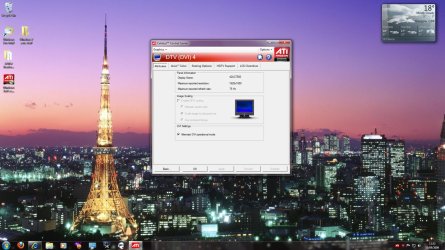
i tryed the ccc thing you said antman but its not letting me change the scaling options at all here is what i am looking at thanks again lads help is appreciated


With ATI, you are referring to OverScan.

Applies to CCC 9.7 and 9.8 and 9.9
as far as I know

In the CCC advanced window
Upper left corner - Graphics
Desktops & Displays
There will be a small image of a monitor in the bottom left corner
NOT THE BIG ONE IN THE MIDDLE
click the black arrow
click configure
scaling options

This GUI sux.
 

Attachments

  • ccc.jpg
    ccc.jpg
    236.2 KB · Views: 417

My Computer

Computer Manufacturer/Model Number
asus
OS
windows 7 ultimate x64
CPU
asus Q6600 quadcore
Motherboard
asus PK5C
Memory
8 gig ocz 1600
Graphics Card(s)
ati 4870
Sound Card
hdmi
Monitor(s) Displays
lg42 lcdtv
Screen Resolution
1920x1080
Hard Drives
1tb
500gb
PSU
ocz 600watt
Case
coolermaster haf
Cooling
stock
Keyboard
wolfking
Mouse
razer diamondback 3g
Internet Speed
50 MEG
well i got it everyone thank you for your help resolving my problems, i just moved the scaling bar to right and bang were in. i guess sometimes i am a bit of a rubbernut
thank you all and take care

regards timaloy
 

My Computer

Computer Manufacturer/Model Number
asus
OS
windows 7 ultimate x64
CPU
asus Q6600 quadcore
Motherboard
asus PK5C
Memory
8 gig ocz 1600
Graphics Card(s)
ati 4870
Sound Card
hdmi
Monitor(s) Displays
lg42 lcdtv
Screen Resolution
1920x1080
Hard Drives
1tb
500gb
PSU
ocz 600watt
Case
coolermaster haf
Cooling
stock
Keyboard
wolfking
Mouse
razer diamondback 3g
Internet Speed
50 MEG
As someone mentioned before, the ATI control sux. I knew exactly what I was looking for, have used it before, and still took ten minutes to find it again.

As such, you do not owe me for the brief face palm.
 
Back
Top