can't get new SSD to run in SATAII mode

CBailey

New member
Local time
5:05 AM
Messages
8
Hi all

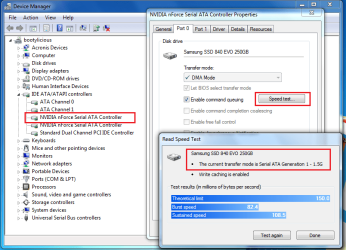
Not sure if this is a driver problem or not but I've just done a fresh install of Windows 7 64bit onto my new Samsung 840 EVO SSD and the drive is stuck in SATAI mode. My motherboard (Gigabyte N650SLI-DS4 - Nvidia 650i SLI chipset) supports SATAII, In fact my other, conventional, HDD is running in SATAII and has better speeds than the SSD (according to the Speed Test for the SATA port in Device Manager)!

My motherboard doesn't support AHCI unfortunately and I can live with that but would really like SATAII to work. Any suggestions.

What I have done so far;
turned RAID on in my BIOS as this has helped some people achieve SATAII on Nvidia chipsets (see http://forum.crucial.com/t5/Solid-S...DS4-C300-works-only-as-SATA/td-p/12203/page/2 for reference)
I even edited the registry to enable the AHCI driver (in desperation as it was mentioned a lot on the web).
My RAID was not turned on when I installed Windows and I didn't load any special drivers during the install because I didn't have any. I suppose I could reload Windows now I have turned on RAID but would want to have some hope it would make a difference

Any help gratefully received!
 

My Computer My Computer

At a glance

Windows 7 64bit
Computer type
PC/Desktop
Computer Manufacturer/Model Number
Custom build
OS
Windows 7 64bit
Hello CBaily. Welcome to the forum.

SATA v1 is 1.5Gb/sec
SATA vII is 3 Gb/sec
SATA vIII is 6Gb/sec

Your board has 4 SATA ports and they are all SATA II - 3 Gb/sec.

So I'm not sure what you mean when you say that they are running in SATA I mode. What are you looking at to determine that?
 

My Computer My Computer

At a glance

Windows 7 64 Bit Home Premium SP1i7-3820GSkill F3-14900CL9Q - 16GBEVGA GeForce GTX660 - Driver 352.86
Computer type
PC/Desktop
Computer Manufacturer/Model Number
Home Built - Jan 2013
OS
Windows 7 64 Bit Home Premium SP1
CPU
i7-3820
Motherboard
Asus P9X79-PRO - Bios 4608
Memory
GSkill F3-14900CL9Q - 16GB
Graphics Card(s)
EVGA GeForce GTX660 - Driver 352.86
Sound Card
On board Realtek ALC898
Monitor(s) Displays
Acer S271HL
Screen Resolution
1920 x 1080
Hard Drives
#1- Samsung 840 Pro Series
#2- Western Digital WD1002FAEX Sata3 Black
#3- Western Digital WD1002FAEX Sata3 Black
PSU
Corsair CMPSU-850TX-V2 - 850 watt (by Seasonic)
Case
Corsair Obsidian 550D
Cooling
Standard 3 120mm case fans, Cooler Master Hyper 212 EVO
Keyboard
MS KC-0405
Mouse
Intellimouse 5-button
Internet Speed
56 Mbits/Sec (on a good day)
Antivirus
Avast & Malwarebytes
Browser
Firefox
Other Info
Asus DVD - DRW-24B1ST 24X
Thanks for your reply. In Device Manager I view the Properties of the SATA Controller and it shows me. See screenshot attached.
 

Attachments

  • screenshot.png
    screenshot.png
    45.1 KB · Views: 4

My Computer My Computer

At a glance

Windows 7 64bit
Computer type
PC/Desktop
Computer Manufacturer/Model Number
Custom build
OS
Windows 7 64bit
Have you installed and run Samsung Magician yet?

Sometimes new SATA 3 devices have trouble communicating with older controllers (although that is not supposed to happen). I'm wondering if Magician will say something different or flag a problem.
 

My Computer My Computer

At a glance

Windows 7 64 Bit Home Premium SP1i7-3820GSkill F3-14900CL9Q - 16GBEVGA GeForce GTX660 - Driver 352.86
Computer type
PC/Desktop
Computer Manufacturer/Model Number
Home Built - Jan 2013
OS
Windows 7 64 Bit Home Premium SP1
CPU
i7-3820
Motherboard
Asus P9X79-PRO - Bios 4608
Memory
GSkill F3-14900CL9Q - 16GB
Graphics Card(s)
EVGA GeForce GTX660 - Driver 352.86
Sound Card
On board Realtek ALC898
Monitor(s) Displays
Acer S271HL
Screen Resolution
1920 x 1080
Hard Drives
#1- Samsung 840 Pro Series
#2- Western Digital WD1002FAEX Sata3 Black
#3- Western Digital WD1002FAEX Sata3 Black
PSU
Corsair CMPSU-850TX-V2 - 850 watt (by Seasonic)
Case
Corsair Obsidian 550D
Cooling
Standard 3 120mm case fans, Cooler Master Hyper 212 EVO
Keyboard
MS KC-0405
Mouse
Intellimouse 5-button
Internet Speed
56 Mbits/Sec (on a good day)
Antivirus
Avast & Malwarebytes
Browser
Firefox
Other Info
Asus DVD - DRW-24B1ST 24X
Just a thought, but looking at the manual for the motherboard (which really doesn't tell you much) it looks as though the SATA controllers are all native yet in your Device Manager it appears as if they're in sets of two with two different controllers. Is that the case? If so, which set is your HDD connected to?
 

My Computer My Computer

At a glance

W7 Pro x64 SP1 | W10 Pro IP x64 | W8.1 Pro x6...i7-4790k @ 4GHz (4.4GHz Boost)16GB DDR3 Kingston HyperX Fury @ 1600MHz CL 9...EVGA GTX 980 Classified
Computer type
PC/Desktop
Computer Manufacturer/Model Number
Custom Build
OS
W7 Pro x64 SP1 | W10 Pro IP x64 | W8.1 Pro x64 VM | Linux Mint VM
CPU
i7-4790k @ 4GHz (4.4GHz Boost)
Motherboard
ASUS Sabertooth Z87 (BIOS Rev 2004)
Memory
16GB DDR3 Kingston HyperX Fury @ 1600MHz CL 9-9-9-27
Graphics Card(s)
EVGA GTX 980 Classified
Sound Card
Realtek Onboard
Monitor(s) Displays
Samsung S27D390
Screen Resolution
1920 x 1080
Hard Drives
240GB Intel 520 Series SSD |
Samsung 850 EVO 120GB SSD |
2TB WD Caviar Black |
2TB WD Caviar Green
PSU
Corsair HX850-80 Gold Modular
Case
Cooler Master Silencio 650
Cooling
Corsair H80i w/2 x Corsair SP120 | 2 x 120mm Noctua NF-S12B
Keyboard
Microsoft Sidewinder X4
Mouse
Gigabyte M6900 optical
Internet Speed
152mb
Antivirus
F-Secure
Browser
Firefox 38.0
Other Info
Backup Rig: Win 7 Pro 64-bit | AMD A10-5800k | ASUS F2A85-V Pro | 8GB Samsung DDR3 @1600MHz | 120GB Toshiba SDD | 2TB Seagate HDD | Cooler Master Silencio 550
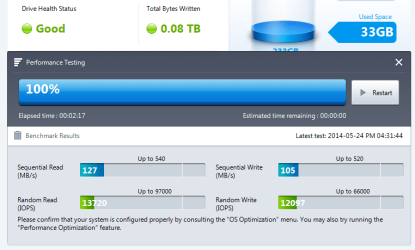
TVeblen -I have installed and run SM. It doesn't suggest outright that there's a problem, although it does say that "AHCI Mode" is deactivated (which it is as the mobo doesn't support it) and also for "SATA Interface" it says "N/A - Unable to detect SATA interface details". When I run the performance test I get the results attached below. I have already done all the things to increase performance in the "OS Optimization" section.

Boozad - you're right, it appears as if there are two controllers in Device Manager. The SSD is connected port 0 on the first one. On the other port on that controller is a DVD drive - it shows up as SATA2. As a test I disconnected the power from the DVD drive and still the SSD showed as SATA1. Are SATA cables versions specific or should a SATA cable work in both SATA1 or SATA2 if the hardware is capable?
 

Attachments

  • screenshot2.png
    screenshot2.png
    18.3 KB · Views: 0

My Computer My Computer

At a glance

Windows 7 64bit
Computer type
PC/Desktop
Computer Manufacturer/Model Number
Custom build
OS
Windows 7 64bit
A SATA cable is a SATA cable, in other words it's the interface that differs not the cable.

I'm looking into the problem you have but don't have any recommendations at the moment.
 

My Computer My Computer

At a glance

Windows 10 Pro 64 bitCore i7 6700K Skylake 4.0GHzCorsair Vengeance LPX DDR4 32GB 3000MHzAsus Radeon RX480 Strix 8GB
Computer type
PC/Desktop
Computer Manufacturer/Model Number
Wordsworth 5000
OS
Windows 10 Pro 64 bit
CPU
Core i7 6700K Skylake 4.0GHz
Motherboard
Asus Z170 Pro
Memory
Corsair Vengeance LPX DDR4 32GB 3000MHz
Graphics Card(s)
Asus Radeon RX480 Strix 8GB
Sound Card
Asus Xonar DSX
Monitor(s) Displays
HP 2709m
Screen Resolution
1920x1080
Hard Drives
Intel 600p M.2 PCIe NVMe SSD 512GB; Intel 335 SSD 240GB ;Western Digital Caviar Black 1TB
PSU
Thermaltake Toughpower Grand Platinum 850W
Case
Lian Li PC-B70
Cooling
CPU-Noctua NH D15, GPU-Stock, Case-Noctua 2x140, 2x120
Keyboard
Microsoft Natural Ergo 4000
Mouse
Microsoft Wireless Optical 1000
Internet Speed
Cable
Other Info
HP bd 340,
HP bd 240,
Klipsch Promedia 5.1 THX
Thank you Wordsworth. I assumed the cable was interchangeable but thought I'd better check - that would be an easy fix!
 

My Computer My Computer

At a glance

Windows 7 64bit
Computer type
PC/Desktop
Computer Manufacturer/Model Number
Custom build
OS
Windows 7 64bit
try upgrading you mobos chipset drivers from you vendors website, it maybe a known bug. And or google all the Bios updates for your mobo and see if the hotfix list mentions something about such a bug/issue.
 

My Computer My Computer

At a glance

Windows 7 Ultimate x64, & Mac OS X 10.9.2Intel Core i5 2500kCorsair Vengence 8gb 1866mhzNvidia GTX 770 OC
Computer type
PC/Desktop
Computer Manufacturer/Model Number
Built by badgers!!!
OS
Windows 7 Ultimate x64, & Mac OS X 10.9.2
CPU
Intel Core i5 2500k
Motherboard
Asus P8z68 LE
Memory
Corsair Vengence 8gb 1866mhz
Graphics Card(s)
Nvidia GTX 770 OC
Monitor(s) Displays
2x ASUS LED 22" IPS
Screen Resolution
3840x1080
Hard Drives
240GB Crucial M500 SSD
120gb Corsair Force 3 SSD
1TB Western Digital
PSU
Corsair HX650w Modular
Case
Corsair Air 540
Cooling
Corsair H60 Push/Pull
Keyboard
Corsair K70/ Logitech G27 wheel
Mouse
Saitek R.A.T 9
Internet Speed
Too slow!
Other Info
AMD fusion E350N Home server-Windows Home Server 2011 (also made by badgers!)
2011 Macbook 2.4ghz Core2Duo, 4gb ddr3, 120gb Ocz Vertex SSD
Thanks for your reply badger906. It's quite an old mobo - I'm using the latest BIOS (there hasn't been an update for years). And I downloaded the latest Nvidia chipset drivers to install when I reinstalled Windows last night, so they're up to date.
 

My Computer My Computer

At a glance

Windows 7 64bit
Computer type
PC/Desktop
Computer Manufacturer/Model Number
Custom build
OS
Windows 7 64bit
I think that "N/A - Unable to detect SATA interface details" is the root of the problem.

I'm guessing that either the motherboard can't figure out what in hell an SSD is, or the SSD can't figure out what in hell the motherboard is, so it is defaulting to SATA 1 as a precaution.
Maybe there could be a work around. Can't think of one just yet.
 

My Computer My Computer

At a glance

Windows 7 64 Bit Home Premium SP1i7-3820GSkill F3-14900CL9Q - 16GBEVGA GeForce GTX660 - Driver 352.86
Computer type
PC/Desktop
Computer Manufacturer/Model Number
Home Built - Jan 2013
OS
Windows 7 64 Bit Home Premium SP1
CPU
i7-3820
Motherboard
Asus P9X79-PRO - Bios 4608
Memory
GSkill F3-14900CL9Q - 16GB
Graphics Card(s)
EVGA GeForce GTX660 - Driver 352.86
Sound Card
On board Realtek ALC898
Monitor(s) Displays
Acer S271HL
Screen Resolution
1920 x 1080
Hard Drives
#1- Samsung 840 Pro Series
#2- Western Digital WD1002FAEX Sata3 Black
#3- Western Digital WD1002FAEX Sata3 Black
PSU
Corsair CMPSU-850TX-V2 - 850 watt (by Seasonic)
Case
Corsair Obsidian 550D
Cooling
Standard 3 120mm case fans, Cooler Master Hyper 212 EVO
Keyboard
MS KC-0405
Mouse
Intellimouse 5-button
Internet Speed
56 Mbits/Sec (on a good day)
Antivirus
Avast & Malwarebytes
Browser
Firefox
Other Info
Asus DVD - DRW-24B1ST 24X
after a bit of googling there literally hundreds of people with the same issue.. and they all have the same issue.. a new SSD with an old mobo.

The general consensus isnt one you want to hear.. its basically sit and wait for a new firmware update for the drive an hope it sorts out the issue.

however im not 100% on this, but if you were to buy a SATA3 pci card and plug it into that then that should have its own firmware and own drivers, so not controlled by the mobo.. that meaning it should work as a SATA3 drive and give you max speeds... however im not sure if all mobos support booting from a pci device..
 

My Computer My Computer

At a glance

Windows 7 Ultimate x64, & Mac OS X 10.9.2Intel Core i5 2500kCorsair Vengence 8gb 1866mhzNvidia GTX 770 OC
Computer type
PC/Desktop
Computer Manufacturer/Model Number
Built by badgers!!!
OS
Windows 7 Ultimate x64, & Mac OS X 10.9.2
CPU
Intel Core i5 2500k
Motherboard
Asus P8z68 LE
Memory
Corsair Vengence 8gb 1866mhz
Graphics Card(s)
Nvidia GTX 770 OC
Monitor(s) Displays
2x ASUS LED 22" IPS
Screen Resolution
3840x1080
Hard Drives
240GB Crucial M500 SSD
120gb Corsair Force 3 SSD
1TB Western Digital
PSU
Corsair HX650w Modular
Case
Corsair Air 540
Cooling
Corsair H60 Push/Pull
Keyboard
Corsair K70/ Logitech G27 wheel
Mouse
Saitek R.A.T 9
Internet Speed
Too slow!
Other Info
AMD fusion E350N Home server-Windows Home Server 2011 (also made by badgers!)
2011 Macbook 2.4ghz Core2Duo, 4gb ddr3, 120gb Ocz Vertex SSD
I find the following link which explains that you need to enable the RAID function for the NVidia sata controller but don't turn on RAID for the actual sata ports 1-4. I'm familiar with the bios on these boards because I'm running the 780i Ultra version.

I'm quite certain that you will need to reinstall the Op system with RAID turned on in order for the drivers to load onto the Op system.

The link explains more.

Nvidia 650SLI (Board Gigabyte N650SLI-DS4) C300 wo... - Page 2 - Crucial Community


In my case using the 15.51 driver I didn't have to do anything in bios for sata 2 but it may be different for the 650i chip set.
 

Attachments

  • SPEED TEST NVIDIA SERIAL ATA SATA 2.PNG
    SPEED TEST NVIDIA SERIAL ATA SATA 2.PNG
    40.2 KB · Views: 4
Last edited:

My Computer My Computer

At a glance

Windows 7 Ult, Windows 8.1 Pro,Q9650-4.275GHz, E8600 4.5GHz, E6750-3.8GHzG.Skill PC2 9600 1200Mhz 5 5 5 15 2TGTX480
Computer type
PC/Desktop
Computer Manufacturer/Model Number
Home built
OS
Windows 7 Ult, Windows 8.1 Pro,
CPU
Q9650-4.275GHz, E8600 4.5GHz, E6750-3.8GHz
Motherboard
Evga 780i FTW
Memory
G.Skill PC2 9600 1200Mhz 5 5 5 15 2T
Graphics Card(s)
GTX480
Sound Card
Asus Xonar D2
Monitor(s) Displays
HannsG
Screen Resolution
1680X1050
Hard Drives
GSkill Phoenix Pro 120GB SSD
PSU
ThermalTake Toughpower 1000Watt modular
Case
ThermalTake XaserV
Cooling
Xigmatek S1283
Keyboard
Logitech G15
Mouse
Logitech G9
Internet Speed
T1
chev65, the OP had read the post at the link you've given but with no luck after trying it.

CBailey, I would agree with both TVeblen and badger906; me thinks old into new just isn't working, at least not without an update in Samsung's firmware since it's not likely Gigabyte will update the BIOS which could resolve the issue as well if they did. But badger's suggestion of a SATA 3 card may be worth looking into as if it worked you'd get more mileage out the motherboard you have. Otherwise your board is too long in the tooth, and believe me I know the feeling.
 

My Computer My Computer

At a glance

Windows 10 Pro 64 bitCore i7 6700K Skylake 4.0GHzCorsair Vengeance LPX DDR4 32GB 3000MHzAsus Radeon RX480 Strix 8GB
Computer type
PC/Desktop
Computer Manufacturer/Model Number
Wordsworth 5000
OS
Windows 10 Pro 64 bit
CPU
Core i7 6700K Skylake 4.0GHz
Motherboard
Asus Z170 Pro
Memory
Corsair Vengeance LPX DDR4 32GB 3000MHz
Graphics Card(s)
Asus Radeon RX480 Strix 8GB
Sound Card
Asus Xonar DSX
Monitor(s) Displays
HP 2709m
Screen Resolution
1920x1080
Hard Drives
Intel 600p M.2 PCIe NVMe SSD 512GB; Intel 335 SSD 240GB ;Western Digital Caviar Black 1TB
PSU
Thermaltake Toughpower Grand Platinum 850W
Case
Lian Li PC-B70
Cooling
CPU-Noctua NH D15, GPU-Stock, Case-Noctua 2x140, 2x120
Keyboard
Microsoft Natural Ergo 4000
Mouse
Microsoft Wireless Optical 1000
Internet Speed
Cable
Other Info
HP bd 340,
HP bd 240,
Klipsch Promedia 5.1 THX
So the Op tried to reinstall Windows 7 with RAID enabled?

Or maybe the Op can answer me directly next time rather than someone else speaking for them?
 

My Computer My Computer

At a glance

Windows 7 Ult, Windows 8.1 Pro,Q9650-4.275GHz, E8600 4.5GHz, E6750-3.8GHzG.Skill PC2 9600 1200Mhz 5 5 5 15 2TGTX480
Computer type
PC/Desktop
Computer Manufacturer/Model Number
Home built
OS
Windows 7 Ult, Windows 8.1 Pro,
CPU
Q9650-4.275GHz, E8600 4.5GHz, E6750-3.8GHz
Motherboard
Evga 780i FTW
Memory
G.Skill PC2 9600 1200Mhz 5 5 5 15 2T
Graphics Card(s)
GTX480
Sound Card
Asus Xonar D2
Monitor(s) Displays
HannsG
Screen Resolution
1680X1050
Hard Drives
GSkill Phoenix Pro 120GB SSD
PSU
ThermalTake Toughpower 1000Watt modular
Case
ThermalTake XaserV
Cooling
Xigmatek S1283
Keyboard
Logitech G15
Mouse
Logitech G9
Internet Speed
T1
My post was not meant as a swipe at you as we are here to help the OP. He stated in his first post he had read the same post at that link but also that he had not enabled it before installation; perhaps that can make a difference, perhaps not.
 

My Computer My Computer

At a glance

Windows 10 Pro 64 bitCore i7 6700K Skylake 4.0GHzCorsair Vengeance LPX DDR4 32GB 3000MHzAsus Radeon RX480 Strix 8GB
Computer type
PC/Desktop
Computer Manufacturer/Model Number
Wordsworth 5000
OS
Windows 10 Pro 64 bit
CPU
Core i7 6700K Skylake 4.0GHz
Motherboard
Asus Z170 Pro
Memory
Corsair Vengeance LPX DDR4 32GB 3000MHz
Graphics Card(s)
Asus Radeon RX480 Strix 8GB
Sound Card
Asus Xonar DSX
Monitor(s) Displays
HP 2709m
Screen Resolution
1920x1080
Hard Drives
Intel 600p M.2 PCIe NVMe SSD 512GB; Intel 335 SSD 240GB ;Western Digital Caviar Black 1TB
PSU
Thermaltake Toughpower Grand Platinum 850W
Case
Lian Li PC-B70
Cooling
CPU-Noctua NH D15, GPU-Stock, Case-Noctua 2x140, 2x120
Keyboard
Microsoft Natural Ergo 4000
Mouse
Microsoft Wireless Optical 1000
Internet Speed
Cable
Other Info
HP bd 340,
HP bd 240,
Klipsch Promedia 5.1 THX
Hi all

Sorry, I've been tied up for a couple of days (family duties). Thank you all for your replies. The one thing I haven't tried is reinstalling Windows with the RAID option enabled. I did rather rush into installing it in the first place as I had to do it Friday night or wait until tonight. I was thinking I should return it to Amazon as being "incompatible" with my system but I think I should really try to reinstall it with the RAID settings configured before I do that. Seems to have worked for chev65.

Watch this space!
 

My Computer My Computer

At a glance

Windows 7 64bit
Computer type
PC/Desktop
Computer Manufacturer/Model Number
Custom build
OS
Windows 7 64bit
Well, I enabled the RAID in the BIOS and after a bit of messing around I got the Windows installer to see the drive. I had to actually add the drive to an array before the installer would see the drive - just enabling RAID didn't do it for me. I put various drivers on a memory stick and ultimately I extracted the ones out of the NVIDIA .exe file and showed Windows Installer that. Windows recognised they were drivers so I selected them and after the installer "scanned" them (or whatever it was doing that required a progress bar) it took me back to the screen where I could choose the drive to install Windows on - no idea whether the driver had been loaded or not. The drive was visible before I loaded the driver.

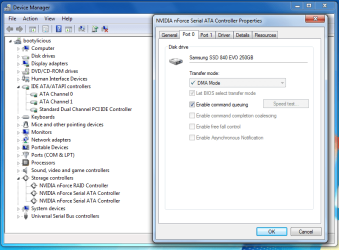
So, I get Windows installed and install the NVIDIA NForce driver, which contains all the chipset and storage stuff. I reboot and go to the Device Manager. I see the IDE controller (nothing about SATA there any more) and there's a new Storage Controller section which contains the SATA controller info. Trouble is, when I find the port that contains my SSD the "Speed Test" button is greyed out so I can't see whether the drive is being recognised as SATAII or check the speeds! See screenshot attached.

I downloaded the demo of 'HD Tune Pro' to benchmark it but I don't really know what I'm looking at. See screenshot - does this seem like good values for an SSD on a SATAII connection? Not if I'm interpreting the figures correctly - seems very close to the values from my first screenshot (using Windows 'speed test', unavailable to me now).

Any advice gratefully received.
Colin
 

Attachments

  • screenshot3.png
    screenshot3.png
    37.6 KB · Views: 1
  • screenshot4.png
    screenshot4.png
    28.1 KB · Views: 3

My Computer My Computer

At a glance

Windows 7 64bit
Computer type
PC/Desktop
Computer Manufacturer/Model Number
Custom build
OS
Windows 7 64bit
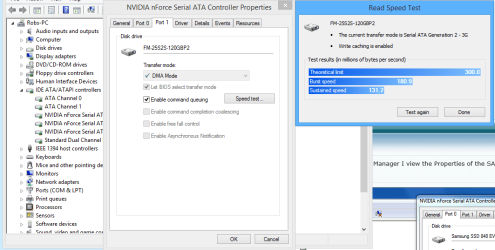
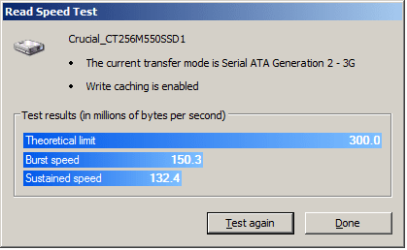
Update - I sent back the EVO SSD and got a Crucial M550. According to the compatibility checker on the Crucial site that SSD is compatible with my motherboard so I took that as a good sign. Fitted it, reinstalled Windows (not using the RAID option) and it now connects as SATAII. Phew. See screenshot for speeds. I know the M550 is not as good or fast as the EVO but it works!

Thanks to everyone for their input.

Colin
 

Attachments

  • hdd.png
    hdd.png
    7.4 KB · Views: 14

My Computer My Computer

At a glance

Windows 7 64bit
Computer type
PC/Desktop
Computer Manufacturer/Model Number
Custom build
OS
Windows 7 64bit
That is surprising.
But it works. So I learned something today.
 

My Computer My Computer

At a glance

Windows 7 64 Bit Home Premium SP1i7-3820GSkill F3-14900CL9Q - 16GBEVGA GeForce GTX660 - Driver 352.86
Computer type
PC/Desktop
Computer Manufacturer/Model Number
Home Built - Jan 2013
OS
Windows 7 64 Bit Home Premium SP1
CPU
i7-3820
Motherboard
Asus P9X79-PRO - Bios 4608
Memory
GSkill F3-14900CL9Q - 16GB
Graphics Card(s)
EVGA GeForce GTX660 - Driver 352.86
Sound Card
On board Realtek ALC898
Monitor(s) Displays
Acer S271HL
Screen Resolution
1920 x 1080
Hard Drives
#1- Samsung 840 Pro Series
#2- Western Digital WD1002FAEX Sata3 Black
#3- Western Digital WD1002FAEX Sata3 Black
PSU
Corsair CMPSU-850TX-V2 - 850 watt (by Seasonic)
Case
Corsair Obsidian 550D
Cooling
Standard 3 120mm case fans, Cooler Master Hyper 212 EVO
Keyboard
MS KC-0405
Mouse
Intellimouse 5-button
Internet Speed
56 Mbits/Sec (on a good day)
Antivirus
Avast & Malwarebytes
Browser
Firefox
Other Info
Asus DVD - DRW-24B1ST 24X
Back
Top