Can't get printer to work

petacof

New member
Local time
4:41 PM
Messages
11
Location
"on the beach"
hi all,
Ive got a desk top pc with printer connected and working
When connecting my laptop vis cable network through my dsl router, I can see and "add network printer", but all my printing jobs get hung, cant even delete them. Have to reboot all pc's to clear the hanging files, which allows the very same "hung" printer job then to print.
I'm sure the decktop is having a networh or user id problem....any suggestions?
 

My Computer

Computer Manufacturer/Model Number
self assembled
OS
windows 7
CPU
core 2 quad
Motherboard
intel dq35jo
Memory
4 gig
Graphics Card(s)
nvidia
Monitor(s) Displays
samsung 2232gw
Hard Drives
2x 500 gig ata
What kind of printer? Also, are you using the Win7 Homegroup feature to share this desktop printer?

This issue has been reported by a few people now including myself. In my case, I am waiting for an official Win7 driver for my HP laser printer before I spend any more time trying to troubleshoot this issue (supposed to be out in mid-November).
 

My Computer

Computer Manufacturer/Model Number
Dell Vostro 420
OS
Windows 7 Pro x64
CPU
3.00 GHz Intel Core2 Quad Q9650
Memory
4 GB
Graphics Card(s)
ATI Radeon HD 3400 Series
Monitor(s) Displays
DELL 2405FPW
Screen Resolution
1920x1200
Hard Drives
System: 80GB WDC WD800JD-22MSA1
Data: 500GB Hitachi HDP725050GLA360
Internet Speed
Verizon FiOS 20/5 mbps
Other Info
Computing is primarily business use with off-time troubleshooting practice: Remote desktop, scanning and producing invoices, some minor graphics work.
Hi Peter,
It's a HP Laserjet 1020. It works fine when a print job is issued from the pc it is connected to. (operating win 7 32 bit)
However once I connect my laptop which is a hp pavillion dv6 (also running win 7 32 bit), the laptop will see the printer to load when adding a new printer, but all print instructions from the laptop via ethernet connection hang. what is interesting is that from the main pc,(that has the printer connection), should one look up the status on this pc one can see the print job hung.
Don't know if this helps?
 

My Computer

Computer Manufacturer/Model Number
self assembled
OS
windows 7
CPU
core 2 quad
Motherboard
intel dq35jo
Memory
4 gig
Graphics Card(s)
nvidia
Monitor(s) Displays
samsung 2232gw
Hard Drives
2x 500 gig ata
Yep, sounds very familiar - My printer is an HP Laserjet 1022 (same family?). Symptoms similar to yours - I have a homegroup set up with two computers participating. File and printer share options are enabled. Main desktop has printer attached directly via USB port. Second computer over the network tries to print and job appears on first computer in a "PRINTING" status but the printer remains quiet.

In my case I run the printer troubleshooter on the printer (Devices and Printers > right click on HP printer entry), it reports that it removed a stuck print job (the one that was attempted from the networked PC) and that networked PC's printout then prints??

With the official release of the Win7 drivers for this printer so close, I opted to wait until I have them installed before diving head-first into this issue.
 

My Computer

Computer Manufacturer/Model Number
Dell Vostro 420
OS
Windows 7 Pro x64
CPU
3.00 GHz Intel Core2 Quad Q9650
Memory
4 GB
Graphics Card(s)
ATI Radeon HD 3400 Series
Monitor(s) Displays
DELL 2405FPW
Screen Resolution
1920x1200
Hard Drives
System: 80GB WDC WD800JD-22MSA1
Data: 500GB Hitachi HDP725050GLA360
Internet Speed
Verizon FiOS 20/5 mbps
Other Info
Computing is primarily business use with off-time troubleshooting practice: Remote desktop, scanning and producing invoices, some minor graphics work.
Sounds like a good idea,
Thanks for the input
 

My Computer

Computer Manufacturer/Model Number
self assembled
OS
windows 7
CPU
core 2 quad
Motherboard
intel dq35jo
Memory
4 gig
Graphics Card(s)
nvidia
Monitor(s) Displays
samsung 2232gw
Hard Drives
2x 500 gig ata
Hey, petacof, for the heck of it I checked the HP site and guess what? Both of our HP printer drivers for Win7 are now available as of yesterday (11/5).

I am going to install my Laserjet 1022 driver on both PCs to see if this resolves my printing to a homegroup printer issue. Will update this thread with any news (fingers crossed).
 

My Computer

Computer Manufacturer/Model Number
Dell Vostro 420
OS
Windows 7 Pro x64
CPU
3.00 GHz Intel Core2 Quad Q9650
Memory
4 GB
Graphics Card(s)
ATI Radeon HD 3400 Series
Monitor(s) Displays
DELL 2405FPW
Screen Resolution
1920x1200
Hard Drives
System: 80GB WDC WD800JD-22MSA1
Data: 500GB Hitachi HDP725050GLA360
Internet Speed
Verizon FiOS 20/5 mbps
Other Info
Computing is primarily business use with off-time troubleshooting practice: Remote desktop, scanning and producing invoices, some minor graphics work.
I have the same problem, I can print from the machine the printer is connected too but it will not print accross the network. The drivers install, I can see the printer on the network but it just hangs and doesn't print. I also tried peer to peer but it wouldn't work either.
Tried the poodle faking thing but it would not work. I can see the print job hanging up on both computers same as you guys.
Of course my printer was made for XP but the updated drivers do have the Win7 shield on it.
 

My Computer

Computer type
PC/Desktop
Computer Manufacturer/Model Number
Home built
OS
Windows 7 Ult, Windows 8.1 Pro,
CPU
Q9650-4.275GHz, E8600 4.5GHz, E6750-3.8GHz
Motherboard
Evga 780i FTW
Memory
G.Skill PC2 9600 1200Mhz 5 5 5 15 2T
Graphics Card(s)
GTX480
Sound Card
Asus Xonar D2
Monitor(s) Displays
HannsG
Screen Resolution
1680X1050
Hard Drives
GSkill Phoenix Pro 120GB SSD
PSU
ThermalTake Toughpower 1000Watt modular
Case
ThermalTake XaserV
Cooling
Xigmatek S1283
Keyboard
Logitech G15
Mouse
Logitech G9
Internet Speed
T1
The latest HP Win7 driver did not solve my homegroup printing problem.

However, making a minor configuration change to the printer properties on the desktop PC sharing the printer (the one with the printer attached) has corrected the issue that was preventing my ability to print from another PC in the homegroup.

On the PC with the printer attached:
1) Start orb > Devices & Printers

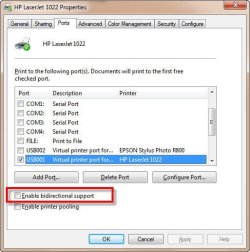
2) Right click on the shared printer (in my case, the HP LaserJet 1022 attached via USB port), then choose Printer Properties.

3) Click on the Ports tab, and note that the USB port for the shared printer should be already highlighted.

4) Deselect the checkbox for "Enable bi-directional support"

SNAG-0061.jpg

5) Save the changes and test the print feature from a networked PC that is part of the homegroup with the shared printer.​
 

My Computer

Computer Manufacturer/Model Number
Dell Vostro 420
OS
Windows 7 Pro x64
CPU
3.00 GHz Intel Core2 Quad Q9650
Memory
4 GB
Graphics Card(s)
ATI Radeon HD 3400 Series
Monitor(s) Displays
DELL 2405FPW
Screen Resolution
1920x1200
Hard Drives
System: 80GB WDC WD800JD-22MSA1
Data: 500GB Hitachi HDP725050GLA360
Internet Speed
Verizon FiOS 20/5 mbps
Other Info
Computing is primarily business use with off-time troubleshooting practice: Remote desktop, scanning and producing invoices, some minor graphics work.
Bravo Peter!!!!!
Way to go. Tried the hp site as you suggested, but without any luck.
Then I treid exactly what you suggested with the deselecting the "En-able bi-directional support" and hey presto it worked.
well done,
many thanks!!!!!:D:D:D
 

My Computer

Computer Manufacturer/Model Number
self assembled
OS
windows 7
CPU
core 2 quad
Motherboard
intel dq35jo
Memory
4 gig
Graphics Card(s)
nvidia
Monitor(s) Displays
samsung 2232gw
Hard Drives
2x 500 gig ata
Thanks Peter. I've been having exactly the same issue - message in another thread. Another member picked up on your idea and now everything works just fine.

Just popped on to say thank you as it was driving me nuts.
 

My Computer

Computer type
PC/Desktop
Computer Manufacturer/Model Number
Self Build
OS
Win7 Home Premium x64, Linux Mint 14
CPU
Intel i5 Sandy Bridge 1155 2400
Motherboard
Gigabyte P67A-UD3-B3
Memory
8gb DDR3
Graphics Card(s)
ATI 3870HD
Sound Card
On board Realtek
Monitor(s) Displays
Asus VE278
Screen Resolution
1920x1080
Hard Drives
1 Kingston 128gb SSD
1 Samsung 500gb
1 Samsung 1000gb
PSU
650w
Case
Aztec
Cooling
Stock
Keyboard
Logitech USB
Mouse
Microsoft USB Optical
Internet Speed
2.0
Antivirus
Avast
Browser
Firefox
Hi everybody, I have exactly the same printing problem, but unfortunately suggested solution (deselecting the "Enable bidirectional support" checkbox) doesn't appear to be the right one in my case. My printer realy does react on that, by not in the way I would expect it to. With bidirectional support enabled, documents are being sent to shared printer, but they keep waiting in the queue forever with status "printing" (which actually never happens), and I am unable to delete them unless I restart both of my computers. When I disable bidirectional support, what I get is that documents are not even sent to printer, simply nothing happens at all. Or at least it looks like that.
The scenery is more or less the same as described above - two machines running Windows 7 Ultimate, one of them desktop computer connected to router via Ethernet, with HP LaserJet 1020 attached to its USB port, and another one is notebook computer, which connects to local network wirelessly. Homegroup is successfuly created (no problems reported), and file sharing works for now. Shared printer is visible to another homegroup member (notebook), it's added as network printer, and driver installation went smoothly.
Prior to upgrading to 7 Ultimate, XP Professional and Vista Business were installed on my desktop and notebook, respectively. The same printer was shared in workgroup (I had the same username/password on both computers), which now seems to me as a better solution...
I would appreciate any suggestion that might help in this case. Thanks!
 

My Computer

OS
Windows
Another interesting related problem

I have windows 7 pro set up on my base pc and my wireless laptop. My printer is a Konia Minolta 2500w - it works fine on my base pc AND it is recognised on my laptop and I can even print test pages from it (no that the bi-directional support is switched off. However it won't print from ANY applications on my laptop including Notepad , Word 2007 , explorer, Firefox etc etc.
I get messages like "invalid handle" "printer not installed this application" etc .

It is properly set up and the default printer on the laptop. I suspect it is because it connected to USB001 , however this is on the other machine ..
HELP please :geek:
 

My Computer

Computer Manufacturer/Model Number
Toshiba Satellite M200
OS
Win 7 Pro
CPU
Pentium Dual core 1.86ghz
Motherboard
not sure
Memory
2 gig
Graphics Card(s)
none
Sound Card
none
Monitor(s) Displays
laptop
Screen Resolution
1280 x 800
Hard Drives
120gb
PSU
Laptop
Case
laptop
Cooling
yes
Keyboard
yes
Mouse
MS Optical Mouse 3000 cordless
Internet Speed
broadband
With bidirectional support enabled, documents are being sent to shared printer, but they keep waiting in the queue forever with status "printing" (which actually never happens), and I am unable to delete them unless I restart both of my computers.

Actually, you shouldn't have to take that drastic an action to clear the print queue - on the Win7 computer with the printer attached try opening the Devices and Printers off the Start menu and right-click on your HP printer listed there. Choose "Troubleshooter" off the menu and let it run.

Edit: Before running the troubleshooter, attempt to delete the document from the print spooler by right clicking on the document and choosing CANCEL. After that point, run the troubleshooter as described above.

In my case when I had this issue the Troubleshooter complained of a stuck document that it removed, but that action allowed the very printout that was stuck to then print. No reboot needed, but admittedly still not the preferred solution.


When I disable bidirectional support, what I get is that documents are not even sent to printer, simply nothing happens at all. Or at least it looks like that.

What drivers did you install on both computers? Are your printer's Win7 drivers now available from HP or are they the Vista drivers? If the printer drivers on your computers are not the absolute latest, I would recommend first removing the existing ones and then installing the latest before moving on to other ideas.
 
Last edited:

My Computer

Computer Manufacturer/Model Number
Dell Vostro 420
OS
Windows 7 Pro x64
CPU
3.00 GHz Intel Core2 Quad Q9650
Memory
4 GB
Graphics Card(s)
ATI Radeon HD 3400 Series
Monitor(s) Displays
DELL 2405FPW
Screen Resolution
1920x1200
Hard Drives
System: 80GB WDC WD800JD-22MSA1
Data: 500GB Hitachi HDP725050GLA360
Internet Speed
Verizon FiOS 20/5 mbps
Other Info
Computing is primarily business use with off-time troubleshooting practice: Remote desktop, scanning and producing invoices, some minor graphics work.
It is properly set up and the default printer on the laptop. I suspect it is because it connected to USB001 , however this is on the other machine ..
HELP please :geek:

You didn't mention in your post if you enabled a homegroup on your "base PC" and allowed the printer to be shared, and then connected to that homegroup with your laptop using the unique homegroup password. Did you do that, too?
 

My Computer

Computer Manufacturer/Model Number
Dell Vostro 420
OS
Windows 7 Pro x64
CPU
3.00 GHz Intel Core2 Quad Q9650
Memory
4 GB
Graphics Card(s)
ATI Radeon HD 3400 Series
Monitor(s) Displays
DELL 2405FPW
Screen Resolution
1920x1200
Hard Drives
System: 80GB WDC WD800JD-22MSA1
Data: 500GB Hitachi HDP725050GLA360
Internet Speed
Verizon FiOS 20/5 mbps
Other Info
Computing is primarily business use with off-time troubleshooting practice: Remote desktop, scanning and producing invoices, some minor graphics work.
I'm still having this problem of not being able to print accross the network but,...it does work when I reboot the machine that the printer is connected too.

Once I reboot it will print the job soon as it boots up but it will not print accross the network unless I do that.

I have tried reinstalling the drivers to no avail. I have a feeling there is some lame security setting causing this to happen but I can't figure out which one it is.

Everything is in the homegroup and all file sharing works perfectly.

So many here seem to having this same problem, I will continue to look for the setting that is causing this. The drivers may still be part of the problem in which case I'm SOL but I will keep trying because it's an interesting problem that may be solveable.

I looked in the Windows trouble shooter for my All in One Printer and it said that the All in One's may not have networking working correctly, in my case this is true and to be honest I'm suprized my old printer is working at all.

Whats funny is that I can print accross the network but only if I restart the machine my network printer is connected too.
 
Last edited:

My Computer

Computer type
PC/Desktop
Computer Manufacturer/Model Number
Home built
OS
Windows 7 Ult, Windows 8.1 Pro,
CPU
Q9650-4.275GHz, E8600 4.5GHz, E6750-3.8GHz
Motherboard
Evga 780i FTW
Memory
G.Skill PC2 9600 1200Mhz 5 5 5 15 2T
Graphics Card(s)
GTX480
Sound Card
Asus Xonar D2
Monitor(s) Displays
HannsG
Screen Resolution
1680X1050
Hard Drives
GSkill Phoenix Pro 120GB SSD
PSU
ThermalTake Toughpower 1000Watt modular
Case
ThermalTake XaserV
Cooling
Xigmatek S1283
Keyboard
Logitech G15
Mouse
Logitech G9
Internet Speed
T1
Peter
Yes, the PC's are in a home group. and the base PC is sharing the printer. As I said, I can see the printer on the Laptop and even print test pages etc. It just wont print from an application on the laptop. The same driver is installed on each PC and basically the same programs. When I choose print on, say, Word, it shows as the default printer but when I then try to print it says the printer is not installed correctly for this application.
 

My Computer

Computer Manufacturer/Model Number
Toshiba Satellite M200
OS
Win 7 Pro
CPU
Pentium Dual core 1.86ghz
Motherboard
not sure
Memory
2 gig
Graphics Card(s)
none
Sound Card
none
Monitor(s) Displays
laptop
Screen Resolution
1280 x 800
Hard Drives
120gb
PSU
Laptop
Case
laptop
Cooling
yes
Keyboard
yes
Mouse
MS Optical Mouse 3000 cordless
Internet Speed
broadband
Not sure if this is much help as I was off the wall with this one. I did though delete all traces of the old printers drivers and reinstalled the new Win7 HP drivers. I made sure the old HP files on all the computers were deleted. Then I disabled the bi-directional support.
 

My Computer

Computer type
PC/Desktop
Computer Manufacturer/Model Number
Self Build
OS
Win7 Home Premium x64, Linux Mint 14
CPU
Intel i5 Sandy Bridge 1155 2400
Motherboard
Gigabyte P67A-UD3-B3
Memory
8gb DDR3
Graphics Card(s)
ATI 3870HD
Sound Card
On board Realtek
Monitor(s) Displays
Asus VE278
Screen Resolution
1920x1080
Hard Drives
1 Kingston 128gb SSD
1 Samsung 500gb
1 Samsung 1000gb
PSU
650w
Case
Aztec
Cooling
Stock
Keyboard
Logitech USB
Mouse
Microsoft USB Optical
Internet Speed
2.0
Antivirus
Avast
Browser
Firefox
I'm still having this problem of not being able to print accross the network but,...it does work when I reboot the machine that the printer is connected too.

Once I reboot it will print the job soon as it boots up but it will not print accross the network unless I do that.

This is exactly what I'm experiencing.

Thanks for your reply Peter, I haven't had much time since my first post to check the drivers, but certainly that would be the next option. I am pretty sure about the driver installed on the base PC (with the printer attached), that it's the latest one available from HP, cause I downloaded and installed it manually few days ago. The driver on notebook was installed earlier when I was still running XP on base PC (printer was shared in a workgroup, and everything worked perfectly), and the problems began with new OS on base computer and sharing in homegroup. As far as I remember, when I tried to add the shared printer again, after upgrade, Windows prompted something about the driver version, that there was new one available, I confirmed and it finished everything automatically.
I hope I'll find some time to deal with this issue today, and I'll keep notifying :)
Best,
Stane
 

My Computer

OS
Windows
i have the exact same problem. Does anyone have a solution yet?
 

My Computer

OS
Windows 7 32-bit
I also have this problem and have found no solution. Desktop computer has printer connected by USB. Laptop on wireless network. Whatever I try, I can't get it to work. I've removed and added the printer numerous times. I've been told that the share name should have no spaces (didn't help) and that the spool on the laptop should be restarted (didn't help).

This is crazy. I can also share files and have no trouble printing from the desktop.
 

My Computer

Computer Manufacturer/Model Number
Dell Studio
OS
Windows 7 Home Premium, 64-bit
CPU
Quad core
Memory
6MB
Monitor(s) Displays
Dell
Hard Drives
450 and 700
Back
Top