
cant get rid of dual boot

Split2ooo

New member
Local time
3:12 AM
Messages
3
I am having a lot of problems getting rid of the dual boot with xp the only thing basically left in the xp partition seems to be the boot loader info and when I try and delete the partition I get the error "Delete is not allowed on the current boot,system,pagefile,crashdump or hibernation volume" I don't really want to have to reformat the whole drive again. any help would be greatly appreciated
 

Attachments
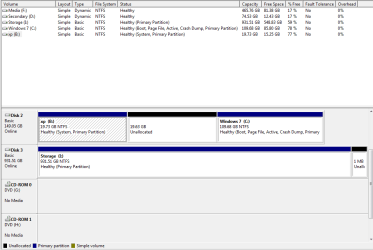
  • Capture.PNG
    Capture.PNG
    16.6 KB · Views: 34

My Computer My Computer

At a glance

windows 7
OS
windows 7
Here is what I recommend:

Backup your files and a Win7 System image as resizing operations can fail.

Burn to CD free Partition Wizard which is the best manager to use with Win7.

Boot into PW, rightclick XP partition>delete. If XP will not delete (even though it is not marked active) then exit, boot into Win7 DVD Repair console, open a Command Line and type:

DISKPART
LIST DISK
SELECT DISK # (for XP/Win7 HD)
List partition
Select partition # (# For XP partition)
Delete Partition override
exit

Now boot back into PW CD, rightclick Win7 partition>Resize>move left partition border slider all the way over to left border of HD. If desired, slide right border to make space for logical data partition in right hand space. Apply all steps.

Now boot back into Win7 DVD repair console, click through to recovery tools and run Startup Repair up to 3 separate times as it will attempt to repair and then rewrite MBR to Win7 partition.
 
Last edited:
Back
Top