

I don't know if this the correct section for restore questions but here goes
I do an image backup using the following command in a batch file...WBADMIN START BACKUP -backupTarget : -include:c: -quiet
cd /D D:\
if exist Windows* move Windows* "%date:/=.%"W7
... and the scheduler.
NOTE that I am renaming the image folder from "WindowsImageBackup" to a name with the date. This disallows overwriting and identifies the Image.
My problem is when I attempt a RESTORE of the image from either
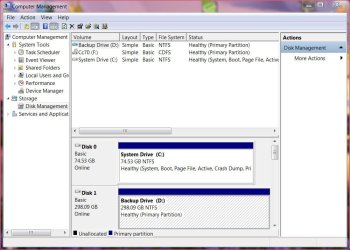
the "Start......Contol Pnl......Backup & Restore" or the Repair Disk the backups are not found nor can I access the backup drive D:.
I have tried this with the image using the native name, "WindowsImageBackup" with the same results.
Anybody got any ideas?
BIOS data concerning HD's in question.
System Drive C:
Sata1 WDC WD800AAJS00 WD
LBA=SUPPORTED
PI Mode=4
Async DMA = Multiword DMA-2
ULTRA DMA = UltraDMA-6
SMART = Supported
LBA/LARGE Mode = Auto
PI Mode = Auto
DMA Mode = Auto
Smart Monitoring = Auto
32 bit Data Transfer = Enabled
Backup Drive D:
Sata2 WD WD3200AAKS-22B
(all other data same as above)
I do an image backup using the following command in a batch file...WBADMIN START BACKUP -backupTarget
: -include:c: -quietcd /D D:\
if exist Windows* move Windows* "%date:/=.%"W7
... and the scheduler.
NOTE that I am renaming the image folder from "WindowsImageBackup" to a name with the date. This disallows overwriting and identifies the Image.
My problem is when I attempt a RESTORE of the image from either
the "Start......Contol Pnl......Backup & Restore" or the Repair Disk the backups are not found nor can I access the backup drive D:.
I have tried this with the image using the native name, "WindowsImageBackup" with the same results.
Anybody got any ideas?
BIOS data concerning HD's in question.
System Drive C:
Sata1 WDC WD800AAJS00 WD
LBA=SUPPORTED
PI Mode=4
Async DMA = Multiword DMA-2
ULTRA DMA = UltraDMA-6
SMART = Supported
LBA/LARGE Mode = Auto
PI Mode = Auto
DMA Mode = Auto
Smart Monitoring = Auto
32 bit Data Transfer = Enabled
Backup Drive D:
Sata2 WD WD3200AAKS-22B
(all other data same as above)
Attachments
My Computer
- Computer type
- Laptop
- Computer Manufacturer/Model Number
- Asus
- OS
- W7 Ultimate
- CPU
- 2.2 bh Intel Core i3-2330M
- Motherboard
- Asustek Computer Inc. P53E 1.0
- Memory
- 4MB
- Graphics Card(s)
- On Board
- Sound Card
- On Board
- Monitor(s) Displays
- On Board
- Screen Resolution
- 1366 X 768
- Hard Drives
- ST9500423AS
ST2000DM USB Backup Drive External