can't initialize to MBR!

You set the Raid mode?! :eek::what::doh: That will automatically prevent XP from loading not being set up for any array to begin with for either version!

Arrays are for using one OS across more then one drive or for storage. For individual OSs each on a separate drive you would never use the Raid setting since that is intended to sync more then one drive together. You can still switch back now however. Setting up an array would mean wiping 7 out as well as the XP install you finally got on.

With XP already on the idea was simply to add a new entry into the 7 boot loader to see the option to boot into XP at startup added not reconfigure everything all over again. When 7 didn't run following the XP install the switch of drive modes was to get both working.
 

My Computers

System One System Two

  • Computer type
    PC/Desktop
    Computer Manufacturer/Model Number
    Custom builds = 2
    OS
    W7 Ultimate x64/W10 Pro x64/W11 Pro Triple Boot - Main PC W7 Remote PC Micro ATX W7 Pro x64/W11 Pro
    CPU
    AMD Phenom II X4 975 Deneb 3.6ghz - 965 2nd remote pc
    Motherboard
    Gigabyte GA-790XTA-UD4-Gigabyte GA-880GM-D2H remote pc
    Memory
    Kingston Hyper X DDR3 1600 1.5v 16gb - Hyper X Fury 8gb 2nd
    Graphics Card(s)
    MSI HD Radeon 5750 1gb - MSI HD Radeon 6450 on mini tower
    Sound Card
    Creative Labs X-Fi Xtreme Audio P - Realtek onooard 2nd case
    Monitor(s) Displays
    ASUS VW199T-P 19" HP 2082a Main-HP 2082a 20" remote pc
    Screen Resolution
    Asus 1440x900 - HP 1600x900
    Hard Drives
    WD Black 1TB HD per OS W7, W10, and pending W11 presently on 500gb OS Drive - Pending Triple 1TB HDs for Spanned Storage/backup volume
    Single 2TB external USB enclosure, single 1TB System 7 Host/Boot drive, Pending 8TB external HD for system image b
    PSU
    Corsair 750TX - primary / Corsair CX600 - second
    Case
    Antec 900-2 - SSD compatible / NZXT Vulcan mini tower
    Cooling
    Zalman CNPS9900A
    Keyboard
    AZIO L70 Backlit Letters Gaming - ONN Cordless/USB
    Mouse
    MSI DS200 Programmable, Logitech Cordless
    Internet Speed
    30mbps upgrade - primary hard wired - mini tower usb WiFi
    Antivirus
    GFI VIPRE Internet Security 2014 on W7 2016 beta on W10,
    Browser
    Cyberfox, WaterFox 64bit FF variants, FireFox x64, Pale Moon
    Other Info
    Accomdata fan cooled usb 2.0 PIDE/Sata II, III external enclosure.
    Sambient usb/eSata PATA/Sata II, III external enclosure.
  • Computer type
    PC/Desktop
    System Manufacturer/Model Number
    CUSTOM ASSEMBLY
    OS
    W7 Pro x64/W11 Pro
    CPU
    AMD Deneb 3.6ghz - 965
    Motherboard
    Gigabyte GA-880GM-D2H remote pc
    Memory
    Kingston Hyper X Fury 8gb
    Graphics Card(s)
    MSI HD Radeon 6450 DVI Output
    Sound Card
    Realtek onooard Creative or Other separate PENDING
    Monitor(s) Displays
    VIZIO 32" LCD TV Separate LCD Pending
    Screen Resolution
    1600x1080
    Hard Drives
    WD 500GB OS Host/Boot WD Green 1TB Storage/Backup
    PSU
    Corsair 600W - THERMALTAKE 600W spare case
    Case
    NZXT Vulcan mini tower
    Cooling
    Twin 120mm Top Fans - 240mm Side Cover
    Keyboard
    ONN Cordless/USB Logitech Cordless
    Mouse
    ONN USB/Cordless - Logitech Cordless
    Internet Speed
    DSL 5G
    Browser
    MS Edge, FireFox, WaterFox x64, FireFox Nightly
    Other Info
    OS Testing-Remote Access to Main TeamViewer
You set the Raid mode?! :eek::what::doh: That will automatically prevent XP from loading not being set up for any array to begin with for either version!
I had to reset to default BIOS to get back into W7. There is IDE/RAID/AHCI as options to set, and the default went to RAID.
Arrays are for using one OS across more then one drive or for storage. For individual OSs each on a separate drive you would never use the Raid setting since that is intended to sync more then one drive together. You can still switch back now however. Setting up an array would mean wiping 7 out as well as the XP install you finally got on.
I didn't set up an array I think, it just shows as the setting. I suppose it is so that I could set one up if needed?
With XP already on the idea was simply to add a new entry into the 7 boot loader to see the option to boot into XP at startup added not reconfigure everything all over again. When 7 didn't run following the XP install the switch of drive modes was to get both working.
Well, I went back in this thread to the instructions in How to Setup a Dual Boot Installation with Windows 7 and XP When Windows 7 is Installed First "method two". That's where I saw this "Warning" about RAID.
 

My Computer

Computer Manufacturer/Model Number
HP p6347c
OS
W7
CPU
AMD Athlon(tm) II X4 630 Processor
Motherboard
AMD RS780/RS880
Memory
8 GB
Graphics Card(s)
ATI Radeon HD 4200
Sound Card
Realtek High Definition Audio
Monitor(s) Displays
HP w2338h (HP w2338h Wide LCD Monitor)
Hard Drives
WDC WD6400AAKS-65A7B SCSI Disk Device
I didn't say you set up an array. But you wouldn't want to leave it set at Raid. This is why I mentioned going back in the bios once you had reset everything back to the defaults as well as looking over the guide there. :D

Most recent and new boards will see the options for setting up an array often with a second pair of drives typically for expanding your storage capacity. A few posts back you mentioned seeing the missing ntldr error message apparently when trying to boot from the second drive if I am correct on that.

That doesn't have to be a bootable drive however to see XP load when the 7 host drive has the XP boot files present and the entry for XP in the 7 BCD. With 7 running the next step would be finding out if XP will load with the option seen in the 7 boot loader the way it is or to see if a change of the drive mode is needed.

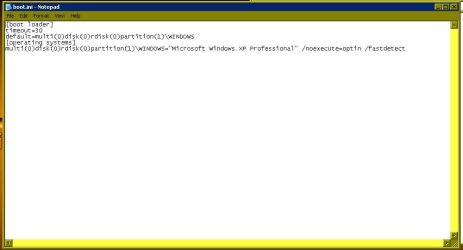
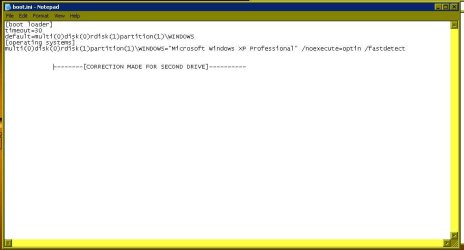
If you already copied the boot files over and added the entry in for XP and ran into the error that would be a result of not having edited the boot.ini file to point to the correct drive which should be seen as "rdisk(1)partition(1)" rather then the default install's "rdisk(0)partition(1)" since XP went on without the 7 drive present. The boot files and mbr entries originally went to the second drive now being seen as the second not first.

The next two screens here will show the correction with the first being the default taken from the XP Mode which of course is the Pro edition there. The second will show the correction for the second drive needed in order to see XP load.

The third shows how to overwrite the original copy of the boot.ini by using the "all files" not "Text Documents [*.txt]" format since you want an exact match not a text file to see this part done. These will give you a reference to work with once you have the "read only" box unchecked in the copy. You may need to take ownership in order to keep the read only box cleared however.
 

Attachments

  • XP boot.ini Default.jpg
    XP boot.ini Default.jpg
    49.8 KB · Views: 2
  • XP boot.ini Dual Boot Correction.jpg
    XP boot.ini Dual Boot Correction.jpg
    52.9 KB · Views: 3
  • XP boot.ini Overwrite.jpg
    XP boot.ini Overwrite.jpg
    81.2 KB · Views: 5

My Computers

System One System Two

  • Computer type
    PC/Desktop
    Computer Manufacturer/Model Number
    Custom builds = 2
    OS
    W7 Ultimate x64/W10 Pro x64/W11 Pro Triple Boot - Main PC W7 Remote PC Micro ATX W7 Pro x64/W11 Pro
    CPU
    AMD Phenom II X4 975 Deneb 3.6ghz - 965 2nd remote pc
    Motherboard
    Gigabyte GA-790XTA-UD4-Gigabyte GA-880GM-D2H remote pc
    Memory
    Kingston Hyper X DDR3 1600 1.5v 16gb - Hyper X Fury 8gb 2nd
    Graphics Card(s)
    MSI HD Radeon 5750 1gb - MSI HD Radeon 6450 on mini tower
    Sound Card
    Creative Labs X-Fi Xtreme Audio P - Realtek onooard 2nd case
    Monitor(s) Displays
    ASUS VW199T-P 19" HP 2082a Main-HP 2082a 20" remote pc
    Screen Resolution
    Asus 1440x900 - HP 1600x900
    Hard Drives
    WD Black 1TB HD per OS W7, W10, and pending W11 presently on 500gb OS Drive - Pending Triple 1TB HDs for Spanned Storage/backup volume
    Single 2TB external USB enclosure, single 1TB System 7 Host/Boot drive, Pending 8TB external HD for system image b
    PSU
    Corsair 750TX - primary / Corsair CX600 - second
    Case
    Antec 900-2 - SSD compatible / NZXT Vulcan mini tower
    Cooling
    Zalman CNPS9900A
    Keyboard
    AZIO L70 Backlit Letters Gaming - ONN Cordless/USB
    Mouse
    MSI DS200 Programmable, Logitech Cordless
    Internet Speed
    30mbps upgrade - primary hard wired - mini tower usb WiFi
    Antivirus
    GFI VIPRE Internet Security 2014 on W7 2016 beta on W10,
    Browser
    Cyberfox, WaterFox 64bit FF variants, FireFox x64, Pale Moon
    Other Info
    Accomdata fan cooled usb 2.0 PIDE/Sata II, III external enclosure.
    Sambient usb/eSata PATA/Sata II, III external enclosure.
  • Computer type
    PC/Desktop
    System Manufacturer/Model Number
    CUSTOM ASSEMBLY
    OS
    W7 Pro x64/W11 Pro
    CPU
    AMD Deneb 3.6ghz - 965
    Motherboard
    Gigabyte GA-880GM-D2H remote pc
    Memory
    Kingston Hyper X Fury 8gb
    Graphics Card(s)
    MSI HD Radeon 6450 DVI Output
    Sound Card
    Realtek onooard Creative or Other separate PENDING
    Monitor(s) Displays
    VIZIO 32" LCD TV Separate LCD Pending
    Screen Resolution
    1600x1080
    Hard Drives
    WD 500GB OS Host/Boot WD Green 1TB Storage/Backup
    PSU
    Corsair 600W - THERMALTAKE 600W spare case
    Case
    NZXT Vulcan mini tower
    Cooling
    Twin 120mm Top Fans - 240mm Side Cover
    Keyboard
    ONN Cordless/USB Logitech Cordless
    Mouse
    ONN USB/Cordless - Logitech Cordless
    Internet Speed
    DSL 5G
    Browser
    MS Edge, FireFox, WaterFox x64, FireFox Nightly
    Other Info
    OS Testing-Remote Access to Main TeamViewer
I didn't say you set up an array. But you wouldn't want to leave it set at Raid. This is why I mentioned going back in the bios once you had reset everything back to the defaults as well as looking over the guide there. :D
So what should I set the BIOS to?
Most recent and new boards will see the options for setting up an array often with a second pair of drives typically for expanding your storage capacity. A few posts back you mentioned seeing the missing ntldr error message apparently when trying to boot from the second drive if I am correct on that.
Yes, you are. I had set the BIOS to IDE, thinking that is what it takes to boot into XP, but the NTLDR is missing" came up. The way I understand it now is that I really don't have to boot into XP to add those needed files to it, like SP3, etc.?
I also don't understand why I originally was able to boot into XP, right after installing it, and no NTLDR missing came up!

I am getting more confused over what to do next every day I see more instructions! :(
 

My Computer

Computer Manufacturer/Model Number
HP p6347c
OS
W7
CPU
AMD Athlon(tm) II X4 630 Processor
Motherboard
AMD RS780/RS880
Memory
8 GB
Graphics Card(s)
ATI Radeon HD 4200
Sound Card
Realtek High Definition Audio
Monitor(s) Displays
HP w2338h (HP w2338h Wide LCD Monitor)
Hard Drives
WDC WD6400AAKS-65A7B SCSI Disk Device
This is pretty good instruction on the slip streaming process: How To: Slipstream Windows XP SP3 and Vista SP1 | Maximum PC
Only trouble is that I was not able to download the SP3 package from the MS site - it repeatedly stopped, claiming it couldn't read from the source file. So I had to give up!
Does anyone have that file, or know how to get it?
 

My Computer

Computer Manufacturer/Model Number
HP p6347c
OS
W7
CPU
AMD Athlon(tm) II X4 630 Processor
Motherboard
AMD RS780/RS880
Memory
8 GB
Graphics Card(s)
ATI Radeon HD 4200
Sound Card
Realtek High Definition Audio
Monitor(s) Displays
HP w2338h (HP w2338h Wide LCD Monitor)
Hard Drives
WDC WD6400AAKS-65A7B SCSI Disk Device
I posted the link for the full redistributed page back a page in the thread here. You simply download that to a folder until you can run in XP. Windows XP Service Pack 3 Download - Softpedia

(Note: Use Mirror #2 not the first IT developers version! Mirror #3 for ISO dvd image)

Due to that being over 300mb in size once downloaded you can burn it to a cd-r to have onhand. In fact MS originally had a 522mb ISO image for the SP3 for seeing it installed on several machines you burned to a dvd-r when the service pack was first released.

Softpedia still carries SP2 for XP as well and both SPs for Vista. You can expect to eventually see the redistributable form of SP1 for 7 there at some point as well.

Now as far as XP still not loading which mode and which drive was set as default when seeing it run the first time? I thought you mentioned you had the bios set in the ide mode and saw XP installed. You might want to list the steps you have taken so far in order to backtrack a little to see what changes you have made since XP was running.

Once you replugged the 7 drive back in the XP was moved to the second drive status as the 7 drive should have automatically been made the default boot device. Have you copied the XP boot files over to the 7 drive?

These are the things you have to look at now in order to find out why XP is not starting up for you.

1) Windows Explorer menu bar>Tools>Folder options>View tab uncheck "files with known extension types" and "protected operating system files" in order to make all boot files visible.

2) copy not edit XP boot files from second drive onto the root of the W7 host drive.

3) edit copy of not original boot.ini file to point copy of ntldr at second drive.

4) add new entry into W7 BCD store and boot options menu with EasyBCD once XP drive provided a drive letter in 7 Disk Management tool. Then associate XP entry to that drive letter in EasyBCD.

5) Verify new entry in EasyBCD view settings prior to system restart to select XP option at startup.

From what you said the XP drive was immediately available showing a trip into the DM to assign a drive letter wouldn't be needed. When adding in the new entry however the correct drive letter will be needed and why you should always verfiy the entry was correct before a full restart with any dual boot setup.
 

My Computers

System One System Two

  • Computer type
    PC/Desktop
    Computer Manufacturer/Model Number
    Custom builds = 2
    OS
    W7 Ultimate x64/W10 Pro x64/W11 Pro Triple Boot - Main PC W7 Remote PC Micro ATX W7 Pro x64/W11 Pro
    CPU
    AMD Phenom II X4 975 Deneb 3.6ghz - 965 2nd remote pc
    Motherboard
    Gigabyte GA-790XTA-UD4-Gigabyte GA-880GM-D2H remote pc
    Memory
    Kingston Hyper X DDR3 1600 1.5v 16gb - Hyper X Fury 8gb 2nd
    Graphics Card(s)
    MSI HD Radeon 5750 1gb - MSI HD Radeon 6450 on mini tower
    Sound Card
    Creative Labs X-Fi Xtreme Audio P - Realtek onooard 2nd case
    Monitor(s) Displays
    ASUS VW199T-P 19" HP 2082a Main-HP 2082a 20" remote pc
    Screen Resolution
    Asus 1440x900 - HP 1600x900
    Hard Drives
    WD Black 1TB HD per OS W7, W10, and pending W11 presently on 500gb OS Drive - Pending Triple 1TB HDs for Spanned Storage/backup volume
    Single 2TB external USB enclosure, single 1TB System 7 Host/Boot drive, Pending 8TB external HD for system image b
    PSU
    Corsair 750TX - primary / Corsair CX600 - second
    Case
    Antec 900-2 - SSD compatible / NZXT Vulcan mini tower
    Cooling
    Zalman CNPS9900A
    Keyboard
    AZIO L70 Backlit Letters Gaming - ONN Cordless/USB
    Mouse
    MSI DS200 Programmable, Logitech Cordless
    Internet Speed
    30mbps upgrade - primary hard wired - mini tower usb WiFi
    Antivirus
    GFI VIPRE Internet Security 2014 on W7 2016 beta on W10,
    Browser
    Cyberfox, WaterFox 64bit FF variants, FireFox x64, Pale Moon
    Other Info
    Accomdata fan cooled usb 2.0 PIDE/Sata II, III external enclosure.
    Sambient usb/eSata PATA/Sata II, III external enclosure.
  • Computer type
    PC/Desktop
    System Manufacturer/Model Number
    CUSTOM ASSEMBLY
    OS
    W7 Pro x64/W11 Pro
    CPU
    AMD Deneb 3.6ghz - 965
    Motherboard
    Gigabyte GA-880GM-D2H remote pc
    Memory
    Kingston Hyper X Fury 8gb
    Graphics Card(s)
    MSI HD Radeon 6450 DVI Output
    Sound Card
    Realtek onooard Creative or Other separate PENDING
    Monitor(s) Displays
    VIZIO 32" LCD TV Separate LCD Pending
    Screen Resolution
    1600x1080
    Hard Drives
    WD 500GB OS Host/Boot WD Green 1TB Storage/Backup
    PSU
    Corsair 600W - THERMALTAKE 600W spare case
    Case
    NZXT Vulcan mini tower
    Cooling
    Twin 120mm Top Fans - 240mm Side Cover
    Keyboard
    ONN Cordless/USB Logitech Cordless
    Mouse
    ONN USB/Cordless - Logitech Cordless
    Internet Speed
    DSL 5G
    Browser
    MS Edge, FireFox, WaterFox x64, FireFox Nightly
    Other Info
    OS Testing-Remote Access to Main TeamViewer
I posted the link for the full redistributed page back a page in the thread here. You simply download that to a folder until you can run in XP. Windows XP Service Pack 3 Download - Softpedia
Great - I am downloading it right now. I wonder why the MS site is so lame on those dl's.
Due to that being over 300mb in size once downloaded you can burn it to a cd-r to have onhand.
That would be for future re-installations I suppose.
Now as far as XP still not loading which mode and which drive was set as default when seeing it run the first time? I thought you mentioned you had the bios set in the ide mode and saw XP installed. You might want to list the steps you have taken so far in order to backtrack a little to see what changes you have made since XP was running.
I only had changed to IDE, and made the XP drive to load first in the HDD group.
Once you replugged the 7 drive back in the XP was moved to the second drive status as the 7 drive should have automatically been made the default boot device.
That may be the reason! I didn't think about the automatic priority change on reconnection of the W7 drive.
Have you copied the XP boot files over to the 7 drive?
No, that is one of the things I don't know how to do yet.
These are the things you have to look at now in order to find out why XP is not starting up for you.

1) Windows Explorer menu bar>Tools>Folder options>View tab uncheck "files with known extension types" and "protected operating system files" in order to make all boot files visible.

2) copy not edit XP boot files from second drive onto the root of the W7 host drive.
I can't find the boot files on the XP drive. Are they in the Windows folder?
3) edit copy of not original boot.ini file to point copy of ntldr at second drive.
I don't understand this instruction.
 

My Computer

Computer Manufacturer/Model Number
HP p6347c
OS
W7
CPU
AMD Athlon(tm) II X4 630 Processor
Motherboard
AMD RS780/RS880
Memory
8 GB
Graphics Card(s)
ATI Radeon HD 4200
Sound Card
Realtek High Definition Audio
Monitor(s) Displays
HP w2338h (HP w2338h Wide LCD Monitor)
Hard Drives
WDC WD6400AAKS-65A7B SCSI Disk Device
OK! You just confirmed that you haven't attempted any edits of the boot.ini file itself. I was trying to find out why you were running into the missing ntldr error if you weren't even booting from the second but first drive where 7 is.

As for SP3 not having an XP SP3 installation disk you will likely want to back it up on a cd-r for availability in case you have an oops! of some type and need another XP install at some point. That will save the download time at least. :D

Step #1 is unhiding the protected system files by going into any Windows Explorer window and running a fast trip upto the menu bar there. You go across to the Tools and drop the menu there and scroll down to "Folder options". Once the next screen appears you want to open the View tab since you are going to change a pair of view settings to make all system files visible.

Once you uncheck the two items named and click the apply button you will be prompted by Windows with the typical warning and confirmation screen. While you won't be changing any 7 files at the root you will want to get to know which ones are present to tell them apart from the XP files coming over. This will also prevent any inability to see them on the XP drive since those are also protected files for the older version.

Simply copy and paste the 3 XP boot files onto the root of C on the 7 drive. NTDETECT.COM, ntldr, and boot.ini You certainly won't need or want the other files or even XP's paging file copied over as useless clutter! :D
 

My Computers

System One System Two

  • Computer type
    PC/Desktop
    Computer Manufacturer/Model Number
    Custom builds = 2
    OS
    W7 Ultimate x64/W10 Pro x64/W11 Pro Triple Boot - Main PC W7 Remote PC Micro ATX W7 Pro x64/W11 Pro
    CPU
    AMD Phenom II X4 975 Deneb 3.6ghz - 965 2nd remote pc
    Motherboard
    Gigabyte GA-790XTA-UD4-Gigabyte GA-880GM-D2H remote pc
    Memory
    Kingston Hyper X DDR3 1600 1.5v 16gb - Hyper X Fury 8gb 2nd
    Graphics Card(s)
    MSI HD Radeon 5750 1gb - MSI HD Radeon 6450 on mini tower
    Sound Card
    Creative Labs X-Fi Xtreme Audio P - Realtek onooard 2nd case
    Monitor(s) Displays
    ASUS VW199T-P 19" HP 2082a Main-HP 2082a 20" remote pc
    Screen Resolution
    Asus 1440x900 - HP 1600x900
    Hard Drives
    WD Black 1TB HD per OS W7, W10, and pending W11 presently on 500gb OS Drive - Pending Triple 1TB HDs for Spanned Storage/backup volume
    Single 2TB external USB enclosure, single 1TB System 7 Host/Boot drive, Pending 8TB external HD for system image b
    PSU
    Corsair 750TX - primary / Corsair CX600 - second
    Case
    Antec 900-2 - SSD compatible / NZXT Vulcan mini tower
    Cooling
    Zalman CNPS9900A
    Keyboard
    AZIO L70 Backlit Letters Gaming - ONN Cordless/USB
    Mouse
    MSI DS200 Programmable, Logitech Cordless
    Internet Speed
    30mbps upgrade - primary hard wired - mini tower usb WiFi
    Antivirus
    GFI VIPRE Internet Security 2014 on W7 2016 beta on W10,
    Browser
    Cyberfox, WaterFox 64bit FF variants, FireFox x64, Pale Moon
    Other Info
    Accomdata fan cooled usb 2.0 PIDE/Sata II, III external enclosure.
    Sambient usb/eSata PATA/Sata II, III external enclosure.
  • Computer type
    PC/Desktop
    System Manufacturer/Model Number
    CUSTOM ASSEMBLY
    OS
    W7 Pro x64/W11 Pro
    CPU
    AMD Deneb 3.6ghz - 965
    Motherboard
    Gigabyte GA-880GM-D2H remote pc
    Memory
    Kingston Hyper X Fury 8gb
    Graphics Card(s)
    MSI HD Radeon 6450 DVI Output
    Sound Card
    Realtek onooard Creative or Other separate PENDING
    Monitor(s) Displays
    VIZIO 32" LCD TV Separate LCD Pending
    Screen Resolution
    1600x1080
    Hard Drives
    WD 500GB OS Host/Boot WD Green 1TB Storage/Backup
    PSU
    Corsair 600W - THERMALTAKE 600W spare case
    Case
    NZXT Vulcan mini tower
    Cooling
    Twin 120mm Top Fans - 240mm Side Cover
    Keyboard
    ONN Cordless/USB Logitech Cordless
    Mouse
    ONN USB/Cordless - Logitech Cordless
    Internet Speed
    DSL 5G
    Browser
    MS Edge, FireFox, WaterFox x64, FireFox Nightly
    Other Info
    OS Testing-Remote Access to Main TeamViewer
There is a check at "Show hidden drives, folders and files". That is the only one present.
 

My Computer

Computer Manufacturer/Model Number
HP p6347c
OS
W7
CPU
AMD Athlon(tm) II X4 630 Processor
Motherboard
AMD RS780/RS880
Memory
8 GB
Graphics Card(s)
ATI Radeon HD 4200
Sound Card
Realtek High Definition Audio
Monitor(s) Displays
HP w2338h (HP w2338h Wide LCD Monitor)
Hard Drives
WDC WD6400AAKS-65A7B SCSI Disk Device
On the XP drive I looked under the Windows folder, then under the system folder, and system32 folder, but not a single one of these 3 files shows up. In the system32 folder are 3 boot*** files, but not the boot.ini!
 

My Computer

Computer Manufacturer/Model Number
HP p6347c
OS
W7
CPU
AMD Athlon(tm) II X4 630 Processor
Motherboard
AMD RS780/RS880
Memory
8 GB
Graphics Card(s)
ATI Radeon HD 4200
Sound Card
Realtek High Definition Audio
Monitor(s) Displays
HP w2338h (HP w2338h Wide LCD Monitor)
Hard Drives
WDC WD6400AAKS-65A7B SCSI Disk Device
You are looking in the wrong place for those! Those are found at "C:\" not "C:\Windows\System32\" being the "root" of the drive itself.

If you go back to the 3 screens posted earlier the 3rd shows the root of C while the XP Mode is running. For the root of C on XP Home as well as for XP Pro or the MCE edition the same boot files will be seen there too.

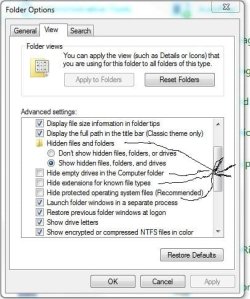
As for the View tab when you look under the "Show hidden files, folders, or drives" the next 3 items are for:
-Hide empty drives in the Computer folder-
-Hide extensions for known file types-
-Hide protected operating system file types-

Once you uncheck those 3 as well Windows will prompt you with the warning where you simply click to confirm the change being made to see them made visible. When you go back to the root of C afterwards the previously hidden boot files will then be seen.
 

My Computers

System One System Two

  • Computer type
    PC/Desktop
    Computer Manufacturer/Model Number
    Custom builds = 2
    OS
    W7 Ultimate x64/W10 Pro x64/W11 Pro Triple Boot - Main PC W7 Remote PC Micro ATX W7 Pro x64/W11 Pro
    CPU
    AMD Phenom II X4 975 Deneb 3.6ghz - 965 2nd remote pc
    Motherboard
    Gigabyte GA-790XTA-UD4-Gigabyte GA-880GM-D2H remote pc
    Memory
    Kingston Hyper X DDR3 1600 1.5v 16gb - Hyper X Fury 8gb 2nd
    Graphics Card(s)
    MSI HD Radeon 5750 1gb - MSI HD Radeon 6450 on mini tower
    Sound Card
    Creative Labs X-Fi Xtreme Audio P - Realtek onooard 2nd case
    Monitor(s) Displays
    ASUS VW199T-P 19" HP 2082a Main-HP 2082a 20" remote pc
    Screen Resolution
    Asus 1440x900 - HP 1600x900
    Hard Drives
    WD Black 1TB HD per OS W7, W10, and pending W11 presently on 500gb OS Drive - Pending Triple 1TB HDs for Spanned Storage/backup volume
    Single 2TB external USB enclosure, single 1TB System 7 Host/Boot drive, Pending 8TB external HD for system image b
    PSU
    Corsair 750TX - primary / Corsair CX600 - second
    Case
    Antec 900-2 - SSD compatible / NZXT Vulcan mini tower
    Cooling
    Zalman CNPS9900A
    Keyboard
    AZIO L70 Backlit Letters Gaming - ONN Cordless/USB
    Mouse
    MSI DS200 Programmable, Logitech Cordless
    Internet Speed
    30mbps upgrade - primary hard wired - mini tower usb WiFi
    Antivirus
    GFI VIPRE Internet Security 2014 on W7 2016 beta on W10,
    Browser
    Cyberfox, WaterFox 64bit FF variants, FireFox x64, Pale Moon
    Other Info
    Accomdata fan cooled usb 2.0 PIDE/Sata II, III external enclosure.
    Sambient usb/eSata PATA/Sata II, III external enclosure.
  • Computer type
    PC/Desktop
    System Manufacturer/Model Number
    CUSTOM ASSEMBLY
    OS
    W7 Pro x64/W11 Pro
    CPU
    AMD Deneb 3.6ghz - 965
    Motherboard
    Gigabyte GA-880GM-D2H remote pc
    Memory
    Kingston Hyper X Fury 8gb
    Graphics Card(s)
    MSI HD Radeon 6450 DVI Output
    Sound Card
    Realtek onooard Creative or Other separate PENDING
    Monitor(s) Displays
    VIZIO 32" LCD TV Separate LCD Pending
    Screen Resolution
    1600x1080
    Hard Drives
    WD 500GB OS Host/Boot WD Green 1TB Storage/Backup
    PSU
    Corsair 600W - THERMALTAKE 600W spare case
    Case
    NZXT Vulcan mini tower
    Cooling
    Twin 120mm Top Fans - 240mm Side Cover
    Keyboard
    ONN Cordless/USB Logitech Cordless
    Mouse
    ONN USB/Cordless - Logitech Cordless
    Internet Speed
    DSL 5G
    Browser
    MS Edge, FireFox, WaterFox x64, FireFox Nightly
    Other Info
    OS Testing-Remote Access to Main TeamViewer
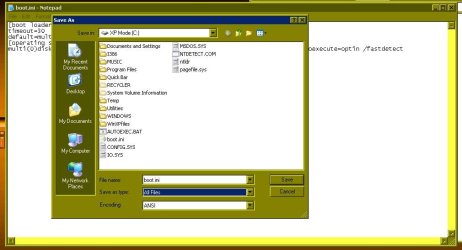
You are looking in the wrong place for those! Those are found at "C:\" not "C:\Windows\System32\" being the "root" of the drive itself.

If you go back to the 3 screens posted earlier the 3rd shows the root of C while the XP Mode is running. For the root of C on XP Home as well as for XP Pro or the MCE edition the same boot files will be seen there too.
But I can't go into XP mode, because I only have the W7 Home Edition, and I can't boot into the drive the darn "NTLDR is missing"! While in W7 mode this is all I see of the XP drive:
 

Attachments

  • screenshot01.jpg
    screenshot01.jpg
    388.1 KB · Views: 2
Last edited:

My Computer

Computer Manufacturer/Model Number
HP p6347c
OS
W7
CPU
AMD Athlon(tm) II X4 630 Processor
Motherboard
AMD RS780/RS880
Memory
8 GB
Graphics Card(s)
ATI Radeon HD 4200
Sound Card
Realtek High Definition Audio
Monitor(s) Displays
HP w2338h (HP w2338h Wide LCD Monitor)
Hard Drives
WDC WD6400AAKS-65A7B SCSI Disk Device
You don't have to be booted into XP or be running the XP Mode to see the boot files copied over to the 7 host drive. You will have to change the view settings however in the Folder options in 7 for the time being in order to see the new entry for XP added into the 7 BCD store and boot options once the XP files are copied over from the second drive.

The reason you are not able to see the boot files is from still having those files hidden from view. I think this is where you are getting a bit confused there.

Once you have that taken care of that first step of unchecking those items where 3 of the 4 there are a mandate you can continue to copy them over and edit the boot.ini file. You then continue to the next step of adding in the new entry for XP using the EasyBCD program being a BCD editing program.

From that point on you would simply reboot and select the option for XP to see if it will load up for you. As for the missing ntldr error you have been seeing is that from setting the XP drive as first in the boot order? Likely something went wrong along the way there.

Once you have the boot files copied over, the boot.ini edit is seen to, and the new entry added into the 7 loader you will be bypassing the boot informaion on the second drive entirely using the 7 boot loader instead with the XP Loader present on the 7 host/boot drive.

I added a screen for which items in the View tab to see unchecked to help you a bit further. You get in there by the "menu bar>Tools>Folder options>View" tab with any WE window open or simply go into the "Control Panel>Folder options" sub there to see those taken care of.
 

Attachments

  • Folder Options Unhiding Protected Files.jpg
    Folder Options Unhiding Protected Files.jpg
    87.7 KB · Views: 1
Last edited:

My Computers

System One System Two

  • Computer type
    PC/Desktop
    Computer Manufacturer/Model Number
    Custom builds = 2
    OS
    W7 Ultimate x64/W10 Pro x64/W11 Pro Triple Boot - Main PC W7 Remote PC Micro ATX W7 Pro x64/W11 Pro
    CPU
    AMD Phenom II X4 975 Deneb 3.6ghz - 965 2nd remote pc
    Motherboard
    Gigabyte GA-790XTA-UD4-Gigabyte GA-880GM-D2H remote pc
    Memory
    Kingston Hyper X DDR3 1600 1.5v 16gb - Hyper X Fury 8gb 2nd
    Graphics Card(s)
    MSI HD Radeon 5750 1gb - MSI HD Radeon 6450 on mini tower
    Sound Card
    Creative Labs X-Fi Xtreme Audio P - Realtek onooard 2nd case
    Monitor(s) Displays
    ASUS VW199T-P 19" HP 2082a Main-HP 2082a 20" remote pc
    Screen Resolution
    Asus 1440x900 - HP 1600x900
    Hard Drives
    WD Black 1TB HD per OS W7, W10, and pending W11 presently on 500gb OS Drive - Pending Triple 1TB HDs for Spanned Storage/backup volume
    Single 2TB external USB enclosure, single 1TB System 7 Host/Boot drive, Pending 8TB external HD for system image b
    PSU
    Corsair 750TX - primary / Corsair CX600 - second
    Case
    Antec 900-2 - SSD compatible / NZXT Vulcan mini tower
    Cooling
    Zalman CNPS9900A
    Keyboard
    AZIO L70 Backlit Letters Gaming - ONN Cordless/USB
    Mouse
    MSI DS200 Programmable, Logitech Cordless
    Internet Speed
    30mbps upgrade - primary hard wired - mini tower usb WiFi
    Antivirus
    GFI VIPRE Internet Security 2014 on W7 2016 beta on W10,
    Browser
    Cyberfox, WaterFox 64bit FF variants, FireFox x64, Pale Moon
    Other Info
    Accomdata fan cooled usb 2.0 PIDE/Sata II, III external enclosure.
    Sambient usb/eSata PATA/Sata II, III external enclosure.
  • Computer type
    PC/Desktop
    System Manufacturer/Model Number
    CUSTOM ASSEMBLY
    OS
    W7 Pro x64/W11 Pro
    CPU
    AMD Deneb 3.6ghz - 965
    Motherboard
    Gigabyte GA-880GM-D2H remote pc
    Memory
    Kingston Hyper X Fury 8gb
    Graphics Card(s)
    MSI HD Radeon 6450 DVI Output
    Sound Card
    Realtek onooard Creative or Other separate PENDING
    Monitor(s) Displays
    VIZIO 32" LCD TV Separate LCD Pending
    Screen Resolution
    1600x1080
    Hard Drives
    WD 500GB OS Host/Boot WD Green 1TB Storage/Backup
    PSU
    Corsair 600W - THERMALTAKE 600W spare case
    Case
    NZXT Vulcan mini tower
    Cooling
    Twin 120mm Top Fans - 240mm Side Cover
    Keyboard
    ONN Cordless/USB Logitech Cordless
    Mouse
    ONN USB/Cordless - Logitech Cordless
    Internet Speed
    DSL 5G
    Browser
    MS Edge, FireFox, WaterFox x64, FireFox Nightly
    Other Info
    OS Testing-Remote Access to Main TeamViewer
The reason you are not able to see the boot files is from still having those files hidden from view. I think this is where you are getting a bit confused there.

Once you have that taken care of that first step of unchecking those items where 3 of the 4 there are a mandate you can continue to copy them over and edit the boot.ini file. You then continue to the next step of adding in the new entry for XP using the EasyBCD program being a BCD editing program.

From that point on you would simply reboot and select the option for XP to see if it will load up for you. As for the missing ntldr error you have been seeing is that from setting the XP drive as first in the boot order? Likely something went wrong along the way there.

Once you have the boot files copied over, the boot.ini edit is seen to, and the new entry added into the 7 loader you will be bypassing the boot informaion on the second drive entirely using the 7 boot loader instead with the XP Loader present on the 7 host/boot drive.

I added a screen for which items in the View tab to see unchecked to help you a bit further. You get in there by the "menu bar>Tools>Folder options>View" tab with any WE window open or simply go into the "Control Panel>Folder options" sub there to see those taken care of.
That is exactly what my folder options look like:
 

Attachments

  • screen02.jpg
    screen02.jpg
    405.4 KB · Views: 2

My Computer

Computer Manufacturer/Model Number
HP p6347c
OS
W7
CPU
AMD Athlon(tm) II X4 630 Processor
Motherboard
AMD RS780/RS880
Memory
8 GB
Graphics Card(s)
ATI Radeon HD 4200
Sound Card
Realtek High Definition Audio
Monitor(s) Displays
HP w2338h (HP w2338h Wide LCD Monitor)
Hard Drives
WDC WD6400AAKS-65A7B SCSI Disk Device
You missed one! :D Now try unchecking the "Hide empty drives in Computer folder" item to see if that helps any when going back to browse the root of the XP drive to see if you now are able to view the files outside of the Windows directory there.
 

My Computers

System One System Two

  • Computer type
    PC/Desktop
    Computer Manufacturer/Model Number
    Custom builds = 2
    OS
    W7 Ultimate x64/W10 Pro x64/W11 Pro Triple Boot - Main PC W7 Remote PC Micro ATX W7 Pro x64/W11 Pro
    CPU
    AMD Phenom II X4 975 Deneb 3.6ghz - 965 2nd remote pc
    Motherboard
    Gigabyte GA-790XTA-UD4-Gigabyte GA-880GM-D2H remote pc
    Memory
    Kingston Hyper X DDR3 1600 1.5v 16gb - Hyper X Fury 8gb 2nd
    Graphics Card(s)
    MSI HD Radeon 5750 1gb - MSI HD Radeon 6450 on mini tower
    Sound Card
    Creative Labs X-Fi Xtreme Audio P - Realtek onooard 2nd case
    Monitor(s) Displays
    ASUS VW199T-P 19" HP 2082a Main-HP 2082a 20" remote pc
    Screen Resolution
    Asus 1440x900 - HP 1600x900
    Hard Drives
    WD Black 1TB HD per OS W7, W10, and pending W11 presently on 500gb OS Drive - Pending Triple 1TB HDs for Spanned Storage/backup volume
    Single 2TB external USB enclosure, single 1TB System 7 Host/Boot drive, Pending 8TB external HD for system image b
    PSU
    Corsair 750TX - primary / Corsair CX600 - second
    Case
    Antec 900-2 - SSD compatible / NZXT Vulcan mini tower
    Cooling
    Zalman CNPS9900A
    Keyboard
    AZIO L70 Backlit Letters Gaming - ONN Cordless/USB
    Mouse
    MSI DS200 Programmable, Logitech Cordless
    Internet Speed
    30mbps upgrade - primary hard wired - mini tower usb WiFi
    Antivirus
    GFI VIPRE Internet Security 2014 on W7 2016 beta on W10,
    Browser
    Cyberfox, WaterFox 64bit FF variants, FireFox x64, Pale Moon
    Other Info
    Accomdata fan cooled usb 2.0 PIDE/Sata II, III external enclosure.
    Sambient usb/eSata PATA/Sata II, III external enclosure.
  • Computer type
    PC/Desktop
    System Manufacturer/Model Number
    CUSTOM ASSEMBLY
    OS
    W7 Pro x64/W11 Pro
    CPU
    AMD Deneb 3.6ghz - 965
    Motherboard
    Gigabyte GA-880GM-D2H remote pc
    Memory
    Kingston Hyper X Fury 8gb
    Graphics Card(s)
    MSI HD Radeon 6450 DVI Output
    Sound Card
    Realtek onooard Creative or Other separate PENDING
    Monitor(s) Displays
    VIZIO 32" LCD TV Separate LCD Pending
    Screen Resolution
    1600x1080
    Hard Drives
    WD 500GB OS Host/Boot WD Green 1TB Storage/Backup
    PSU
    Corsair 600W - THERMALTAKE 600W spare case
    Case
    NZXT Vulcan mini tower
    Cooling
    Twin 120mm Top Fans - 240mm Side Cover
    Keyboard
    ONN Cordless/USB Logitech Cordless
    Mouse
    ONN USB/Cordless - Logitech Cordless
    Internet Speed
    DSL 5G
    Browser
    MS Edge, FireFox, WaterFox x64, FireFox Nightly
    Other Info
    OS Testing-Remote Access to Main TeamViewer
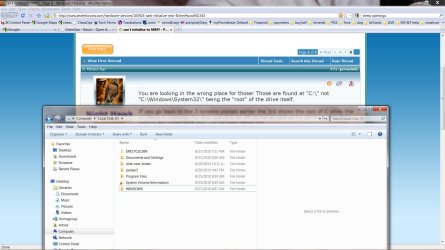
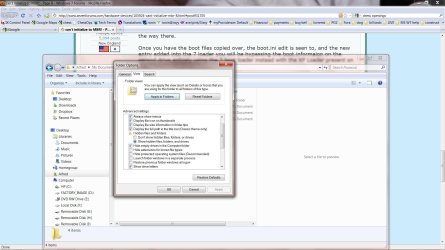
You missed one! :D Now try unchecking the "Hide empty drives in Computer folder" item to see if that helps any when going back to browse the root of the XP drive to see if you now are able to view the files outside of the Windows directory there.
True, but it still shows only this:
 

Attachments

  • screen03.jpg
    screen03.jpg
    331.4 KB · Views: 4

My Computer

Computer Manufacturer/Model Number
HP p6347c
OS
W7
CPU
AMD Athlon(tm) II X4 630 Processor
Motherboard
AMD RS780/RS880
Memory
8 GB
Graphics Card(s)
ATI Radeon HD 4200
Sound Card
Realtek High Definition Audio
Monitor(s) Displays
HP w2338h (HP w2338h Wide LCD Monitor)
Hard Drives
WDC WD6400AAKS-65A7B SCSI Disk Device
You shouldn't be having any problem seeing the files at the root if you had XP running while the 7 drive was unplugged. If you simply went ahead and got XP while the 7 drive was plugged in that would explain why 7 wouldn't start up afterwards until you corrected that with the startup repair tool.

In that case the missing ntldr error would be seen when setting the XP drive as first due to the various attempts you made collectively seeing mbr entries on both drives for XP without any boot files there instead of simply seeing a flashing dash in the upper left hand corner of the screen.

If you discover that the boot files are present your next two steps would simply be editing the boot.ini file to insure that correction is addressed and adding the new entry into the 7 boot loader.
 

My Computers

System One System Two

  • Computer type
    PC/Desktop
    Computer Manufacturer/Model Number
    Custom builds = 2
    OS
    W7 Ultimate x64/W10 Pro x64/W11 Pro Triple Boot - Main PC W7 Remote PC Micro ATX W7 Pro x64/W11 Pro
    CPU
    AMD Phenom II X4 975 Deneb 3.6ghz - 965 2nd remote pc
    Motherboard
    Gigabyte GA-790XTA-UD4-Gigabyte GA-880GM-D2H remote pc
    Memory
    Kingston Hyper X DDR3 1600 1.5v 16gb - Hyper X Fury 8gb 2nd
    Graphics Card(s)
    MSI HD Radeon 5750 1gb - MSI HD Radeon 6450 on mini tower
    Sound Card
    Creative Labs X-Fi Xtreme Audio P - Realtek onooard 2nd case
    Monitor(s) Displays
    ASUS VW199T-P 19" HP 2082a Main-HP 2082a 20" remote pc
    Screen Resolution
    Asus 1440x900 - HP 1600x900
    Hard Drives
    WD Black 1TB HD per OS W7, W10, and pending W11 presently on 500gb OS Drive - Pending Triple 1TB HDs for Spanned Storage/backup volume
    Single 2TB external USB enclosure, single 1TB System 7 Host/Boot drive, Pending 8TB external HD for system image b
    PSU
    Corsair 750TX - primary / Corsair CX600 - second
    Case
    Antec 900-2 - SSD compatible / NZXT Vulcan mini tower
    Cooling
    Zalman CNPS9900A
    Keyboard
    AZIO L70 Backlit Letters Gaming - ONN Cordless/USB
    Mouse
    MSI DS200 Programmable, Logitech Cordless
    Internet Speed
    30mbps upgrade - primary hard wired - mini tower usb WiFi
    Antivirus
    GFI VIPRE Internet Security 2014 on W7 2016 beta on W10,
    Browser
    Cyberfox, WaterFox 64bit FF variants, FireFox x64, Pale Moon
    Other Info
    Accomdata fan cooled usb 2.0 PIDE/Sata II, III external enclosure.
    Sambient usb/eSata PATA/Sata II, III external enclosure.
  • Computer type
    PC/Desktop
    System Manufacturer/Model Number
    CUSTOM ASSEMBLY
    OS
    W7 Pro x64/W11 Pro
    CPU
    AMD Deneb 3.6ghz - 965
    Motherboard
    Gigabyte GA-880GM-D2H remote pc
    Memory
    Kingston Hyper X Fury 8gb
    Graphics Card(s)
    MSI HD Radeon 6450 DVI Output
    Sound Card
    Realtek onooard Creative or Other separate PENDING
    Monitor(s) Displays
    VIZIO 32" LCD TV Separate LCD Pending
    Screen Resolution
    1600x1080
    Hard Drives
    WD 500GB OS Host/Boot WD Green 1TB Storage/Backup
    PSU
    Corsair 600W - THERMALTAKE 600W spare case
    Case
    NZXT Vulcan mini tower
    Cooling
    Twin 120mm Top Fans - 240mm Side Cover
    Keyboard
    ONN Cordless/USB Logitech Cordless
    Mouse
    ONN USB/Cordless - Logitech Cordless
    Internet Speed
    DSL 5G
    Browser
    MS Edge, FireFox, WaterFox x64, FireFox Nightly
    Other Info
    OS Testing-Remote Access to Main TeamViewer
You shouldn't be having any problem seeing the files at the root if you had XP running while the 7 drive was unplugged. If you simply went ahead and got XP while the 7 drive was plugged in that would explain why 7 wouldn't start up afterwards until you corrected that with the startup repair tool.
This may be how things happened.
In that case the missing ntldr error would be seen when setting the XP drive as first due to the various attempts you made collectively seeing mbr entries on both drives for XP without any boot files there instead of simply seeing a flashing dash in the upper left hand corner of the screen.

If you discover that the boot files are present your next two steps would simply be editing the boot.ini file to insure that correction is addressed and adding the new entry into the 7 boot loader.
Well, they don't seem to be present, at least not visible! What should be our next step then? :shock:
 

My Computer

Computer Manufacturer/Model Number
HP p6347c
OS
W7
CPU
AMD Athlon(tm) II X4 630 Processor
Motherboard
AMD RS780/RS880
Memory
8 GB
Graphics Card(s)
ATI Radeon HD 4200
Sound Card
Realtek High Definition Audio
Monitor(s) Displays
HP w2338h (HP w2338h Wide LCD Monitor)
Hard Drives
WDC WD6400AAKS-65A7B SCSI Disk Device
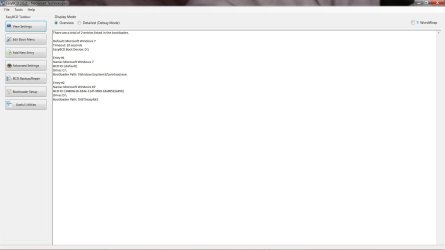
Here is an update on what I did today.
By a stroke of brilliance (ha! :what:) I cranked up my second PC, an old Compaq with XP), copied the boot files on a little flash drive, and added them to my W7 root. Then I downloaded EasyBCD and added the XP drive.
Then I held my breath, and rebooted my machine.
Low and behold, it gave me a choice of both drives!
However, when I select the XP drive, it asks how I want to open it (the 5 options from "SAFE MODE" over "SM with Networking", "SM with Command Prompt", to "Open Windows normally")
I tried all 5 except "SM with Command Prompt", and none opens XP, but keeps repeating the boot process, offering both OSes.

Could this be the reason:
In EasyBCD the XP drive shows as "D", not "F".
I made sure not to let EBCD "select automatically", but manually entered F as the drive. It just ignored me!
 

Attachments

  • EasyBCD.jpg
    EasyBCD.jpg
    156 KB · Views: 2
Last edited:

My Computer

Computer Manufacturer/Model Number
HP p6347c
OS
W7
CPU
AMD Athlon(tm) II X4 630 Processor
Motherboard
AMD RS780/RS880
Memory
8 GB
Graphics Card(s)
ATI Radeon HD 4200
Sound Card
Realtek High Definition Audio
Monitor(s) Displays
HP w2338h (HP w2338h Wide LCD Monitor)
Hard Drives
WDC WD6400AAKS-65A7B SCSI Disk Device
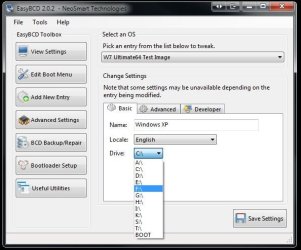
You first have to verify which drive letter is assigned in the DM for the XP drive. If F you apparently used D when adding the new entry in offsetting things a bit but wouldn't be seeing the XP boot options menu!

In the 7 DM first make sure the XP drive is set with the letter you want to use for the XP drive if not already seen in WE as F. The options found in the EasyBCD's Advanced Settings will allow you to reassociate the XP entry with the correct drive letter as well.(see attached image) Once you change and even rename the entry simply click on the "save" button to save the change made.

The F8 boot menu shows that XP is loading but having a problem of some type where you will want to take notice of any error messages like those seen if a blue screen appears in order to trace the problem.

Knowing that XP made the attempt however is certainly good news for you. Now to get it running normally! :D You may end up needing another full install to replace the present following the guide or a repair install if the option is seen during the setup to correct initial installation problems.

Once you are at the XP desktop and can connect online the first item will be the optional hardware updates for XP. The MS update may just locate and display the needed sata/Raid controller drivers as part of the total number you can expect! Often that's how you can get the "hard2find" type. Go for it! :D
 

Attachments

  • EasyBCD Advanced Settings.jpg
    EasyBCD Advanced Settings.jpg
    61.2 KB · Views: 2

My Computers

System One System Two

  • Computer type
    PC/Desktop
    Computer Manufacturer/Model Number
    Custom builds = 2
    OS
    W7 Ultimate x64/W10 Pro x64/W11 Pro Triple Boot - Main PC W7 Remote PC Micro ATX W7 Pro x64/W11 Pro
    CPU
    AMD Phenom II X4 975 Deneb 3.6ghz - 965 2nd remote pc
    Motherboard
    Gigabyte GA-790XTA-UD4-Gigabyte GA-880GM-D2H remote pc
    Memory
    Kingston Hyper X DDR3 1600 1.5v 16gb - Hyper X Fury 8gb 2nd
    Graphics Card(s)
    MSI HD Radeon 5750 1gb - MSI HD Radeon 6450 on mini tower
    Sound Card
    Creative Labs X-Fi Xtreme Audio P - Realtek onooard 2nd case
    Monitor(s) Displays
    ASUS VW199T-P 19" HP 2082a Main-HP 2082a 20" remote pc
    Screen Resolution
    Asus 1440x900 - HP 1600x900
    Hard Drives
    WD Black 1TB HD per OS W7, W10, and pending W11 presently on 500gb OS Drive - Pending Triple 1TB HDs for Spanned Storage/backup volume
    Single 2TB external USB enclosure, single 1TB System 7 Host/Boot drive, Pending 8TB external HD for system image b
    PSU
    Corsair 750TX - primary / Corsair CX600 - second
    Case
    Antec 900-2 - SSD compatible / NZXT Vulcan mini tower
    Cooling
    Zalman CNPS9900A
    Keyboard
    AZIO L70 Backlit Letters Gaming - ONN Cordless/USB
    Mouse
    MSI DS200 Programmable, Logitech Cordless
    Internet Speed
    30mbps upgrade - primary hard wired - mini tower usb WiFi
    Antivirus
    GFI VIPRE Internet Security 2014 on W7 2016 beta on W10,
    Browser
    Cyberfox, WaterFox 64bit FF variants, FireFox x64, Pale Moon
    Other Info
    Accomdata fan cooled usb 2.0 PIDE/Sata II, III external enclosure.
    Sambient usb/eSata PATA/Sata II, III external enclosure.
  • Computer type
    PC/Desktop
    System Manufacturer/Model Number
    CUSTOM ASSEMBLY
    OS
    W7 Pro x64/W11 Pro
    CPU
    AMD Deneb 3.6ghz - 965
    Motherboard
    Gigabyte GA-880GM-D2H remote pc
    Memory
    Kingston Hyper X Fury 8gb
    Graphics Card(s)
    MSI HD Radeon 6450 DVI Output
    Sound Card
    Realtek onooard Creative or Other separate PENDING
    Monitor(s) Displays
    VIZIO 32" LCD TV Separate LCD Pending
    Screen Resolution
    1600x1080
    Hard Drives
    WD 500GB OS Host/Boot WD Green 1TB Storage/Backup
    PSU
    Corsair 600W - THERMALTAKE 600W spare case
    Case
    NZXT Vulcan mini tower
    Cooling
    Twin 120mm Top Fans - 240mm Side Cover
    Keyboard
    ONN Cordless/USB Logitech Cordless
    Mouse
    ONN USB/Cordless - Logitech Cordless
    Internet Speed
    DSL 5G
    Browser
    MS Edge, FireFox, WaterFox x64, FireFox Nightly
    Other Info
    OS Testing-Remote Access to Main TeamViewer
Back
Top