
Can't instal x64 (but did x86 just fine...)

pooksahib

New member
Member
VIP
Local time
9:52 PM
Messages
149
Location
Scotland
Until recently, I was running 32bit Vista. Last week, I installed 32bit Win7 (7100 build).
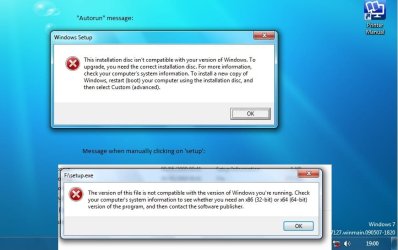
That worked fine but then I decided I'd like to install 64bit Win7. I don't use torrents so I made an installation disk from 17 Rapidshare files provided on another (reputable) forum. This was the 7127 build of Win7 x64. When I inserted the disk and clicked 'run', I got an error message. A similar message came up when I went into the folders on the DVD drive and clicked 'setup.exe'. The two messages are attached.

I went into BIOS thinking I might be able to boot from DVD drive but, even with DVD selected as first boot option, I got the usual choice of Vista or Win7 (I haven't deleted Vista yet).


What am I doing wrong? Many thanks.
 

Attachments
  • x64.jpg
    x64.jpg
    52.6 KB · Views: 137

My Computer My Computer

At a glance

Microsoft Windows 7 Ultimate 64-bit 7601 Mult...Intel(R) Core(TM) i3-4150 CPU @ 3.50GHz8.00 GBIntel(R) HD Graphics 4400
Computer type
PC/Desktop
Computer Manufacturer/Model Number
self build
OS
Microsoft Windows 7 Ultimate 64-bit 7601 Multiprocessor Free Service Pack 1
CPU
Intel(R) Core(TM) i3-4150 CPU @ 3.50GHz
Motherboard
ASUSTeK COMPUTER INC. H97M-PLUS
Memory
8.00 GB
Graphics Card(s)
Intel(R) HD Graphics 4400
Sound Card
(1) High Definition Audio Device (2) USB Audio Device
Screen Resolution
1024 x 768 x 32 bits (4294967296 colors) @ 75 Hz
Hard Drives
(1) SAMSUNG HD103SI ATA Device (2) Samsung SSD 840 EVO 120GB ATA Device (3) ST31000528AS ATA Device (4) GENERIC USB Storage-CFC USB Device (5) GENERIC USB Storage-MSC USB Device (6) GENERIC USB Storage-SDC USB Device (7) GENERIC USB Stora
PSU
Corsair CXM 430W Modular 80 PLUS Bronze
Antivirus
Panda Free
Browser
Firefox+NoScript, AdBlockPlus, Disconnect
It looks like Seven thinks you're trying to "upgrade" from your current 32-bit install to a 64-bit install -- which you can't do. You can only do a clean install.
 

My Computer My Computer

At a glance

Win7 Pro 32-bit, Win8 Pro 32-bitAMD Phenom II X6 1090T4GB ddr3 1300AMD HD 4290 onboard
Computer type
PC/Desktop
Computer Manufacturer/Model Number
Custom
OS
Win7 Pro 32-bit, Win8 Pro 32-bit
CPU
AMD Phenom II X6 1090T
Motherboard
Gigabyte
Memory
4GB ddr3 1300
Graphics Card(s)
AMD HD 4290 onboard
Sound Card
Builtin Realtek HD Audio
Monitor(s) Displays
Samsung 24" widescreen, LG 23" widescreen
Screen Resolution
1920x1200/1920x1080
Hard Drives
Kingston 256GB SSD
Keyboard
Logitech Illuminated Keyboard
Mouse
Logitech M705 wireless mouse
Antivirus
Norton Av 2013
Browser
IE v10
When I inserted the disk and clicked 'run', I got an error message. A similar message came up when I went into the folders on the DVD drive and clicked 'setup.exe'. The two messages are attached.

You can not UPGRADE from x86 to x64. That is what your post shows.
want to dual boot, OK. Insert DVD then reboot and make sure you have boot to DVD active. Then when ask select a new different partition to install x64. Then you will be in DUAL boot mode. As long as your System will accept x64. Not all system are made to be compatible with X64 OS's.
 
Yes, Mark, that makes sense if I was running Win7 at the time but it's the same story when I load Vista. And that's weird, isn't it? I ran Vista when doing the clean instal of Win7 32bit (on a different drive) and all went well. I assume it should be possible to 'clean install' W7 64bit onto, say, D drive from my 32bit Vista on C drive?
Can I maybe confirm that I have the correct disk - the program I'm asked to run is sperr32. Is that right?
 

My Computer My Computer

At a glance

Microsoft Windows 7 Ultimate 64-bit 7601 Mult...Intel(R) Core(TM) i3-4150 CPU @ 3.50GHz8.00 GBIntel(R) HD Graphics 4400
Computer type
PC/Desktop
Computer Manufacturer/Model Number
self build
OS
Microsoft Windows 7 Ultimate 64-bit 7601 Multiprocessor Free Service Pack 1
CPU
Intel(R) Core(TM) i3-4150 CPU @ 3.50GHz
Motherboard
ASUSTeK COMPUTER INC. H97M-PLUS
Memory
8.00 GB
Graphics Card(s)
Intel(R) HD Graphics 4400
Sound Card
(1) High Definition Audio Device (2) USB Audio Device
Screen Resolution
1024 x 768 x 32 bits (4294967296 colors) @ 75 Hz
Hard Drives
(1) SAMSUNG HD103SI ATA Device (2) Samsung SSD 840 EVO 120GB ATA Device (3) ST31000528AS ATA Device (4) GENERIC USB Storage-CFC USB Device (5) GENERIC USB Storage-MSC USB Device (6) GENERIC USB Storage-SDC USB Device (7) GENERIC USB Stora
PSU
Corsair CXM 430W Modular 80 PLUS Bronze
Antivirus
Panda Free
Browser
Firefox+NoScript, AdBlockPlus, Disconnect

Hi Snuffy, you just got in before me. You'll note what I said about the same messages when loading Vista. Are you saying that I should change BIOS to have DVD as first boot priority? Because I did try that but simply got the usual dual boot message - choose Vista or W7...

Just had a thought... Could the problem be that I already have 2 OS's installed - Vista and Win7 32bit AND YOU CANNOT HAVE "TRIPLE BOOT"? If I deleted Win7 32bit maybe the Win 7 64 bit disk would work??
 
Last edited:

My Computer My Computer

At a glance

Microsoft Windows 7 Ultimate 64-bit 7601 Mult...Intel(R) Core(TM) i3-4150 CPU @ 3.50GHz8.00 GBIntel(R) HD Graphics 4400
Computer type
PC/Desktop
Computer Manufacturer/Model Number
self build
OS
Microsoft Windows 7 Ultimate 64-bit 7601 Multiprocessor Free Service Pack 1
CPU
Intel(R) Core(TM) i3-4150 CPU @ 3.50GHz
Motherboard
ASUSTeK COMPUTER INC. H97M-PLUS
Memory
8.00 GB
Graphics Card(s)
Intel(R) HD Graphics 4400
Sound Card
(1) High Definition Audio Device (2) USB Audio Device
Screen Resolution
1024 x 768 x 32 bits (4294967296 colors) @ 75 Hz
Hard Drives
(1) SAMSUNG HD103SI ATA Device (2) Samsung SSD 840 EVO 120GB ATA Device (3) ST31000528AS ATA Device (4) GENERIC USB Storage-CFC USB Device (5) GENERIC USB Storage-MSC USB Device (6) GENERIC USB Storage-SDC USB Device (7) GENERIC USB Stora
PSU
Corsair CXM 430W Modular 80 PLUS Bronze
Antivirus
Panda Free
Browser
Firefox+NoScript, AdBlockPlus, Disconnect
Hi Snuffy, you just got in before me. You'll note what I said about the same messages when loading Vista. Are you saying that I should change BIOS to have DVD as first boot priority? Because I did try that but simply got the usual dual boot message - choose Vista or W7...

If you change the BIOS to priority boot: My priority is:
1. Floppy
2. USB
3. CD-DVD
4. HD
If the finds nothing in 1 - 2 - 3 it boots to HD, other wise it boots in order.
Set the order for your preference.
I assume it should be possible to 'clean install' W7 64bit onto, say, D drive from my 32bit Vista on C drive?
NO this looks like UPGRADE.
 
Recently, someone I trusted told me that I was 64-bit compatible but I now have my doubts. I've installed and ran the Everest system checker and here are some 'edited highlights':


CPU Properties:
CPU Type Intel Pentium 4 631, 3000 MHz (15 x 200)
CPU Alias Cedar Mill
CPU Stepping D0
Instruction Set x86, x86-64, MMX, SSE, SSE2, SSE3
Instruction Set:
64-bit x86 Extension (AMD64, Intel64) Supported


To me, that suggests x64 is 'doable' but look at this:


Computer:
Computer Type ACPI x86-based PC


That part seems pretty conclusive, doesn't it? Can anyone confirm that I CANNOT install a 64-bit O/S?


If that is indeed the case, I'd be interested to know:
a) what the references to 64-bit in the Everest report mean?
b) why the installation disk I created for Win7 64-bit doesn't play. Surely it should load and then 'check compatibility' before saying No Deal?
c) is there such a thing as an 'Ugrade only' Win7 disk? I thought it was just 'a disk' and you either chose 'upgrade' or 'custom'.


Thanks to all for your invaluable help.
 

My Computer My Computer

At a glance

Microsoft Windows 7 Ultimate 64-bit 7601 Mult...Intel(R) Core(TM) i3-4150 CPU @ 3.50GHz8.00 GBIntel(R) HD Graphics 4400
Computer type
PC/Desktop
Computer Manufacturer/Model Number
self build
OS
Microsoft Windows 7 Ultimate 64-bit 7601 Multiprocessor Free Service Pack 1
CPU
Intel(R) Core(TM) i3-4150 CPU @ 3.50GHz
Motherboard
ASUSTeK COMPUTER INC. H97M-PLUS
Memory
8.00 GB
Graphics Card(s)
Intel(R) HD Graphics 4400
Sound Card
(1) High Definition Audio Device (2) USB Audio Device
Screen Resolution
1024 x 768 x 32 bits (4294967296 colors) @ 75 Hz
Hard Drives
(1) SAMSUNG HD103SI ATA Device (2) Samsung SSD 840 EVO 120GB ATA Device (3) ST31000528AS ATA Device (4) GENERIC USB Storage-CFC USB Device (5) GENERIC USB Storage-MSC USB Device (6) GENERIC USB Storage-SDC USB Device (7) GENERIC USB Stora
PSU
Corsair CXM 430W Modular 80 PLUS Bronze
Antivirus
Panda Free
Browser
Firefox+NoScript, AdBlockPlus, Disconnect
YES, you can install a x64 OS's. It will have to be "CLEAN INSTALL"
CPU Properties:
CPU Type Intel Pentium 4 631, 3000 MHz (15 x 200)
CPU Alias Cedar Mill
CPU Stepping D0
Instruction Set x86, x86-64, MMX, SSE, SSE2, SSE3
Instruction Set:
64-bit x86 Extension (AMD64, Intel64) Supported


Clean Install = Boot to DVD, select a HD or Partition where there is NO OS installed, (Install it there). YOU CAN NOT INSERT THE DVD WHILE IN ANY X32 OS AND INSTALL. That method is = to trying to upgrade x86 to x64.
 
I've sussed it and can now get the disk to 'play'. Haven't installed the x64 though - gonna buy some more memory first. Thanks all, esp Snuffy.
 

My Computer My Computer

At a glance

Microsoft Windows 7 Ultimate 64-bit 7601 Mult...Intel(R) Core(TM) i3-4150 CPU @ 3.50GHz8.00 GBIntel(R) HD Graphics 4400
Computer type
PC/Desktop
Computer Manufacturer/Model Number
self build
OS
Microsoft Windows 7 Ultimate 64-bit 7601 Multiprocessor Free Service Pack 1
CPU
Intel(R) Core(TM) i3-4150 CPU @ 3.50GHz
Motherboard
ASUSTeK COMPUTER INC. H97M-PLUS
Memory
8.00 GB
Graphics Card(s)
Intel(R) HD Graphics 4400
Sound Card
(1) High Definition Audio Device (2) USB Audio Device
Screen Resolution
1024 x 768 x 32 bits (4294967296 colors) @ 75 Hz
Hard Drives
(1) SAMSUNG HD103SI ATA Device (2) Samsung SSD 840 EVO 120GB ATA Device (3) ST31000528AS ATA Device (4) GENERIC USB Storage-CFC USB Device (5) GENERIC USB Storage-MSC USB Device (6) GENERIC USB Storage-SDC USB Device (7) GENERIC USB Stora
PSU
Corsair CXM 430W Modular 80 PLUS Bronze
Antivirus
Panda Free
Browser
Firefox+NoScript, AdBlockPlus, Disconnect
Thanks for the nice words. That is what we all are here for.

Getting Win 7 to work.

Next on the list will be.
 

Attachments

  • w8new.jpg
    w8new.jpg
    4.3 KB · Views: 731
  • win7_ult.jpg
    win7_ult.jpg
    22.8 KB · Views: 150
Back
Top