Can't install drivers for my (unknown) devices??

rapt0r

New member
Local time
4:41 PM
Messages
12
Hi all.

A couple days ago, I installed Windows 7 (through MSDNAA).

I have a problem with some devices. The situation can be seen here:
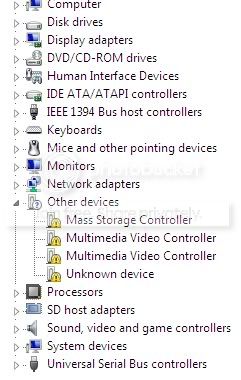
problemdeviceman-1.jpg


I tried updating driver software through windows and it said it was unable to find drivers :(

I have no idea what the "Unknown Device" may be. The "Multimedia Video controller" I'm guessing is my Nvidia graphics card? The Mass Storage Device I think is my Magicgate memory card slot, but I'm not sure.


I have an Nvidia 8400M GT graphics card and judging by what I've seen on the resolution window (and device manager), I'm currently running on my standard VGA graphics device, and not my Nvidia.


I manually searched for the drivers for my graphics card off the Nvidia site, but every time I try to install it, I get this messege

driverproblem.jpg


]I've already tried reformatting and reinstalling windows 7, now I'm running out of ideas. Can anybody please help?

I'm using a Sony Vaio TP3 computer. It's a "desktop" with laptop components and was initially running on Vista.

Thanks
 
Last edited by a moderator:

My Computer My Computer

At a glance

Windows 72GB, 2GB8400M GT
Computer Manufacturer/Model Number
Sony Vaio TP3, Sony Vaio NR-32L
OS
Windows 7
Memory
2GB, 2GB
Graphics Card(s)
8400M GT
Hard Drives
500GB, 200GB
Keyboard
Logitech MX5000
Mouse
Logitech MX5000
Internet Speed
~10kbp/s
For your unknowns try this. Unknown Device Identifier - Freeware Download

As far as the card, make sure you got the right drivers from nvidia for either x32 or x64 for windows 7. also try windows update a few times, not everything comes up right away. do these and report back lol
 

My Computer My Computer

At a glance

Windows 7 7600RTM X64AMD Phenom(tm) 9600 Quad-Core Processor4GB 1066 DDR2 OCZ Gold EditionNVIDIA GeForce 8600 GT
Computer Manufacturer/Model Number
Custom
OS
Windows 7 7600RTM X64
CPU
AMD Phenom(tm) 9600 Quad-Core Processor
Motherboard
ASUS M4A78 PRO
Memory
4GB 1066 DDR2 OCZ Gold Edition
Graphics Card(s)
NVIDIA GeForce 8600 GT
Sound Card
On board
Monitor(s) Displays
42" RCA LCD TV
Screen Resolution
1920x1080
Hard Drives
500GB 7200 RPM SATA
PSU
400W
Case
Crappy
Cooling
Fans
Keyboard
Logitech Wireless Keyboard W/Integrated Touchpad
Internet Speed
10Mbps DL
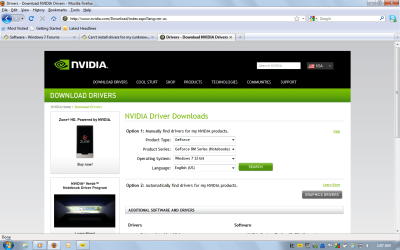
ok this might help you out... that Nvidia card you have right there the Nvidia 8400M GT is a Laptop card now for you to get drives for it go to the nvidia site http://www.nvidia.com click on download drivers then the rest should look like this (Windows 7 32bit i am gathering your running) ((CLICK THE PICTURE TO VIEW IT BETTER))

After that click the search button and you should get the lastest Driver for your Nvidia 8400M GT (M stands for Mobile chipset meaning that its on the motherboard)

Then click the download button :) good luck mate

Hope this helps you out with your graphics problem mate please post back to let me know
 

Attachments

  • Nvidia how to download.png
    Nvidia how to download.png
    62.5 KB · Views: 264
Last edited:

My Computer My Computer

At a glance

Windows 7 Professional (64 Bit)Intel Core i5 2400 @ 3.10GHz8.00 GB Dual-Channel DDR3Nvidia GeForce GTX 460
Computer Manufacturer/Model Number
Custom Built
OS
Windows 7 Professional (64 Bit)
CPU
Intel Core i5 2400 @ 3.10GHz
Motherboard
ASRock Z68 Extreme4
Memory
8.00 GB Dual-Channel DDR3
Graphics Card(s)
Nvidia GeForce GTX 460
Sound Card
On Board
Monitor(s) Displays
E2260 LG 21"
Screen Resolution
1920x1080
Hard Drives
3 drives

ST3750640AS Seagate 700Gb

ST3500418AS Seagate 500Gb

ST2000DL003-9VT166 ATA Device Seagate 2Tb
PSU
Shaw 860 Watt
Case
Antec NINE-HUNDRED
Cooling
Fans
Keyboard
Logitech G110
Mouse
Logitech Revolution VX
Internet Speed
1.5Mb/s
Guys, thanks for the replies but I know how to download the correct graphics driver, believe me :)

I have solved 90% of the problem. It was cause I have a sony vaio and needed the drivers from the OEM, but i still have one unknown device left to solve. The "Unknown device" one :(
 

My Computer My Computer

At a glance

Windows 72GB, 2GB8400M GT
Computer Manufacturer/Model Number
Sony Vaio TP3, Sony Vaio NR-32L
OS
Windows 7
Memory
2GB, 2GB
Graphics Card(s)
8400M GT
Hard Drives
500GB, 200GB
Keyboard
Logitech MX5000
Mouse
Logitech MX5000
Internet Speed
~10kbp/s
Guys, thanks for the replies but I know how to download the correct graphics driver, believe me :)

I have solved 90% of the problem. It was cause I have a sony vaio and needed the drivers from the OEM, but i still have one unknown device left to solve. The "Unknown device" one :(

Rapt0r

If you go into device manager and go to the unknown device. right click go to properties and look for a long numeric string. post that and I can look it up for you

ken
 

My Computer My Computer

At a glance

Win 8 Release candidate 8400[email protected]4 gigsNvidia 9600M
Computer Manufacturer/Model Number
HP Pavillion dv-7 1005 Tx
OS
Win 8 Release candidate 8400
CPU
[email protected]
Memory
4 gigs
Graphics Card(s)
Nvidia 9600M
Sound Card
HD built-in
Monitor(s) Displays
17" Wxga
Screen Resolution
1440x900
Cooling
none
Internet Speed
45Mb down 5Mb up
Hi there
typical "Unknown device" might be built in webcam / TV card / card reader / other mass storage device.

Could also be the sound portion of a "fax modem" card -- yes some people still use dial up.

Also load the chipset drivers for your machine.

Cheers
jimbo
 

My Computer My Computer

At a glance

Linux CENTOS 7 / various Windows OS'es and se...Intel i7 Intel i58GB, 16GBOn Motherboard
Computer type
PC/Desktop
Computer Manufacturer/Model Number
Custom built, several laptops HP/ASUS
OS
Linux CENTOS 7 / various Windows OS'es and servers
CPU
Intel i7 Intel i5
Memory
8GB, 16GB
Graphics Card(s)
On Motherboard
Sound Card
Realtek HD audio
Monitor(s) Displays
Apple Cinema display, Samsung LCD
Screen Resolution
1920 X 1080
Hard Drives
4 X 1TB SATA
Mouse
Toshiba wireless laser
Internet Speed
> 20MB up
Guys, thanks for the replies but I know how to download the correct graphics driver, believe me :)

I have solved 90% of the problem. It was cause I have a sony vaio and needed the drivers from the OEM, but i still have one unknown device left to solve. The "Unknown device" one :(

ok no problem.... (i was just making sure is all) go to device manager as ZigZag said and look at the properties of the unknown device and click the details then find the drop down that says Hardware Id's and post that please I might be able to find you the right driver for you :)
 

My Computer My Computer

At a glance

Windows 7 Professional (64 Bit)Intel Core i5 2400 @ 3.10GHz8.00 GB Dual-Channel DDR3Nvidia GeForce GTX 460
Computer Manufacturer/Model Number
Custom Built
OS
Windows 7 Professional (64 Bit)
CPU
Intel Core i5 2400 @ 3.10GHz
Motherboard
ASRock Z68 Extreme4
Memory
8.00 GB Dual-Channel DDR3
Graphics Card(s)
Nvidia GeForce GTX 460
Sound Card
On Board
Monitor(s) Displays
E2260 LG 21"
Screen Resolution
1920x1080
Hard Drives
3 drives

ST3750640AS Seagate 700Gb

ST3500418AS Seagate 500Gb

ST2000DL003-9VT166 ATA Device Seagate 2Tb
PSU
Shaw 860 Watt
Case
Antec NINE-HUNDRED
Cooling
Fans
Keyboard
Logitech G110
Mouse
Logitech Revolution VX
Internet Speed
1.5Mb/s
A couple months ago I had an "unknown device" pop up in my device manager. I had no new devices and everything connected to my computer was accounted for and working. I did some research and found a forum thread somewhere that suggested shutting down and unplugging the power cord for a few minutes then restart. That worked for me, haven't had the problem since. When the power is disconnected, the motherboard reboots and assigns devices again. You probably knew that...
 

My Computer My Computer

At a glance

Windows 7 x64
OS
Windows 7 x64
Guys, thanks for the replies but I know how to download the correct graphics driver, believe me :)

I have solved 90% of the problem. It was cause I have a sony vaio and needed the drivers from the OEM, but i still have one unknown device left to solve. The "Unknown device" one :(

Oh, I have the same problems like you on my Acer Notebook 7738G:

1. The correct version of the Nvidia driver 130M 64bit was downloaded, but the Nvidia installer said that the system were not 64bit and stopped- kind of weird.

I read somewhere else that someone had the same problem and he manually updated the driver by right clicking on the grafic in the device manager, then choose update, then go to the folder in which the Nvidia files were decompressed into, say "C:\nvidia", then let the system update. But I have had no success doing liked him.

2. By trying to update the "unknown device" the system asked for "Nuvoton Advanced HID Device", but I can download it nowhere after googling many times, even on the website of Nuvoton the driver is not offered for downloading.

Somewhere in this forum, some software for finding unknows devices was introduced, i will try it and report to the forum later.
 

My Computer My Computer

At a glance

Windows 7 Ultimate x64Mobile Q9000 Quadcore4 GB DDR3Nvidia 130M
Computer Manufacturer/Model Number
ACER 7738G
OS
Windows 7 Ultimate x64
CPU
Mobile Q9000 Quadcore
Memory
4 GB DDR3
Graphics Card(s)
Nvidia 130M
Hard Drives
500 GB
Case
Notebook
Guys, thanks for the replies but I know how to download the correct graphics driver, believe me :)

I have solved 90% of the problem. It was cause I have a sony vaio and needed the drivers from the OEM, but i still have one unknown device left to solve. The "Unknown device" one :(

Rapt0r

If you go into device manager and go to the unknown device. right click go to properties and look for a long numeric string. post that and I can look it up for you

ken


Guys, thanks for the replies but I know how to download the correct graphics driver, believe me :)

I have solved 90% of the problem. It was cause I have a sony vaio and needed the drivers from the OEM, but i still have one unknown device left to solve. The "Unknown device" one :(

ok no problem.... (i was just making sure is all) go to device manager as ZigZag said and look at the properties of the unknown device and click the details then find the drop down that says Hardware Id's and post that please I might be able to find you the right driver for you :)


Thanks guys. Sorry for the late reply, i was having problems with my internet.

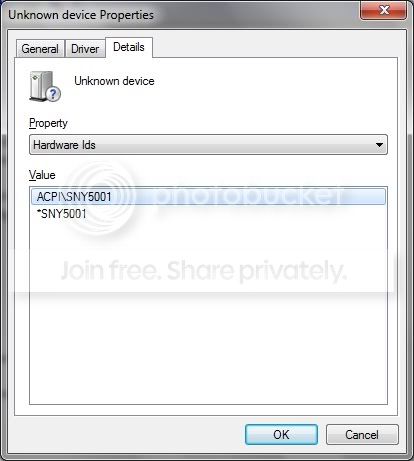
Is this what you're looking for?


Driver.jpg


ACPI\SNY5001
*SNY5001

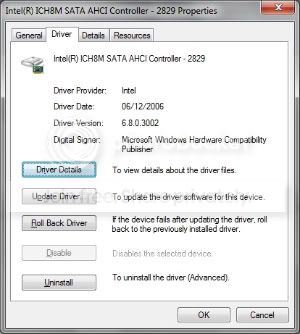
Furthermore, it seems that I have lots of old drivers (dating back as far as 2006) for example:

ddf.jpg


Intel(R) ICH8M SATA AHCI Controller - 2829


Is this normal?
 

My Computer My Computer

At a glance

Windows 72GB, 2GB8400M GT
Computer Manufacturer/Model Number
Sony Vaio TP3, Sony Vaio NR-32L
OS
Windows 7
Memory
2GB, 2GB
Graphics Card(s)
8400M GT
Hard Drives
500GB, 200GB
Keyboard
Logitech MX5000
Mouse
Logitech MX5000
Internet Speed
~10kbp/s
Hi all.

A couple days ago, I installed Windows 7 (through MSDNAA).

I have a problem with some devices. The situation can be seen here:

problemdeviceman-1.jpg


I tried updating driver software through windows and it said it was unable to find drivers :(

I have no idea what the "Unknown Device" may be. The "Multimedia Video controller" I'm guessing is my Nvidia graphics card? The Mass Storage Device I think is my Magicgate memory card slot, but I'm not sure.


I have an Nvidia 8400M GT graphics card and judging by what I've seen on the resolution window (and device manager), I'm currently running on my standard VGA graphics device, and not my Nvidia.


I manually searched for the drivers for my graphics card off the Nvidia site, but every time I try to install it, I get this messege

driverproblem.jpg


]I've already tried reformatting and reinstalling windows 7, now I'm running out of ideas. Can anybody please help?

I'm using a Sony Vaio TP3 computer. It's a "desktop" with laptop components and was initially running on Vista.

Thanks

I have a Vaio All in One VCG-LT15E that I just upgraded to Win 7 Pro x64 from Vista x32 using the student website. I also have the Geforce 8400M GT and had issues for a while. None of the NVIDIA website drivers will work ... ended up using the driver and modified .inf from:


v190.62 Windows 7/Vista 64bit | NVIDIA - NVISION

I know it's a 190 series and not the "mobile" 180 series but after many tries....it worked like a charm. Just make sure you copy and replace the modified .inf ..... that's the secret to get around Sony's lack of Windows 7 support for existing models.

Now...I have the same issues with you as far as my Mass Media Controller (Smart Card Reader)....still working on that one.

I'm also not too happy about the drivers I'm using for my VCCG-6 Webcam...wish I could find a better one.

Good Luck!
 

My Computer My Computer

At a glance

Windows 7 Professional x64Intel Core 2NVIDIA Geforce 8400M GT
Computer Manufacturer/Model Number
Sony Vaio VGC-LT15E
OS
Windows 7 Professional x64
CPU
Intel Core 2
Graphics Card(s)
NVIDIA Geforce 8400M GT
Video driver for the machine?

I have the same machine, the same problem with the drivers. My biggest issue is the video driver but I have a few others as you did to get on Windows 7. I didn't see the end result of your search. did you ever get it to work?
 

My Computer My Computer

At a glance

Windows 7 64 bit
OS
Windows 7 64 bit
Hi can any1 please help!!!

i have an acer aspire one 521 notebook, i am trying to attach a verbatim 1t exteral hard drive!

USB not recognised,

Device status: Windows has stopped this device because it has reported problems. (Code 43)

i have updated the drivers on the note book, i thought the drivers needed for the verbatim were built in.

has any1 got any ideas please!!
 

My Computer My Computer

At a glance

windows 7 starterAMD processor V1051 GB DDR3
OS
windows 7 starter
CPU
AMD processor V105
Memory
1 GB DDR3
Back
Top