Solved Can’t install graphics drivers for RTX 3050.

VaniTS

New member
Member
Local time
9:54 PM
Messages
43
Can’t install graphics drivers for RTX 3050.

I can’t install graphics drivers for the RTX 3050. When I try to install the most recent driver it says it can’t run because of certificate issues. I tried searching for older posts talking about this but that didn’t help either.
 

My Computers

System One System Two

  • Computer type
    PC/Desktop
    Computer Manufacturer/Model Number
    CyberPowerPC
    OS
    Windows 10 IoT Enterprise LTSC 2019, Windows 7 Ultimate X64
    CPU
    11th Gen Intel(R) Core(TM) i7-11700KF @ 3.60GHz
    Motherboard
    Gigabyte Z590 UD AC Rev 1.1
    Memory
    32GB DDR4
    Graphics Card(s)
    NVIDIA Geforce RTX 3050 8GB & AMD Radeon HD 7850 HIS Fan 2GB
    Screen Resolution
    2560x1080, 1920x1080
    Hard Drives
    Samsung 970 EVO Plus PCIe 3.0 SSD, external drives are unknown.
    Antivirus
    Bitdefender
    Browser
    Firefox 140
    Other Info
    Running Windows 10 and Windows 7 in a dual-boot setup.
  • Computer type
    Laptop
    System Manufacturer/Model Number
    Lenovo Ideapad Y570
    OS
    Windows 7 Home Premium x64
    CPU
    Intel Core i5-2410M @2.30GHz
    Memory
    6GB DDR3-1333Mhz DIMMs
    Graphics Card(s)
    Nvidia Geforce GT555M
    Sound Card
    Integrated Audio
    Monitor(s) Displays
    Integrated
    Screen Resolution
    1366x768
    Hard Drives
    Single Toshiba 5400rpm 750gb HDD
    PSU
    90W
    Browser
    Chrome 58
    Antivirus
    Bitdefender
    Other Info
    Personal Laptop
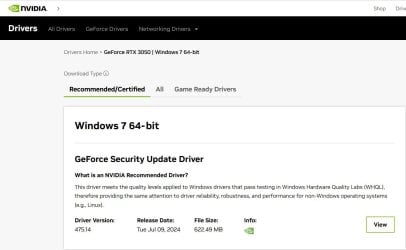
Is this the driver you're trying to install? It is the latest one for Windows 7 64-bit from the Nvidia website.

2024-09-25 21_59_26-Driver Results _ GeForce RTX 3050 _ Windows 7 64-bit _ NVIDIA — Mozilla Fire.jpg
 

My Computers

System One System Two

  • Computer type
    PC/Desktop
    Computer Manufacturer/Model Number
    Custom build
    OS
    Windows 7 Home Premium 64-bits
    CPU
    AMD FX-8350
    Motherboard
    Gigabyte GA-990FXA-UD3 (AM3+)
    Memory
    GSKILL Ripjaw-X PC3 12800 8GB (2x4GB)
    Graphics Card(s)
    ASUS ROG STRIX GTX 1060 6GB
    Sound Card
    Integrated
    Monitor(s) Displays
    Asus VE228H (21.5-in)
    Screen Resolution
    1920x1080 60Hz
    Hard Drives
    SAMSUNG 870 EVO 2.5 Inch SATA SSD (1TB)
    SAMSUNG 870 EVO 2.5 Inch SATA SSD (1TB)
    SAMSUNG 870 EVO 2.5 Inch SATA SSD (1TB)
    PSU
    Corsair RM750x (750 watts)
    Case
    Corsair Carbide Series 200R
    Cooling
    Corsair Hydro Series H60 (CWCH60)
    Keyboard
    Logitech Elite
    Mouse
    Logitech M510 Wireless Mouse
    Internet Speed
    Comcast Gigabit Extra (1200Mbps down / 35Mbps up)
    Antivirus
    Malwarebytes
    Browser
    Firefox, Edge, Chrome
    Other Info
    ASUS DRW-24B1ST DVD-RW (24X) optical drive
    Seagate Expansion Desk (5TB) external SATA/USB HDD
    Comcast XB8 Internet Gateway
  • Computer type
    PC/Desktop
    System Manufacturer/Model Number
    Custom
    OS
    Windows 7 Pro (64-bit)
    CPU
    AMD Phenom II 960T X4
    Motherboard
    ASUS M4N82 Deluxe
    Memory
    Corsair XMS2 DDR2-800 8GB (4x2GB)
    Graphics Card(s)
    ASUS ENGTX560 DCII OC/2DI/1GD5 1GB
    Monitor(s) Displays
    Samsung 930B 19-inch LCD
    Screen Resolution
    1280x1024
    Hard Drives
    Samsung SSD 870 EVO 1000 GB (Windows 10)
    Seagate ST1000DM003 1000 GB (Windows 7)
    PSU
    Antec TruePower (new) TP-650
    Case
    Antec Three Hundred
    Cooling
    AMD stock cooler from FX8350
    Mouse
    Logitech M100
    Internet Speed
    Xfinity Gigabit Extra 1200/35 Mbps
I believe NVIDIA graphic drivers newer than version 391.35 have the certificate issues.

Unfortunately, it does not appear that version 391.35 supports the GeForce RTX 3050 graphic card.
 

My Computer

Computer type
PC/Desktop
Computer Manufacturer/Model Number
Dell OptiPlex 9020
OS
Windows 7 Professional SP1 64-bit
CPU
Intel Core i7-4790 3.60 GHz
Memory
32 GB DDR3-1600 MHz
Graphics Card(s)
Integrated Intel HD Graphics 4600
Monitor(s) Displays
Viewsonic 32" LCD
Hard Drives
Kingston SATA 3 240 GB SSD
Internet Speed
Spectrum Internet 1000 Mbps

My Computers

System One System Two

  • Computer type
    PC/Desktop
    Computer Manufacturer/Model Number
    Custom build
    OS
    Windows 7 Home Premium 64-bits
    CPU
    AMD FX-8350
    Motherboard
    Gigabyte GA-990FXA-UD3 (AM3+)
    Memory
    GSKILL Ripjaw-X PC3 12800 8GB (2x4GB)
    Graphics Card(s)
    ASUS ROG STRIX GTX 1060 6GB
    Sound Card
    Integrated
    Monitor(s) Displays
    Asus VE228H (21.5-in)
    Screen Resolution
    1920x1080 60Hz
    Hard Drives
    SAMSUNG 870 EVO 2.5 Inch SATA SSD (1TB)
    SAMSUNG 870 EVO 2.5 Inch SATA SSD (1TB)
    SAMSUNG 870 EVO 2.5 Inch SATA SSD (1TB)
    PSU
    Corsair RM750x (750 watts)
    Case
    Corsair Carbide Series 200R
    Cooling
    Corsair Hydro Series H60 (CWCH60)
    Keyboard
    Logitech Elite
    Mouse
    Logitech M510 Wireless Mouse
    Internet Speed
    Comcast Gigabit Extra (1200Mbps down / 35Mbps up)
    Antivirus
    Malwarebytes
    Browser
    Firefox, Edge, Chrome
    Other Info
    ASUS DRW-24B1ST DVD-RW (24X) optical drive
    Seagate Expansion Desk (5TB) external SATA/USB HDD
    Comcast XB8 Internet Gateway
  • Computer type
    PC/Desktop
    System Manufacturer/Model Number
    Custom
    OS
    Windows 7 Pro (64-bit)
    CPU
    AMD Phenom II 960T X4
    Motherboard
    ASUS M4N82 Deluxe
    Memory
    Corsair XMS2 DDR2-800 8GB (4x2GB)
    Graphics Card(s)
    ASUS ENGTX560 DCII OC/2DI/1GD5 1GB
    Monitor(s) Displays
    Samsung 930B 19-inch LCD
    Screen Resolution
    1280x1024
    Hard Drives
    Samsung SSD 870 EVO 1000 GB (Windows 10)
    Seagate ST1000DM003 1000 GB (Windows 7)
    PSU
    Antec TruePower (new) TP-650
    Case
    Antec Three Hundred
    Cooling
    AMD stock cooler from FX8350
    Mouse
    Logitech M100
    Internet Speed
    Xfinity Gigabit Extra 1200/35 Mbps
"certificate issues" might imply that you need to update the new install of Windows 7 with various patches and packs, before you get to the graphics-card driver install. Are you trying to install a valid Windows 7 driver on a brand new ISO-installed OS?

As for versions, I would try the stable 472.12 drivers, though there are later ones for Windows 7.
 

My Computers

System One System Two

  • Computer type
    PC/Desktop
    OS
    Windows 7 Ultimate x64 SP3
    CPU
    Xeon
  • Computer type
    PC/Desktop
I believe NVIDIA graphic drivers newer than version 391.35 have the certificate issues.

Unfortunately, it does not appear that version 391.35 supports the GeForce RTX 3050 graphic card.
Does that mean that I have to stick with always booting with driver signature enforcement disabled?

- - - Updated - - -

"certificate issues" might imply that you need to update the new install of Windows 7 with various patches and packs, before you get to the graphics-card driver install. Are you trying to install a valid Windows 7 driver on a brand new ISO-installed OS?

As for versions, I would try the stable 472.12 drivers, though there are later ones for Windows 7.

472.12 doesn't have any drivers for the 3050.
May have to buy a 3060 just to get drivers at this point.

- - - Updated - - -

Also 475.14 for some odd reason doesn't allow me to change the display resolution.
 

My Computers

System One System Two

  • Computer type
    PC/Desktop
    Computer Manufacturer/Model Number
    CyberPowerPC
    OS
    Windows 10 IoT Enterprise LTSC 2019, Windows 7 Ultimate X64
    CPU
    11th Gen Intel(R) Core(TM) i7-11700KF @ 3.60GHz
    Motherboard
    Gigabyte Z590 UD AC Rev 1.1
    Memory
    32GB DDR4
    Graphics Card(s)
    NVIDIA Geforce RTX 3050 8GB & AMD Radeon HD 7850 HIS Fan 2GB
    Screen Resolution
    2560x1080, 1920x1080
    Hard Drives
    Samsung 970 EVO Plus PCIe 3.0 SSD, external drives are unknown.
    Antivirus
    Bitdefender
    Browser
    Firefox 140
    Other Info
    Running Windows 10 and Windows 7 in a dual-boot setup.
  • Computer type
    Laptop
    System Manufacturer/Model Number
    Lenovo Ideapad Y570
    OS
    Windows 7 Home Premium x64
    CPU
    Intel Core i5-2410M @2.30GHz
    Memory
    6GB DDR3-1333Mhz DIMMs
    Graphics Card(s)
    Nvidia Geforce GT555M
    Sound Card
    Integrated Audio
    Monitor(s) Displays
    Integrated
    Screen Resolution
    1366x768
    Hard Drives
    Single Toshiba 5400rpm 750gb HDD
    PSU
    90W
    Browser
    Chrome 58
    Antivirus
    Bitdefender
    Other Info
    Personal Laptop

My Computers

System One System Two

  • OS
    Windows 7 Home Premium 64bit
  • Computer type
    PC/Desktop

My Computers

System One System Two

  • Computer type
    PC/Desktop
    Computer Manufacturer/Model Number
    CyberPowerPC
    OS
    Windows 10 IoT Enterprise LTSC 2019, Windows 7 Ultimate X64
    CPU
    11th Gen Intel(R) Core(TM) i7-11700KF @ 3.60GHz
    Motherboard
    Gigabyte Z590 UD AC Rev 1.1
    Memory
    32GB DDR4
    Graphics Card(s)
    NVIDIA Geforce RTX 3050 8GB & AMD Radeon HD 7850 HIS Fan 2GB
    Screen Resolution
    2560x1080, 1920x1080
    Hard Drives
    Samsung 970 EVO Plus PCIe 3.0 SSD, external drives are unknown.
    Antivirus
    Bitdefender
    Browser
    Firefox 140
    Other Info
    Running Windows 10 and Windows 7 in a dual-boot setup.
  • Computer type
    Laptop
    System Manufacturer/Model Number
    Lenovo Ideapad Y570
    OS
    Windows 7 Home Premium x64
    CPU
    Intel Core i5-2410M @2.30GHz
    Memory
    6GB DDR3-1333Mhz DIMMs
    Graphics Card(s)
    Nvidia Geforce GT555M
    Sound Card
    Integrated Audio
    Monitor(s) Displays
    Integrated
    Screen Resolution
    1366x768
    Hard Drives
    Single Toshiba 5400rpm 750gb HDD
    PSU
    90W
    Browser
    Chrome 58
    Antivirus
    Bitdefender
    Other Info
    Personal Laptop
Tried this version, refuses to even start, just immediately deletes the files after they're extracted.

I decided to try this on one of my computers with Windows 7. If you follow my steps you will see I succeeded.

The newest video card I have on a Windows 7 computer is a GTX 1060 6GB. That is OK because it has the same drivers as an RTX 3050.

I ran GeForce Experience. It recommended the driver 475.14. Unfortunately, it showed an error when it tried to download it.

============================================

I downloaded driver 475.14 directly from Nvidia, "475.14-desktop-win8-win7-64bit-international.exe"
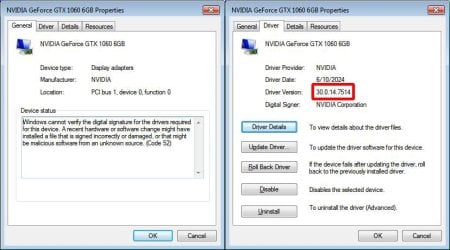
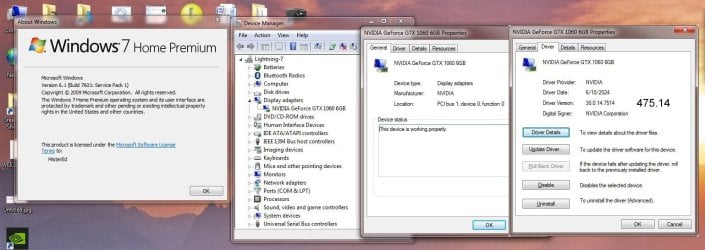
When I ran this file it seemed to install OK. After I rebooted I checked the Device Manager.

driver1.jpg

It said the driver was 475.14 but apparently it wasn't really installed. I ran GeForce Experience again. It wanted to download 475.14 again so it didn't recognize that it was installed.

============================================

I decided to modify the driver like that reference I showed in Post #4 said to do.

Note I did the following steps on my Windows 11 computer
I had to do a little searching to find out how to extract the driver without installing it. I found out I had to do it from the command line. To make this easier I shortened the name to 47514.exe. From the command line:
Code:
> 47514.exe /a
I told it to extract the driver to folder "driver". Like you it deleted this folder after I exited the dialog.
I did it again but before I exited the dialog I made a copy of the folder. The copy was called "driver - Copy"

From the previous post link I downloaded the file "nvlddmkm 475.14.7z". From it I extracted the file "nvlddmkm.sy_"

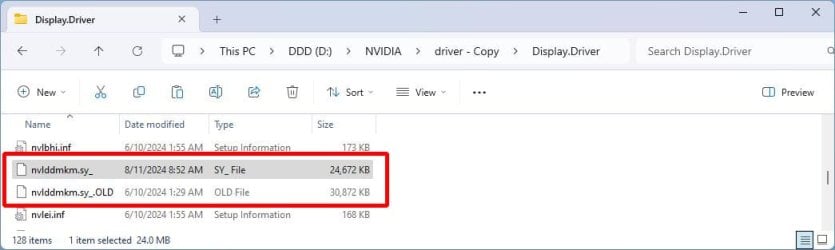
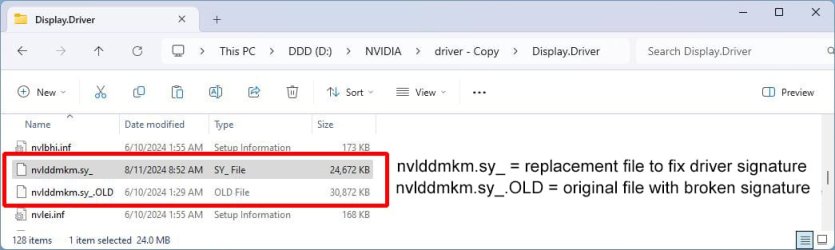
To show what was going on I renamed the original file and copied the new file to the folder it was in. Here is a screenshot of that.

driver2.jpg

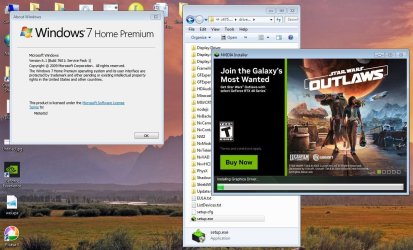
I copied the setup folder to a flash drive. I copied this folder to the desktop of my Windows 7 computer.
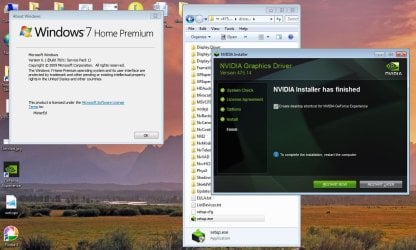
I ran the file setup.exe file.

driver3.jpg

When the setup was done it said to restart the computer

driver4.jpg

This time Windows did not complain about the driver.

driver5.jpg
 

My Computers

System One System Two

  • Computer type
    PC/Desktop
    Computer Manufacturer/Model Number
    Custom build
    OS
    Windows 7 Home Premium 64-bits
    CPU
    AMD FX-8350
    Motherboard
    Gigabyte GA-990FXA-UD3 (AM3+)
    Memory
    GSKILL Ripjaw-X PC3 12800 8GB (2x4GB)
    Graphics Card(s)
    ASUS ROG STRIX GTX 1060 6GB
    Sound Card
    Integrated
    Monitor(s) Displays
    Asus VE228H (21.5-in)
    Screen Resolution
    1920x1080 60Hz
    Hard Drives
    SAMSUNG 870 EVO 2.5 Inch SATA SSD (1TB)
    SAMSUNG 870 EVO 2.5 Inch SATA SSD (1TB)
    SAMSUNG 870 EVO 2.5 Inch SATA SSD (1TB)
    PSU
    Corsair RM750x (750 watts)
    Case
    Corsair Carbide Series 200R
    Cooling
    Corsair Hydro Series H60 (CWCH60)
    Keyboard
    Logitech Elite
    Mouse
    Logitech M510 Wireless Mouse
    Internet Speed
    Comcast Gigabit Extra (1200Mbps down / 35Mbps up)
    Antivirus
    Malwarebytes
    Browser
    Firefox, Edge, Chrome
    Other Info
    ASUS DRW-24B1ST DVD-RW (24X) optical drive
    Seagate Expansion Desk (5TB) external SATA/USB HDD
    Comcast XB8 Internet Gateway
  • Computer type
    PC/Desktop
    System Manufacturer/Model Number
    Custom
    OS
    Windows 7 Pro (64-bit)
    CPU
    AMD Phenom II 960T X4
    Motherboard
    ASUS M4N82 Deluxe
    Memory
    Corsair XMS2 DDR2-800 8GB (4x2GB)
    Graphics Card(s)
    ASUS ENGTX560 DCII OC/2DI/1GD5 1GB
    Monitor(s) Displays
    Samsung 930B 19-inch LCD
    Screen Resolution
    1280x1024
    Hard Drives
    Samsung SSD 870 EVO 1000 GB (Windows 10)
    Seagate ST1000DM003 1000 GB (Windows 7)
    PSU
    Antec TruePower (new) TP-650
    Case
    Antec Three Hundred
    Cooling
    AMD stock cooler from FX8350
    Mouse
    Logitech M100
    Internet Speed
    Xfinity Gigabit Extra 1200/35 Mbps
This should be the latest WHQL-certified driver for your card: GeForce Security Update Driver | 474.11 | Windows 7 64-bit | NVIDIA

Tried this version, refuses to even start, just immediately deletes the files after they're extracted.
I had the same problem with it on the fresh Windows 7 installation. It is related to the driver's certificate.

Just right-click the downloaded .exe file, check Properties -> Digital Signatures -> Details -> View Certificate, then press the "Install Certificate..." button and follow the instructions. You can find all the details here.
 

My Computers

System One System Two

  • OS
    Windows 7 Home Premium 64bit
  • Computer type
    PC/Desktop
I had the same problem with it on the fresh Windows 7 installation. It is related to the driver's certificate.

Just right-click the downloaded .exe file, check Properties -> Digital Signatures -> Details -> View Certificate, then press the "Install Certificate..." button and follow the instructions. You can find all the details here.

Did this and it installed the drivers, but didn’t install the nvidia control panel for some odd reason, which means I still can’t change my
refresh rate
 

My Computers

System One System Two

  • Computer type
    PC/Desktop
    Computer Manufacturer/Model Number
    CyberPowerPC
    OS
    Windows 10 IoT Enterprise LTSC 2019, Windows 7 Ultimate X64
    CPU
    11th Gen Intel(R) Core(TM) i7-11700KF @ 3.60GHz
    Motherboard
    Gigabyte Z590 UD AC Rev 1.1
    Memory
    32GB DDR4
    Graphics Card(s)
    NVIDIA Geforce RTX 3050 8GB & AMD Radeon HD 7850 HIS Fan 2GB
    Screen Resolution
    2560x1080, 1920x1080
    Hard Drives
    Samsung 970 EVO Plus PCIe 3.0 SSD, external drives are unknown.
    Antivirus
    Bitdefender
    Browser
    Firefox 140
    Other Info
    Running Windows 10 and Windows 7 in a dual-boot setup.
  • Computer type
    Laptop
    System Manufacturer/Model Number
    Lenovo Ideapad Y570
    OS
    Windows 7 Home Premium x64
    CPU
    Intel Core i5-2410M @2.30GHz
    Memory
    6GB DDR3-1333Mhz DIMMs
    Graphics Card(s)
    Nvidia Geforce GT555M
    Sound Card
    Integrated Audio
    Monitor(s) Displays
    Integrated
    Screen Resolution
    1366x768
    Hard Drives
    Single Toshiba 5400rpm 750gb HDD
    PSU
    90W
    Browser
    Chrome 58
    Antivirus
    Bitdefender
    Other Info
    Personal Laptop
Did this and it installed the drivers, but didn’t install the nvidia control panel for some odd reason, which means I still can’t change my
refresh rate
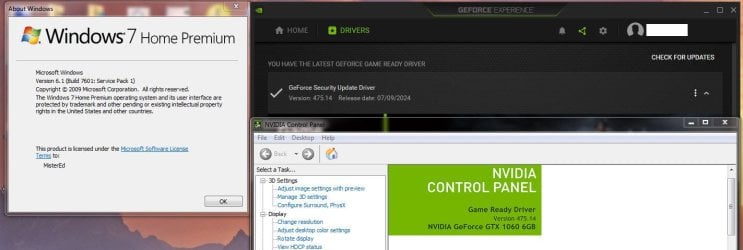
What driver did you install? I modified and installed the latest driver which is 475.14.

driver6.jpg

The Geforce Experience and Nvidia Control Panel apps agree that I have 475.14 installed.

driver7.jpg
 

My Computers

System One System Two

  • Computer type
    PC/Desktop
    Computer Manufacturer/Model Number
    Custom build
    OS
    Windows 7 Home Premium 64-bits
    CPU
    AMD FX-8350
    Motherboard
    Gigabyte GA-990FXA-UD3 (AM3+)
    Memory
    GSKILL Ripjaw-X PC3 12800 8GB (2x4GB)
    Graphics Card(s)
    ASUS ROG STRIX GTX 1060 6GB
    Sound Card
    Integrated
    Monitor(s) Displays
    Asus VE228H (21.5-in)
    Screen Resolution
    1920x1080 60Hz
    Hard Drives
    SAMSUNG 870 EVO 2.5 Inch SATA SSD (1TB)
    SAMSUNG 870 EVO 2.5 Inch SATA SSD (1TB)
    SAMSUNG 870 EVO 2.5 Inch SATA SSD (1TB)
    PSU
    Corsair RM750x (750 watts)
    Case
    Corsair Carbide Series 200R
    Cooling
    Corsair Hydro Series H60 (CWCH60)
    Keyboard
    Logitech Elite
    Mouse
    Logitech M510 Wireless Mouse
    Internet Speed
    Comcast Gigabit Extra (1200Mbps down / 35Mbps up)
    Antivirus
    Malwarebytes
    Browser
    Firefox, Edge, Chrome
    Other Info
    ASUS DRW-24B1ST DVD-RW (24X) optical drive
    Seagate Expansion Desk (5TB) external SATA/USB HDD
    Comcast XB8 Internet Gateway
  • Computer type
    PC/Desktop
    System Manufacturer/Model Number
    Custom
    OS
    Windows 7 Pro (64-bit)
    CPU
    AMD Phenom II 960T X4
    Motherboard
    ASUS M4N82 Deluxe
    Memory
    Corsair XMS2 DDR2-800 8GB (4x2GB)
    Graphics Card(s)
    ASUS ENGTX560 DCII OC/2DI/1GD5 1GB
    Monitor(s) Displays
    Samsung 930B 19-inch LCD
    Screen Resolution
    1280x1024
    Hard Drives
    Samsung SSD 870 EVO 1000 GB (Windows 10)
    Seagate ST1000DM003 1000 GB (Windows 7)
    PSU
    Antec TruePower (new) TP-650
    Case
    Antec Three Hundred
    Cooling
    AMD stock cooler from FX8350
    Mouse
    Logitech M100
    Internet Speed
    Xfinity Gigabit Extra 1200/35 Mbps
What driver did you install? I modified and installed the latest driver which is 475.14.

View attachment 424226

The Geforce Experience and Nvidia Control Panel apps agree that I have 475.14 installed.

View attachment 424225
I also installed 475.14.
Also I checked and even with these instructions I still need to boot with driver signatures off because it won't detect the signature
 

My Computers

System One System Two

  • Computer type
    PC/Desktop
    Computer Manufacturer/Model Number
    CyberPowerPC
    OS
    Windows 10 IoT Enterprise LTSC 2019, Windows 7 Ultimate X64
    CPU
    11th Gen Intel(R) Core(TM) i7-11700KF @ 3.60GHz
    Motherboard
    Gigabyte Z590 UD AC Rev 1.1
    Memory
    32GB DDR4
    Graphics Card(s)
    NVIDIA Geforce RTX 3050 8GB & AMD Radeon HD 7850 HIS Fan 2GB
    Screen Resolution
    2560x1080, 1920x1080
    Hard Drives
    Samsung 970 EVO Plus PCIe 3.0 SSD, external drives are unknown.
    Antivirus
    Bitdefender
    Browser
    Firefox 140
    Other Info
    Running Windows 10 and Windows 7 in a dual-boot setup.
  • Computer type
    Laptop
    System Manufacturer/Model Number
    Lenovo Ideapad Y570
    OS
    Windows 7 Home Premium x64
    CPU
    Intel Core i5-2410M @2.30GHz
    Memory
    6GB DDR3-1333Mhz DIMMs
    Graphics Card(s)
    Nvidia Geforce GT555M
    Sound Card
    Integrated Audio
    Monitor(s) Displays
    Integrated
    Screen Resolution
    1366x768
    Hard Drives
    Single Toshiba 5400rpm 750gb HDD
    PSU
    90W
    Browser
    Chrome 58
    Antivirus
    Bitdefender
    Other Info
    Personal Laptop
I also installed 475.14.
Also I checked and even with these instructions I still need to boot with driver signatures off because it won't detect the signature
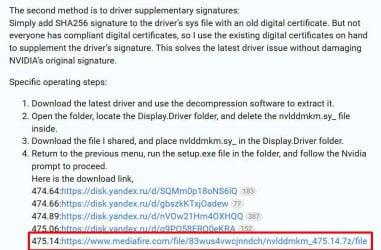
I should have clarified that I used the second method. This method doesn't require you to turn off the driver signatures.
The file I downloaded and copied to the "Display.Driver" folder took care of the driver signature problem.

driver8.jpg

The file nvlddmkm.sy_ is what is causing the driver signature problem. The replacement file I downloaded fixed the driver signature problem.
I did this
  1. Renamed the original file nvlddmkm.sy_ to nvlddmkm.sy_.OLD
  2. Copied the replacement file nvlddmkm.sy_ to that same folder to replace it
driver2a.jpg

- - - Updated - - -

UPDATE

@VaniTS. I see you haven't responded. If you don't quite understand the steps I took to install the Nvidia driver just post back and let me know. All it takes is for you to ask. I will stay with this as long as needed.

BTW, if you prefer not go any further with this then say so also. That way I can stop coming back to this thread and spend my time helping someone else.
 
Last edited:

My Computers

System One System Two

  • Computer type
    PC/Desktop
    Computer Manufacturer/Model Number
    Custom build
    OS
    Windows 7 Home Premium 64-bits
    CPU
    AMD FX-8350
    Motherboard
    Gigabyte GA-990FXA-UD3 (AM3+)
    Memory
    GSKILL Ripjaw-X PC3 12800 8GB (2x4GB)
    Graphics Card(s)
    ASUS ROG STRIX GTX 1060 6GB
    Sound Card
    Integrated
    Monitor(s) Displays
    Asus VE228H (21.5-in)
    Screen Resolution
    1920x1080 60Hz
    Hard Drives
    SAMSUNG 870 EVO 2.5 Inch SATA SSD (1TB)
    SAMSUNG 870 EVO 2.5 Inch SATA SSD (1TB)
    SAMSUNG 870 EVO 2.5 Inch SATA SSD (1TB)
    PSU
    Corsair RM750x (750 watts)
    Case
    Corsair Carbide Series 200R
    Cooling
    Corsair Hydro Series H60 (CWCH60)
    Keyboard
    Logitech Elite
    Mouse
    Logitech M510 Wireless Mouse
    Internet Speed
    Comcast Gigabit Extra (1200Mbps down / 35Mbps up)
    Antivirus
    Malwarebytes
    Browser
    Firefox, Edge, Chrome
    Other Info
    ASUS DRW-24B1ST DVD-RW (24X) optical drive
    Seagate Expansion Desk (5TB) external SATA/USB HDD
    Comcast XB8 Internet Gateway
  • Computer type
    PC/Desktop
    System Manufacturer/Model Number
    Custom
    OS
    Windows 7 Pro (64-bit)
    CPU
    AMD Phenom II 960T X4
    Motherboard
    ASUS M4N82 Deluxe
    Memory
    Corsair XMS2 DDR2-800 8GB (4x2GB)
    Graphics Card(s)
    ASUS ENGTX560 DCII OC/2DI/1GD5 1GB
    Monitor(s) Displays
    Samsung 930B 19-inch LCD
    Screen Resolution
    1280x1024
    Hard Drives
    Samsung SSD 870 EVO 1000 GB (Windows 10)
    Seagate ST1000DM003 1000 GB (Windows 7)
    PSU
    Antec TruePower (new) TP-650
    Case
    Antec Three Hundred
    Cooling
    AMD stock cooler from FX8350
    Mouse
    Logitech M100
    Internet Speed
    Xfinity Gigabit Extra 1200/35 Mbps
Sorry, forgot this thread existed, I'll try it later.
 

My Computers

System One System Two

  • Computer type
    PC/Desktop
    Computer Manufacturer/Model Number
    CyberPowerPC
    OS
    Windows 10 IoT Enterprise LTSC 2019, Windows 7 Ultimate X64
    CPU
    11th Gen Intel(R) Core(TM) i7-11700KF @ 3.60GHz
    Motherboard
    Gigabyte Z590 UD AC Rev 1.1
    Memory
    32GB DDR4
    Graphics Card(s)
    NVIDIA Geforce RTX 3050 8GB & AMD Radeon HD 7850 HIS Fan 2GB
    Screen Resolution
    2560x1080, 1920x1080
    Hard Drives
    Samsung 970 EVO Plus PCIe 3.0 SSD, external drives are unknown.
    Antivirus
    Bitdefender
    Browser
    Firefox 140
    Other Info
    Running Windows 10 and Windows 7 in a dual-boot setup.
  • Computer type
    Laptop
    System Manufacturer/Model Number
    Lenovo Ideapad Y570
    OS
    Windows 7 Home Premium x64
    CPU
    Intel Core i5-2410M @2.30GHz
    Memory
    6GB DDR3-1333Mhz DIMMs
    Graphics Card(s)
    Nvidia Geforce GT555M
    Sound Card
    Integrated Audio
    Monitor(s) Displays
    Integrated
    Screen Resolution
    1366x768
    Hard Drives
    Single Toshiba 5400rpm 750gb HDD
    PSU
    90W
    Browser
    Chrome 58
    Antivirus
    Bitdefender
    Other Info
    Personal Laptop
Back
Top