Can't install intel drivers.

Nippe

New member
Member
Local time
12:24 AM
Messages
84
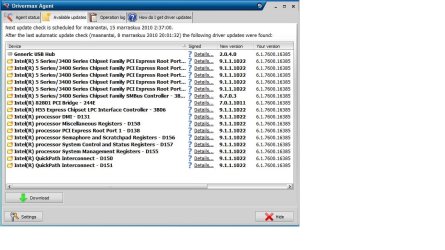
My system says that i have old (6.1.7600.16385 dated to 21.6.2006) intel 5 series drivers and 9.1.1.1025 is newest.. When I download setup from http://downloadcenter.intel.com/Detail_Desc.aspx?agr=Y&DwnldID=18494 and run it, setup will extract some files and start up installer, when I agree license stuff it says installation is complete, but drivers still remain old?? I ran setup as adminstrator.
 

My Computer

Computer Manufacturer/Model Number
Me
OS
Windows 7 Ultimate x64
CPU
Intel Core i7-3960X 3.3GHz LGA2011
Motherboard
Asus P9X79 PRO Intel X79 LGA2011 ATX
Memory
Kingston HyperX 16 GB (2 x 8 GB) DDR3 2133MHz
Graphics Card(s)
NVIDIA GeForce GTX 690
Sound Card
Creative Sound Blaster X-Fi Titanium
Monitor(s) Displays
Asus VE276Q 27" LCD
Screen Resolution
1920x1080
Hard Drives
2x Intel 520 120 GB SATA3 SSD 2.5" (25nm)
Western Digital Caviar Black 2 TB SATA
PSU
Corsair AX1200W AX
Case
Cooler Master Cosmos II
Cooling
Corsair Cooling Hydro H100
Keyboard
Razer BlackWidow Ultimate
Mouse
Razer Naga Hex
My system says that i have old (6.1.7600.16385 dated to 21.6.2006) intel 5 series drivers and 9.1.1.1025 is newest.. When I download setup from http://downloadcenter.intel.com/Detail_Desc.aspx?agr=Y&DwnldID=18494 and run it, setup will extract some files and start up installer, when I agree license stuff it says installation is complete, but drivers still remain old?? I ran setup as adminstrator.


As far as I can tell this (6.1.7600.16385) is your win 7 version not intel drivers. Your link does have the newest driver what happens when you try to install as per directions?


Ken J
 

My Computer

Computer Manufacturer/Model Number
HP Pavillion dv-7 1005 Tx
OS
Win 8 Release candidate 8400
CPU
[email protected]
Memory
4 gigs
Graphics Card(s)
Nvidia 9600M
Sound Card
HD built-in
Monitor(s) Displays
17" Wxga
Screen Resolution
1440x900
Cooling
none
Internet Speed
45Mb down 5Mb up
Umm what u mean with "as per directions"?
 

My Computer

Computer Manufacturer/Model Number
Me
OS
Windows 7 Ultimate x64
CPU
Intel Core i7-3960X 3.3GHz LGA2011
Motherboard
Asus P9X79 PRO Intel X79 LGA2011 ATX
Memory
Kingston HyperX 16 GB (2 x 8 GB) DDR3 2133MHz
Graphics Card(s)
NVIDIA GeForce GTX 690
Sound Card
Creative Sound Blaster X-Fi Titanium
Monitor(s) Displays
Asus VE276Q 27" LCD
Screen Resolution
1920x1080
Hard Drives
2x Intel 520 120 GB SATA3 SSD 2.5" (25nm)
Western Digital Caviar Black 2 TB SATA
PSU
Corsair AX1200W AX
Case
Cooler Master Cosmos II
Cooling
Corsair Cooling Hydro H100
Keyboard
Razer BlackWidow Ultimate
Mouse
Razer Naga Hex
Exactly what drivers are you trying to update?
 

My Computer

Computer Manufacturer/Model Number
Compaq Desktop
OS
Windows 7 Ultimate x64
CPU
AMD Sempron Dual Core
Memory
3GB
Graphics Card(s)
NVIDIA GeForce 6150SE nForce 430
Screen Resolution
1024x768
Hard Drives
150GB Sata
Umm.. Well this is what my program says (it could update them but it requires full version what cost 30 euros) And I dont have a clue how to update these?
 

Attachments

  • Drivers.jpg
    Drivers.jpg
    106.4 KB · Views: 75

My Computer

Computer Manufacturer/Model Number
Me
OS
Windows 7 Ultimate x64
CPU
Intel Core i7-3960X 3.3GHz LGA2011
Motherboard
Asus P9X79 PRO Intel X79 LGA2011 ATX
Memory
Kingston HyperX 16 GB (2 x 8 GB) DDR3 2133MHz
Graphics Card(s)
NVIDIA GeForce GTX 690
Sound Card
Creative Sound Blaster X-Fi Titanium
Monitor(s) Displays
Asus VE276Q 27" LCD
Screen Resolution
1920x1080
Hard Drives
2x Intel 520 120 GB SATA3 SSD 2.5" (25nm)
Western Digital Caviar Black 2 TB SATA
PSU
Corsair AX1200W AX
Case
Cooler Master Cosmos II
Cooling
Corsair Cooling Hydro H100
Keyboard
Razer BlackWidow Ultimate
Mouse
Razer Naga Hex

My Computer

Computer type
PC/Desktop
Computer Manufacturer/Model Number
Custom Build
OS
Windows 10 Pro x64, Arch Linux
CPU
Intel Core 2 Quad Q8200 OC'd 3.08GHz
Motherboard
Asus Rampage formula LGA775
Memory
8GB DDR2 900Mhz
Graphics Card(s)
MSI GT730 2GB GDDR5 (Kepler)
Sound Card
Supreme FX2
Monitor(s) Displays
Samsung LS22F350 LED
Screen Resolution
1080P
Hard Drives
Kingston SSDNow UV400 120GB, 500GB Hitachi, 2TB Samsung, 500GB Seagate FreeAgent, 640GB Samsung, 160GB Toshiba (Arch)
PSU
AeroCool 500W Bronze
Cooling
Cooler Master V6 + 3X fans
Keyboard
Prolink keyboard
Mouse
Logitech M705
Internet Speed
1MiB/s
Browser
Chrome Beta
I'd be wary of using driver update software. In some cases it could be reporting the wrong date just to get you to buy the software.

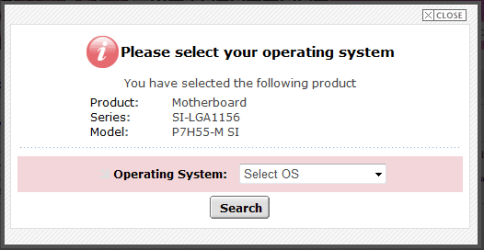
Try downloading from ASUSTeK Computer Inc.-Support- and see if the drivers there help. I've screen cap'd an image of what you're looking for...

Capture.PNG

   Note
If your system is running fine and as you expect it too then there's not really any need to update drivers unless they appear in Windows Update. The choice is yours


OS
 

My Computer

Computer Manufacturer/Model Number
Compaq Desktop
OS
Windows 7 Ultimate x64
CPU
AMD Sempron Dual Core
Memory
3GB
Graphics Card(s)
NVIDIA GeForce 6150SE nForce 430
Screen Resolution
1024x768
Hard Drives
150GB Sata
I tried to download download driver from ASUSTeK Computer Inc.-Support- but it seems I got newer one already (it installed afterall?) but I still cannot see newer version in device manager or Drivemax.. so if 6.1.7600.16385 is some kind of deafult driver and 9.1.1.1022 is newer I should just ignore them? And what about those that got some random "newer" version like 6.7.0.3? Should I upgrade them?
 

My Computer

Computer Manufacturer/Model Number
Me
OS
Windows 7 Ultimate x64
CPU
Intel Core i7-3960X 3.3GHz LGA2011
Motherboard
Asus P9X79 PRO Intel X79 LGA2011 ATX
Memory
Kingston HyperX 16 GB (2 x 8 GB) DDR3 2133MHz
Graphics Card(s)
NVIDIA GeForce GTX 690
Sound Card
Creative Sound Blaster X-Fi Titanium
Monitor(s) Displays
Asus VE276Q 27" LCD
Screen Resolution
1920x1080
Hard Drives
2x Intel 520 120 GB SATA3 SSD 2.5" (25nm)
Western Digital Caviar Black 2 TB SATA
PSU
Corsair AX1200W AX
Case
Cooler Master Cosmos II
Cooling
Corsair Cooling Hydro H100
Keyboard
Razer BlackWidow Ultimate
Mouse
Razer Naga Hex
6.1.7600.16385 is the build string of the OS you currently have installed, in this case Windows 7. If the drivers from the ASUS website are reporting that they are the latest then you don't need to update and can ignore what Drivermax is telling you. The only things that will eventually recieve updates are the Video, Sound, Mouse/Keyboard (possibly), and of course any new devices that you purchase and install at a later date.


OS
 

My Computer

Computer Manufacturer/Model Number
Compaq Desktop
OS
Windows 7 Ultimate x64
CPU
AMD Sempron Dual Core
Memory
3GB
Graphics Card(s)
NVIDIA GeForce 6150SE nForce 430
Screen Resolution
1024x768
Hard Drives
150GB Sata
Back
Top