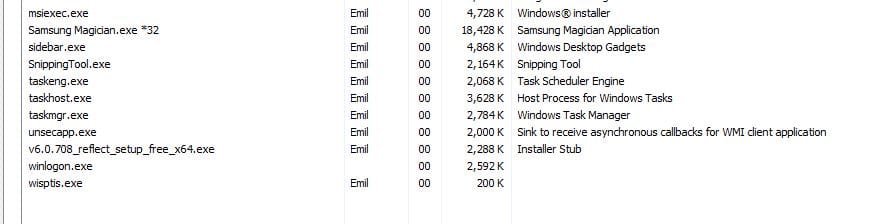
Hi All,
I've used win7 back-up so far but would like to try free Macrium.
While installing "v6.0.708_reflect_setup_free_x64.exe" nothing happens and install log is below:
There is no support for the free version @ Macrium so I'm stuck.
Anyone can suggest a way to install the free version of Macrium?
Thanks,
Emil
=== Verbose logging started: 18/07/2015 13:03:36 Build type: SHIP UNICODE 5.00.7601.00 Calling process: C:\Windows\system32\msiexec.exe ===
MSI (c) (60:14) [13:03:36:895]: Font created. Charset: Req=0, Ret=0, Font: Req=MS Shell Dlg, Ret=MS Shell Dlg
MSI (c) (60:14) [13:03:36:895]: Font created. Charset: Req=0, Ret=0, Font: Req=MS Shell Dlg, Ret=MS Shell Dlg
MSI (c) (60:88) [13:03:36:895]: Resetting cached policy values
MSI (c) (60:88) [13:03:36:895]: Machine policy value 'Debug' is 0
MSI (c) (60:88) [13:03:36:895]: ******* RunEngine:
******* Product: C:\Windows\Installer\reflect_setupv6.0.708-x64-00.msi
******* Action:
******* CommandLine: **********
MSI (c) (60:88) [13:03:36:910]: Machine policy value 'DisableUserInstalls' is 0
MSI (c) (60:88) [13:03:36:910]: Note: 1: 1402 2: HKEY_CURRENT_USER\Software\Microsoft\Windows\CurrentVersion\Policies\Explorer 3: 2
MSI (c) (60:88) [13:03:36:910]: SOFTWARE RESTRICTION POLICY: Verifying package --> 'C:\Windows\Installer\reflect_setupv6.0.708-x64-00.msi' against software restriction policy
MSI (c) (60:88) [13:03:36:910]: SOFTWARE RESTRICTION POLICY: C:\Windows\Installer\reflect_setupv6.0.708-x64-00.msi has a digital signature
MSI (c) (60:88) [13:03:37:035]: SOFTWARE RESTRICTION POLICY: C:\Windows\Installer\reflect_setupv6.0.708-x64-00.msi is permitted to run at the 'unrestricted' authorization level.
MSI (c) (60:88) [13:03:37:051]: Failed to connect to server. Error: 0x80070424
MSI (c) (60:88) [13:03:37:051]: MainEngineThread is returning 1601
=== Verbose logging stopped: 18/07/2015 13:03:37 ===
I've used win7 back-up so far but would like to try free Macrium.
While installing "v6.0.708_reflect_setup_free_x64.exe" nothing happens and install log is below:
There is no support for the free version @ Macrium so I'm stuck.
Anyone can suggest a way to install the free version of Macrium?
Thanks,
Emil
=== Verbose logging started: 18/07/2015 13:03:36 Build type: SHIP UNICODE 5.00.7601.00 Calling process: C:\Windows\system32\msiexec.exe ===
MSI (c) (60:14) [13:03:36:895]: Font created. Charset: Req=0, Ret=0, Font: Req=MS Shell Dlg, Ret=MS Shell Dlg
MSI (c) (60:14) [13:03:36:895]: Font created. Charset: Req=0, Ret=0, Font: Req=MS Shell Dlg, Ret=MS Shell Dlg
MSI (c) (60:88) [13:03:36:895]: Resetting cached policy values
MSI (c) (60:88) [13:03:36:895]: Machine policy value 'Debug' is 0
MSI (c) (60:88) [13:03:36:895]: ******* RunEngine:
******* Product: C:\Windows\Installer\reflect_setupv6.0.708-x64-00.msi
******* Action:
******* CommandLine: **********
MSI (c) (60:88) [13:03:36:910]: Machine policy value 'DisableUserInstalls' is 0
MSI (c) (60:88) [13:03:36:910]: Note: 1: 1402 2: HKEY_CURRENT_USER\Software\Microsoft\Windows\CurrentVersion\Policies\Explorer 3: 2
MSI (c) (60:88) [13:03:36:910]: SOFTWARE RESTRICTION POLICY: Verifying package --> 'C:\Windows\Installer\reflect_setupv6.0.708-x64-00.msi' against software restriction policy
MSI (c) (60:88) [13:03:36:910]: SOFTWARE RESTRICTION POLICY: C:\Windows\Installer\reflect_setupv6.0.708-x64-00.msi has a digital signature
MSI (c) (60:88) [13:03:37:035]: SOFTWARE RESTRICTION POLICY: C:\Windows\Installer\reflect_setupv6.0.708-x64-00.msi is permitted to run at the 'unrestricted' authorization level.
MSI (c) (60:88) [13:03:37:051]: Failed to connect to server. Error: 0x80070424
MSI (c) (60:88) [13:03:37:051]: MainEngineThread is returning 1601
=== Verbose logging stopped: 18/07/2015 13:03:37 ===
My Computer
- Computer type
- PC/Desktop
- Computer Manufacturer/Model Number
- Custom
- OS
- Windows 7 Ultimate x64