
Can't install or uninstall office 2010

geniulmalefic

Push the limits!
Member
VIP
Local time
12:52 PM
Messages
186
Location
Look behind you...
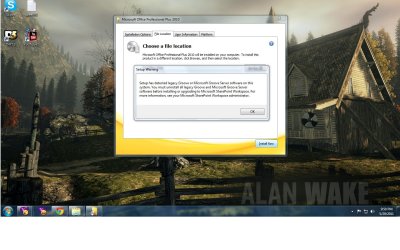
Hey,I got MS office 2010 installed couple of weeks ago,but I unninstall it,because i didn't got enough disk space.
When I try to install it it gave me this error.
About the unninstall:It didn't succesfull unninstall,and when I try to run the unninstaller,it restart my PC.
Thanks.
 

Attachments
  • Untitled.jpg
    Untitled.jpg
    160.2 KB · Views: 628

My Computer My Computer

Computer Manufacturer/Model Number
AMD Athlon 64x2 dual core 4400+
OS
Windows 7 Enterprise x64
CPU
2,3GHz
Motherboard
ASUS
Memory
2GB DDR2
Graphics Card(s)
ATI Radeon HD 2400
Sound Card
Realtek
Monitor(s) Displays
Benq G900W
Screen Resolution
1440x900
Hard Drives
160 GB
Hey,I got MS office 2010 installed couple of weeks ago,but I unninstall it,because i didn't got enough disk space.
When I try to install it it gave me this error.
About the unninstall:It didn't succesfull unninstall,and when I try to run the unninstaller,it restart my PC.
Thanks.

Use this MS Support tutiorial :
How do I uninstall Office 2003, 2007 or 2010 suites
How do I uninstall Office 2003, Office 2007 or Office 2010 suites if I cannot uninstall it from Control Panel?

Note : scroll down and select Office 2010 suites button


My Computer My Computer

Computer Manufacturer/Model Number
Acer Aspire 7741Z
OS
Windows 7 Home Premium 64-bit, SP1
CPU
Intel Pentium P6200, Cores 2, 2.13 GHz
Memory
4 GB
Graphics Card(s)
Intel HD
Sound Card
unknown
Monitor(s) Displays
17.3 inches
Screen Resolution
1600 x 900
Hard Drives
640 GB, 5400 PRM
  • Like
Reactions: JMH
Hey,I got MS office 2010 installed couple of weeks ago,but I unninstall it,because i didn't got enough disk space.
When I try to install it it gave me this error.
About the unninstall:It didn't succesfull unninstall,and when I try to run the unninstaller,it restart my PC.
Thanks.

Use this MS Support tutiorial :
How do I uninstall Office 2003, 2007 or 2010 suites
How do I uninstall Office 2003, Office 2007 or Office 2010 suites if I cannot uninstall it from Control Panel?

Note : scroll down and select Office 2010 suites button


Didn't worked!
any othe solutions?
 

My Computer My Computer

Computer Manufacturer/Model Number
AMD Athlon 64x2 dual core 4400+
OS
Windows 7 Enterprise x64
CPU
2,3GHz
Motherboard
ASUS
Memory
2GB DDR2
Graphics Card(s)
ATI Radeon HD 2400
Sound Card
Realtek
Monitor(s) Displays
Benq G900W
Screen Resolution
1440x900
Hard Drives
160 GB

My Computer My Computer

Computer type
PC/Desktop
Computer Manufacturer/Model Number
Packard Bell
OS
Windows 7 Home Premium 64bit
CPU
Intel(R) Core(TM) i3-2120 CPU @ 3.30GHz
Motherboard
Packard Bell IPISB-AG
Memory
3.00 GB
Graphics Card(s)
(1) Intel(R) HD Graphics (2) VNC Mirror Driver
Sound Card
Realtek High Definition Audio
Monitor(s) Displays
AIO LCD
Screen Resolution
1920 x 1080
Hard Drives
WDC WD10EADX-22TDHB0 ATA Device
Fixed hard disk media
4 partitions
931.51 GB
Keyboard
Wireless
Mouse
Wireless
Antivirus
Microsoft Security Essentials
Browser
IE; Firefox
Other Info
Also:
Samsung N220 Plus Netbook - Windows 7 Home
HP laptop
iPad 5

My Computer My Computer

Computer Manufacturer/Model Number
AMD Athlon 64x2 dual core 4400+
OS
Windows 7 Enterprise x64
CPU
2,3GHz
Motherboard
ASUS
Memory
2GB DDR2
Graphics Card(s)
ATI Radeon HD 2400
Sound Card
Realtek
Monitor(s) Displays
Benq G900W
Screen Resolution
1440x900
Hard Drives
160 GB
I'm curious -
Re Office Professional Plus 2010.

* Did you read the System requirements for this program before trying to install
Office Professional Plus 2010 ?
System requirements for Office 2010

* Did you employ the Microsoft Fixit solution, Office 2010 suites as per the recommendation of dhu in post 2?

* What is being logged to the Event Viewer about this?
Start > search for Event viewer > Windows Logs > Application
See if any errors related to Office are there .

* Have you a System Restore point made PRIOR to this situation happening?
 

My Computer My Computer

Computer Manufacturer/Model Number
LAPTOP. HP Pavilion dv7-4010TX .
OS
Win 7 Ultimate 64-bit. SP1.
CPU
Intel i7 -720QM.[1.6GHz Turbo Boost 2.8GHz. 6MB Cache.]
Memory
8 DDR 3 RAM. 1066MHZ
Graphics Card(s)
ATI 1024 MB. DDR3. Radeon HD5650
Monitor(s) Displays
17.3" High Definition Brightview LCD. LED Backlit.
Screen Resolution
1600 x 900.
Hard Drives
640GB
Case
Laptop / notebook.
Mouse
Logitech Anywhere mouse. MX.
Internet Speed
ADSL [ but too slow ]
Try this. I think this will help you! Download the zip file. Extract it. There you will find two more zip file 'Remove MS Office 2007' and 'Remove office 2010'. Extract the zip file 'Remove office 2010'. Run the file 'removeoffice2010.exe' as an administrator. Wait for few minutes then it automatically reboots your computer. And after reboot the MS office 2010 will be fully uninstalled!:D
 

Attachments

My Computer My Computer

Computer Manufacturer/Model Number
Lenovo Ideapad Y550 (4186)
OS
Windows 7 Ultimate x64 SP1 / Ubuntu 12.04.3 x64
CPU
Intel Core 2 Duo 2.20 Ghz
Motherboard
LENOVO KIWB1 (U2E1)
Memory
4.0GB Dual-Channel DDR3 @ 398MHz
Graphics Card(s)
NVIDIA GeForce GT 240M 1GB
Sound Card
Realtek High Definition Audio
Monitor(s) Displays
15 inch (1366x768@60Hz)
Screen Resolution
1366*768
Hard Drives
320GB Hitachi HITACHI HTS545032B9A300 (SATA)
Keyboard
Build In
Mouse
Touchpad
Internet Speed
30 KBps (Dial up)
Thanks Ravi5kumar for your link in above post. My daughter was having major issues uninstalling and reinstalling microsoft office 2010. We tried for hours to figure out what was wrong. Using your link above fixed it in less then 10 minutes. Again Thanks so much for the help.
 

My Computer My Computer

Computer type
PC/Desktop
OS
windows 7 64bit
I'm glad that it helped you. And welcome to 7 forums :)
 

My Computer My Computer

Computer Manufacturer/Model Number
Lenovo Ideapad Y550 (4186)
OS
Windows 7 Ultimate x64 SP1 / Ubuntu 12.04.3 x64
CPU
Intel Core 2 Duo 2.20 Ghz
Motherboard
LENOVO KIWB1 (U2E1)
Memory
4.0GB Dual-Channel DDR3 @ 398MHz
Graphics Card(s)
NVIDIA GeForce GT 240M 1GB
Sound Card
Realtek High Definition Audio
Monitor(s) Displays
15 inch (1366x768@60Hz)
Screen Resolution
1366*768
Hard Drives
320GB Hitachi HITACHI HTS545032B9A300 (SATA)
Keyboard
Build In
Mouse
Touchpad
Internet Speed
30 KBps (Dial up)
Myfantac - Welcome to the forum and thanks for posting about your success using the info that Ravi5kumar posted. Not enough people post back to let the forum know what worked.
 

My Computer My Computer

Computer type
PC/Desktop
Computer Manufacturer/Model Number
Home Built desktop, Dell G15 5511 Gaming laptop,MS Surface Pro 7 tablet
OS
W10 Pro desktop, W11 laptop, W11 Pro tablet (all 64-bit)
CPU
3.7Ghz 8700K i7, i7-11800H, i7-1065G7
Motherboard
ASUS TUF Z370-Pro Gaming in desktop
Memory
16G desktop, 16G laptop, 4G tablet
Graphics Card(s)
AMD Radeon RX580, RTX 3060, Intel Iris Plus
Sound Card
High Definition Audio (Built-in to mobo)
Monitor(s) Displays
Samsung U32J59 32" (2x), 15.6", 12"
Screen Resolution
3840x2160, 3840x2160, 1920x1080, 2160x1440
Hard Drives
500G SSD for OS; 2T, 10T & 15T HDDs for Data on Desktop, 1TB SSD laptop, 128G SSD tablet.
PSU
Corsair CX 750M
Case
Antec 100
Cooling
CM 212+
Keyboard
IBM Model M - used continuously since 1986
Mouse
Microsoft Pro IntelliMouse
Internet Speed
400M down 8M up
Antivirus
Windows Defender
Browser
FireFox
Other Info
Built my first computer (8Mhz 8088cpu, 640K RAM, 20MB HDD, 2 360K floppy drives) in 1985 and have been building them for myself, relatives and friends ever since.
Ravi5kumar,

I had a similar issue. I wanted to go ahead with the MS 2013 but MS 2010 would not uninstall clean; the machine would restart and the un-install would fail.

The utility you provided worked like charm!

The support executive had asked me to re-image the machine The utility helped me save the efforts.MS office 2013 got installed after it was removed using the utility you provided.

Thanks a Ton ! You are the man!

- Vaibhav
 

My Computer My Computer

Computer type
PC/Desktop
Computer Manufacturer/Model Number
HP
OS
Windows 7 Enterprise x64
So, I downloaded your Remove Microsoft Office file, and unzipped the 2010 one as instructed. Half an hour it spent busily working away and I thought my 8 hour nightmare was coming to an end.
My laptop restarted ..... and the program had uninstalled Office 2003 (which I use for Outlook & Access), but Starter 2010 was still there & not opening or uninstalling! :shock:
I really hate Microsoft some days. So I'm going to try it again and hope that it does the same for 2010 'cos I need some sleep - it's nearly 2am here! I have to get this working and then I will investigate alternatives I think. :confused:
 

My Computer My Computer

Computer type
Laptop
OS
Windows 7 Home Premium 64bit.
Sorry to bump an old thread, but it worked for me too, Ravi! Thanks!
 

My Computer My Computer

Computer type
PC/Desktop
OS
Windows 7 x64
It worked. But when I removed 2010 my 2007 version removed also, I don't know if that's because I run Fixit.
 

My Computer My Computer

Computer type
Laptop
Computer Manufacturer/Model Number
MSI
OS
Windows 7 Ultimate x64
CPU
Intel
Motherboard
na
Memory
1GB
Graphics Card(s)
na
Hard Drives
320GB
Antivirus
Webroot
Browser
Google Chrome
This is awesome, saved me a headache with Ravi's tool, thanks!
 

My Computer My Computer

Computer type
PC/Desktop
OS
Windows 7 64-bit
Reply to Ravi5kumar post

Thank you a lot .... This is awesome ! :D
 

My Computer My Computer

Computer type
PC/Desktop
OS
Windows 7 64bit
zip file worked great. uninstalled all office products, but Microsoft Office is still listed in programs list? Any ideas why?
 

My Computer My Computer

Computer type
PC/Desktop
OS
Windows 7 64 bit

My Computer My Computer

Computer type
PC/Desktop
Computer Manufacturer/Model Number
Packard Bell
OS
Windows 7 Home Premium 64bit
CPU
Intel(R) Core(TM) i3-2120 CPU @ 3.30GHz
Motherboard
Packard Bell IPISB-AG
Memory
3.00 GB
Graphics Card(s)
(1) Intel(R) HD Graphics (2) VNC Mirror Driver
Sound Card
Realtek High Definition Audio
Monitor(s) Displays
AIO LCD
Screen Resolution
1920 x 1080
Hard Drives
WDC WD10EADX-22TDHB0 ATA Device
Fixed hard disk media
4 partitions
931.51 GB
Keyboard
Wireless
Mouse
Wireless
Antivirus
Microsoft Security Essentials
Browser
IE; Firefox
Other Info
Also:
Samsung N220 Plus Netbook - Windows 7 Home
HP laptop
iPad 5

My Computer My Computer

Computer type
PC/Desktop
Computer Manufacturer/Model Number
Custom
OS
Windows 7 Ultimate x64,
CPU
i3 540
Motherboard
Asus P7555
Memory
Ripjaws 1333 4gb x 2
Graphics Card(s)
HD 6870
Hard Drives
X25-M 80GB
Antivirus
Avast
Browser
Fox
Try this. I think this will help you! Download the zip file. Extract it. There you will find two more zip file 'Remove MS Office 2007' and 'Remove office 2010'. Extract the zip file 'Remove office 2010'. Run the file 'removeoffice2010.exe' as an administrator. Wait for few minutes then it automatically reboots your computer. And after reboot the MS office 2010 will be fully uninstalled!:D

This worked like a champ. Thanks for the post.
 

My Computer My Computer

Computer type
PC/Desktop
OS
windows 7 nome premium 64bit
Back
Top