vanhaze2000
New member
- Local time
- 5:53 PM
- Messages
- 9
Hi,
I have made a custom PC build. (mobo - gigabyte UD3H-B3, UEFI Bios).
Have put in a Sasmung 830 SSD, 250 gig.
Want this drive to be my bootdrive and want to clean-install W7 pro 64 (from retail dvd) on this drive.
But installing W7 is just giving me an error, that W7 can't be installed on that Samsung drive.
Does anyone know this:
1) which are the proper EUFI BIOS settings for my SSD drive ? (cause i am not sure ..)
2) how do i have to format/partition the Samsung SSD for use with W7 ??
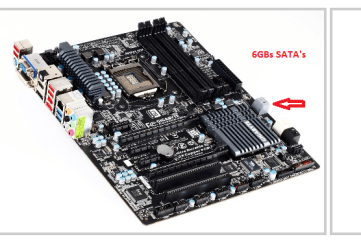
3) Does it matter on which SATA port the SSD is connected , for being able to be used as a W7 bootdisk ?
Sorry for all these question but i am a PC noob.
I come from mac ..
Thx in advance !
Rob.
I have made a custom PC build. (mobo - gigabyte UD3H-B3, UEFI Bios).
Have put in a Sasmung 830 SSD, 250 gig.
Want this drive to be my bootdrive and want to clean-install W7 pro 64 (from retail dvd) on this drive.
But installing W7 is just giving me an error, that W7 can't be installed on that Samsung drive.
Does anyone know this:
1) which are the proper EUFI BIOS settings for my SSD drive ? (cause i am not sure ..)
2) how do i have to format/partition the Samsung SSD for use with W7 ??
3) Does it matter on which SATA port the SSD is connected , for being able to be used as a W7 bootdisk ?
Sorry for all these question but i am a PC noob.
I come from mac ..
Thx in advance !
Rob.
My Computer
At a glance
Windows 7 Pro 64 bitI7 260032 GIGNividia GT210
- Computer type
- PC/Desktop
- Computer Manufacturer/Model Number
- Custom Build
- OS
- Windows 7 Pro 64 bit
- CPU
- I7 2600
- Motherboard
- Giga UD3H-B3
- Memory
- 32 GIG
- Graphics Card(s)
- Nividia GT210
- Hard Drives
- Samsung ssd 830
Corsair Force 3
- Antivirus
- Nope
- Browser
- Nightly