can't install win7 - GPT drive

jonasolof

New member
Local time
8:45 AM
Messages
1
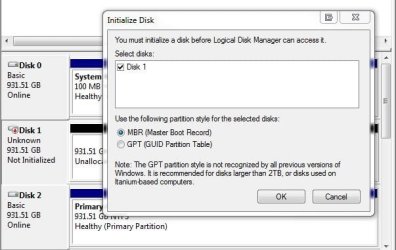
Laptop is HP pavillon 6d with pentium dual core T4200, ram is 4 GB, Bios F.12. Old HDD failed and we got a new one, 500 GB sata, as the old one. I put it in a win7 desktop and formatted it to NTFS as a single partition for the whole voleume. Probably it then automatically was formatted as a secondary HDD. I then put the formatted HDD into the laptop.

When I try to make a clean install of windows 7 home premium, the installation process reports that windows can't be installed on neither the small nor the large partition (funny, I didn't intend to make two partitions...). There is lots of info on GPT and windows 7 but none that in a straightforward way explains what to do in this trivial situation. How could I proceed?
 
Last edited:

My Computer My Computer

Computer Manufacturer/Model Number
HP pavillon d6
OS
windows 7
CPU
AMD turion 64x2
Motherboard
?
I would delete the volumes from that new drive and put it in the laptop and then install Windows 7.
The install works fine with an unallocated, new hardrive and you can also partition it during the install if you desire.
 

My Computer My Computer

Computer type
PC/Desktop
Computer Manufacturer/Model Number
Custom Built
OS
Windows 10 Pro x64, Windows 8.1 Pro x64, Windows 7 Ultimate x64 SP1,
CPU
INTEL i9-7920X LGA 2066
Motherboard
Gigabyte X299-WU8 F3
Memory
64 GB (4 X 16 GB) G-Skill V Series DDR4 3200 Quad Channel
Graphics Card(s)
EVGA GTX 1060 SC 3 GB
Sound Card
Realtek Onboard ALC1220
Monitor(s) Displays
2 x Samsung S27E310
Screen Resolution
1920x1080
Hard Drives
Samsung 2 x 970 EVO Plus 500 GB NVMe
1 x 6TB WD 6003FZBX SATA
1 x 6TB WD 60EFRX SATA
12 x 3TB WD 30EFRX SATA
PSU
Seasonic X-1050
Case
Thermaltake Armor+
Cooling
Corsair H80i V2 Liquid AOI Cooler
Keyboard
Logitech G510s
Mouse
Logitech MX Master 2S
Internet Speed
200 Mb/s
Antivirus
ESET NOD32 13.1
Browser
EDGE (Dev, Canary, Beta), Chrome
Other Info
ASUS RT-AC68U router
Malwarebytes 4.0.4
Laptop is HP pavillon 6d with pentium dual core T4200, ram is 4 GB, Bios F.12. Old HDD failed and we got a new one, 500 GB sata, as the old one. I put it in a win7 desktop and formatted it to NTFS as a single partition for the whole voleume. Probably it then automatically was formatted as a secondary HDD. I then put the formatted HDD into the laptop.

When I try to make a clean install of windows 7 home premium, the installation process reports that windows can't be installed on neither the small nor the large partition (funny, I didn't intend to make two partitions...). There is lots of info on GPT and windows 7 but none that in a straightforward way explains what to do in this trivial situation. How could I proceed?

Unless your laptop has an EFI (extensible firmware interface) rather than the standard BIOS (using an MBR), you can't use a GPT as a bootable drive. As far as I know, only Intel-based Macintosh PCs commonly come with an EFI.

I guess that you need to delete the existing partitions and set the drive up again using the Win7 install DVD.
 

My Computer My Computer

Computer Manufacturer/Model Number
homegrown
OS
Windows 7 Pro X64 SP1
CPU
Intel Core I7-3930k
Motherboard
Asus P9X79 Pro
Memory
16 GB Gskill DDR3-2133
Graphics Card(s)
eVGA GTX680
Sound Card
Creative X-Fi Titanium
Monitor(s) Displays
As PA246Q
Screen Resolution
1920 X 1200
Hard Drives
Corsair Force GT, 120 GB
WDC 1.5TB Caviar Black
PSU
PCP&C Silencer 750 Crossfire
Case
Silverstone FT02
Cooling
Noctua NH-D14
Keyboard
cheap Logitech USB
Mouse
Microsoft Intellimouse Explorer (old optical) USB
Internet Speed
6Mb cable
Other Info
Pioneer BDR-205
Samsung SH-203B
Monsoon 5.1 speakers
Welcome to SF! jonasolof

On looking at this I can point out that when moving the drive into the other desktop you likely went into the Disk Management and saw the new volume wizard there correct?

When that is first seen the default item will be the one for MBR(Master Boot Record) not the GUID Partition Table. That seems to be where the mistake was made by selecting that rather then leaving it at the default mbr option.

The attached image will show how the two options appear when first seen. At this point simply following the advice given so far will see 7 go on without problems.
 

Attachments

  • New Volume Wizard GUID Partition Table or MBR.jpg
    New Volume Wizard GUID Partition Table or MBR.jpg
    40.2 KB · Views: 203

My Computers My Computers

System One System Two

  • Computer type
    PC/Desktop
    Computer Manufacturer/Model Number
    Custom builds = 2
    OS
    W7 Ultimate x64/W10 Pro x64/W11 Pro Triple Boot - Main PC W7 Remote PC Micro ATX W7 Pro x64/W11 Pro
    CPU
    AMD Phenom II X4 975 Deneb 3.6ghz - 965 2nd remote pc
    Motherboard
    Gigabyte GA-790XTA-UD4-Gigabyte GA-880GM-D2H remote pc
    Memory
    Kingston Hyper X DDR3 1600 1.5v 16gb - Hyper X Fury 8gb 2nd
    Graphics Card(s)
    MSI HD Radeon 5750 1gb - MSI HD Radeon 6450 on mini tower
    Sound Card
    Creative Labs X-Fi Xtreme Audio P - Realtek onooard 2nd case
    Monitor(s) Displays
    ASUS VW199T-P 19" HP 2082a Main-HP 2082a 20" remote pc
    Screen Resolution
    Asus 1440x900 - HP 1600x900
    Hard Drives
    WD Black 1TB HD per OS W7, W10, and pending W11 presently on 500gb OS Drive - Pending Triple 1TB HDs for Spanned Storage/backup volume
    Single 2TB external USB enclosure, single 1TB System 7 Host/Boot drive, Pending 8TB external HD for system image b
    PSU
    Corsair 750TX - primary / Corsair CX600 - second
    Case
    Antec 900-2 - SSD compatible / NZXT Vulcan mini tower
    Cooling
    Zalman CNPS9900A
    Keyboard
    AZIO L70 Backlit Letters Gaming - ONN Cordless/USB
    Mouse
    MSI DS200 Programmable, Logitech Cordless
    Internet Speed
    30mbps upgrade - primary hard wired - mini tower usb WiFi
    Antivirus
    GFI VIPRE Internet Security 2014 on W7 2016 beta on W10,
    Browser
    Cyberfox, WaterFox 64bit FF variants, FireFox x64, Pale Moon
    Other Info
    Accomdata fan cooled usb 2.0 PIDE/Sata II, III external enclosure.
    Sambient usb/eSata PATA/Sata II, III external enclosure.
  • Computer type
    PC/Desktop
    System Manufacturer/Model Number
    CUSTOM ASSEMBLY
    OS
    W7 Pro x64/W11 Pro
    CPU
    AMD Deneb 3.6ghz - 965
    Motherboard
    Gigabyte GA-880GM-D2H remote pc
    Memory
    Kingston Hyper X Fury 8gb
    Graphics Card(s)
    MSI HD Radeon 6450 DVI Output
    Sound Card
    Realtek onooard Creative or Other separate PENDING
    Monitor(s) Displays
    VIZIO 32" LCD TV Separate LCD Pending
    Screen Resolution
    1600x1080
    Hard Drives
    WD 500GB OS Host/Boot WD Green 1TB Storage/Backup
    PSU
    Corsair 600W - THERMALTAKE 600W spare case
    Case
    NZXT Vulcan mini tower
    Cooling
    Twin 120mm Top Fans - 240mm Side Cover
    Keyboard
    ONN Cordless/USB Logitech Cordless
    Mouse
    ONN USB/Cordless - Logitech Cordless
    Internet Speed
    DSL 5G
    Browser
    MS Edge, FireFox, WaterFox x64, FireFox Nightly
    Other Info
    OS Testing-Remote Access to Main TeamViewer
Back
Top