Solved Can't install windows 7 (Windows cannot be installed to disk)

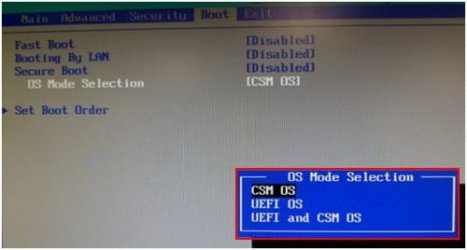
I just tried to boot with secure boot disabled and uefi & csm OS and it works!

regular bios - mbr.
UEFI bios - GPT.

My hard was formatted as gpt so I had to boot it with uefi and csm OS :)

Hope I don't get issues in further installation ;)


May be a Samsung UEFI/BIOS firmware.

Samsung 3.jpg
 

My Computer My Computer

OS
ME/XP/Vista/Win7
Yes,theog is right I have a Samsung series 3 laptop.

Just finished installing windows 7...

Now how do I download wifi and other drivers since I can't connect to my wifi? :D
 

My Computer My Computer

Computer type
Laptop
OS
Windows 8 64bit
You should be following the steps in Clean Reinstall - Factory OEM Windows 7 to know you prepared correctly beyond just the UEFI issues.

As it says in tutorial, have your wireless driver from the Samsung Support Downloads webpage for you model in the backup so you can install it to get online, enable Automatically get recommended drivers and updates for your hardware (Step 3) then run all rounds of Important and Optional Windows Updates to completion which should supply all other drivers. Any missing after no more Updates are available can also be imported from Samsung webpage.

You can also plug in by ethernet cable, enable auto driver updating from the blue link above, see if Ethernet driver loads since about 70% of them are in the installer and Win7 driver store while only 50% of wireless drivers are.

Then I'd study the rest of the steps to get a perfect install unless you want some other kind.
 

My Computer My Computer

Computer type
Laptop
Computer Manufacturer/Model Number
ACER ASPIRE 5742G
OS
Microsoft Windows 7 Home Premium 64-bits 7601 Multiprocessor Free Service Pack 1
CPU
Intel(R) Core(TM) i3 CPU M 370 @ 2.40GHz
Motherboard
Acer Aspire 5742G
Memory
4,00 GB
Graphics Card(s)
ATI Mobility Radeon HD 5400 Series
Sound Card
(1) AMD High Definition Audio Device (2) Realtek High Defi
Screen Resolution
1366 x 768 x 32 bits (4294967296 colors) @ 60 Hz
Hard Drives
WDC WD5000BEVT-22ZAT0
Yes,theog is right I have a Samsung series 3 laptop.

Just finished installing windows 7...

Now how do I download wifi and other drivers since I can't connect to my wifi? :D
Goto "device manager". How many "other devices"?
Give me the hardware id of the network adapter.
http://www.sevenforums.com/tutorials/96442-device-manager-finding-unknown-devices.html
What brand and model laptop is it?

Other devices - 6
Hardware Id's
IMG_20130803_002501.jpg


Samsung NP370-R5E-S01EE
 

My Computer My Computer

Computer type
Laptop
OS
Windows 8 64bit
It's one of the Intel LAN drivers here for the Network Controller you provide HID above which is Intel Centrino: NP370R5E - Allalaadimine | TUGI | SAMSUNG

We can provide better help if you dont' hide the other missing drivers in the back so we can't read them. There's likely other LAN listings there.

Remember once you connect by whatever method to internet, Win7 delivers the other drivers via Windows Update as I outlined earlier.
 
IMG_20130803_004159.jpg


Big Thanks for everyone who posted in this thread! ;)
 

My Computer My Computer

Computer type
Laptop
OS
Windows 8 64bit
Expand Network Adapters because it appears you already have one installed so can simply use that to connect and pull down all your other drivers via Windows Update, or if necessary the Samsung webpage linked earlier.

If the driver already in Network Adapters is ethernet then plug in by wire and it should connect. If wireless sign onto your network in bottom right system tray. If it balks rightclick the 5-bar connection icon to Troubleshoot.
 

My Computer My Computer

Computer type
Laptop
Computer Manufacturer/Model Number
ACER ASPIRE 5742G
OS
Microsoft Windows 7 Home Premium 64-bits 7601 Multiprocessor Free Service Pack 1
CPU
Intel(R) Core(TM) i3 CPU M 370 @ 2.40GHz
Motherboard
Acer Aspire 5742G
Memory
4,00 GB
Graphics Card(s)
ATI Mobility Radeon HD 5400 Series
Sound Card
(1) AMD High Definition Audio Device (2) Realtek High Defi
Screen Resolution
1366 x 768 x 32 bits (4294967296 colors) @ 60 Hz
Hard Drives
WDC WD5000BEVT-22ZAT0
Everything works smoothly now,thanks again for help guys ;)
 

My Computer My Computer

Computer type
Laptop
OS
Windows 8 64bit

My Computer My Computer

Computer type
Laptop
Computer Manufacturer/Model Number
ACER ASPIRE 5742G
OS
Microsoft Windows 7 Home Premium 64-bits 7601 Multiprocessor Free Service Pack 1
CPU
Intel(R) Core(TM) i3 CPU M 370 @ 2.40GHz
Motherboard
Acer Aspire 5742G
Memory
4,00 GB
Graphics Card(s)
ATI Mobility Radeon HD 5400 Series
Sound Card
(1) AMD High Definition Audio Device (2) Realtek High Defi
Screen Resolution
1366 x 768 x 32 bits (4294967296 colors) @ 60 Hz
Hard Drives
WDC WD5000BEVT-22ZAT0
Aww,didn't checked before,still got 4 other devices. -.-
 

My Computer My Computer

Computer type
Laptop
OS
Windows 8 64bit

My Computer My Computer

Computer type
Laptop
Computer Manufacturer/Model Number
ACER ASPIRE 5742G
OS
Microsoft Windows 7 Home Premium 64-bits 7601 Multiprocessor Free Service Pack 1
CPU
Intel(R) Core(TM) i3 CPU M 370 @ 2.40GHz
Motherboard
Acer Aspire 5742G
Memory
4,00 GB
Graphics Card(s)
ATI Mobility Radeon HD 5400 Series
Sound Card
(1) AMD High Definition Audio Device (2) Realtek High Defi
Screen Resolution
1366 x 768 x 32 bits (4294967296 colors) @ 60 Hz
Hard Drives
WDC WD5000BEVT-22ZAT0
Check windows updates. Let it search for updates... install the updates. Still "other devices"?
 

My Computer My Computer

Computer type
Laptop
Computer Manufacturer/Model Number
ACER ASPIRE 5742G
OS
Microsoft Windows 7 Home Premium 64-bits 7601 Multiprocessor Free Service Pack 1
CPU
Intel(R) Core(TM) i3 CPU M 370 @ 2.40GHz
Motherboard
Acer Aspire 5742G
Memory
4,00 GB
Graphics Card(s)
ATI Mobility Radeon HD 5400 Series
Sound Card
(1) AMD High Definition Audio Device (2) Realtek High Defi
Screen Resolution
1366 x 768 x 32 bits (4294967296 colors) @ 60 Hz
Hard Drives
WDC WD5000BEVT-22ZAT0

My Computer My Computer

Computer type
Laptop
Computer Manufacturer/Model Number
ACER ASPIRE 5742G
OS
Microsoft Windows 7 Home Premium 64-bits 7601 Multiprocessor Free Service Pack 1
CPU
Intel(R) Core(TM) i3 CPU M 370 @ 2.40GHz
Motherboard
Acer Aspire 5742G
Memory
4,00 GB
Graphics Card(s)
ATI Mobility Radeon HD 5400 Series
Sound Card
(1) AMD High Definition Audio Device (2) Realtek High Defi
Screen Resolution
1366 x 768 x 32 bits (4294967296 colors) @ 60 Hz
Hard Drives
WDC WD5000BEVT-22ZAT0
Did you run all rounds of Important and Optional Windows Updates with reboots, after enabling Automatically deliver drivers via Windows Update (Step 3)? Keep going back to Check for Updates.

I also asked to see a screenshot of expanded Network Adapters so we could determine which one was already installed. If you'd gotten online otherwise then you should have posted back so we'd know what worked to help others.
 
Installed ALL windows updates,ALL drivers suggested by DriverGenius.
Got one other devices left - Universal serial bus (USB) Controller.

Also I can't change my screen brightness,why?


Thanks.
 

My Computer My Computer

Computer type
Laptop
OS
Windows 8 64bit
What is Driver Genius? :huh:

We gave you the most specific instructions for handling drivers in Win7 you can get anywhere on the net. Are you saying you instead installed driver crapware which hasn't been needed since XP and may have ruined your new install?

Why were you not able to follow simple written instructions repeated several times to run all Important and Optional Updates after enabling Automatically deliver drivers via Windows Update (Step 3). Then only after all Updates are done should you import any drivers, from the OEM's Support Downloads webpage.

Why would you ask for our help and then go off and do something so totally whacked? Are you able to follow simple written instructions?
 
Last edited:
Back
Top