
You are using an out of date browser. It may not display this or other websites correctly.
You should upgrade or use an alternative browser.
You should upgrade or use an alternative browser.
Can't Install Windows
- Thread starter shokan2
- Start date

- Local time
- 6:22 AM
- Messages
- 50,634
Can you test the card in another PC to see if it works?
Since you have 1 year tech support with any new hardware I would contact the card maker and have them walk you through troubleshooting which sets you up for possible RMA.
Since you have 1 year tech support with any new hardware I would contact the card maker and have them walk you through troubleshooting which sets you up for possible RMA.

When did you get the 690 ? Why are you just putting it in now ?
Do you have any other pci-express video cards around ? To test the motherboard pci-express slot ?
Did you check the bios to see if there is any type of video option, maybe it`s trying to use the integrated video output that comes from the motherboard ( which you still haven`t tried )
But you said you can`t even see the BIOS
It can be switched from the integrated graphics to the pci-express graphics.
EVGA has very good support, maybe you should contact them
Another thing that comes to mind, in the past, when a cpu was not compatible, I would get no picture on the screen, none at all.
All you need to do is get that pc hooked to a monitor with an HDMI port, using the HDMI port from the motherboard, even an HD tv will work.
You are not screwed, most every computer parts company out there replaces their product with a brand new item, no questions asked, well except for Asus, they suck
Do you have any other pci-express video cards around ? To test the motherboard pci-express slot ?
Did you check the bios to see if there is any type of video option, maybe it`s trying to use the integrated video output that comes from the motherboard ( which you still haven`t tried )
But you said you can`t even see the BIOS
It can be switched from the integrated graphics to the pci-express graphics.
EVGA has very good support, maybe you should contact them
Another thing that comes to mind, in the past, when a cpu was not compatible, I would get no picture on the screen, none at all.
All you need to do is get that pc hooked to a monitor with an HDMI port, using the HDMI port from the motherboard, even an HD tv will work.
You are not screwed, most every computer parts company out there replaces their product with a brand new item, no questions asked, well except for Asus, they suck
Last edited:
My Computer
At a glance
Windows 10 Pro x64Intel Core i7 6700KGSkill TridentZ RGB 16GB 3600 16-16-16-36EVGA GTX 980 Ti SC x2
- Computer type
- PC/Desktop
- Computer Manufacturer/Model Number
- Skylake Special #666
- OS
- Windows 10 Pro x64
- CPU
- Intel Core i7 6700K
- Motherboard
- Asus Sabertooth Z170 Mark 1
- Memory
- GSkill TridentZ RGB 16GB 3600 16-16-16-36
- Graphics Card(s)
- EVGA GTX 980 Ti SC x2
- Sound Card
- Realtek High Definition
- Monitor(s) Displays
- AOC G2460PG
- Screen Resolution
- 1920 x 1080 144Hz
- Hard Drives
- Samsung 860 Pro 256GB, Seagate Barracuda 4TB x2
- PSU
- EVGA 1000 P2, EVGA White Custom Braided Cables
- Case
- Corsair Vengeance C70 Gunmetal Black
- Cooling
- Corsair H100i v2, Corsair ML120 x2, Thermal Grizzly Kryonaut
- Keyboard
- Logitech G910 Orion Spectrum
- Mouse
- Logitech G700s
- Internet Speed
- Verizon Fios Quantum Gateway 75/75
- Antivirus
- Windows Defender, Malwarebytes Free 3.8.3
- Browser
- Chrome
- Other Info
- Corsair SP120 x4, LG Blu-ray Drive, Durabrand HT-395 100 Watt Dolby Digital Amp, Corsair H2100 Wireless 7.1 Headset
Thanks the replies. I am not going to pursue this $2,500 mistake any further. Into the closet, gone. I've got no more money, TBH. Even to hire a taxi to get me to Tiger Direct where they could look at at.
My Computer
At a glance
Windows 7 Pro 64bit
- OS
- Windows 7 Pro 64bit
Computer repair tech guy looked at it and says it's probably the used motherboard. He said the card is fine (whew!). So, now searching out a V-Deluxe alternative. Asus' model line is perplexing to say the least for the P8Z77 boards.
My Computer
At a glance
Windows 7 Pro 64bit
- OS
- Windows 7 Pro 64bit
Unless you are sure that the "computer tech repair guy" thoroughly tested your motherboard then...Did you check the bios to see if there is any type of video option, maybe it`s trying to use the integrated video output that comes from the motherboard ( which you still haven`t tried )
This is the second time this was suggested by AddRAM. Why don't you remove the 690 graphics card and try to get things running on the internal graphics first (remove the GTX690 graphics card). Your monitor appears to have DVI/VGA connectors so you probably need to get hold of a HDMI to DVI connector.
With the Dell monitor check that is either Auto Select or the appropriate input. If you don't have it set properly then you will have problems. On my Dell Ultrasharp monitor you go (Menu>Input Source>Auto Select).
This will take the 690 card out of the issue for the time being and help you see if everything else is ok, especially the motherboard.
I'd also download the motherboard manual if you haven't already.
Motherboards - P8Z77-V DELUXE - ASUS
My Computer
At a glance
Windows 7x64 Home Premium SP1Intel i7 2600kG.Skill Ripjaws (DDR3-1600) 2x4GBNvidia GeForce GTS 450; Intel HD Graphics 300...
- Computer type
- PC/Desktop
- Computer Manufacturer/Model Number
- Own build
- OS
- Windows 7x64 Home Premium SP1
- CPU
- Intel i7 2600k
- Motherboard
- ASUS P8Z68 Deluxe
- Memory
- G.Skill Ripjaws (DDR3-1600) 2x4GB
- Graphics Card(s)
- Nvidia GeForce GTS 450; Intel HD Graphics 3000(GT2+)
- Monitor(s) Displays
- Dell Ultrasharp IPS panel U2311H, Samsung SyncMaster P2350
- Screen Resolution
- 1920x1080
- Hard Drives
- Samsung 850 Pro SSD 256GB, Samsung SSD 840 120GB, Seagates 1TB Barracuda ST31000528AS x2
- PSU
- Seasonic M12II 520W
- Case
- Lian Li Lancool PC-K60
- Cooling
- Case: 1x120mm, 3x140mm CPU: Hyper 212+
- Keyboard
- Logitech MK520 (wireless)
- Mouse
- Logitech MK520
- Internet Speed
- 6-7 Mbps
- Antivirus
- Norton Security Premium, Malwarebytes on 2 (MSE on 3rd PC)
- Browser
- FireFox
- Other Info
- Audio: Logitech Z523 2.1
The machine is at the shop. No, I have no way to know if the motherboard is the real culprit as the tech guy says. How would I know he knows for sure? All he says is he gets an A2 error, but swapping out the card to another machine, says it's fine.Unless you are sure that the "computer tech repair guy" thoroughly tested your motherboard then...Did you check the bios to see if there is any type of video option, maybe it`s trying to use the integrated video output that comes from the motherboard ( which you still haven`t tried )
This is the second time this was suggested by AddRAM. Why don't you remove the 690 graphics card and try to get things running on the internal graphics first (remove the GTX690 graphics card). Your monitor appears to have DVI/VGA connectors so you probably need to get hold of a HDMI to DVI connector.
With the Dell monitor check that is either Auto Select or the appropriate input. If you don't have it set properly then you will have problems. On my Dell Ultrasharp monitor you go (Menu>Input Source>Auto Select).
This will take the 690 card out of the issue for the time being and help you see if everything else is ok, especially the motherboard.
The PC is at the shop, no way to check. He seems competent and says the card is fine. He's getting an A2 error. That's all I know at the moment.
I'd also download the motherboard manual if you haven't already.
Motherboards - P8Z77-V DELUXE - ASUS
My Computer
At a glance
Windows 7 Pro 64bit
- OS
- Windows 7 Pro 64bit
- Local time
- 6:22 AM
- Messages
- 50,634
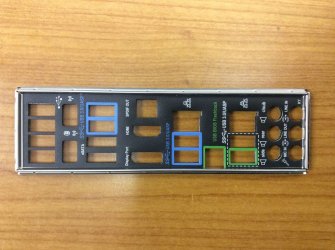
If you have onboard graphics on the mobo then you should most definitely try running them. I'd assumed you had done so. Why would you not? It comes with your mobo. You were provided with a picture of where to plug it in! :huh:
If everything works fine without the card then you know its not your mobo but the card or the slot.
If everything works fine without the card then you know its not your mobo but the card or the slot.
Again, don't have the machine at the moment to do this. Honestly, I don't recall seeing a DVI port on the IO ports. The picture in post # 11 is not what P8Z77-V Deluxe is.You were provided with a picture of where to plug it in!
If everything works fine without the card then you know its not your mobo but the card or the slot.
My Computer
At a glance
Windows 7 Pro 64bit
- OS
- Windows 7 Pro 64bit
My Computer
At a glance
Windows 7 Pro 64bit
- OS
- Windows 7 Pro 64bit
I already mentioned that you'd probably need an HDMI to DVI adapter.
I also linked you to the full motherboard manual. If the BIOS stops at q code A2 then there is some IDE issue. It doesn't mean the motherboard has definitely had it.
I also linked you to the full motherboard manual. If the BIOS stops at q code A2 then there is some IDE issue. It doesn't mean the motherboard has definitely had it.
My Computer
At a glance
Windows 7x64 Home Premium SP1Intel i7 2600kG.Skill Ripjaws (DDR3-1600) 2x4GBNvidia GeForce GTS 450; Intel HD Graphics 300...
- Computer type
- PC/Desktop
- Computer Manufacturer/Model Number
- Own build
- OS
- Windows 7x64 Home Premium SP1
- CPU
- Intel i7 2600k
- Motherboard
- ASUS P8Z68 Deluxe
- Memory
- G.Skill Ripjaws (DDR3-1600) 2x4GB
- Graphics Card(s)
- Nvidia GeForce GTS 450; Intel HD Graphics 3000(GT2+)
- Monitor(s) Displays
- Dell Ultrasharp IPS panel U2311H, Samsung SyncMaster P2350
- Screen Resolution
- 1920x1080
- Hard Drives
- Samsung 850 Pro SSD 256GB, Samsung SSD 840 120GB, Seagates 1TB Barracuda ST31000528AS x2
- PSU
- Seasonic M12II 520W
- Case
- Lian Li Lancool PC-K60
- Cooling
- Case: 1x120mm, 3x140mm CPU: Hyper 212+
- Keyboard
- Logitech MK520 (wireless)
- Mouse
- Logitech MK520
- Internet Speed
- 6-7 Mbps
- Antivirus
- Norton Security Premium, Malwarebytes on 2 (MSE on 3rd PC)
- Browser
- FireFox
- Other Info
- Audio: Logitech Z523 2.1
Hmm, yes there's a DVI to HDMI adapter in the GTX 690 box. No way to check this out at the moment. I will try it Monday. Don't understand about the BIOS comment, but I'll find out and post then.
My Computer
At a glance
Windows 7 Pro 64bit
- OS
- Windows 7 Pro 64bit
A DVI to HDMI adapter is useless for you to check the motherboard, you need an HDMI to DVI adapter.
So you are looking for a new Z77 board ?
So you are looking for a new Z77 board ?
My Computer
At a glance
Windows 10 Pro x64Intel Core i7 6700KGSkill TridentZ RGB 16GB 3600 16-16-16-36EVGA GTX 980 Ti SC x2
- Computer type
- PC/Desktop
- Computer Manufacturer/Model Number
- Skylake Special #666
- OS
- Windows 10 Pro x64
- CPU
- Intel Core i7 6700K
- Motherboard
- Asus Sabertooth Z170 Mark 1
- Memory
- GSkill TridentZ RGB 16GB 3600 16-16-16-36
- Graphics Card(s)
- EVGA GTX 980 Ti SC x2
- Sound Card
- Realtek High Definition
- Monitor(s) Displays
- AOC G2460PG
- Screen Resolution
- 1920 x 1080 144Hz
- Hard Drives
- Samsung 860 Pro 256GB, Seagate Barracuda 4TB x2
- PSU
- EVGA 1000 P2, EVGA White Custom Braided Cables
- Case
- Corsair Vengeance C70 Gunmetal Black
- Cooling
- Corsair H100i v2, Corsair ML120 x2, Thermal Grizzly Kryonaut
- Keyboard
- Logitech G910 Orion Spectrum
- Mouse
- Logitech G700s
- Internet Speed
- Verizon Fios Quantum Gateway 75/75
- Antivirus
- Windows Defender, Malwarebytes Free 3.8.3
- Browser
- Chrome
- Other Info
- Corsair SP120 x4, LG Blu-ray Drive, Durabrand HT-395 100 Watt Dolby Digital Amp, Corsair H2100 Wireless 7.1 Headset
Yes. Saw this yesterday.A DVI to HDMI adapter is useless for you to check the motherboard, you need an HDMI to DVI adapter.
So you are looking for a new Z77 board ?
Buy the ASUS Intel Z77 Motherboard at TigerDirect.ca
My Computer
At a glance
Windows 7 Pro 64bit
- OS
- Windows 7 Pro 64bit
Well at least you know the card works, I hope you didn`t leave it at the shop :shock:
My Computer
At a glance
Windows 10 Pro x64Intel Core i7 6700KGSkill TridentZ RGB 16GB 3600 16-16-16-36EVGA GTX 980 Ti SC x2
- Computer type
- PC/Desktop
- Computer Manufacturer/Model Number
- Skylake Special #666
- OS
- Windows 10 Pro x64
- CPU
- Intel Core i7 6700K
- Motherboard
- Asus Sabertooth Z170 Mark 1
- Memory
- GSkill TridentZ RGB 16GB 3600 16-16-16-36
- Graphics Card(s)
- EVGA GTX 980 Ti SC x2
- Sound Card
- Realtek High Definition
- Monitor(s) Displays
- AOC G2460PG
- Screen Resolution
- 1920 x 1080 144Hz
- Hard Drives
- Samsung 860 Pro 256GB, Seagate Barracuda 4TB x2
- PSU
- EVGA 1000 P2, EVGA White Custom Braided Cables
- Case
- Corsair Vengeance C70 Gunmetal Black
- Cooling
- Corsair H100i v2, Corsair ML120 x2, Thermal Grizzly Kryonaut
- Keyboard
- Logitech G910 Orion Spectrum
- Mouse
- Logitech G700s
- Internet Speed
- Verizon Fios Quantum Gateway 75/75
- Antivirus
- Windows Defender, Malwarebytes Free 3.8.3
- Browser
- Chrome
- Other Info
- Corsair SP120 x4, LG Blu-ray Drive, Durabrand HT-395 100 Watt Dolby Digital Amp, Corsair H2100 Wireless 7.1 Headset