
ClassicMovieFan
New member
- Local time
- 8:41 PM
- Messages
- 1
Thanks for reading.
I download audiobooks from the library. With my new computer, Win 7, when I try to "open" an .odm file I get message that the computer can't open this file because the file is incompatible with 64-bit system, that the file supplier should be contacted.
I can't find anything on the Overdrive site about this. Plenty of other users with same problem on a lot of other internet searches -- but no solution. (Just Microsoft saying, "use Windows Media Player.") The files have DRM protection, and can't just be "played" on any old media player. Libraries usually use either OneClickDigital or Overdrive Media but the user doesn't have a choice.
Yes, I have the .odm associated with the Overdrive program.
This computer is about 6 months old. My old Win 7 computer worked okay with these files and the OD program. I know I need to "do" something to make it work, but can't find out what it is.
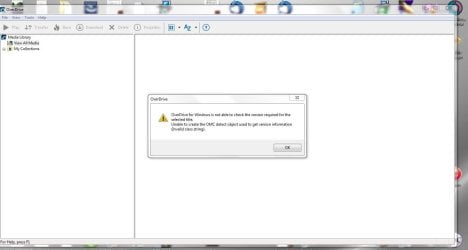
*** Added screenshot of error message. In trying to "open" the ODM file in OverDrive console, I get the message: OD for Windows is not able to check the version required for selected title. Unable to create OMC detect object used to get version info. (Invalid class string.)
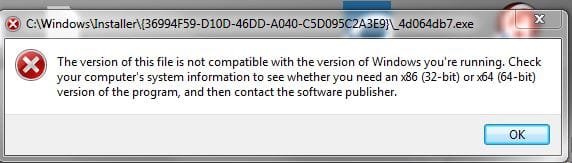
*** Second screenshot is the message I get when I try to "open" the downloaded file from browser.
***More Info:
I found a Windows suggestion that the DRM can be corrupted or needs to be reset if the hardware on a system has changed. When I bought this computer, I had them add an additional hard drive. It was brand new. I don't know if this would be considered a hardware change. The info I read is at:
https://support.microsoft.com/en-us/kb/891664
When I follow the instructions to find the DRM folder, it isn't there. I have the view set to show hidden files and folders. The path (according to the binary file in the regedit.exe is: \programdata\microsoft\windows\drm -- however, i get as far as "windows" in this path and there is no DRM.
I really don't want to mess around with the DRM until I have a chance of knowing what I am doing -- at least a little bit -- and it warns that I may disable ALL of my permissions for other media. I have many audiobook downloads from Audible and other sources which don't use OverDrive Media Console, and frankly, I don't want to mess it all up.
HELP!!
Thanks very much for the help.

I download audiobooks from the library. With my new computer, Win 7, when I try to "open" an .odm file I get message that the computer can't open this file because the file is incompatible with 64-bit system, that the file supplier should be contacted.
I can't find anything on the Overdrive site about this. Plenty of other users with same problem on a lot of other internet searches -- but no solution. (Just Microsoft saying, "use Windows Media Player.") The files have DRM protection, and can't just be "played" on any old media player. Libraries usually use either OneClickDigital or Overdrive Media but the user doesn't have a choice.
Yes, I have the .odm associated with the Overdrive program.
This computer is about 6 months old. My old Win 7 computer worked okay with these files and the OD program. I know I need to "do" something to make it work, but can't find out what it is.
*** Added screenshot of error message. In trying to "open" the ODM file in OverDrive console, I get the message: OD for Windows is not able to check the version required for selected title. Unable to create OMC detect object used to get version info. (Invalid class string.)
*** Second screenshot is the message I get when I try to "open" the downloaded file from browser.
***More Info:
I found a Windows suggestion that the DRM can be corrupted or needs to be reset if the hardware on a system has changed. When I bought this computer, I had them add an additional hard drive. It was brand new. I don't know if this would be considered a hardware change. The info I read is at:
https://support.microsoft.com/en-us/kb/891664
When I follow the instructions to find the DRM folder, it isn't there. I have the view set to show hidden files and folders. The path (according to the binary file in the regedit.exe is: \programdata\microsoft\windows\drm -- however, i get as far as "windows" in this path and there is no DRM.
I really don't want to mess around with the DRM until I have a chance of knowing what I am doing -- at least a little bit -- and it warns that I may disable ALL of my permissions for other media. I have many audiobook downloads from Audible and other sources which don't use OverDrive Media Console, and frankly, I don't want to mess it all up.
HELP!!
Thanks very much for the help.
Attachments
Last edited:
My Computer
At a glance
Microsoft Windows 7 Professional 64-bit 7601 ...Intel(R) Core(TM) i7-4790 CPU @ 3.60GHz16.00 GBNVIDIA GeForce GTX 745
- Computer type
- PC/Desktop
- Computer Manufacturer/Model Number
- Dell
- OS
- Microsoft Windows 7 Professional 64-bit 7601 Multiprocessor Free Service Pack 1
- CPU
- Intel(R) Core(TM) i7-4790 CPU @ 3.60GHz
- Motherboard
- Dell Inc. 0KWVT8
- Memory
- 16.00 GB
- Graphics Card(s)
- NVIDIA GeForce GTX 745
- Sound Card
- (1) Bluetooth Audio Device (2) NVIDIA High Definition Audi
- Screen Resolution
- 1920 x 1080 x 32 bits (4294967296 colors) @ 60 Hz
- Hard Drives
- (1) ATA ST1000DM003-1ER1 SCSI Disk Device (2) ATA WDC WD30EZRX-00S SCSI Disk Device (3) CF/MD Card (4) MS/Pro/Duo Card (5) SD/mini-MMC/RS Card (6) SM/xD Card (7) WDC WD10 EARS-00Y5B1 USB Device