Can't locate infection using excessive internet download

vicvic

New member
Power User
Local time
10:45 AM
Messages
155
Hi all

I am not sure if i am infected

Yesterday i used 1.7g download, my internet usage should be under a gig download. This has been happening off and on for the last week. My concern regarding my internet is if use all my allocated allowance, i have to pay extra. :mad:

i have tried the following scans

eset online
malarebytes
superantisyeware

and a couple of others

As i am using a wireless router. i have changed all networks setting and passwords


Does anyone have any suggestions to see what might becausing the issue?
 

My Computer My Computer

At a glance

windows 7 Home premium 32 bitintel core 2 duo cpu t6500 @ 2.10 ghz 2095 mhz4Ati mobility radeon hd 4530
Computer Manufacturer/Model Number
Hp DVD6 1242tx
OS
windows 7 Home premium 32 bit
CPU
intel core 2 duo cpu t6500 @ 2.10 ghz 2095 mhz
Memory
4
Graphics Card(s)
Ati mobility radeon hd 4530
How many users are there on your network?
 

My Computer My Computer

At a glance

Microsoft Windows 7 Home Premium 64-bit 7601 ...Intel(R) Core(TM) i7-3770 CPU @ 3.40GHz8.00 GBIntel(R) HD Graphics 4000
Computer type
PC/Desktop
OS
Microsoft Windows 7 Home Premium 64-bit 7601 Multiprocessor Free Service Pack 1
CPU
Intel(R) Core(TM) i7-3770 CPU @ 3.40GHz
Motherboard
ASUSTeK COMPUTER INC. P8H77-M
Memory
8.00 GB
Graphics Card(s)
Intel(R) HD Graphics 4000
Sound Card
On Board
Monitor(s) Displays
Dell 24"
Screen Resolution
1920 x 1080
Hard Drives
(1) INTEL SSDSC2CT180A3 ATA Device (2) ST500DM002-1BD142 ATA Device (3) WDC WD3200AAKS-75L9A0 ATA Device (4) Generic- Compact Flash USB Device (5) Generic- MS/MS-Pro USB Device (6) Generic- SD/MMC USB Device (7) Generic- SM/xD-Picture USB
PSU
500w Corsair
Case
Cooler Master
Cooling
3 Fans
Keyboard
Logitech MK300
Mouse
Logitech WOM
Internet Speed
75Mb
Antivirus
Norton 360
Browser
Firefox, Opera, IE
Only one person on the network. Myself
 

My Computer My Computer

At a glance

windows 7 Home premium 32 bitintel core 2 duo cpu t6500 @ 2.10 ghz 2095 mhz4Ati mobility radeon hd 4530
Computer Manufacturer/Model Number
Hp DVD6 1242tx
OS
windows 7 Home premium 32 bit
CPU
intel core 2 duo cpu t6500 @ 2.10 ghz 2095 mhz
Memory
4
Graphics Card(s)
Ati mobility radeon hd 4530

My Computer My Computer

At a glance

Windows 7 Home Premium
Computer type
PC/Desktop
Computer Manufacturer/Model Number
An ol' eMachines
OS
Windows 7 Home Premium
Internet Speed
Fine for me...I'm retired!
It may help to place a network meter to show how much your computer is actually using. I use Networx (Bandwidth monitor, bandwidth speed test, bandwidth and traffic monitoring tool for Windows). It shows how much traffic do you have and you can view all active connections and show warnings when you're near the quota. While it doesn't prevents the problem from happening, it helps seeing it early.

You can also put a firewall in place, and setup very restrictive outgoing rules to allow only those programs you know you use to download data. It's somewhat complicated but worths the effort if you know how to do so. Even the Windows built-in firewall can do the job.

Some thing to monitor if you're on a metered connection is program's auto-updates, that may download a lot without your consent. Make sure Windows update is disabled and any other program that tries to do so is put to manual too. If you want to get updates, request them manually when you know you have free quota to spare.

Also, since you're using wi-fi, consider the case that someone else might have been using you connection without your knowledge. Make sure you have a strong password on the wifi network (and the web-setup, by the way), and use WPA encryption (NOT WEP).
 
Last edited:

My Computer My Computer

At a glance

Windows 7 Ultimate x64Intel Core i7-740QM8 GB DDR3NVIDIA GeForce 330GT
Computer type
Laptop
Computer Manufacturer/Model Number
Toshiba Sattelite A665-S6092
OS
Windows 7 Ultimate x64
CPU
Intel Core i7-740QM
Memory
8 GB DDR3
Graphics Card(s)
NVIDIA GeForce 330GT
Screen Resolution
1366x768
Hard Drives
Samsung 840 SSD 500GB
1TB USB3 external HD
Cooling
Coolermaster Notepal U3 notebook cooling pad
Internet Speed
3mbps ASDL
Antivirus
ClamWin 0.98.7
Browser
Opera 12.17 x86 (main), Firefox 38 (sec), IE11 (last resort)
I have tried the following scans

eset online
malarebytes
superantisyeware
Did these come up clean?

If yes, you may want to talk to the folks here to troubleshoot your connection:
Network & Sharing - Windows 7 Help Forums


They didn't find anything.

I don't really want to, i am preparing to reinstall my OS

Unless someone has an idea in the next couple of hours

I have been using Netlimiter 3 i cant find an application of mine using that much data


I have changed my wifi passwords of admin access and device. Changed the setting to only allow 1 device to connect.
 

My Computer My Computer

At a glance

windows 7 Home premium 32 bitintel core 2 duo cpu t6500 @ 2.10 ghz 2095 mhz4Ati mobility radeon hd 4530
Computer Manufacturer/Model Number
Hp DVD6 1242tx
OS
windows 7 Home premium 32 bit
CPU
intel core 2 duo cpu t6500 @ 2.10 ghz 2095 mhz
Memory
4
Graphics Card(s)
Ati mobility radeon hd 4530
You may want to check if your wireless router has been configured to have a secure connection, there could be very well someone within the range of your router "mooching" off your service if the router is not secure.

Wireless routers have a pretty wide range depending on the make and model, when I connect to my own home wireless with my laptop I can also pick up neighbors well over 100 yards away from my home with insecure wireless routers with some pretty damn good connection rates.

Although where I am from we do not get charged for over usage so there is no need for anyone to mooch off one another.
 

My Computer My Computer

At a glance

Windows 8 Pro / Windows 7 Home Premium x64 du...6 gigsNvidia GEForce 9400 GT
Computer type
PC/Desktop
Computer Manufacturer/Model Number
HP
OS
Windows 8 Pro / Windows 7 Home Premium x64 dual boot
Memory
6 gigs
Graphics Card(s)
Nvidia GEForce 9400 GT
Screen Resolution
1600 x 900
Hard Drives
Internal - Western Digital 600 gb HDD
Internal - Western Digital 250 gb HDD
External - Western Digital 1 TB HDD
Antivirus
Avast!
Browser
Pale Moon
Although where I am from we do not get charged for over usage so there is no need for anyone to mooch off one another.

If someone makes any illegal activity from internet, in the remote case that someone cares about it and want to pursue him, it's your IP what will be logged everywhere, not the original attacker's. I guess it counts towards wanting to keep everyone outside my network.
Also, it uses your own bandwidth, slowing down your connection depending on what each other is doing.
 

My Computer My Computer

At a glance

Windows 7 Ultimate x64Intel Core i7-740QM8 GB DDR3NVIDIA GeForce 330GT
Computer type
Laptop
Computer Manufacturer/Model Number
Toshiba Sattelite A665-S6092
OS
Windows 7 Ultimate x64
CPU
Intel Core i7-740QM
Memory
8 GB DDR3
Graphics Card(s)
NVIDIA GeForce 330GT
Screen Resolution
1366x768
Hard Drives
Samsung 840 SSD 500GB
1TB USB3 external HD
Cooling
Coolermaster Notepal U3 notebook cooling pad
Internet Speed
3mbps ASDL
Antivirus
ClamWin 0.98.7
Browser
Opera 12.17 x86 (main), Firefox 38 (sec), IE11 (last resort)
As has been said, secure your wireless network. Use WPA2-PSK with AES encryption. Do not use the WPS button to connect anything, it can be hacked into easily that way. Change the WiFi channel too.

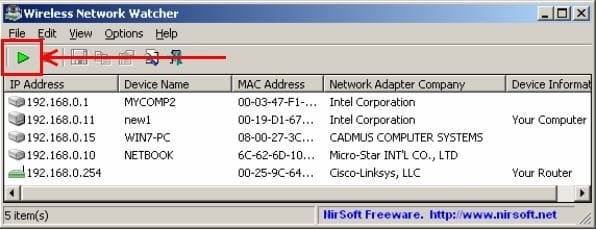
Install this: http://www.nirsoft.net/utils/wireless_network_watcher.html It will show all devices connected to your network. It will scan your network when you start it, but you may have to click the green triangle to re-scan, see snip.

wireless.JPG
 

My Computer My Computer

At a glance

Windows 7 Ultimate X64 SP1Intel i5-2550K, Differing ~4.4-4.8GHz No buil...16GB G.Skill Sniper 1866MHz @ 2133MHz 2x8GBASUS GTX650TIB-DC2OC-2GD5, (650TI Boost)
Computer type
PC/Desktop
Computer Manufacturer/Model Number
Home Built Desktop By DataTech
OS
Windows 7 Ultimate X64 SP1
CPU
Intel i5-2550K, Differing ~4.4-4.8GHz No built in GPU
Motherboard
ASUS P8Z68-V PRO/GEN3
Memory
16GB G.Skill Sniper 1866MHz @ 2133MHz 2x8GB
Graphics Card(s)
ASUS GTX650TIB-DC2OC-2GD5, (650TI Boost)
Sound Card
Onboard Realtek 5-1
Monitor(s) Displays
Samsung P2570HD
Screen Resolution
1920x1080
Hard Drives
Samsung 840 Pro 256GB SSD for OS, 500GB Seagate Constellation (Enterprise drive) for Data
PSU
Corsair HX650W
Case
Inwin Dragon Rider
Cooling
Hyper 212 EVO w/two Noctua fans, push-pull, @1300 RPM
Keyboard
E-Z Eyes, bright yellow keys with large characters
Mouse
steelseries SENSEI Laser Pro Gaming
Internet Speed
48-51Mbs Mbs down, 11 Mbs up Xfinity Cable
Antivirus
Norton Internet Security 2013
Browser
IE 10, Opera, Pale Moon if needed
Other Info
4 case fans, LG BluRay-RE, ASUS DVD-RW, Mr. Fusion power supply, 1.21 gigawatts.
Although where I am from we do not get charged for over usage so there is no need for anyone to mooch off one another.

If someone makes any illegal activity from internet, in the remote case that someone cares about it and want to pursue him, it's your IP what will be logged everywhere, not the original attacker's. I guess it counts towards wanting to keep everyone outside my network.
Also, it uses your own bandwidth, slowing down your connection depending on what each other is doing.

What I was trying to say Alejandro, although my home router is secure, others is my neighborhood aren't, when I connect my laptop to my own home router it will also show me choices of others in my neighborhood well over 100 yards away that are unsecure, I shake my head every time I see it.

I am well aware of the legal ramifications of committing illegal activities on someone else's connection should they decide to pursue it, not that I would do it, but if I WAS a criminal and wanted to commit an internet crime, this would be the neighborhood to do it in, if I count the unsecure connections I get on my laptop and number of houses in my neighborhood, it would be safe to say at least 50% of them are unsecure. It simply amazes me how many people will purchase a router and just never take the time to configure them correctly, they simply plug into the wall, attach it to their modems and go.

But like I said, where I am from we do not get charged by our ISP for over usage, so even if someone innocently roaming the neighborhood with their smart phone needed a connection, they could get one without the owner having to worry about being charged more, that's just ridiculous, even though I know that there are ISP's that still have plans like that, personally I would never sign up for a plan such as that, not in today's day and age, understanding that some live in such remote locations they really have no other choice.

Hell, if I REALLY need to piggy back someone else's connection I'll simply got to the nearest coffee shop or restaurant and order a coffee to do what I need being as most if not all coffee shops, restaurants, hotels and stores here offer free hot spots. The WHOLE city of Atlanta and around a 50 -60 mile radius around it here is one big hot spot, the biggest in the world, provided by Clear Wireless, I guess if you live within city limits you pay for it through your state taxes but outside city limits .... I live right on the outside of that cusp but can still get a signal but I pay zero.

But getting back on subject, if you buy a router, you need to take the time and learn how to configure it or at the very least have someone who does know do it, if you have an open connection, sooner or later someone is going to find it.

 

My Computer My Computer

At a glance

Windows 8 Pro / Windows 7 Home Premium x64 du...6 gigsNvidia GEForce 9400 GT
Computer type
PC/Desktop
Computer Manufacturer/Model Number
HP
OS
Windows 8 Pro / Windows 7 Home Premium x64 dual boot
Memory
6 gigs
Graphics Card(s)
Nvidia GEForce 9400 GT
Screen Resolution
1600 x 900
Hard Drives
Internal - Western Digital 600 gb HDD
Internal - Western Digital 250 gb HDD
External - Western Digital 1 TB HDD
Antivirus
Avast!
Browser
Pale Moon
Back
Top