Can't log into the second partition

dfs4

New member
Member
VIP
Local time
9:28 AM
Messages
199
I have two partitions, the first one vista that came with the laptop and the second one I installed windows 7. I had to reinstall windows 7 again this morning because of a virus and while I was at it I restored the vista to original factory settings afterwards. Now when I go to msconfig.exe ... it doesn't show windows 7 and it also on startup I don't get whether I want to log in to first or second partition. Is there a way to get into the second partition(windows 7 on D drive)?
 

My Computer

Computer type
Laptop
Computer Manufacturer/Model Number
Dell Inspiron
OS
Microsoft Windows 7 Home Premium 32-bit 7600 Multiprocessor Free
CPU
Intel(R) Core(TM) i3-4030U CPU @ 1.90GHz
Motherboard
Dell Inc. 0CG89M
Memory
4.00 GB
Graphics Card(s)
Intel(R) HD Graphics Family
Sound Card
High Definition Audio Device
From Vista, you might try opening an administrative command window and type:

bootrec /rebuildbcd

This should give you an option to add any Windows installs not currently in the boot menu.

__________________________

The utility bootrec.exe does not appear to be in the basic Vista or Win 7 install, so it probably has to be run from the Install DVD using the Command function in the repair area.
 
Last edited:

My Computer

Computer Manufacturer/Model Number
Homebuilt
OS
Windows 7 x64
CPU
i7-2600K
Motherboard
Asus P8Z77-v Pro
Memory
8 G
Graphics Card(s)
GTX 480
Sound Card
Onboard
Monitor(s) Displays
LG W2753V
Screen Resolution
1920x1080
Hard Drives
Crucial M4 128 G SSD
the recovery only restores drive C to original factory settings. doesn't affect drive D. I can use the files on D drive.

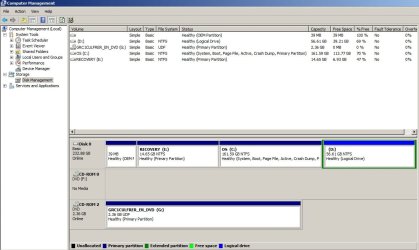
since this afternoon I have made another change. I installed win7 64bit on C drive(previously vista 64bit). one thing here that drives me absolutely crazy is that it won't let me install win7 32bit on C drive. I keep getting 'you can't install 32bit windows on a 64bit windows'.

Now I don't know how to install 32bit on C drive. Is there a way to format it if there is then how because it won't let me format it. this is a dell 1545. In any case I have had to create another partition to install the 32bit windows and I can't get into it without having to reinstall it again.

but I would like to know if it is possible to install 32bit windows on C drive, since it seems it is saying I can't install win7 32 bit on this 64bit hardware(not sure if that is dell or MS doing that.. in either case this is beyond frustrating. why can't I use my laptop for 32 or 64bit OS.. it is rendering it useless in a way if I can't do so.)


p.s. drive G is a virtual drive. I have mounted the win7 installation files via virtualclone drive.
 

Attachments

  • Untitled.jpg
    Untitled.jpg
    78.5 KB · Views: 28

My Computer

Computer type
Laptop
Computer Manufacturer/Model Number
Dell Inspiron
OS
Microsoft Windows 7 Home Premium 32-bit 7600 Multiprocessor Free
CPU
Intel(R) Core(TM) i3-4030U CPU @ 1.90GHz
Motherboard
Dell Inc. 0CG89M
Memory
4.00 GB
Graphics Card(s)
Intel(R) HD Graphics Family
Sound Card
High Definition Audio Device
but I would like to know if it is possible to install 32bit windows on C drive, since it seems it is saying I can't install win7 32 bit on this 64bit hardware(not sure if that is dell or MS doing that.. in either case this is beyond frustrating. why can't I use my laptop for 32 or 64bit OS.. it is rendering it useless in a way if I can't do so.)
You cannot downgrade to 32 bit from 64bit without a workaround.
Are you going to try upgrade or clean install?

If clean install download the partituion boot disc and burn it to a cd
Free Download Partition Wizard

Boot using the disc>select Resolution one (turn on numpad)>ok to all other messages.
Right click on C: and click format. Format as NTFS and Primary>click apply
Right click on the partition again and click modify>set as active>apply

Reboot with the Win7 DVD and install the 64bit OS

Or
Boot from the Win7 disc>Install>advanced>Format>format C:>then install to C:
 

My Computer

Computer Manufacturer/Model Number
Blue Shards 1.0
OS
Windows 7 Ultimate 64bit
CPU
AMD Phenom II 555 Black Edition Quad Core OC'd to 4.0GHz
Motherboard
ASUS M4A88T-M
Memory
G Skill RipJaw 1333MHz 4GB
Graphics Card(s)
ATI raideon 4250 HD/XFX ATI Radeon 1GB HD4650
Sound Card
Realteck HD Audio
Monitor(s) Displays
2x 22" Widescreen HD Monitors
Hard Drives
500GB Sata 7500RPM
80GB IDE
PSU
850W OCUK Modular
Case
Antec Dark Fleet DF-30
Cooling
Titan Fenrir Pro (CPU)
Keyboard
Logitech Wireless
Mouse
Logitech Wireless
Internet Speed
24Meg
Other Info
Getting soon-
2TB 7200RPM HDD
+8GB RAM
30GB SSD
HD6950/70
You need to boot the 32 bit installer to install to C: drive, and to get Drive Tools to delete/create/format HD.

You can't run a 32 bit installer from a 64 bit OS, even mounting it virtually.

burn the ISO to DVD using ImgBurn at 4x speed with Verify, then boot the DVD, select Custom install, use Advanced drive tools to delete whatever partitions you don't want, create New partition(s) you do want, then format before intalling Win7 where you want it.
 
Back
Top