Can't make image smaller again - help?

Ken M

New member
Local time
9:34 PM
Messages
10
On the website spaceweather.com SpaceWeather.com -- News and information about meteor showers, solar flares, auroras, and near-Earth asteroids

I clicked on the image of the sun on the left side to make it larger. The image became larger with a magnifying glass cursor with a "+" in it. Using that I made it even larger, but the cursor did not change to the "-" sign, so now I can't make it smaller again.

So now every time I enlarge the original image from the website it opens in it's extremely large size.

Being an amateur astronomer / solar observer, I check this website every day so this is annoying I can't shrink the image back down.

Any advice is appreciated! Thanks.
 

My Computer

OS
Windows Home Premium 64

My Computer

Computer type
PC/Desktop
Computer Manufacturer/Model Number
Dell XPS 420
OS
Windows 10, Home Clean Install
CPU
Intel Core2 processsor Q8200(2.33Ghz 1333FSB) Quad Core Tech
Motherboard
Dell
Memory
6 gb
Graphics Card(s)
ATI Radeon 256MB HD3650
Sound Card
Intergrated 7.1 Channel Audio
Monitor(s) Displays
Dell SP2009W 20"
Hard Drives
640 GB Serial ATA Hard drive
Cooling
Fan
Keyboard
Dell USB Keyboard
Mouse
Dell Premium Optical USB
Internet Speed
DSL 2.85
The website seems to be working fine when enlarging and sizing down the image, as I've tried it with two other computers, not running Windows 7. I'll try the other suggestions. Thanks.
 

My Computer

OS
Windows Home Premium 64
Then use ccleaner, may be your cache. Its your computer that is the problem.
 

My Computer

Computer type
PC/Desktop
Computer Manufacturer/Model Number
Dell XPS 420
OS
Windows 10, Home Clean Install
CPU
Intel Core2 processsor Q8200(2.33Ghz 1333FSB) Quad Core Tech
Motherboard
Dell
Memory
6 gb
Graphics Card(s)
ATI Radeon 256MB HD3650
Sound Card
Intergrated 7.1 Channel Audio
Monitor(s) Displays
Dell SP2009W 20"
Hard Drives
640 GB Serial ATA Hard drive
Cooling
Fan
Keyboard
Dell USB Keyboard
Mouse
Dell Premium Optical USB
Internet Speed
DSL 2.85
I downloaded and ran ccleaner. Didn't help. When I click on the image on the website it still opens in the extremely large view with no way to size it down.
Any OTHER suggestions? Thanks in advance, keep the advice coming.

Ken
 

My Computer

OS
Windows Home Premium 64
Why not use Ctrl + - Ctrl minus key on num pad ?
 

My Computer

Computer type
PC/Desktop
Computer Manufacturer/Model Number
self build
OS
Windows 7 Ultimate 64 bit
CPU
Intel Core i7 4770K overclocked to 4.7GHz Quad Core Haswell
Motherboard
Asus Z87 Pro (Socket 1150) ATX Motherboard
Memory
16GB Team Group Vulcan Gold 2133MHz
Graphics Card(s)
ATI Radeon HD 7880 Series Display adapter
Monitor(s) Displays
NEC LCD2690WUXi2
Screen Resolution
26" 1920 x 1200
Hard Drives
Samsung 500GB SSD 840 EVO SATA 6Gb/s
Samsung 250GB SSD 840 EVO SATA 6Gb/s
PSU
Corsair AX760 Platinum
Case
Cooler Master HAF X Gaming Tower
Cooling
XSPC RayStorm 750 RS360 Water cooling
Mouse
Razer Death Adder left handed
Internet Speed
126Mb download 11.5Mb up
Antivirus
Avast free
Browser
Opera
Other Info
Main Browser is Opera
Favorite software Adobe Lightroom & Photoshop
best plugins Nik software
Firewall : Private firewall 7
In the Internet Options>Advanced, make sure the accessibility section is unchecked and that the Multimedia section has "enable image resizing" checked.
 

My Computer

Computer type
PC/Desktop
Computer Manufacturer/Model Number
OQO 2+
OS
Windows 8 Pro w/MC 32-bit
CPU
Intel Atom 1.86 GHz
Motherboard
OQO 2+
Memory
2 GB
Graphics Card(s)
Intel GMA 500
Sound Card
IDT
Monitor(s) Displays
LCD
Screen Resolution
800 x 480 (portable) 1280 x 1024 (docked)
Hard Drives
64 GB SSD
PSU
9 Ah Battery (portable) or OQO Brick (docked)
Case
Shirt Pocket Sized
Cooling
Tiny Fan
Keyboard
Slide out (portable) DiNovo Edge (docked)
Mouse
Eraser head (portable) Logitech Bluetooth (docked)
Internet Speed
WWAN or 802.11G (portable) T1 (docked)
Browser
IE 10
Other Info
DVD-RW OQO Docking Station
I have tried all the suggestions so far, with no luck. On other computers enlarging the image on the website allows it to open in a larger size correctly and allows it to be resized down.

This worked correctly when I first tried it with this Windows 7 computer, but I must have clicked on something else acccidentally or hit some key, because there is nothing I can do to make the enlarging/resizing of the image work correctly.

Thanks for the advice... keep the suggestions coming.
 

My Computer

OS
Windows Home Premium 64
Tools>Internet Options>Advanced>Reset
 

My Computer

Computer type
PC/Desktop
Computer Manufacturer/Model Number
OQO 2+
OS
Windows 8 Pro w/MC 32-bit
CPU
Intel Atom 1.86 GHz
Motherboard
OQO 2+
Memory
2 GB
Graphics Card(s)
Intel GMA 500
Sound Card
IDT
Monitor(s) Displays
LCD
Screen Resolution
800 x 480 (portable) 1280 x 1024 (docked)
Hard Drives
64 GB SSD
PSU
9 Ah Battery (portable) or OQO Brick (docked)
Case
Shirt Pocket Sized
Cooling
Tiny Fan
Keyboard
Slide out (portable) DiNovo Edge (docked)
Mouse
Eraser head (portable) Logitech Bluetooth (docked)
Internet Speed
WWAN or 802.11G (portable) T1 (docked)
Browser
IE 10
Other Info
DVD-RW OQO Docking Station
Tools>Internet Options>Advanced>Reset


Here's something I've discovered. This problem exists when I'm using version 10.00.0079.2600 of IE. This version is part of my Qwest DSL by MSN. I don't have the Tools>Internet Options>Advanced>Reset option.

If I open the separate standalone version 8.0 IE. The image sizing up and down of the website image works properly.

So somewhere along the line I've clicked something or hit a key when using my DSL/MSN version of IE that has messed things up.
 

My Computer

OS
Windows Home Premium 64
Maybe they omitted it because it would fix things by removing the MSN/DSL stuff. I wonder if it would help to reset IE8 anyway in standalone version.
 

My Computer

Computer type
PC/Desktop
Computer Manufacturer/Model Number
OQO 2+
OS
Windows 8 Pro w/MC 32-bit
CPU
Intel Atom 1.86 GHz
Motherboard
OQO 2+
Memory
2 GB
Graphics Card(s)
Intel GMA 500
Sound Card
IDT
Monitor(s) Displays
LCD
Screen Resolution
800 x 480 (portable) 1280 x 1024 (docked)
Hard Drives
64 GB SSD
PSU
9 Ah Battery (portable) or OQO Brick (docked)
Case
Shirt Pocket Sized
Cooling
Tiny Fan
Keyboard
Slide out (portable) DiNovo Edge (docked)
Mouse
Eraser head (portable) Logitech Bluetooth (docked)
Internet Speed
WWAN or 802.11G (portable) T1 (docked)
Browser
IE 10
Other Info
DVD-RW OQO Docking Station
Maybe they omitted it because it would fix things by removing the MSN/DSL stuff. I wonder if it would help to reset IE8 anyway in standalone version.

I tried that, but it didn't help when I went back to the MSN/DSL version. Thanks for all your help and suggestions so far.
 

My Computer

OS
Windows Home Premium 64
Try from another user account
Try another browser, maybe Chrome or FF
 

My Computer

Computer type
PC/Desktop
Computer Manufacturer/Model Number
Dell XPS 420
OS
Windows 10, Home Clean Install
CPU
Intel Core2 processsor Q8200(2.33Ghz 1333FSB) Quad Core Tech
Motherboard
Dell
Memory
6 gb
Graphics Card(s)
ATI Radeon 256MB HD3650
Sound Card
Intergrated 7.1 Channel Audio
Monitor(s) Displays
Dell SP2009W 20"
Hard Drives
640 GB Serial ATA Hard drive
Cooling
Fan
Keyboard
Dell USB Keyboard
Mouse
Dell Premium Optical USB
Internet Speed
DSL 2.85
Have you ever tried just to use the Back button of the browser ?

Seems to work fine in Firefox.

-DG
 

My Computer

Computer Manufacturer/Model Number
HP m8000n
OS
Windows 7 Ultimate x86
CPU
DualCore AMD Athlon 64 X2, 2600 MHz 5200+
Motherboard
Asus M2N68-LA (Narra)
Memory
Samsung 2GB DDR2
Graphics Card(s)
Onboard NVIDIA GeForce 6150SE nForce 430
Sound Card
Onboard nVIDIA nForce 6100-430 (MCP61P)
Monitor(s) Displays
Westinghouse 19" LED
Screen Resolution
1280x1024
Hard Drives
SATA II Seagate Barracuda 500GB
USB II WD Elements 500GB
USB II WD My Book 1TB
USB II WD My Book 2TB
PSU
Stock (HP)
Case
Stock (HP)
Cooling
Stock
Keyboard
Logitech Classic KB 200
Mouse
Standard HP opticle USB mouse
Yes I've tried it with other accounts on other computers and it works as it should. The back button on the browser will return to the website home page. Again the problem is this... When clicking on the image of the sun on the left side of the spaceweather.com home page, the image should enlarge but be totally within view. On my new Windows 7 computer when I click on the image it scales up so large that I can see only 1/4 of the sun image, with no way so size it down other than to use the back button.

This is not the way it's supposed to function. I know this from several years of looking at this site on a daily basis with computers other than my new Windows 7 machine.

When I first got this new Windows 7 computer I clicked on the image and it enlarged as it should and the magnifying glass with the "-" sign in it appeared over the image, then somehow something happened... I clicked when or where I shouldn't have, I pressed a key I shouldn't have...I don't know... but enlarging the image on this website has not functioned correctly since.

Again, I appreciate all the advice on this situation, and hopefully we'll find a resolve for the problem.

Ken
 

My Computer

OS
Windows Home Premium 64
I have the advanced Multimedia setting checked "enable automatic image resizing" so anytime a large image appears (and after fully downloaded) it is automatically made smaller to fit the page, so that I see the magnifying symbol with the "+" in it first (the option to re-enlarge it). After re-enlarging the "-" symbol appears giving me the option to reduce it again. This is how it works for me on your image. What happens if you enable that option (or is it even available on MSN/DSL)?
 

My Computer

Computer type
PC/Desktop
Computer Manufacturer/Model Number
OQO 2+
OS
Windows 8 Pro w/MC 32-bit
CPU
Intel Atom 1.86 GHz
Motherboard
OQO 2+
Memory
2 GB
Graphics Card(s)
Intel GMA 500
Sound Card
IDT
Monitor(s) Displays
LCD
Screen Resolution
800 x 480 (portable) 1280 x 1024 (docked)
Hard Drives
64 GB SSD
PSU
9 Ah Battery (portable) or OQO Brick (docked)
Case
Shirt Pocket Sized
Cooling
Tiny Fan
Keyboard
Slide out (portable) DiNovo Edge (docked)
Mouse
Eraser head (portable) Logitech Bluetooth (docked)
Internet Speed
WWAN or 802.11G (portable) T1 (docked)
Browser
IE 10
Other Info
DVD-RW OQO Docking Station
I don't have the Tools>Internet Options>Advanced>Reset option.
Are you saying you don't have those options or that you haven't found them yet ??

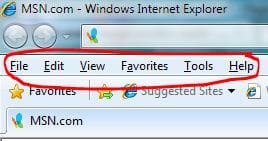
What happens, if you press ALT do you get this menu bar ?

Capture.JPG

If not, your IE is neutered and you should get rid of it ASAP either getting a fully working IE or go the alternate route with FF, Chrome or Opera (or even Lunarscape).

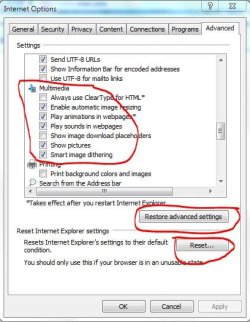
If you do get said bar, go to Tools/Internet options/Advanced scroll down to Multimedia and compare to this snippet
Capture1.JPG
(I don't use IE so all what's checked here is done so by default)
Or you can try those two reset/restore buttons.

-DG
 

My Computer

Computer Manufacturer/Model Number
HP m8000n
OS
Windows 7 Ultimate x86
CPU
DualCore AMD Athlon 64 X2, 2600 MHz 5200+
Motherboard
Asus M2N68-LA (Narra)
Memory
Samsung 2GB DDR2
Graphics Card(s)
Onboard NVIDIA GeForce 6150SE nForce 430
Sound Card
Onboard nVIDIA nForce 6100-430 (MCP61P)
Monitor(s) Displays
Westinghouse 19" LED
Screen Resolution
1280x1024
Hard Drives
SATA II Seagate Barracuda 500GB
USB II WD Elements 500GB
USB II WD My Book 1TB
USB II WD My Book 2TB
PSU
Stock (HP)
Case
Stock (HP)
Cooling
Stock
Keyboard
Logitech Classic KB 200
Mouse
Standard HP opticle USB mouse
I have the advanced Multimedia setting checked "enable automatic image resizing" so anytime a large image appears (and after fully downloaded) it is automatically made smaller to fit the page, so that I see the magnifying symbol with the "+" in it first (the option to re-enlarge it). After re-enlarging the "-" symbol appears giving me the option to reduce it again. This is how it works for me on your image. What happens if you enable that option (or is it even available on MSN/DSL)?

It doesn't appear that those type of option settings are available on MSN/DSL explorer. I guess when I want to check out that webpage, I'll need to use the regular IE v8.
 

My Computer

OS
Windows Home Premium 64
I don't have the Tools>Internet Options>Advanced>Reset option.
Are you saying you don't have those options or that you haven't found them yet ??

What happens, if you press ALT do you get this menu bar ?

View attachment 116478

If not, your IE is neutered and you should get rid of it ASAP either getting a fully working IE or go the alternate route with FF, Chrome or Opera (or even Lunarscape).

If you do get said bar, go to Tools/Internet options/Advanced scroll down to Multimedia and compare to this snippet
View attachment 116479
(I don't use IE so all what's checked here is done so by default)
Or you can try those two reset/restore buttons.

-DG

I have all those options in the regular IE 8, and the image viewing works fine. It's in the "MSN Explorer v.10.xxxx" that the image viewing problem on this particular website exists.

I prefer to use the MSN/DSL browser/homepage as it conveniently has a lot of other features I prefer... prefered links, etc.

Again I thank all who have offered advice and suggestions, but it appears the answer will continue to be elusive regarding this proprietary browser that MSN provides for Qwest DSL.

Ken
 

My Computer

OS
Windows Home Premium 64
Since it's clearly the MSN browser which causes the problems in question, you only have 3 options as I see it

#1) uninstall / re install the Msn Part to see if that somehow remedies the faulty behavior.
#2) use a different browser (either your IE8 or a portable Chrome, FF, Opera etc.) just for this one page
#3) suck it up and deal with msn's shortcomings (j/k)

What did mick Jagger sing: You can't always get what you want...but you can get what you need :D

-DG
 

My Computer

Computer Manufacturer/Model Number
HP m8000n
OS
Windows 7 Ultimate x86
CPU
DualCore AMD Athlon 64 X2, 2600 MHz 5200+
Motherboard
Asus M2N68-LA (Narra)
Memory
Samsung 2GB DDR2
Graphics Card(s)
Onboard NVIDIA GeForce 6150SE nForce 430
Sound Card
Onboard nVIDIA nForce 6100-430 (MCP61P)
Monitor(s) Displays
Westinghouse 19" LED
Screen Resolution
1280x1024
Hard Drives
SATA II Seagate Barracuda 500GB
USB II WD Elements 500GB
USB II WD My Book 1TB
USB II WD My Book 2TB
PSU
Stock (HP)
Case
Stock (HP)
Cooling
Stock
Keyboard
Logitech Classic KB 200
Mouse
Standard HP opticle USB mouse
Back
Top