Cant make my cloned SSD boot up

Ukdodger

New member
Member
VIP
Local time
6:38 PM
Messages
178
Location
Surrey England
I'm running W7 Home on a Samsung RV510 laptop.

I cloned an SSD from my PC SSD successfully. I can read all the files on the clone when it's plugged into my caddy and connected to my laptop running W10.

But when I substitute the W10 disk on the laptop with the cloned disk booting up gets as far as the 'Welcome' screen and there it stays for about 4 minutes before the screen below appears.

It will then go into a loop doing the same thing over and over.

It will boot successfully into Safe Mode.

I wiped the cloned disk completely before cloning it.

Tried everything I know. Can anyone help. Thanks
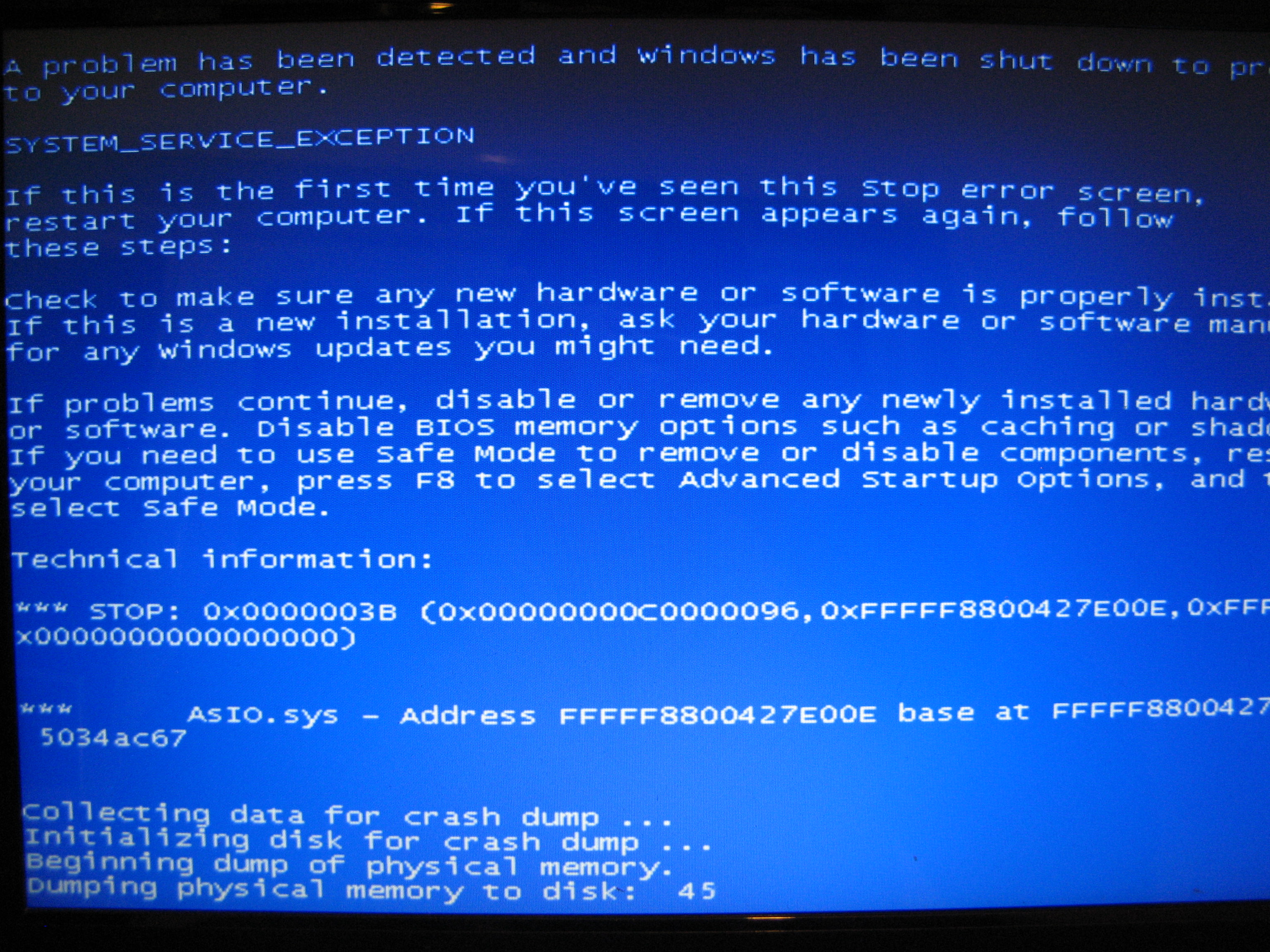
NGf8GGz.jpg
 

My Computer My Computer

At a glance

Windows 7 home
Computer type
Laptop
OS
Windows 7 home
So you cloned win7 and then put it in a totally different PC is that correct? You would expect it not to work as all the drivers would be wrong
 

My Computer My Computer

At a glance

win 8 32 bit
Computer type
PC/Desktop
OS
win 8 32 bit
So you cloned win7 and then put it in a totally different PC is that correct? You would expect it not to work as all the drivers would be wrong

Thanks for the reply. Yes from a desktop.

That makes sense But I did go into device manager and try updating all the drivers. Each one came back - Driver is working and up to date.

If that's wrong how can I put the right drivers in place?
 

My Computer My Computer

At a glance

Windows 7 home
Computer type
Laptop
OS
Windows 7 home
First things first.

You can not legally have the same COA keyed Windows 7 on two different computers.
The rules are simple.

If you do not have a "Retail License" and most don't, Windows 7 is locked to the computer it was first activated on.

If you have a "Retail License" Windows 7 can be moved from one computer to another, but only on one system at a time.

Jack
 

My Computer My Computer

At a glance

Windows 10 Pro. 64/ version 1709 Windows 7 Pr...Intel i7-6800K @ 4.3Corsair Platinum 16 gig @2400EVGA GTX 1070 OC
Computer type
PC/Desktop
Computer Manufacturer/Model Number
Home made Desktop
OS
Windows 10 Pro. 64/ version 1709 Windows 7 Pro/64
CPU
Intel i7-6800K @ 4.3
Motherboard
ASUS X-99 Deluxe II
Memory
Corsair Platinum 16 gig @2400
Graphics Card(s)
EVGA GTX 1070 OC
Monitor(s) Displays
Asus 27" LED LCD/VE278Q
Screen Resolution
1920-1080 or 1280-720 HDMI
Hard Drives
INTEL SSD 730-240 Gb Sata 3.0/
PSU
EVGA Platium 1200W
Case
Phanteks Luxe Tempered Glass 8 fans/ one radiator
Cooling
XSPC/ Water Cooled CPU
Keyboard
Das 4 Professional
Mouse
Logitech M705/MX Anywhere 2-S
Internet Speed
100 mbits
Antivirus
Microsoft Security Essentials/ Malwarebytes Premium 3.0/ SAS
Browser
I.E. 11 default/Firefox/ ISP Time Warner Cable/Spectrum
Other Info
LG BluRay Burner/
Sound system-KLipsch-THX/
Icy Dock ssd Hot Swap bays.
First things first.

You can not legally have the same COA keyed Windows 7 on two different computers.
The rules are simple.

If you do not have a "Retail License" and most don't, Windows 7 is locked to the computer it was first activated on.

If you have a "Retail License" Windows 7 can be moved from one computer to another, but only on one system at a time.

Jack

That's odd because W7 was already on this laptop and on the PC. In fact I'm almost certain the W7 laptop copy was an old clone of the PC version.
 

My Computer My Computer

At a glance

Windows 7 home
Computer type
Laptop
OS
Windows 7 home
The asio.sys driver is something to do with asus software.

You should be able to load the system hive remotely and set it to start type 4.

Or, if you can boot into safemode- open regedit, browse to System\services and set the start type for asio.sys to 4

I would also suggest using this:

Make Windows 7 bootable after motherboard swap - Windows 7 Help Forums
 

My Computers My Computers

  • At a glance

    7 X64i5 84002x8gb 3200mhz
    Computer type
    PC/Desktop
    OS
    7 X64
    CPU
    i5 8400
    Motherboard
    gigabyte b365m ds3h
    Memory
    2x8gb 3200mhz
    Hard Drives
    various
    PSU
    pure power 11 400w cm
    Case
    Coolermaster
    Cooling
    cryorig m9i
  • At a glance

    7x64g54008gb ddr4 2400
    Computer type
    PC/Desktop
    OS
    7x64
    CPU
    g5400
    Motherboard
    ga b365m ds3h
    Memory
    8gb ddr4 2400
    PSU
    xfx pro 450w

My Computer My Computer

At a glance

Windows 7 home
Computer type
Laptop
OS
Windows 7 home
Services are under the ControlSet001 and ControlSet002 keys in the system hive.

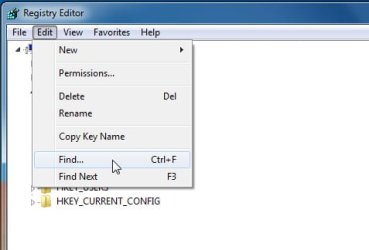
You can use the edit>find function in regedit to search for asio.sys . iT may appear in two or three places

regedit-find.jpg
 

My Computers My Computers

  • At a glance

    7 X64i5 84002x8gb 3200mhz
    Computer type
    PC/Desktop
    OS
    7 X64
    CPU
    i5 8400
    Motherboard
    gigabyte b365m ds3h
    Memory
    2x8gb 3200mhz
    Hard Drives
    various
    PSU
    pure power 11 400w cm
    Case
    Coolermaster
    Cooling
    cryorig m9i
  • At a glance

    7x64g54008gb ddr4 2400
    Computer type
    PC/Desktop
    OS
    7x64
    CPU
    g5400
    Motherboard
    ga b365m ds3h
    Memory
    8gb ddr4 2400
    PSU
    xfx pro 450w
Services are under the ControlSet001 and ControlSet002 keys in the system hive.

You can use the edit>find function in regedit to search for asio.sys . iT may appear in two or three places

View attachment 403469

Thanks. I already searched for all those without result. I've decided on a clean reinstall anyway now but thanks for trying.
 

My Computer My Computer

At a glance

Windows 7 home
Computer type
Laptop
OS
Windows 7 home
Back
Top