Solved can't map a network drive. win 7 pro to win 7 ultimate.

runtime

New member
Local time
4:03 AM
Messages
2
Hi all,

I'm trying to map a network drive between two computers on a simple network. The network is comprised of two computers, one unmanaged switch (Cisco) and a router (Cisco). The two computers and the switch are behind the firewall. When I patch the two computers together I can map the drive no problem (\\computername\shared folder). When I plug both computers into the switch the computers cant find each other.

Also, I have tried several different switches. Different brands managed and unmanaged. The result is always the same.

Any ideas?
 

My Computer My Computer

At a glance

win 7 ultimate 64i78 gb
Computer type
PC/Desktop
Computer Manufacturer/Model Number
hp
OS
win 7 ultimate 64
CPU
i7
Memory
8 gb
Antivirus
symantec
Browser
i.e. 10
When I patch the two computers together I can map the drive
That suggests you are using a cross-over cable. For connecting to a Switch or Router straight-through cables are required. The two types are the same cable but the wires in the plugs are arranged differently and that could be the problem.
 

My Computer My Computer

At a glance

Windows 7 Ultimate 64-bit, Windows 8.1 64-bit...
Computer type
PC/Desktop
Computer Manufacturer/Model Number
Customs, Dell, Gateway, HP, Toshiba, Acer, ASUS
OS
Windows 7 Ultimate 64-bit, Windows 8.1 64-bit, Mac OS X 10.10, Linux Mint 17, Windows 10 Pro TP
Keyboard
Microsoft
Mouse
Microsoft
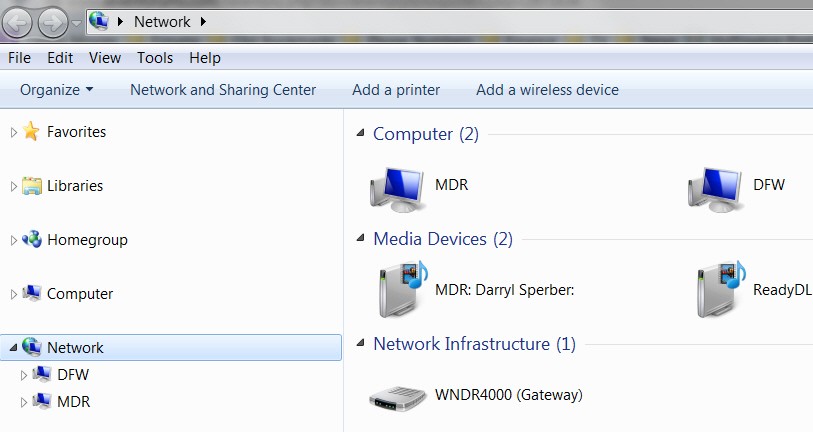
Are you saying that the two computers do NOT show up in the Network object (as my two MDR and DFW machines do in this screenshot)?

Puek82.jpg


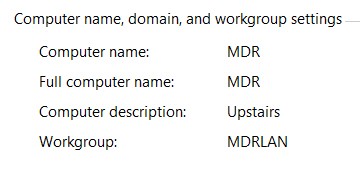
Are both machines defined to be in the same "workgroup" (not home network, but the workgroup):

zmVxmG.jpg


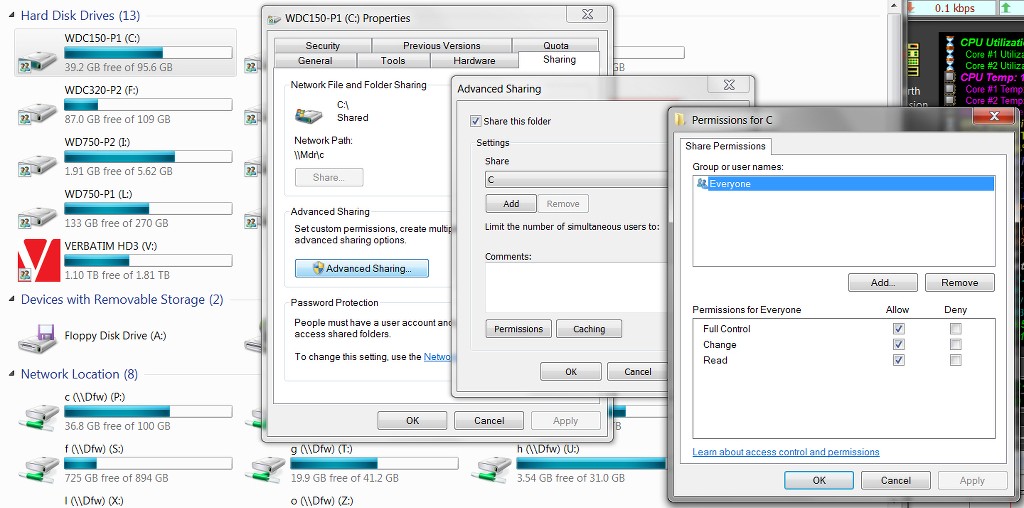
Do you have "sharing" enabled for at least one partition (aka "drive letter") on each machine, through My Computer?

MEm2l6.jpg


Do you have a userid/password present on both machines? If so, when you first try to access the second machine from the first machine through the network router/switch, Windows would prompt you for the userid/password of the target machine you're trying to connect to. There will also be a checkbox (that you'd normally check) to retain this login information so that from now on you won't be prompted whenever you want to access the second machine. This is normally how you'd operate, for the convenient "map network drive" dialog to assign a drive letter on the local machine to a partition on the remote machine.
 

My Computer My Computer

At a glance

Windows 7 Pro x64 (1), Win7 Pro X64 (2)i5-3350p 3.1Ghz/6MB-cache (1); E8400 3.0Ghz/6...8GB PC3-12800 DDR3 (1); 4GB PC3-10600 DDR3 (2)ATI HD7750 (1), (see TV cards); ATI R7 250 (2)
Computer type
PC/Desktop
Computer Manufacturer/Model Number
Home-built, two systems (1) and (2)
OS
Windows 7 Pro x64 (1), Win7 Pro X64 (2)
CPU
i5-3350p 3.1Ghz/6MB-cache (1); E8400 3.0Ghz/6MB-cache (2)
Motherboard
ASUS P8Z77-V Pro (1); ASUS P5Q3 (2)
Memory
8GB PC3-12800 DDR3 (1); 4GB PC3-10600 DDR3 (2)
Graphics Card(s)
ATI HD7750 (1), (see TV cards); ATI R7 250 (2)
Sound Card
Realtek ALC892 HD Audio (1); Realtek ALC1200 HD Audio (2)
Monitor(s) Displays
Eizo HD2441W LCD, Eizo S2433W (1); Eizo 24" S2433W (2)
Screen Resolution
1920x1200, 1920x1200 (1); 1920x1200 (2)
Hard Drives
(1) 1TB SATA-II (7200RPM), 2x2TB SATA-III (7200RPM), 250GB SATA-III (10000RPM) for OS; 2x2TB external USB 3.0

(2) 320GB SATA-II (7200RPM), 750GB SATA-II (7200RPM), 150GB SATA-II (10000RPM) for OS; 2TB external USB 3.0
PSU
Nesteq ECS-6001 600W (1); Nesteq ECS-5001 500W (2)
Case
Acousti-Case 360 (1) and (2)
Cooling
Noctua NH-U12P SE2 for CPU, 2x120mm case fans (1) and (2)
Keyboard
IBM PS/2 (1) and (2)
Mouse
Logitech MX Revolution wireless (1); Microsoft wired (2)
Internet Speed
100mbps down / 10mbps up
Antivirus
Microsoft Security Essentials; Malwarebyte Anti-Malware Pro
Browser
Firefox
Other Info
Ceton InfiniTV 4-tuner cablecard-enabled TV card as well as Hauppauge HVR-2250 OTA/ATSC 2-tuner TV card in (1), running under Win7 WMC
Hi dsperber,

thank you for the questions and the tip! your questions reminded me to check the advanced sharing settings and that is where the problem was. (forgot to turn OFF password protected sharing).

thanks again!
 

My Computer My Computer

At a glance

win 7 ultimate 64i78 gb
Computer type
PC/Desktop
Computer Manufacturer/Model Number
hp
OS
win 7 ultimate 64
CPU
i7
Memory
8 gb
Antivirus
symantec
Browser
i.e. 10
Back
Top