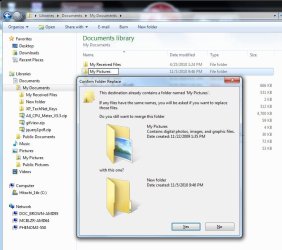
Can't name a folder in my document "My Pictures"???!

Monsoon

Banned
Local time
10:47 AM
Messages
91
Ok, now i've seen everything.

I can't name a folder "My Pictures" in my documents.

Any attempt to do so, and I get a nice little popup telling me the folder will be moved somewhere else.

Why on earth would Microsoft have a problem with this?

And sure, I can name the folder Microsoft is Stupid, or something, but why have to rename it at all?
 

My Computer My Computer

At a glance

Win 7 Ultimate x64
OS
Win 7 Ultimate x64
Yes, I get this message. How about My Pictures 001 ?
 

Attachments

  • My_PicturesFolder_Problem.JPG
    My_PicturesFolder_Problem.JPG
    80.2 KB · Views: 29

My Computer My Computer

At a glance

Win7 Enterprise, Win7 x86 (Ult 7600), Win7 x6...AMD fx8350 4ghz, AMD-32 2400mhz, AMD-64 3200m...2gb, 4gb on the Ult 7600, 4gb on Technet RTM,...Draw my own Graphics, several nVidia cards
Computer type
PC/Desktop
Computer Manufacturer/Model Number
Built them myself, Science Experiments !
OS
Win7 Enterprise, Win7 x86 (Ult 7600), Win7 x64 Ult 7600, TechNet RTM on AMD x64 (2.8Ghz)
CPU
AMD fx8350 4ghz, AMD-32 2400mhz, AMD-64 3200mhz, AMDx64 2.8G
Motherboard
SIS 755, ECS-K8M890M-M (Ult 7600), GigaByte & others
Memory
2gb, 4gb on the Ult 7600, 4gb on Technet RTM, 32gb on FX8350
Graphics Card(s)
Draw my own Graphics, several nVidia cards
Sound Card
on motherboard
Monitor(s) Displays
19" flat scr, 28" I-Inc widescr,22" Emprex Widescr, 23" Acer
Screen Resolution
1280 x 1024, 1440 x 900, 1920 x 1080
Hard Drives
6 pata Ide HD's & 2 Sata HD's
added 80gb external on Ult 7600 computer,
numerous extra 1tb, 2TB, 3Tb SATA HD's
A collection of ext HD Docks w/ HDs
PSU
430w, 550w, 600w, 700, 800, etc
Case
All Generic Full Towers
Cooling
Open Air & a few fans, some w/ colored LEDs
Keyboard
Compaq & Dell recycled from GoodWill
Mouse
Made in China Optical Wired Mouse
Internet Speed
Fast Cable InterNet
Antivirus
AVG Free on 24 different Desktops, NO Problems!
Browser
IE 8 is preferred, but use FireFox sometimes
Other Info
Linksys Routers, switches, & Hubs
Too Many USB Flash Drives to count, Biggest is 64GB !
Eight computers in my home network.
Sixteen computers at my business network.
Linked via TeamViewer !
Lots of old used spare computer parts everywhere!
Yeah I know I can just rename it easy enough.

But it's just so silly, that it makes me nuts.

For one thing, now if I want all my pictures in my documents, I will have to open up my document, then the picture folder everytime I want to access the pics, instead of the normal Start/pictures.

Or I could do it Microsoft's way, let the os put the pics where it wants. But then when I go to backup all my stuff, I'll always have to remember to look for the pictures folder, too.
 

My Computer My Computer

At a glance

Win 7 Ultimate x64
OS
Win 7 Ultimate x64
Hello Monsoon, welcome to Seven Forums!


Don't you think it's even sillier to expect to name a folder/file to something that already exists?
 

My Computer My Computer

At a glance

W 7 64-bit UltimateIntel Q9550 Yorkfield8GB Dominator 8500C5DATI : XFX 5870
Computer Manufacturer/Model Number
* BFK Customs *
OS
W 7 64-bit Ultimate
CPU
Intel Q9550 Yorkfield
Motherboard
ASUS P5Q Pro
Memory
8GB Dominator 8500C5D
Graphics Card(s)
ATI : XFX 5870
Sound Card
Realtek HD Audio 7-1
Monitor(s) Displays
1x 47" LCD HDMI & 3x 26" LCD HDMI
Screen Resolution
1920x1080P & 1920x1200
Hard Drives
1x 80GB Intel X25-M G2 SSD : 1x 500GB & 1x 640GB WD Caviar Black(s)
PSU
Corsair 620HX
Case
Cooler Master RC-690
Cooling
Tuniq Tower 120, 2x 140mm and 3x 120mm case fans
Keyboard
Microsoft 500
Mouse
Razer Diamondback 3G
Internet Speed
14 Mb/s
Other Info
1x Koutech 3Gb/s SATA HDD Hot Swap Rack
Yeah I know I can just rename it easy enough.

But it's just so silly, that it makes me nuts.

For one thing, now if I want all my pictures in my documents, I will have to open up my document, then the picture folder everytime I want to access the pics, instead of the normal Start/pictures.

Or I could do it Microsoft's way, let the os put the pics where it wants. But then when I go to backup all my stuff, I'll always have to remember to look for the pictures folder, too.
The "My Documents" folder already contains a folder named "My Pictures", so, obviously, you can't locate that folder there. The big question is, if the folder already exists there, why would you need to create another one?
You are really going against the grain, here, trying to use, and manipulate Windows in a way that it was not designed to work. If you let Windows decide where to store your photos, they will show up in Start/pictures, so, I don't see what the issue is, there. As a matter of fact, no matter where they are stored, they will still appear in Start/pictures. (A wonderful libraries feature).
 

My Computer My Computer

At a glance

Windows 7 Pro/32 Academic. Build 7600Intel 2.3 Duo core4 GB DDRNvidia GeForce 9500 GT
Computer Manufacturer/Model Number
Custom Build
OS
Windows 7 Pro/32 Academic. Build 7600
CPU
Intel 2.3 Duo core
Motherboard
EliteGroup G31T-M
Memory
4 GB DDR
Graphics Card(s)
Nvidia GeForce 9500 GT
Sound Card
Built in
Monitor(s) Displays
Viewsonic 15" 4:3
Screen Resolution
1280 x 1024
Hard Drives
WD Caviar Black 750 GB
WD 250 GB External
PSU
Antec 450w
Keyboard
Standard windows
Mouse
Logitech USB
Internet Speed
Bellsouth DSL 6.0
my documents does not already contain such a folder.
 

My Computer My Computer

At a glance

Win 7 Ultimate x64
OS
Win 7 Ultimate x64
But the label "My Pictures" has been in use by MS for years.


click to enlarge
Untitled.jpg
 

My Computer My Computer

At a glance

W 7 64-bit UltimateIntel Q9550 Yorkfield8GB Dominator 8500C5DATI : XFX 5870
Computer Manufacturer/Model Number
* BFK Customs *
OS
W 7 64-bit Ultimate
CPU
Intel Q9550 Yorkfield
Motherboard
ASUS P5Q Pro
Memory
8GB Dominator 8500C5D
Graphics Card(s)
ATI : XFX 5870
Sound Card
Realtek HD Audio 7-1
Monitor(s) Displays
1x 47" LCD HDMI & 3x 26" LCD HDMI
Screen Resolution
1920x1080P & 1920x1200
Hard Drives
1x 80GB Intel X25-M G2 SSD : 1x 500GB & 1x 640GB WD Caviar Black(s)
PSU
Corsair 620HX
Case
Cooler Master RC-690
Cooling
Tuniq Tower 120, 2x 140mm and 3x 120mm case fans
Keyboard
Microsoft 500
Mouse
Razer Diamondback 3G
Internet Speed
14 Mb/s
Other Info
1x Koutech 3Gb/s SATA HDD Hot Swap Rack
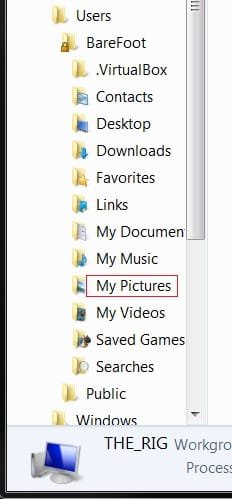
Hmmm, wonder how I got a My pictures folder under My Documents then? There is still also one under my account name in Users.
 

My Computer My Computer

At a glance

Windows 10 Pro X64Intel Quad Core i7-4770 @ 3.4Ghz16.0GB PC3-12800 DDR3 SDRAM 1600 MHzIntel Integrated HD Graphics
Computer type
PC/Desktop
Computer Manufacturer/Model Number
Lenovo IdeaCenter 450
OS
Windows 10 Pro X64
CPU
Intel Quad Core i7-4770 @ 3.4Ghz
Memory
16.0GB PC3-12800 DDR3 SDRAM 1600 MHz
Graphics Card(s)
Intel Integrated HD Graphics
Sound Card
Realtek HD Audio
Monitor(s) Displays
HP 22" LCD
Screen Resolution
1680 x 1050
Hard Drives
250GB Samsung EVO SATA-3 SSD
2TB Seagate ST2000DM001 SATA-2
1.5TB Seagate ST3150041AS SATA
Keyboard
Dell USB
Mouse
Lenovo USB
Internet Speed
Cable via Road Runner 3MB Upload, 30MB Download
Antivirus
Windows Defender, MBAM Pro, MBAE
Browser
Seamonkey
Other Info
UEFI/GPT
PLDS DVD-RW DH16AERSH
But the label "My Pictures" has been in use by MS for years.
click to enlarge
View attachment 111586
That pic was not taken from within "My Documents".

The "My Documents" folder in my computer is empty. And to be clear, I am speaking of the "My Documents" as is accessed by way of Start > My Documents.

I don't know if I deleted the "My Pictures" folder from "My Documents" during the install, but at the moment the "My Documents" folder is EMPTY.

And when I try to put a folder named "My Pictures" into the "My Documents" folder, it says there is already a folder in there named "My Pictures", when in fact the folder is EMPTY.
 

My Computer My Computer

At a glance

Win 7 Ultimate x64
OS
Win 7 Ultimate x64
But the label "My Pictures" has been in use by MS for years.
click to enlarge
View attachment 111586
That pic was not taken from within "My Documents".

The "My Documents" folder in my computer is empty. And to be clear, I am speaking of the "My Documents" as is accessed by way of Start > My Documents.

I don't know if I deleted the "My Pictures" folder from "My Documents" during the install, but at the moment the "My Documents" folder is EMPTY.

And when I try to put a folder named "My Pictures" into the "My Documents" folder, it says there is already a folder in there named "My Pictures", when in fact the folder is EMPTY.

I'm aware of that, my point is that you are trying to nane a file to a name reserved for MS use.
 

My Computer My Computer

At a glance

W 7 64-bit UltimateIntel Q9550 Yorkfield8GB Dominator 8500C5DATI : XFX 5870
Computer Manufacturer/Model Number
* BFK Customs *
OS
W 7 64-bit Ultimate
CPU
Intel Q9550 Yorkfield
Motherboard
ASUS P5Q Pro
Memory
8GB Dominator 8500C5D
Graphics Card(s)
ATI : XFX 5870
Sound Card
Realtek HD Audio 7-1
Monitor(s) Displays
1x 47" LCD HDMI & 3x 26" LCD HDMI
Screen Resolution
1920x1080P & 1920x1200
Hard Drives
1x 80GB Intel X25-M G2 SSD : 1x 500GB & 1x 640GB WD Caviar Black(s)
PSU
Corsair 620HX
Case
Cooler Master RC-690
Cooling
Tuniq Tower 120, 2x 140mm and 3x 120mm case fans
Keyboard
Microsoft 500
Mouse
Razer Diamondback 3G
Internet Speed
14 Mb/s
Other Info
1x Koutech 3Gb/s SATA HDD Hot Swap Rack
But the label "My Pictures" has been in use by MS for years.
click to enlarge
View attachment 111586
That pic was not taken from within "My Documents".

The "My Documents" folder in my computer is empty. And to be clear, I am speaking of the "My Documents" as is accessed by way of Start > My Documents.

I don't know if I deleted the "My Pictures" folder from "My Documents" during the install, but at the moment the "My Documents" folder is EMPTY.

And when I try to put a folder named "My Pictures" into the "My Documents" folder, it says there is already a folder in there named "My Pictures", when in fact the folder is EMPTY.

I'm aware of that, my point is that you are trying to nane a file to a name reserved for MS use.
I'm currently on my XP drive.

In XP, I can delete the My Pictures folder, and recreate it without a single issue.

Now, do you have a reasonable explanation why that shouldn't work in 7?

For that matter, is there a reasonable explanation why any deleted folder from documents, on any operating system ever coded, cannot be deleted and recreated?

We're not talking about a system folder in the root directory here.

THIS IS DOCUMENTS.
 

My Computer My Computer

At a glance

Win 7 Ultimate x64
OS
Win 7 Ultimate x64
The folder"my pictures" is a reserved folder name in win7 as this was used as a subdirectory in old Microsoft operating systems such as XP.

In order to facilitate older badly written applications that expect there always to be a my pictures within the my documents folder win7 uses junction point to redirect these applications to the correct folder Username\pictures.

This is a system that creates a virtual folder structure using junction points which fools older programs into thinking that they are working on XP

due to the way that this virtualisation works the system sees a virtual "My Documents" present in the actual my documents folder which prevents the user from recreating it
 

My Computers My Computers

  • At a glance

    Windows 11 Pro x64 [Latest Release and Releas...Ryzen 9 5950X, 3.8 - 5.2 MHz64GB [2 x 32GB] DDR4 3200MHz4GB NVIDIA GEFORCE GTX 1650 Ti
    Computer type
    PC/Desktop
    Computer Manufacturer/Model Number
    ChillBlast - Custom to my design
    OS
    Windows 11 Pro x64 [Latest Release and Release Preview]
    CPU
    Ryzen 9 5950X, 3.8 - 5.2 MHz
    Motherboard
    Asus Prime X570-Pro
    Memory
    64GB [2 x 32GB] DDR4 3200MHz
    Graphics Card(s)
    4GB NVIDIA GEFORCE GTX 1650 Ti
    Sound Card
    On-board SPDIF to 5.1 System + HDMI [5.1 system]
    Monitor(s) Displays
    32" UHD 32 Bit HDR Monitor + 43" UHD 4K 32Bit HDR TV
    Screen Resolution
    2 x 3840 x 2160 @60Hz
    Hard Drives
    1TB M2 SSD OS, 500GB Fast Access SSD, 2 x 8TB Data + Various Externals from 1TB to 4TB, 10TB NAS
    PSU
    NZXT C750 80 PLUS Gold 750W Modular PSU
    Case
    Workstation Case [Matt Black]
    Cooling
    NZXT Kraken X63 280mm CPU Cooler +2x Quiet Case fans
    Keyboard
    Logitech Wireless MX Keys & K400 + others
    Mouse
    Logitech Wireless MX Master 3S
    Internet Speed
    920 MB Down 50 MB Up
    Antivirus
    BitDefender Total Security Pro
    Browser
    Chrome (always run latest Non-Beta)
    Other Info
    Also run ...
    Laptop - Quad 8GB - Windows 10 Pro x64
    Nexus 7 Android tablet x2
    Samsung 10.2" tablet
    Blackview TAB 8 4G Android Tablet c/w Keyboard
    Wacom Intuos Pro Medium Pen Pad
    Wacom Intuos Pro Small Pen Pad
    Wacom Expresskeys Remote
    Loopdeck+ Graphics Controller
    Shuttle Pro v2 Control
  • At a glance

    Windows 11 Pro x64 Latest RPIntel I7 10750H 5.0GHz32GB [2x16GB] DDR4 2933 MHznVidia GTX1650Ti 4 GB GDDR6
    Computer type
    Laptop
    System Manufacturer/Model Number
    Dell XPS 17 10750H
    OS
    Windows 11 Pro x64 Latest RP
    CPU
    Intel I7 10750H 5.0GHz
    Motherboard
    Dell XPS
    Memory
    32GB [2x16GB] DDR4 2933 MHz
    Graphics Card(s)
    nVidia GTX1650Ti 4 GB GDDR6
    Sound Card
    Stock [Realtek] 4 Speaker
    Monitor(s) Displays
    17" IPS UHD+ Infinity Edge Touchscreen
    Screen Resolution
    3840 x 2400
    Hard Drives
    2TB M2 NVMe, 4TB External + various 500GB & 1TB External NVMe (also have access to spinner HDD from
    PSU
    Stock
    Case
    Stock XPS Aluminium & Carbon Fibre
    Cooling
    Stock - Active Fan Control
    Keyboard
    Backlit + Various Logitech
    Mouse
    Stock Track Pad + Logitech MX Trackball
    Internet Speed
    72 MB Down 18MB Up
    Browser
    Chrome
    Other Info
    Also run ...
    Laptop - Quad 8GB - Windows 10 Pro x64
    Nexus 7 Android tablet x2
    10.2" tablet
    Sony Z3 Android Smartphone
    Wacom Intuos Pro Medium Pen Pad
    Wacom Intuos Pro Small Pen Pad
    Wacom Expresskeys Remote
    Loopdeck+ Graphics Controller
    Shuttle Pro v2 Control Pad
    10TB NAS
So then that's it? You delete it, your screwed?

I can just see the microsoft guys sitting around having a big old chuckle on this one. "Hahhahahaaaaa, this will teach those tweakers to mess with us! If they want that folder back, they can just do a reinstall!"
:haha:
 

My Computer My Computer

At a glance

Win 7 Ultimate x64
OS
Win 7 Ultimate x64
I wonder if this has something to do with the various desktop.ini files scattered everywhere?

In My Documents, desktop.ini looks like this for me: (note first line is blank)


[.ShellClassInfo]
LocalizedResourceName=@%SystemRoot%\system32\shell32.dll,-21770
IconResource=%SystemRoot%\system32\imageres.dll,-112
IconFile=%SystemRoot%\system32\shell32.dll
IconIndex=-235

In the My Pictures folder, desktop.ini looks like this: (note first line is blank)

[.ShellClassInfo]
LocalizedResourceName=@%SystemRoot%\system32\shell32.dll,-21779
InfoTip=@%SystemRoot%\system32\shell32.dll,-12688
IconResource=%SystemRoot%\system32\imageres.dll,-113
IconFile=%SystemRoot%\system32\shell32.dll
IconIndex=-236

This is aa SWAG, but I'm wondering if some other folder under My Documents has the data I have for My Pictures and is thus thought to be a My Pictures folder by Win 7?
 

My Computer My Computer

At a glance

Windows 10 Pro X64Intel Quad Core i7-4770 @ 3.4Ghz16.0GB PC3-12800 DDR3 SDRAM 1600 MHzIntel Integrated HD Graphics
Computer type
PC/Desktop
Computer Manufacturer/Model Number
Lenovo IdeaCenter 450
OS
Windows 10 Pro X64
CPU
Intel Quad Core i7-4770 @ 3.4Ghz
Memory
16.0GB PC3-12800 DDR3 SDRAM 1600 MHz
Graphics Card(s)
Intel Integrated HD Graphics
Sound Card
Realtek HD Audio
Monitor(s) Displays
HP 22" LCD
Screen Resolution
1680 x 1050
Hard Drives
250GB Samsung EVO SATA-3 SSD
2TB Seagate ST2000DM001 SATA-2
1.5TB Seagate ST3150041AS SATA
Keyboard
Dell USB
Mouse
Lenovo USB
Internet Speed
Cable via Road Runner 3MB Upload, 30MB Download
Antivirus
Windows Defender, MBAM Pro, MBAE
Browser
Seamonkey
Other Info
UEFI/GPT
PLDS DVD-RW DH16AERSH
I ran a backup once and got the error message, "Windows backup could not locate C:\documents\my pictures, some files may not have been backed up" I simply recreated the folder, no issues.
 

My Computer My Computer

At a glance

Windows 7 Pro/32 Academic. Build 7600Intel 2.3 Duo core4 GB DDRNvidia GeForce 9500 GT
Computer Manufacturer/Model Number
Custom Build
OS
Windows 7 Pro/32 Academic. Build 7600
CPU
Intel 2.3 Duo core
Motherboard
EliteGroup G31T-M
Memory
4 GB DDR
Graphics Card(s)
Nvidia GeForce 9500 GT
Sound Card
Built in
Monitor(s) Displays
Viewsonic 15" 4:3
Screen Resolution
1280 x 1024
Hard Drives
WD Caviar Black 750 GB
WD 250 GB External
PSU
Antec 450w
Keyboard
Standard windows
Mouse
Logitech USB
Internet Speed
Bellsouth DSL 6.0
Back
Top