Can't open CCC

DrBejar

New member
Member
VIP
Local time
1:00 AM
Messages
188
Location
Bass Town
Hey everyone!
My question is why is it that my CCC (catalyst control center) won’t open? I start up like normal, let the computer load what it has to do, but I don’t see it on my taskbar on the right hand corner.

Capture.PNG

When I click on the right mouse button to open it up there, it won’t open at all.
I uninstalled my drives for the video card and then reinstalled them, same thing is happening, it won’t open. I’m trying to open CCC to set my fan speed low and lower the OC’d settings I have, they aren’t high, but I put them up a bit and fan speed so it won’t over heat right.

Please let me know what to do, thanks!


If you're not going to help or just say something stupid, just leave this thread.
 
Last edited:

My Computer

Computer Manufacturer/Model Number
ASUSTeK Computer INC
OS
Windows 7 Professional x64
CPU
AMD Athlon 64x2 Dual core Processor 5400+
Motherboard
ASUSTek Computer INC
Memory
5GB DDR2
Graphics Card(s)
ATi Radeon Hd 4650
Sound Card
Realtek High Definition Audio
Screen Resolution
1680x1024 AOC
Hard Drives
250GB
Internet Speed
28mbps
Have you tried opening it from the start menu?

Start>All Programs>Catalyst Control Center>CCC Advanced
 

My Computer

Computer Manufacturer/Model Number
Toshiba P300
OS
Windows 8 Pro
CPU
Intel Centrino Dual Core P7450 2.13GHz
Memory
4gb
Graphics Card(s)
ATI Mobility Raedon HD3650
Hard Drives
Toshiba MK3252GSX ATA
Internet Speed
Wish it were faster
Oh and not to nit pick, you should only have one of those anti-virus's running at a time. :p

Is that Mbam just the scanner or is it the paid for version?
 

My Computer

Computer Manufacturer/Model Number
Toshiba P300
OS
Windows 8 Pro
CPU
Intel Centrino Dual Core P7450 2.13GHz
Memory
4gb
Graphics Card(s)
ATI Mobility Raedon HD3650
Hard Drives
Toshiba MK3252GSX ATA
Internet Speed
Wish it were faster
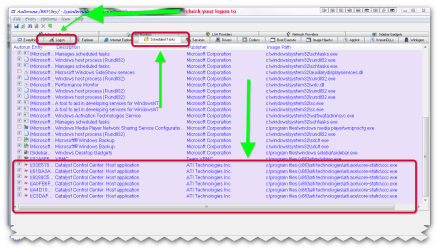
if you look in autoruns (download here >>> ( http://download.sysinternals.com/Files/Autoruns.zip )
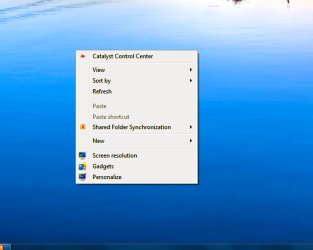
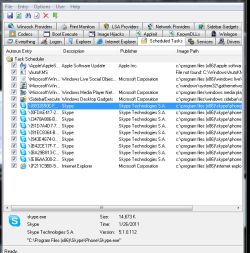
you will see in the task scheduler ccc is set to run by default so it does run. if you look in the context menu when you right click on the desktop you should see the ccc at the top, click on it and it will open on the desktop, minimise it to the tray and the icon will stay in the notification area.

Autoruns for Windows v10.06 By Mark Russinovich and Bryce Cogswell

This utility, which has the most comprehensive knowledge of auto-starting locations of any startup monitor, shows you what programs are configured to run during system bootup or login, and shows you the entries in the order Windows processes them. These programs include ones in your startup folder, Run, RunOnce, and other Registry keys. You can configure Autoruns to show other locations, including Explorer shell extensions, toolbars, browser helper objects, Winlogon notifications, auto-start services, and much more. Autoruns goes way beyond the MSConfig utility bundled with Windows Me and XP ( microsoft website >>> http://technet.microsoft.com/en-us/sysinternals/bb963902.aspx )
 

Attachments

  • brys snap ?18 ?February ?2011 16h12m32s.png
    brys snap ?18 ?February ?2011 16h12m32s.png
    54.8 KB · Views: 159
  • brys snap ?18 ?February ?2011 16h22m58s.png
    brys snap ?18 ?February ?2011 16h22m58s.png
    21.8 KB · Views: 59
  • brys snap ?18 ?February ?2011 16h25m08s.png
    brys snap ?18 ?February ?2011 16h25m08s.png
    2.6 KB · Views: 2,246

My Computer

Computer Manufacturer/Model Number
packard bell IXTREME M5722
OS
Operating System : Windows 7 Home Premium Edition 6.01.7600 SP1 (x64)
CPU
Processor : Intel Core 2 Quad Q8300 @ 2500 MHz
Motherboard
Mainboard : Packard Bell (Acer EG43M )
Memory
Physical Memory :8GB Corsair4x 2GB 800MHz C5 DDR2
Graphics Card(s)
Video Card : XFX 6700 AMD
Monitor(s) Displays
Maestro 234DL - BenQ V2220 - BenQ VW2420H
Screen Resolution
Current Display :1920x1080p pixels at 60 Hz in HD LED
Hard Drives
Hard Disks : WDC (1000 GB)
Drive C: (Hard Disk) : 428 GB available on 491 GB
Drive D: (Hard Disk) : 426 GB available on 492 GB
SAMSUNG spinpoint HD103SJ 1000.2 GB
(X 2) KINGSTON SSD NOW V 30GB
PSU
XFX ProSeries 550W PSU
Case
PACKARD BELL IXTREME
Cooling
System Blower Current: 150mA Air Flow16CFM ;Akasa 90mm rear
Keyboard
Gigabyte Aivia K8100
Mouse
TRUST-Wireless Laser Mouse - Carbon edition MI-7770C
Internet Speed
TP-LINK > TL-WN951N / AV500 Gigabit Powerline Adapters
Browser
chrome dev
Other Info
EXTRA COOLING>(FAN CONTROLLER) PC Bay Cooler 3 x 40mm fans; Akasa AK-HD-BL Blue hard drive cooler 2 x 40 mm fan 4500 rpm 29.7 dBA
Bios> American Megatrends Inc.
Version : P01-A1
Date : 08/31/2009

My Computer

Computer Manufacturer/Model Number
ASUSTeK Computer INC
OS
Windows 7 Professional x64
CPU
AMD Athlon 64x2 Dual core Processor 5400+
Motherboard
ASUSTek Computer INC
Memory
5GB DDR2
Graphics Card(s)
ATi Radeon Hd 4650
Sound Card
Realtek High Definition Audio
Screen Resolution
1680x1024 AOC
Hard Drives
250GB
Internet Speed
28mbps
if you look in autoruns (download here >>> ( http://download.sysinternals.com/Files/Autoruns.zip )
you will see in the task scheduler ccc is set to run by default so it does run. if you look in the context menu when you right click on the desktop you should see the ccc at the top, click on it and it will open on the desktop, minimise it to the tray and the icon will stay in the notification area.

Autoruns for Windows v10.06 By Mark Russinovich and Bryce Cogswell

This utility, which has the most comprehensive knowledge of auto-starting locations of any startup monitor, shows you what programs are configured to run during system bootup or login, and shows you the entries in the order Windows processes them. These programs include ones in your startup folder, Run, RunOnce, and other Registry keys. You can configure Autoruns to show other locations, including Explorer shell extensions, toolbars, browser helper objects, Winlogon notifications, auto-start services, and much more. Autoruns goes way beyond the MSConfig utility bundled with Windows Me and XP ( microsoft website >>> Autoruns for Windows )


This is what I saw.
[/ATTACH][/ATTACH]
 

Attachments

  • Picture1.jpg
    Picture1.jpg
    208.2 KB · Views: 25
  • Capturenn.PNG
    Capturenn.PNG
    19.7 KB · Views: 45

My Computer

Computer Manufacturer/Model Number
ASUSTeK Computer INC
OS
Windows 7 Professional x64
CPU
AMD Athlon 64x2 Dual core Processor 5400+
Motherboard
ASUSTek Computer INC
Memory
5GB DDR2
Graphics Card(s)
ATi Radeon Hd 4650
Sound Card
Realtek High Definition Audio
Screen Resolution
1680x1024 AOC
Hard Drives
250GB
Internet Speed
28mbps

My Computer

Computer Manufacturer/Model Number
ASUSTeK Computer INC
OS
Windows 7 Professional x64
CPU
AMD Athlon 64x2 Dual core Processor 5400+
Motherboard
ASUSTek Computer INC
Memory
5GB DDR2
Graphics Card(s)
ATi Radeon Hd 4650
Sound Card
Realtek High Definition Audio
Screen Resolution
1680x1024 AOC
Hard Drives
250GB
Internet Speed
28mbps
Having two av's running at once is likely causing things to not install properly.
My guess is you accidentally clicked on the hide option in the ccc context menu at some point, and now it's stuck in that state.

You'll probably have to do a complete wipe of all ATI related materials and reinstall to get it back.
 

My Computer

Computer Manufacturer/Model Number
Insane hobo technologies. ;-)
OS
Windows 7 x64
CPU
Intel i7 2600k
Motherboard
Asrock z68 extreme 4 gen 3
Memory
G.skill Ripjaw 16gigs @ 1866
Graphics Card(s)
Nvidia gtx580 (evga)
Sound Card
Integrated HD audio + hdmi
Monitor(s) Displays
24" ASUS widescreen + 42" insignia
Screen Resolution
1080p (1920x1080)
Hard Drives
128 Samsung 830
256 Samsung 840
3 x 1tb storage drive (various)
1 western digital 1tb (eSATA)
1 Seagate 1tb (eSATA)
PSU
1 kilowatt SLI/Crossfire rated Silverstone modular
Case
NZXT Phantom + additional 220 fan
Cooling
Zalmann
Keyboard
Microsoft wireless 3000 (v2)
Mouse
MS - wireless 5000 (bluetrack)
Internet Speed
depends on if you ask me or my provider.
Other Info
The above information is provided as is, and the author assumes no responsibility for issues it may cause with your sanity or fanboyism.
I had the same issue reinstalled uninstalled nothing worked so i just restored my comp to the earliest point and now it works great
 

My Computer

Computer Manufacturer/Model Number
Me
OS
Windows 7 Home Premium 64-bit (6.1, Build 7600)
CPU
Intel(R) Core(TM) i7 CPU 870 @ 2.93GHz (8 CPUs), ~2.9GHz
Memory
8192MB RAM
Graphics Card(s)
Nvidia Geforce 560 GTX Non-Ti
Sound Card
Speakers (Realtek High Definition Audio)
Monitor(s) Displays
Generic PnP Monitor
Screen Resolution
1920x1080
Hard Drives
1 TB
Having two av's running at once is likely causing things to not install properly.
My guess is you accidentally clicked on the hide option in the ccc context menu at some point, and now it's stuck in that state.

You'll probably have to do a complete wipe of all ATI related materials and reinstall to get it back.

Not install properly?
I had CCC working fine with malwarebytes anti-malware and microsoft essentials antivirus.
Only think i touch in CCc is overdrive.
I already deleted everything from Ati>CCC, i deleted the registry using, CCleaner, and yes that's safe.:p
 

My Computer

Computer Manufacturer/Model Number
ASUSTeK Computer INC
OS
Windows 7 Professional x64
CPU
AMD Athlon 64x2 Dual core Processor 5400+
Motherboard
ASUSTek Computer INC
Memory
5GB DDR2
Graphics Card(s)
ATi Radeon Hd 4650
Sound Card
Realtek High Definition Audio
Screen Resolution
1680x1024 AOC
Hard Drives
250GB
Internet Speed
28mbps
I had the same issue reinstalled uninstalled nothing worked so i just restored my comp to the earliest point and now it works great


I can try that, but if it doesn't work then i don't know. :confused:
 

My Computer

Computer Manufacturer/Model Number
ASUSTeK Computer INC
OS
Windows 7 Professional x64
CPU
AMD Athlon 64x2 Dual core Processor 5400+
Motherboard
ASUSTek Computer INC
Memory
5GB DDR2
Graphics Card(s)
ATi Radeon Hd 4650
Sound Card
Realtek High Definition Audio
Screen Resolution
1680x1024 AOC
Hard Drives
250GB
Internet Speed
28mbps
Three active security programs at once is just begging for conflicts. I'll say nothing else in this thread.
 

My Computer

Computer Manufacturer/Model Number
Insane hobo technologies. ;-)
OS
Windows 7 x64
CPU
Intel i7 2600k
Motherboard
Asrock z68 extreme 4 gen 3
Memory
G.skill Ripjaw 16gigs @ 1866
Graphics Card(s)
Nvidia gtx580 (evga)
Sound Card
Integrated HD audio + hdmi
Monitor(s) Displays
24" ASUS widescreen + 42" insignia
Screen Resolution
1080p (1920x1080)
Hard Drives
128 Samsung 830
256 Samsung 840
3 x 1tb storage drive (various)
1 western digital 1tb (eSATA)
1 Seagate 1tb (eSATA)
PSU
1 kilowatt SLI/Crossfire rated Silverstone modular
Case
NZXT Phantom + additional 220 fan
Cooling
Zalmann
Keyboard
Microsoft wireless 3000 (v2)
Mouse
MS - wireless 5000 (bluetrack)
Internet Speed
depends on if you ask me or my provider.
Other Info
The above information is provided as is, and the author assumes no responsibility for issues it may cause with your sanity or fanboyism.
Three active security programs at once is just begging for conflicts. I'll say nothing else in this thread.

CCleaner is a security program?
I been running Microsoft security essentials and CCleaner for the longest, never had a problem.

Then don't come on a thread if you won't help someone and just say something ignorant, "i'll say nothing else in this thread.":mad:
 

My Computer

Computer Manufacturer/Model Number
ASUSTeK Computer INC
OS
Windows 7 Professional x64
CPU
AMD Athlon 64x2 Dual core Processor 5400+
Motherboard
ASUSTek Computer INC
Memory
5GB DDR2
Graphics Card(s)
ATi Radeon Hd 4650
Sound Card
Realtek High Definition Audio
Screen Resolution
1680x1024 AOC
Hard Drives
250GB
Internet Speed
28mbps
Three active security programs at once is just begging for conflicts. I'll say nothing else in this thread.

CCleaner is a security program?
I been running Microsoft security essentials and CCleaner for the longest, never had a problem.

Then don't come on a thread if you won't help someone and just say something ignorant, "i'll say nothing else in this thread.":mad:

Magurscreed is correct! You should only have one Anti-Virus program running. Having two running can cause problems. I fail to see how telling you that is "ignorant" :huh:

Insulting people will not only NOT get you any help, but puts you in a bad light!!!

Later
 

My Computer

Computer type
PC/Desktop
Computer Manufacturer/Model Number
Custom built by me.
OS
Windows 10 Pro
CPU
Intel Core i7-4770K (3.5Ghz)
Motherboard
Gigabyte G1 Sniper 5 (F10 Bios)
Memory
32 gig Corsair Dominator Platinum (4x8Gig)
Graphics Card(s)
Sapphire Tri-X R9 Fury
Sound Card
Soundblaster ZXR
Monitor(s) Displays
NEC PA242W 24" LCD Monitor
Screen Resolution
1920 x 1200
Hard Drives
Primary - Samsung 850 Pro (512gig), Samsung 840 Pro (256gig), 2TB WD Caviar Black.
PSU
EVGA Supernova 1000 G2
Case
Cooler Master HAF X
Cooling
Corsair H100i with Corsair Air Series SP120 Quiet Fans
Keyboard
Logitech Wireless Wave
Mouse
Logitech Performance MX
Internet Speed
High Speed Cable
Antivirus
Norton Security
Browser
IE11
Other Info
Memory Timings - 1866MHz @ 9-9-9-27-1T @ 1.5 volts
How, I don't understand...
I asked on a thread can i run both of them, pretty much everyone said yes.
I don't care if it puts me in a bad light, shouldn’t say you’re not going to say anything else on a tread, just keep quiet and move on.
 

My Computer

Computer Manufacturer/Model Number
ASUSTeK Computer INC
OS
Windows 7 Professional x64
CPU
AMD Athlon 64x2 Dual core Processor 5400+
Motherboard
ASUSTek Computer INC
Memory
5GB DDR2
Graphics Card(s)
ATi Radeon Hd 4650
Sound Card
Realtek High Definition Audio
Screen Resolution
1680x1024 AOC
Hard Drives
250GB
Internet Speed
28mbps
A general rule of thumb is... You can use multiple virus scanners, but you should only be using one of them for real time protection. So you should use one of them running in real time. You can still use the other for a secondary opinion, but it shouldn't be running non stop along with the other.

Think about it this way, if you have two guys doing the same job, and they aren't really programmed to talk to each other, both will be getting confused and lose track of what the other is doing.
 

My Computer

Computer Manufacturer/Model Number
Toshiba P300
OS
Windows 8 Pro
CPU
Intel Centrino Dual Core P7450 2.13GHz
Memory
4gb
Graphics Card(s)
ATI Mobility Raedon HD3650
Hard Drives
Toshiba MK3252GSX ATA
Internet Speed
Wish it were faster
A general rule of thumb is... You can use multiple virus scanners, but you should only be using one of them for real time protection. So you should use one of them running in real time. You can still use the other for a secondary opinion, but it shouldn't be running non stop along with the other.

Think about it this way, if you have two guys doing the same job, and they aren't really programmed to talk to each other, both will be getting confused and lose track of what the other is doing.


Microsoft essentials is set to real time>malware bytes is set to normal, been like that. I also put both on ignore, i have malware bytes to not scan on schedule and Microsoft essentials always does a scan.
 

My Computer

Computer Manufacturer/Model Number
ASUSTeK Computer INC
OS
Windows 7 Professional x64
CPU
AMD Athlon 64x2 Dual core Processor 5400+
Motherboard
ASUSTek Computer INC
Memory
5GB DDR2
Graphics Card(s)
ATi Radeon Hd 4650
Sound Card
Realtek High Definition Audio
Screen Resolution
1680x1024 AOC
Hard Drives
250GB
Internet Speed
28mbps
Back
Top