
can't open email after they are saved

rodgarnett

New member
Local time
7:36 PM
Messages
3
Hello Folks If I save my emails or files they look strange to me and I don't know how to open or read them They look like the email is broken down into pieces and when i try they say they can't open an eml file. I am so far from computer smart it is scary.:( I have a new windows 7 pro operating system and i use live mail.
 
Last edited by a moderator:

My Computer My Computer

At a glance

windows 7pro, 32 bit
OS
windows 7pro, 32 bit
Hi

Welcome to Seven Forums and Happy New Year :)
Need further clarifications from you:

  1. In what format are you saving your email? You can try saving an email and verifying the extension for the saved copy e.g. .html or other;
  2. What files exactly are you having difficulties with? Is it the attachments with emails or are these other office formats such as .xlsx, docx etc.??
  3. What is the default language setting for your computer?


Will await your response and hang in there


Regards
 

My Computer My Computer

At a glance

Win7 HP (x64)/Win7 Ultimate (x64)Core i7 9206 x 2GB Corsair XMS3CF HD4890
Computer Manufacturer/Model Number
Custom
OS
Win7 HP (x64)/Win7 Ultimate (x64)
CPU
Core i7 920
Motherboard
Intel X58
Memory
6 x 2GB Corsair XMS3
Graphics Card(s)
CF HD4890
Sound Card
Asus Xonar
Monitor(s) Displays
Dell 2408WFP
Screen Resolution
1920 x 1200
Hard Drives
2 x 150GB WDC Velociraptors (Raid 0)
1 x 1TB Seagate
1 x 1.5TB Seagate
PSU
Corsair HX1000W
Case
Antec 1200
Keyboard
Razer Lycosa/N52te
Mouse
Razer Lachesis
Hello when I read my emails I use windows live mail. If I want to save an email I will click save to my desktop and put it into a file. For example I have asked some realestate agents for info on a home. When I get the responce I try to save it to a file. Then when I open the file it says can't open eml file. I have win 7 pro operating system, english is the language. I have also tried to save material froma web page. I ususlly want to raed it latter so I click save as a file on my desktop. When I open the file it is all broken down into pieces of pitcues, icons, funny looking flies etc. What ever it is I have no clue how to make it come back together so i can see or read it again. I tried to copy the material from the realestate agenst that is on my desktop file called homes. I slideover a half dozenlines and they turn blue I click copy and come back to this note to you and they won't paste to this note. This is so nuts. I used to save things all the time and they never became a totoal of all it's parts, but just remained as a readable file.
 

My Computer My Computer

At a glance

windows 7pro, 32 bit
OS
windows 7pro, 32 bit
Hello Rod, and welcome to Seven Forums.

Double check in Default Programs to make sure that the .eml file extension (name) has it's "Current Default" set to Windows Live Mail (C:\Program Files\Windows Live\Mail\wlmail.exe).

Afterwards, see if double clicking on .eml files will open with Windows Live Mail now. :)

Hope this helps,
Shawn
 

My Computer My Computer

At a glance

64-bit Windows 11 Pro for WorkstationsIntel i7-8700K OC'd to 5 GHz64 GB (4x16GB) G.SKILL TridentZ RGB DDR4 3600...ASUS ROG-STRIX-GTX1080TI-O11G-GAMING
Computer type
PC/Desktop
Computer Manufacturer/Model Number
Self built custom
OS
64-bit Windows 11 Pro for Workstations
CPU
Intel i7-8700K OC'd to 5 GHz
Motherboard
ASUS ROG Maximus XI Formula Z390
Memory
64 GB (4x16GB) G.SKILL TridentZ RGB DDR4 3600 MHz
Graphics Card(s)
ASUS ROG-STRIX-GTX1080TI-O11G-GAMING
Sound Card
Integrated
Monitor(s) Displays
2 x Samsung Odyssey G7 27"
Screen Resolution
2560x1440
Hard Drives
1TB Samsung 990 PRO M.2,
4TB Samsung 990 PRO PRO M.2,
TerraMaster F8 SSD Plus NAS
PSU
Seasonic Prime Titanium 850W
Case
Thermaltake Core P3
Cooling
Corsair Hydro H115i
Keyboard
Logitech wireless K800
Mouse
Logitech MX Master 4
Internet Speed
2 Gb/s Download and 100 Mb/s Upload
Antivirus
Malwarebyte Anti-Malware Premium
Browser
Google Chrome
Other Info
Logitech Z625 speaker system,
Logitech BRIO 4K Pro webcam,
HP Color LaserJet Pro MFP M477fdn,
APC SMART-UPS RT 1000 XL - SURT1000XLI,
Galaxy S23 Plus phone
can't open saved emails/.

This didn't work for me. There is no eml file extension in the list. :confused:Where could it go.???? I am so confused. I take any email or article i like and clik on it. It says save as and i make a file on my desktop and then click to save this article or email to the file I just made. In the past that was great. Now when I open the file on my desktop it is a hoge poge of items as if the article is now the sum of its' parts. Most of which will say they can't open an eml file. Here is the crazy part. The houses I had received from a real estate broker and saved on my desktop. When I try to open open of those links/emails/files/with the open with and I select windows live.Well the darn page changes and/takes me back to my folders on the left side of my email program . The side where inbox, junk, send, etc. folders are. I have a file in my email I call homes. there I save a listing from the broker with the home & photos. Then when i have what i want I clik on the listing in the HOMES file and say save as home # one on my desktop in the homes file there. I do that so I don't need to alwsy open my email to review the homes. Now when i open the file on the desktop and clcik any thing it goes back to my email homes file and opens all the listing in that file and I have no clue what to do then.I am so confused. I save a home in my email folder, transfer that to my desktop. then I try to open it and it goes right back to my email program and some mixed up eml file. I amgoing in circles and it more nuts with each click. Is there a download that can restore file apps sp they are all in my list under default and maybe this will all go away. Thank you for patience with this old fool. God Bless rod
 

My Computer My Computer

At a glance

windows 7pro, 32 bit
OS
windows 7pro, 32 bit
You will only see file extensions if you select that option in Control Panel > Folder Options...
Windows Live components, if you try to uninstall it through Control Panel, will present you with a "repair" option as well as an uninstaller... I'd give that a shot before anything else... :)
 

My Computer My Computer

At a glance

W7 x64Intel Q9300 2.5Ghz Quad LGA775 (Would like Q9...4Gb OCZ Gold 1,333MhzPalit HD4850 O/C Sonic 512Mb DDR3, Dual DViD's
Computer Manufacturer/Model Number
Custom built machine
OS
W7 x64
CPU
Intel Q9300 2.5Ghz Quad LGA775 (Would like Q9650)
Motherboard
Gigabyte GA-EP45T-UD3R (F6 Bios)
Memory
4Gb OCZ Gold 1,333Mhz
Graphics Card(s)
Palit HD4850 O/C Sonic 512Mb DDR3, Dual DViD's
Sound Card
Azalia to twin Samson 50w Studio Monitors
Monitor(s) Displays
Twin Dell (E-IPS) U2311H 23.6" Screens
Screen Resolution
1920 x 1080 @ 60Hz
Hard Drives
Crucial M4 SSD, archives on twin Western Digital Caviar Black WD2002FAEX, 2TB, 7200rpm HDD's, Samsung Ritemaster CD/DVD Burner...
PSU
OCZ 600w
Case
Lian-Li PC8 acoustifoamed' aluminium tower
Cooling
Scythe 140mm Zipang
Keyboard
Cherry PS/2 custom model
Mouse
Lenovo USB laser "Thinkpad" Mouse
Internet Speed
ADSL2+ @14Mbps downstream & Cat6 Gigabit Ethernet
Antivirus
NOD32
Browser
Opera
Other Info
Silicon Dust HD Homerun Dual FTA (Ethernet) TV Tuners, Dray Tek Vigor 2850Vn router and 8x HP Gigabit Switch. Lian-Li CR26 Card Reader, Canon MF4430 iSensys laser printer/scanner.
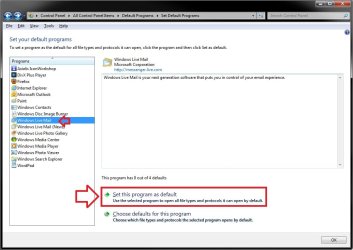
Ok Rod. One more thing to try. In Default Programs below, select Windows Live Mail, and click on the Set this program as default option. Afterwards, see if you can double click on a .eml file to have it open with Windows Live Mail.

WLM.jpg
 

My Computer My Computer

At a glance

64-bit Windows 11 Pro for WorkstationsIntel i7-8700K OC'd to 5 GHz64 GB (4x16GB) G.SKILL TridentZ RGB DDR4 3600...ASUS ROG-STRIX-GTX1080TI-O11G-GAMING
Computer type
PC/Desktop
Computer Manufacturer/Model Number
Self built custom
OS
64-bit Windows 11 Pro for Workstations
CPU
Intel i7-8700K OC'd to 5 GHz
Motherboard
ASUS ROG Maximus XI Formula Z390
Memory
64 GB (4x16GB) G.SKILL TridentZ RGB DDR4 3600 MHz
Graphics Card(s)
ASUS ROG-STRIX-GTX1080TI-O11G-GAMING
Sound Card
Integrated
Monitor(s) Displays
2 x Samsung Odyssey G7 27"
Screen Resolution
2560x1440
Hard Drives
1TB Samsung 990 PRO M.2,
4TB Samsung 990 PRO PRO M.2,
TerraMaster F8 SSD Plus NAS
PSU
Seasonic Prime Titanium 850W
Case
Thermaltake Core P3
Cooling
Corsair Hydro H115i
Keyboard
Logitech wireless K800
Mouse
Logitech MX Master 4
Internet Speed
2 Gb/s Download and 100 Mb/s Upload
Antivirus
Malwarebyte Anti-Malware Premium
Browser
Google Chrome
Other Info
Logitech Z625 speaker system,
Logitech BRIO 4K Pro webcam,
HP Color LaserJet Pro MFP M477fdn,
APC SMART-UPS RT 1000 XL - SURT1000XLI,
Galaxy S23 Plus phone
easiest fix

Open all programs, uninstall programs, find windows live essentials, click on uninstall/change, click on repair.

It will fix the problem.

Monamie
 

My Computer My Computer

At a glance

Windows 7 pro 64 bit
Computer type
Laptop
Computer Manufacturer/Model Number
Dell
OS
Windows 7 pro 64 bit
Back
Top