can't open (excel) files

hxl7

New member
Hi All ...
When I am in Explorer and My Documents and I try to double click open an Excel file (Office 2003), I get the error message: "There was a problem sending the command to the program."
However, if I try to similarly open a Word, or .PDF, or .TXT file in a similar manner, there is no problem.
Thank you for any ideas.
Bill
Win7 Ultimate, 64
 

My Computer

Computer Manufacturer/Model Number
cool tech, quiet elite
OS
win 7 64 ultimate
CPU
Intel i& 950 3.06GHz
Motherboard
Asus P6TD Deluxe
Memory
12GB PC3 12800
Graphics Card(s)
ATI Radeon HD 4850
Sound Card
-
Monitor(s) Displays
HP w2207
Hard Drives
2 WD Quiet 640GB 7200
Case
Antec P183
Cooling
Noctua NH-U12P SE 1366
Hello, Welcome to the Forums!
Sounds like an Excel issue, and not a Windows issue. Can you remove Excel and reinstall it?
 

My Computer

Computer Manufacturer/Model Number
Custom
OS
Windows 7 Professional x64
CPU
Intel i7 2600K OC'd @ 4620 MHz
Motherboard
Asus P8Z68-V Pro
Memory
16GB GSkill Sniper 2133 Mhz (4x4GB)
Graphics Card(s)
EVGA GeForce GTX 480 SuperClocked+
Sound Card
Realtek High Definition Audio
Monitor(s) Displays
2x Acer S273HLbmii 27"
Screen Resolution
2 x 1920x1080
Hard Drives
64GB Crucial M4 SSD

Storage: Hitachi 1TB 5400RPM, Samsung 1.5TB 5400RPM
PSU
Corsair HW Series 750w (modular)
Case
Cooler Master HAF 932 Advanced Blue Edition
Cooling
CM Hyper 212+ CPU cooler, 3x 230mm + 1x 140mm case fans
Keyboard
Logitech MK320 (wireless)
Mouse
Logitech MK320 (wireless)
Internet Speed
30 Mb/s : 2 Mb/s
You might run sfc /scannow from a command prompt to see if it is a system file problem.

I think Excel will offer to do a repair install if you use your original disc. If not, take Jonathan's advise and uninstall, then reinstall.
 

My Computer

Computer type
PC/Desktop
Computer Manufacturer/Model Number
Ignatz Special; 4 speed manual gearbox; factory air conditioning; one of one
OS
Windows 7 Home Premium SP1, 64-bit
CPU
Intel Skylake i5-6600K, not overclocked
Motherboard
AsRock Z170M Extreme 4, micro ATX
Memory
8 GB HyperX DDR4-2666 (2 x 4 GB)
Graphics Card(s)
none; graphics are integrated on CPU
Sound Card
onboard: Realtek ALC1150; external: USB Behringer UF0-202
Monitor(s) Displays
Dell S2340M 23 inch IPS
Screen Resolution
1600 x 900
Hard Drives
System: Crucial MX100 series SSD, 128 GB;
Data: Samsung Spinpoint 103SJ, 1 TB;
Backup: WD Caviar Green WD30EZRX-00D8PB0, 3 TB
PSU
Rosewill SilentNight 500 watt fanless, semi-modular
Case
Antec Solo II
Cooling
Noctua NH-U12S; Noctua F12 intake, Noctua S12A exhaust
Keyboard
Microsoft 200 6JH-00001 USB
Mouse
Dell or Microsoft optical wired; USB
Antivirus
Microsoft Security Essentials and Malwarebytes Premium
Browser
Pale Moon
Other Info
All fans PWM; speeds at idle: CPU circa 500 rpm; intake circa 600 rpm; exhaust circa 600 rpm; CPU temps 27 idle and 47 C load in a warm room (27 C/81 F) when running Intel Extreme Tuning Utility stress test.
Thanks for the ideas, guys, but no go.
All the best, Bill
 

My Computer

Computer Manufacturer/Model Number
cool tech, quiet elite
OS
win 7 64 ultimate
CPU
Intel i& 950 3.06GHz
Motherboard
Asus P6TD Deluxe
Memory
12GB PC3 12800
Graphics Card(s)
ATI Radeon HD 4850
Sound Card
-
Monitor(s) Displays
HP w2207
Hard Drives
2 WD Quiet 640GB 7200
Case
Antec P183
Cooling
Noctua NH-U12P SE 1366
This is a long shot, but disable your AV software and see if it opens. Had a prob like this before and AVG wouldn't let me open the files.
 

My Computer

OS
Windows 7 Ultimate x64 Retail RTM, Ubuntu 9.10
There's a setting in tools, options regarding "Ignore other programs that use dde" - this option needs to be unchecked

Had the same problem with a windows 7 64 bit and Excel 2007, dde was the problem.
 

My Computer

OS
Windows 7 64 Bit
  • Like
Reactions: Dom
scrozier: when you wrote,

"There's a setting in tools, options regarding 'Ignore other programs that use dde' - this option needs to be unchecked"

where is this done? I am unable to open some older Excel files using 2007 Excel. However, if I used the same file say within the last year (using XP before 2007) and saved it in a different place I can now open it using 2007. Hope this makes sense. Thank you.
 

My Computer

OS
Windows 7
Thanks to all for your suggestions. I am still having the problem.

I do not seem to have the DDE option in Excel 2003.

It is a very odd problem since a) double clicking to Open produces the error, but b) Send To and c) /File Open from within Excel both will function normally.

Bill
 

My Computer

Computer Manufacturer/Model Number
cool tech, quiet elite
OS
win 7 64 ultimate
CPU
Intel i& 950 3.06GHz
Motherboard
Asus P6TD Deluxe
Memory
12GB PC3 12800
Graphics Card(s)
ATI Radeon HD 4850
Sound Card
-
Monitor(s) Displays
HP w2207
Hard Drives
2 WD Quiet 640GB 7200
Case
Antec P183
Cooling
Noctua NH-U12P SE 1366
Try right-clicking on an Excel file that is giving problems, then select "Open with..." and make sure that Excel is the default program associated with the file.
 

My Computer

Computer Manufacturer/Model Number
Custom
OS
Windows 7 Enterprise x64
CPU
Intel i7 920
Motherboard
Asus P6T Deluxe v2
Memory
6 GB
Graphics Card(s)
nVidia GTX260 + nVidia 3D
Sound Card
Onboard
Monitor(s) Displays
Samsung SyncMaster 2233RZ
Screen Resolution
1680 x 1050
Hard Drives
1 x 64GB SSD primary
2 x 1 TB (mirrored)
PSU
700W
Other Info
Edimax 802.11n Wireless PCI Card
Netgear DG834G router
Hi hxl7. Did you ever resolve this issue? Please have a look at my posting today titled "Excel files are not opening". It sounds like it could be the same problem, or very similar anyway. Interested to know how you went on it.
Regards, Robert
 

My Computer

OS
windows 7 ultimate
Resolved

I had the same issue but unchecking 'Ignore other applications that use Dynamic Data Exchange (DDE)' resolved the issue. I am using Windows 7 and Excel 2007. I believe the issue occurred at the same time I installed AVG antivirus.

You can get to that option in excel by clicking on;
-Office 2007 icon at the top left in excel
-Excel options at the bottom right
-Advanced from the selections on the left bar
-Scroll down to General
- Untick 'Ignore other applications that use Dynamic Data Exchange (DDE)'


Hope this helps as I tried to be as detailed as possible
 

My Computer

OS
Windows 7
Hello, Welcome to the Forums!
Sounds like an Excel issue, and not a Windows issue. Can you remove Excel and reinstall it?

This gets my vote.

About DDE: if you turn that off, you will lose some functionality between Office apps.
 

My Computer

Computer type
Laptop
Computer Manufacturer/Model Number
Sager NP9150
OS
Windows 7 Home x64
CPU
Intel Core i7-3610QM @ 2.3GHz x4
Motherboard
Clevo P15xEMx
Memory
16GBs
Graphics Card(s)
nVidia GeForce GTX 670M
Sound Card
Realtek High Def Audio
Monitor(s) Displays
Samsung SyncMaster S24B300 + Mobile Display
Screen Resolution
1920x1080 + 1920x1080 (running 1366x768)
Hard Drives
128GBt SSD
500GBt HDD
Keyboard
Logitech K360
Mouse
Logitech Anywhere Mouse MX
Internet Speed
Fat
Antivirus
Avast
Browser
Chrome
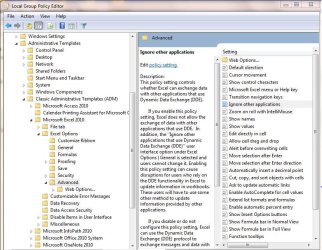
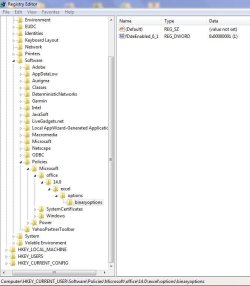
A little additional information on this, this can be controlled by GPO or a registry change. This setting is also known to cause Excel and other documents to not open by double clicking them. But opening the application by means of a start menu or shortcut to the application and then doing a File Open for the document will work. As a fix if Unchecking the box isnt working for you (as some have reported that issue on various sites) changing the registry or setting/modifying Group Policy can resolve this. See attached screen shots, this works for all versions of Windows and Office 2007 or 2010. The registry entries will only exist if a Group Policy Administrative Template was used. But if it isnt there, you can create the keys and entry and it will resolve the problem. Big important note on this policy as you will see in the screen shot of the registry, the registry setting is opposite to what you are use to most likely. In most cases a "0" is off and a "1" is on. This is not the case here, "1" is off and "0" is on. So as in my screen shot, this will turn off (or in other words Uncheck the box) and thus allowing your application to work. Hope this sets some light on the subject for those trying to resolve their own issue. Best of luck.
 

Attachments

  • DDE-screenshot.JPG
    DDE-screenshot.JPG
    146.9 KB · Views: 646
  • RegEntry-DDE-Screenshot.JPG
    RegEntry-DDE-Screenshot.JPG
    75.1 KB · Views: 616

My Computer

OS
Windows 7 Enterprise Edition x64
Back
Top