Can't open folders when double-clicking them

saroy94

New member
Member
VIP
Local time
9:17 PM
Messages
150
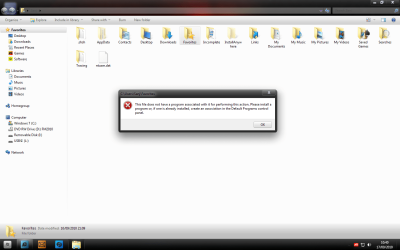
For some odd reason, I cannot open files. I double-click them and a message comes up (below). I even checked the folder options and it is set to double-click folders to open. The only way for me to open folders is to right-click and click open, but that's long.

Could anyone tell me how I can sort out my problem? I've tried system restore but that doesn't seem to work either, an error comes up :(
 

Attachments

  • folders.png
    folders.png
    63.7 KB · Views: 712

My Computer My Computer

At a glance

Windows 7 Ultimate x32Intel Core 2 Duo E6600 @ 2.40GHz3GB PC2-5300 DDR2-667MhzXFX ATI Radeon HD 4870 1GB
Computer Manufacturer/Model Number
HP-Pavilion m7755.uk
OS
Windows 7 Ultimate x32
CPU
Intel Core 2 Duo E6600 @ 2.40GHz
Motherboard
P5LP-LE (Leonite)
Memory
3GB PC2-5300 DDR2-667Mhz
Graphics Card(s)
XFX ATI Radeon HD 4870 1GB
Monitor(s) Displays
Generic PnP Monitor
Screen Resolution
1440 x 900
Hard Drives
SAMSUNG HD400LJ Hard drive 400GB
PSU
OCZ Modxstream 600W

My Computer My Computer

At a glance

W 7 64-bit UltimateIntel Q9550 Yorkfield8GB Dominator 8500C5DATI : XFX 5870
Computer Manufacturer/Model Number
* BFK Customs *
OS
W 7 64-bit Ultimate
CPU
Intel Q9550 Yorkfield
Motherboard
ASUS P5Q Pro
Memory
8GB Dominator 8500C5D
Graphics Card(s)
ATI : XFX 5870
Sound Card
Realtek HD Audio 7-1
Monitor(s) Displays
1x 47" LCD HDMI & 3x 26" LCD HDMI
Screen Resolution
1920x1080P & 1920x1200
Hard Drives
1x 80GB Intel X25-M G2 SSD : 1x 500GB & 1x 640GB WD Caviar Black(s)
PSU
Corsair 620HX
Case
Cooler Master RC-690
Cooling
Tuniq Tower 120, 2x 140mm and 3x 120mm case fans
Keyboard
Microsoft 500
Mouse
Razer Diamondback 3G
Internet Speed
14 Mb/s
Other Info
1x Koutech 3Gb/s SATA HDD Hot Swap Rack
Thanks! One of the registry files worked! :)
 

My Computer My Computer

At a glance

Windows 7 Ultimate x32Intel Core 2 Duo E6600 @ 2.40GHz3GB PC2-5300 DDR2-667MhzXFX ATI Radeon HD 4870 1GB
Computer Manufacturer/Model Number
HP-Pavilion m7755.uk
OS
Windows 7 Ultimate x32
CPU
Intel Core 2 Duo E6600 @ 2.40GHz
Motherboard
P5LP-LE (Leonite)
Memory
3GB PC2-5300 DDR2-667Mhz
Graphics Card(s)
XFX ATI Radeon HD 4870 1GB
Monitor(s) Displays
Generic PnP Monitor
Screen Resolution
1440 x 900
Hard Drives
SAMSUNG HD400LJ Hard drive 400GB
PSU
OCZ Modxstream 600W
Glad to see you got it resolved and thanks for the update.
 

My Computer My Computer

At a glance

W 7 64-bit UltimateIntel Q9550 Yorkfield8GB Dominator 8500C5DATI : XFX 5870
Computer Manufacturer/Model Number
* BFK Customs *
OS
W 7 64-bit Ultimate
CPU
Intel Q9550 Yorkfield
Motherboard
ASUS P5Q Pro
Memory
8GB Dominator 8500C5D
Graphics Card(s)
ATI : XFX 5870
Sound Card
Realtek HD Audio 7-1
Monitor(s) Displays
1x 47" LCD HDMI & 3x 26" LCD HDMI
Screen Resolution
1920x1080P & 1920x1200
Hard Drives
1x 80GB Intel X25-M G2 SSD : 1x 500GB & 1x 640GB WD Caviar Black(s)
PSU
Corsair 620HX
Case
Cooler Master RC-690
Cooling
Tuniq Tower 120, 2x 140mm and 3x 120mm case fans
Keyboard
Microsoft 500
Mouse
Razer Diamondback 3G
Internet Speed
14 Mb/s
Other Info
1x Koutech 3Gb/s SATA HDD Hot Swap Rack
Solved: Can't open hard disk folder by double click

Hi,
I had the same problem. I installed /merged the reg fix "default_folder.reg" and everything works now.

My question: How did this problem occur in the first place?

Thanks!
 

My Computer My Computer

At a glance

Win 7 ultimate 32 biti74gGeForce 8400gs
Computer Manufacturer/Model Number
none
OS
Win 7 ultimate 32 bit
CPU
i7
Motherboard
GA-p55-usb3
Memory
4g
Graphics Card(s)
GeForce 8400gs
Sound Card
built in
Monitor(s) Displays
samsung 22"
Hard Drives
samsung 500G SATA
PSU
na
Case
na
Cooling
fan
Hi,

I have the same problem. Now when I have found the right .reg file where am I supposed to put it ?
Thanks !
 

My Computer My Computer

At a glance

Windows 7 Home Premium 32bit
OS
Windows 7 Home Premium 32bit
Hi,

I have the same problem. Now when I have found the right .reg file where am I supposed to put it ?
Thanks !


Just do as the steps #1 - #7 suggest.
 

My Computer My Computer

At a glance

W 7 64-bit UltimateIntel Q9550 Yorkfield8GB Dominator 8500C5DATI : XFX 5870
Computer Manufacturer/Model Number
* BFK Customs *
OS
W 7 64-bit Ultimate
CPU
Intel Q9550 Yorkfield
Motherboard
ASUS P5Q Pro
Memory
8GB Dominator 8500C5D
Graphics Card(s)
ATI : XFX 5870
Sound Card
Realtek HD Audio 7-1
Monitor(s) Displays
1x 47" LCD HDMI & 3x 26" LCD HDMI
Screen Resolution
1920x1080P & 1920x1200
Hard Drives
1x 80GB Intel X25-M G2 SSD : 1x 500GB & 1x 640GB WD Caviar Black(s)
PSU
Corsair 620HX
Case
Cooler Master RC-690
Cooling
Tuniq Tower 120, 2x 140mm and 3x 120mm case fans
Keyboard
Microsoft 500
Mouse
Razer Diamondback 3G
Internet Speed
14 Mb/s
Other Info
1x Koutech 3Gb/s SATA HDD Hot Swap Rack
What should i do

Dear Everybody,

I downloaded MRT March version and after scanning my PC. i got this problem none of this .reg files that somebody toled to merge into the registry, helped. Please tell me what to do.
My OS is Win 7 Ultimate and My Anti-virus is Bit defender Internet Security 2010, updating daily.

Thanks
 

My Computer My Computer

At a glance

Win7 and XP
OS
Win7 and XP
Did you try to merge the files for the directory, drive and folder?
 

My Computer My Computer

At a glance

Windows 7 Ultimate 32bitAMD Phenom II x4 965 3.4GHzG.SKILL F3-16000CL8D-4GBPIS (2GBx2)Inno3d GTX480 1.5GB GDDR5
OS
Windows 7 Ultimate 32bit
CPU
AMD Phenom II x4 965 3.4GHz
Motherboard
Gigabyte GA-890FXA-UD5 rev2.0
Memory
G.SKILL F3-16000CL8D-4GBPIS (2GBx2)
Graphics Card(s)
Inno3d GTX480 1.5GB GDDR5
Monitor(s) Displays
LG FLATRON W2486L
Screen Resolution
1920x1080@60Hz
Hard Drives
Western Digital Caviar Black WD1002FAEX 1TB 64MB 7200RPM Sata III x3
PSU
Enermax MODU82+ 625W
Case
Thermaltake Element G Middle Tower
Hi,

i have downloaded all of the registry files and after unpacking the .reg files i merged them into the registry. After reboot nothing happened.
 

My Computer My Computer

At a glance

Win7 and XP
OS
Win7 and XP
Hi hemn.


Please follow the following procedure:
  1. Open notepad and paste the following content into it:
    Code:
    Windows Registry Editor Version 5.00 
     
    [-HKEY_CURRENT_USER\Software\Classes\*] 
    [-HKEY_CURRENT_USER\Software\Classes\Directory] 
    [-HKEY_CURRENT_USER\Software\Classes\Drive] 
    [-HKEY_CURRENT_USER\Software\Classes\Folder] 
     
    [-HKEY_CURRENT_USER\Software\Microsoft\Windows\CurrentVersion\Explorer\FileExts\Directory] 
    [HKEY_CURRENT_USER\Software\Microsoft\Windows\CurrentVersion\Explorer\FileExts\Directory] 
    [HKEY_CURRENT_USER\Software\Microsoft\Windows\CurrentVersion\Explorer\FileExts\Directory\OpenWithList] 
    [HKEY_CURRENT_USER\Software\Microsoft\Windows\CurrentVersion\Explorer\FileExts\Directory\OpenWithProgids] 
    "File Folder"=hex(0): 
     
    [HKEY_CURRENT_USER\Software\Microsoft\Windows\CurrentVersion\Explorer\CabinetState] 
    "Settings"=hex:0c,00,02,00,0a,01,00,00,60,00,00,00 
    "FullPath"=dword:00000000
  2. Save it as "reg1.reg" (with the quotation marks, so it'll save it as a registry file). Please DON'T run it yet.
  3. Download these 3 registry files:
    Code:
    [URL]http://www.sevenforums.com/attachments/tutorials/122125d1291909691-default-file-type-associations-restore-default_directory.reg[/URL]
    [URL]http://www.sevenforums.com/attachments/tutorials/21367d1249420595-default-file-type-associations-restore-default_drive.zip[/URL]
    [URL]http://www.sevenforums.com/attachments/tutorials/122126d1291909691-default-file-type-associations-restore-default_folder.reg[/URL]
  4. Run all the registry files. Please run reg.reg first, and then run the others, no matter in which order.
  5. Restart your computer.
  6. If the above ain't worked, please open cmd window and run:
    Code:
    sfc /scannow
    It'll scan the system's files and will repair them if necessary.
  7. If step 6 didn't helpled you can choose between repairing your windows installation and running combofix. I'm suggesting repairing. If you choose so you can read the following excellent tutorial, by Brink, which will guide you through:http://www.sevenforums.com/tutorials/3413-repair-install.html

    If you choose combofix, you can download it at: Bleeping Computer Downloads: ComboFix Download
    and run it. Note that you should run it when all the other windows closed and the antivirus is temporarily disabled. Also note that it might take some time, and during it one or more of the following might happen: you'll be disconnected from the internet, your clock will change, and your desktop will disappear. They all should be back to normal when combofix will finish.
    More instruction at: A guide and tutorial on using ComboFix
    Please read these instructions BEFORE running combofix if you choosing this way . When it'll finish copy the C:\ComboFix.txt log content to here.

    combofix could solve your issue. Others might suggest it right now as a solution, but I don't think it's a good idea to run it as long as there other alternatives. I usually use it as a last resort action, and before a complete format.
More information at Brink's great post at http://www.sevenforums.com/tutorials/19449-default-file-type-associations-restore.html


Good luck!.
 

My Computer My Computer

At a glance

Windows 7 Ultimate 32bitAMD Phenom II x4 965 3.4GHzG.SKILL F3-16000CL8D-4GBPIS (2GBx2)Inno3d GTX480 1.5GB GDDR5
OS
Windows 7 Ultimate 32bit
CPU
AMD Phenom II x4 965 3.4GHz
Motherboard
Gigabyte GA-890FXA-UD5 rev2.0
Memory
G.SKILL F3-16000CL8D-4GBPIS (2GBx2)
Graphics Card(s)
Inno3d GTX480 1.5GB GDDR5
Monitor(s) Displays
LG FLATRON W2486L
Screen Resolution
1920x1080@60Hz
Hard Drives
Western Digital Caviar Black WD1002FAEX 1TB 64MB 7200RPM Sata III x3
PSU
Enermax MODU82+ 625W
Case
Thermaltake Element G Middle Tower
It works!

Dear need4steer,

The first procedure you said worked for me. But the first reboot after doing this resulted in Blue screen of death! again i restarted and now it's OK. I think the PC is a bit slower than what it used to be. It does not matter.
Great thanks for your support and wish you the bests!

Bye,
 

My Computer My Computer

At a glance

Win7 and XP
OS
Win7 and XP
Hi hemn.
Thanks a lot for your appreciation.
I'm glad it worked.

If your PC is slower, then it would be great if you'll post here what's loading when the system is starting.

If you'd like please follow the following procedure in order to get a text file with the needed information:
  1. Please open notepad and paste the following content into it:
    Code:
    @echo off 
    echo %date% %time% > check1.txt
    tasklist /svc /fo csv > check1.txt 
    echo. >> check1.txt 
    net start >> check1.txt 
    echo. >> check1.txt  
    reg query HKCU\Software\Microsoft\Windows\CurrentVersion\Run >> check1.txt 
    reg query HKCU\Software\Microsoft\Windows\CurrentVersion\RunOnce >> check1.txt 
    reg query HKLM\Software\Microsoft\Windows\CurrentVersion\Run >> check1.txt 
    reg query HKLM\Software\Microsoft\Windows\CurrentVersion\RunOnce >> check1.txt 
    reg query HKLM\Software\Microsoft\Windows\CurrentVersion\RunOnceEx >> check1.txt 
    reg query "HKLM\SOFTWARE\Microsoft\Windows NT\CurrentVersion\Winlogon" /v Userinit >> check1.txt 
    reg query "HKLM\SOFTWARE\Microsoft\Windows NT\CurrentVersion\Winlogon" /v Shell >> check1.txt 
    reg query "HKLM\SYSTEM\CurrentControlSet\Control\SafeBoot" /v AlternateShell >> check1.txt 
    reg query "HKLM\System\CurrentControlSet\Control" /v ServiceControlManagerExtension >> check1.txt 
    echo %appdata%\Microsoft\Windows\Start Menu\Programs\Startup >> check1.txt 
    dir "%appdata%\Microsoft\Windows\Start Menu\Programs\Startup" /b >> check1.txt 
    echo. >> check1.txt 
    echo %allusersprofile%\Microsoft\Windows\Start Menu\Programs\Startup >> check1.txt 
    dir "%allusersprofile%\Microsoft\Windows\Start Menu\Programs\Startup" /b >> check1.txt 
    echo. >> check1.txt
    echo %date% %time% >> check1.txt
  2. Save it as "check1.bat" (with the quotation mark, so it'll save it as a batch file), and run it.
  3. Wherever you'll run it, it'll create a check1.txt file. Please copy this file content to here.
Good luck.
 

My Computer My Computer

At a glance

Windows 7 Ultimate 32bitAMD Phenom II x4 965 3.4GHzG.SKILL F3-16000CL8D-4GBPIS (2GBx2)Inno3d GTX480 1.5GB GDDR5
OS
Windows 7 Ultimate 32bit
CPU
AMD Phenom II x4 965 3.4GHz
Motherboard
Gigabyte GA-890FXA-UD5 rev2.0
Memory
G.SKILL F3-16000CL8D-4GBPIS (2GBx2)
Graphics Card(s)
Inno3d GTX480 1.5GB GDDR5
Monitor(s) Displays
LG FLATRON W2486L
Screen Resolution
1920x1080@60Hz
Hard Drives
Western Digital Caviar Black WD1002FAEX 1TB 64MB 7200RPM Sata III x3
PSU
Enermax MODU82+ 625W
Case
Thermaltake Element G Middle Tower
Cant open folders by double clicking them - resolved mine

Hi all. After numerous updates and phone calls to microsoft over the past 4 months and finding that also my folders would not open by dble clicking. One night my son came out and said try this ( details below) and it has resolved the problem and now my folders are working fine. It took 2 minutes to fix this, So i hope that it will work for you

Download CCleaner

Go to Registry and scan for issues, after it scans then click - Fix all problems.

Then go to Tools, then start up, then CONTEXT MENU.

See if you can see a key folder called explore ( this folder has NO association file or publisher details) . If it is there is will be enabled. Highlight it and DISABLE IT. then close CCleaner.

You should find that you are able to open your folders by doubling clicking it. It worked immediately for me and i hope it does for you
 

My Computer My Computer

At a glance

NSW
Computer type
PC/Desktop
OS
NSW
Cant open folders by double clicking them - resolved mine

Hi all. After numerous updates and phone calls to microsoft over the past 4 months and finding that also my folders would not open by dble clicking. One night my son came out and said try this ( details below) and it has resolved the problem and now my folders are working fine. It took 2 minutes to fix this, So i hope that it will work for you

Download CCleaner

Go to Registry and scan for issues, after it scans then click - Fix all problems.

Then go to Tools, then start up, then CONTEXT MENU.

See if you can see a key folder called explore ( this folder has NO association file or publisher details) . If it is there is will be enabled. Highlight it and DISABLE IT. then close CCleaner.

You should find that you are able to open your folders by doubling clicking it. It worked immediately for me and i hope it does for you

I have window 7
 

My Computer My Computer

At a glance

NSW
Computer type
PC/Desktop
OS
NSW
Back
Top