Solved Can't open gpedit.msc and services.msc because activeX

pirata11

New member
Local time
3:35 AM
Messages
4
Hi all,

When I write gpedit.msc or services.msc on execute... it shows me the following message:

It was not possible show one or more activeX controls because:
1) The actual security definitions forbbiden the execution of ActiveX controls in that page
2) You lock the editor of one of the controls

as you can see in portuguese message picture.
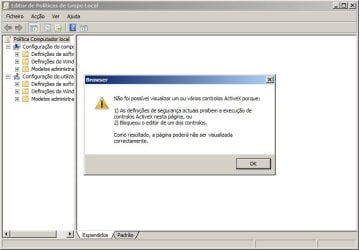
gpedit-activex.jpg

I've tried also to run as administrator in administrative tools of control panel.

What can i do to fix it?

Best Regards,
Ricardo Silva
 

My Computer My Computer

At a glance

Windows 7 Ultimate 32bits
OS
Windows 7 Ultimate 32bits

My Computer My Computer

At a glance

Windows 7 Ultimate 32bits
OS
Windows 7 Ultimate 32bits
Do you have also problems with Icons Blocked on Desktop?
Do you have also problems with drag & drop on desktop that doesn't work?

If yes, solution for me (Windows XP) was:

Open registry with regedit and search the following line:

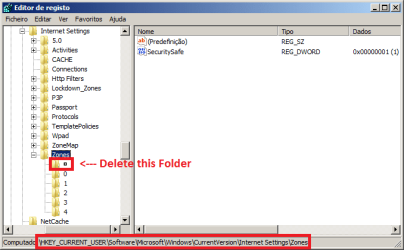
HKEY_CURRENT_USER\Software\Microsoft\Windows\CurrentVersion\Internet Settings\Zones\

Delete a graphic number ( usually is a square) you'll see it before zone number 0.
It seems this is a bug of Adobe flash player update.

I found the solution at this link:

One or more activex controls could not be displayed because either


Reply if you solved the problem.


My Computer My Computer

At a glance

Windows XP
OS
Windows XP
WOW!!! It's a kind of magic :|

*** IT WORKS FELLOWS ***

Thank you very much quasar!

Answering you questions:
No, I did't have any problem with Icons blocked or drag'n'drop! Just the question that I Post!

Code:
----- PROBLEM SOLVED -----
 

My Computer My Computer

At a glance

Windows 7 Ultimate 32bits
OS
Windows 7 Ultimate 32bits
Same problem

Hey quasar

I have the same problem but I do have issues with my Desktop Gadgets in Windows 7(b4 bit) they disappear when dragged and dropped onto my desktop. (MY UAC Settings are on as well)

I have tried this solution already but when I go to my registry with regedit but my zone number is already set to 0.

I've looked everywhere and tried soo many things but no solution, if you know anything else that might help let me know.

Thanks
 

My Computer My Computer

At a glance

Windows Home Premium 64 bit
OS
Windows Home Premium 64 bit
Just wanted to thank you quasar for this miracle solution!
What a ridiculous problem.
I have no idea how you found that solution but thank you very, very much!
This needs to be pinned somewhere for sure.


My Computer My Computer

At a glance

Windows XPP4 3.4 GHz HT1GB DDR3338800GT
OS
Windows XP
CPU
P4 3.4 GHz HT
Motherboard
P4VM900-SATA2
Memory
1GB DDR333
Graphics Card(s)
8800GT
Sound Card
Onboard Realtek HDA
Monitor(s) Displays
1 Gateway POS
Hard Drives
Maxtor Diamond 20GB PATA
PSU
500W Earthwatts
Cooling
Stock CPU cooler, 2 case fans, 1 PSU fan
"" Open registry with regedit and search the following line:

HKEY_CURRENT_USER\Software\Microsoft\Windows\CurrentVersion\Internet Settings\Zones\

Delete a graphic number ( usually is a square) you'll see it before zone number 0.
It seems this is a bug of Adobe flash player update. ""

hi , quasar.
I got the same problem with Pirata11... But i'm not sure to delete which icon (wondering what is the graphic number?)
can u please guide me?
thanks alot..


My Computer My Computer

At a glance

Windows XP, Windows 7
OS
Windows XP, Windows 7
alancheong,

delete all non-numbers folder in HKEY_CURRENT_USER\Software\Microsoft\Windows\CurrentVersion\Internet Settings\Zones\. See the picture below:

deletefolder.png

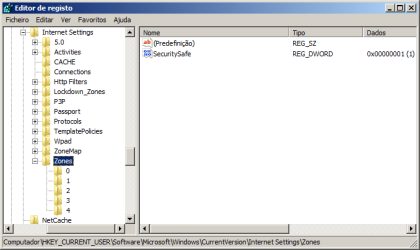
Your final solution must be:

deleted.png

Good luck,
Pirata
 

My Computer My Computer

At a glance

Windows 7 Ultimate 32bits
OS
Windows 7 Ultimate 32bits
pirata11 was very clear! :)
 

My Computer My Computer

At a glance

Windows XP
OS
Windows XP
Hey thnx bro it worked :)
 

My Computer My Computer

At a glance

Windows 7 Ultimate X86Intel Core 2 Duo1 GBNone
Computer Manufacturer/Model Number
Zenith
OS
Windows 7 Ultimate X86
CPU
Intel Core 2 Duo
Motherboard
Asus
Memory
1 GB
Graphics Card(s)
None
Sound Card
Realtek
Monitor(s) Displays
Acer
Hard Drives
Seagate 1 TB
Seagate 160 GB
Back
Top