Cant open pictures: Permission error.

Thuzain

New member
Local time
6:27 AM
Messages
5
So i have a folder with all my pictures in it, in this folder i have other folders for sorting years and events. I can open alot of pictures save one folder. Everything i attempt to open has a permission error. I am admin, i have shared it to everyone. It says in properties everyone should be able to view them. Ive put other pictures in that folder and i can view the ones i moved. Ive tried pulling ones i cant view out of that folder but still cant view them. I would appreciate all the help i can get.
 

My Computer

Computer type
PC/Desktop
OS
Windows 7 ultimate x64
Welcome to the forum. You have set the share to everyone but then NTFS permission kick in if they dont have right on NTFS they arnt going anywhere. As you are proberley the creator/owner of folders no one else will have right on them you will have to grant access to the folders and subfolders
 

My Computer

Computer type
PC/Desktop
OS
win 8 32 bit
Thanks for the welcome! It is set to share with everybody and im also the only person in my house. There are no other users set up either.The settings are the exact same in other folders in the main folder and they work. Just some other folders ( same settings ) do not work. Im about as lost as one could possibly be.
 

My Computer

Computer type
PC/Desktop
OS
Windows 7 ultimate x64
What are NTFS permission on the folders giving problems?
 

My Computer

Computer type
PC/Desktop
OS
win 8 32 bit
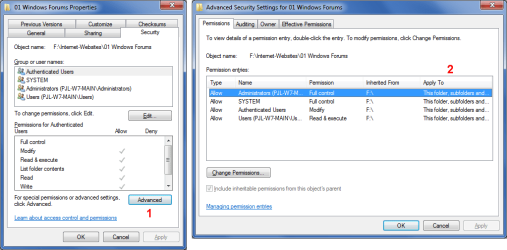
Try this:

  1. In the "Properties" window, click on the "Advanced" button.
  2. In the "Advanced Security Settings" window, check that the "Apply To" column shows "This folder, subfolders and files".
W7 Permissions 02.png


My Computer

Computer type
PC/Desktop
Computer Manufacturer/Model Number
n/a
OS
W7 Ultimate SP1, LM19.2 MATE, W10 Home 1703, W10 Pro 1703 VM, #All 64 bit
CPU
AMD Phenom II x6 1100T, 3.3 GHz
Motherboard
ASUS M4A88T-M/USB3 (AM3)
Memory
12GB DDR3 1333 G-Skill (4GB x 2), G-Skill (2GB x 2)
Graphics Card(s)
NVIDIA GeForce GTX 660
Sound Card
Realtek?
Monitor(s) Displays
Samsung S23B350
Screen Resolution
1920x1080
Hard Drives
WD Green 2TB (SATA), WD Green 3TB (SATA), WD Blue 4TB (SATA), WD Blue 6TB (SATA)
PSU
Cooler Master
Case
Antec GX300 Tower
Cooling
3x Antec TRICOOL 120mm Fans
Mouse
Wired Optical
Internet Speed
DSL
Antivirus
Avast
Browser
Pale Moon (64 bit)
Other Info
2018-12-27 Upgraded HDDs
2015-12-10 Upgraded case, graphics card, storage
2015-08-15 Upgraded motherboard & RAM
2015-07-15 Upgraded LM17.1 to LM17.2
The "apply to" column shows This folder, subfolder and files. Permissions are full control etc. Samuria, im not the best with computers so im not familiar with what NTFS is and/or means. I apologize for being a computer dummy.
 

My Computer

Computer type
PC/Desktop
OS
Windows 7 ultimate x64
Try this:
Right click on folder > Properties > Security > Advanced > Owner > Edit. Now make yourself a owner and apply.

If it doesn't work, then try this:
Right click on folder > Properties > Security > Advanced > Change Permissions > Remove until nobody has ownership (if Remove is grayed, un-tick "Include inheritable permissions from this object's parent") > click Add > type your username (that's your account name, probably) > Give full control > click OK > tick "Include inheritable permissions from this object's parent" > click Apply > click OK.
 
Last edited:
MSClin ive tried all you said to no avail. To you Samuria my NTFS on all options (system admin and my pc name) are all set to full control.
 

My Computer

Computer type
PC/Desktop
OS
Windows 7 ultimate x64
MSClin ive tried all you said to no avail. To you Samuria my NTFS on all options (system admin and my pc name) are all set to full control.

When you followed the 2nd method, did you give full control after you typed your username? I missed to include this in the step.
 
Live Linux CD/DVD/USB

Try this:

  • Use a Live Linux CD/DVD/USB to copy the files to another drive (e.g. external HDD)
  • Check if you can view them in Linux
  • If they are OK in Linux, boot into Windows and then see if Windows will let you read them
  • If they are OK, create a new folder and copy the files into it
 

My Computer

Computer type
PC/Desktop
Computer Manufacturer/Model Number
n/a
OS
W7 Ultimate SP1, LM19.2 MATE, W10 Home 1703, W10 Pro 1703 VM, #All 64 bit
CPU
AMD Phenom II x6 1100T, 3.3 GHz
Motherboard
ASUS M4A88T-M/USB3 (AM3)
Memory
12GB DDR3 1333 G-Skill (4GB x 2), G-Skill (2GB x 2)
Graphics Card(s)
NVIDIA GeForce GTX 660
Sound Card
Realtek?
Monitor(s) Displays
Samsung S23B350
Screen Resolution
1920x1080
Hard Drives
WD Green 2TB (SATA), WD Green 3TB (SATA), WD Blue 4TB (SATA), WD Blue 6TB (SATA)
PSU
Cooler Master
Case
Antec GX300 Tower
Cooling
3x Antec TRICOOL 120mm Fans
Mouse
Wired Optical
Internet Speed
DSL
Antivirus
Avast
Browser
Pale Moon (64 bit)
Other Info
2018-12-27 Upgraded HDDs
2015-12-10 Upgraded case, graphics card, storage
2015-08-15 Upgraded motherboard & RAM
2015-07-15 Upgraded LM17.1 to LM17.2
Yes sir i sure did.
 

My Computer

Computer type
PC/Desktop
OS
Windows 7 ultimate x64

My Computer

Computer type
PC/Desktop
Computer Manufacturer/Model Number
n/a
OS
W7 Ultimate SP1, LM19.2 MATE, W10 Home 1703, W10 Pro 1703 VM, #All 64 bit
CPU
AMD Phenom II x6 1100T, 3.3 GHz
Motherboard
ASUS M4A88T-M/USB3 (AM3)
Memory
12GB DDR3 1333 G-Skill (4GB x 2), G-Skill (2GB x 2)
Graphics Card(s)
NVIDIA GeForce GTX 660
Sound Card
Realtek?
Monitor(s) Displays
Samsung S23B350
Screen Resolution
1920x1080
Hard Drives
WD Green 2TB (SATA), WD Green 3TB (SATA), WD Blue 4TB (SATA), WD Blue 6TB (SATA)
PSU
Cooler Master
Case
Antec GX300 Tower
Cooling
3x Antec TRICOOL 120mm Fans
Mouse
Wired Optical
Internet Speed
DSL
Antivirus
Avast
Browser
Pale Moon (64 bit)
Other Info
2018-12-27 Upgraded HDDs
2015-12-10 Upgraded case, graphics card, storage
2015-08-15 Upgraded motherboard & RAM
2015-07-15 Upgraded LM17.1 to LM17.2
Back
Top