Can't open ports.

UtterImadness

New member
Local time
8:13 PM
Messages
2
I just installed Windows 7 tonight and thus have moved from the Vista forums to here :party:

But of course if everything were going smoothly I wouldn't be here. Now here's my problem, I'm trying to open ports for some of my programs but I havn't been able to. I've done it many times before in Vista with no trouble. I've tried disabling the firewall to see if that worked but it didn't.
Now here's where it gets weird. When I was in Vista I'd use Open Port Check Tool to check if my ports were opened correctly, it always worked. But now when I try it it tells me that my ports are closed, even basic ports like 80 and 21 keep getting:
Error: I could not see your service on 76.68.106.153 on port (80)
Reason: Connection timed out

Any help will be greatly appreciated :D
 

My Computer

Computer Manufacturer/Model Number
HP dv6642ca
OS
Windows 7 Professional
CPU
Intel Core-2Duo @ 1.5GHz
Memory
4GB 667MHz DDR2
Graphics Card(s)
Nvidia GeForce 8400 M GS
Monitor(s) Displays
15.4" LCD
Hard Drives
Internal: WD 250GB 2.5" 5400rpm SATA
External: Seagate 320GB 7200rpm USB
UI

I assume you can connect to router>internet etc? Not connectivity.? what AV and firewall?

ken
 

My Computer

Computer Manufacturer/Model Number
HP Pavillion dv-7 1005 Tx
OS
Win 8 Release candidate 8400
CPU
[email protected]
Memory
4 gigs
Graphics Card(s)
Nvidia 9600M
Sound Card
HD built-in
Monitor(s) Displays
17" Wxga
Screen Resolution
1440x900
Cooling
none
Internet Speed
45Mb down 5Mb up
I'm using NOD 32 as my AV and just Windows firewall as my firewall. And yes, other than this problem my internet is working the way it should be.
 

My Computer

Computer Manufacturer/Model Number
HP dv6642ca
OS
Windows 7 Professional
CPU
Intel Core-2Duo @ 1.5GHz
Memory
4GB 667MHz DDR2
Graphics Card(s)
Nvidia GeForce 8400 M GS
Monitor(s) Displays
15.4" LCD
Hard Drives
Internal: WD 250GB 2.5" 5400rpm SATA
External: Seagate 320GB 7200rpm USB
If disabling the Windows Firewall didn't work, then it is not the one blocking the ports.
 

My Computer

Computer type
PC/Desktop
Computer Manufacturer/Model Number
Alienware Aurora ALX R4
OS
Windows 10 Pro (x64)
CPU
Intel Core i7-3930K (3.2GHz - 4.5GHz)
Motherboard
Alienware Aurora-R4 x79
Memory
4x Samsung 4GB PC3-12800 DDR3 (16GB 1600MHz)
Graphics Card(s)
Nvidia Geforce GTX 690
Sound Card
SteelSeries Siberia Elite
Monitor(s) Displays
Dell UltraSharp U3011
Screen Resolution
2560x1600
Hard Drives
Samsung 850 Pro 256 GB, Seagate 1TB Desktop Hybrid HDD, 2x Western Digital 4TB Green HDD
PSU
875W Some Dell PSU <.<
Case
Alienware Aurora ALX
Cooling
Custom Liquid Cooling (EK CPU & GPU blocks) dual EK 480RAD
Keyboard
Logitech G710+ Mechanical
Mouse
Logitech G700s
Internet Speed
Verizon Fios (50 mbps average)
Other Info
Server: Intel NUC D54250WYK: i5-4250U, 16GB, 256 GB mSATA, Windows Server 2012 R2
Are you using a router? You may have to port forward through it.
 

My Computer

Computer Manufacturer/Model Number
Custom Build
OS
Windows 7 (x64), Windows XP (x86), Backtrack 3
CPU
Intel Q6600 @ 3.0GHz (Lapped)
Motherboard
Gigabyte EP45C-DS3R
Memory
2 x 2 Corsair XMS3 DDR3
Graphics Card(s)
EVGA GeForce GTX 260 (Core 216)
Sound Card
Creative Soundblaster X-Fi Titanium
Monitor(s) Displays
22" Acer
Screen Resolution
1440 x 900
Hard Drives
Samsung 320Gb 7,200RPM
Western Digital 160Gb 7,200RPM
PSU
Corsair TX750W
Case
Coolermaster 690
Cooling
5 Scythe 3000RPM, Thermalright Ultra Extreme 120 (Lapped)
Keyboard
Logitech G15
Mouse
Razer Deathadder
Internet Speed
19Mbps DL / 2Mbps UL
Other Info
Realtek RTL8168C(P)/8111C(P) PCI-E Gigabit Ethernet NIC
Hi there

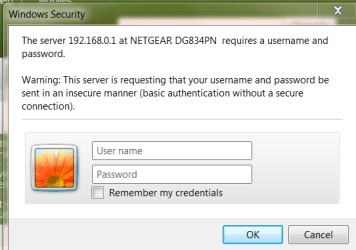
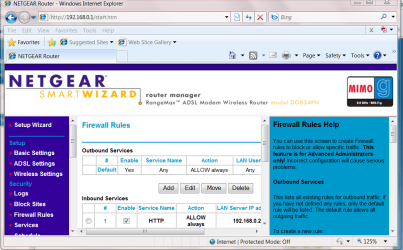
Typical routers have a web interface where you can configure them.

1) logon - its usually the Gateway address you assigned when you installed the router

on mine its 192.168.0.1

2) Now configure service / firewall -- its called different things on different routers but here you can open / close ports and "port forward" to specific machines on your LOCAL LAN.

Cheers
jimbo
 

Attachments

  • router1.png
    router1.png
    16.6 KB · Views: 47
  • router2.png
    router2.png
    64.7 KB · Views: 146

My Computer

Computer type
PC/Desktop
Computer Manufacturer/Model Number
Custom built, several laptops HP/ASUS
OS
Linux CENTOS 7 / various Windows OS'es and servers
CPU
Intel i7 Intel i5
Memory
8GB, 16GB
Graphics Card(s)
On Motherboard
Sound Card
Realtek HD audio
Monitor(s) Displays
Apple Cinema display, Samsung LCD
Screen Resolution
1920 X 1080
Hard Drives
4 X 1TB SATA
Mouse
Toshiba wireless laser
Internet Speed
> 20MB up
It is not the router. As I said in the OP, if I turn of the Windows Firewall, it works fine, so the router must be set up correctly. It has to the Windows Firewall not letting it through.
 

My Computer

Computer type
PC/Desktop
OS
Windows 7
Back
Top